






How to Set Time Zone using Intune MEM
Today, I will explore how to Set Time Zone using Intune MEM. Learn how to Set the Time Zone for AVD VMs with Endpoint Manager | Intune.
There are PowerShell scripts and Group Policies to change the time zone of Windows Virtual Desktop virtual machines. However, I think giving us a time zone option in the WVD VM provisioning template would be better.
I have a post where you can get the list of time zone details that Windows supports. Learn how to manually change the time zone of Windows 10 devices and enable daylight saving settings while changing the time zone. More details: Latest Updated List of Windows 10 Time Zone | Codes | TZUTIL.
If you are worried about Intune policies, how do you take a trial subscription to Endpoint Manager Intune, etc.? Learn more about Intune from HTMD free Intune training (63+ episodes).

Table of Contents
How to Set Time Zone using Intune MEM
Let’s check how to create an Intune Time Zone Policy for WVD VMs. I hope you already have access to creating an Intune policy.
- Best Guide to Enable WinSCP Win32 App Supersedence and Auto-Update with Intune
- Configure Apple DDM Enabled Software Update and Passcode Policies in Intune
- Enrol Corporate Owned Android Devices into Kiosk Mode using Intune – Part 1
- Microsoft Intune 2309 September Service Release New Features Improvement
- Secure Microsoft 365 Office Apps using Intune Security Policies
Login to the Endpoint Manager Intune portal https://endpoint.microsoft.com/#home
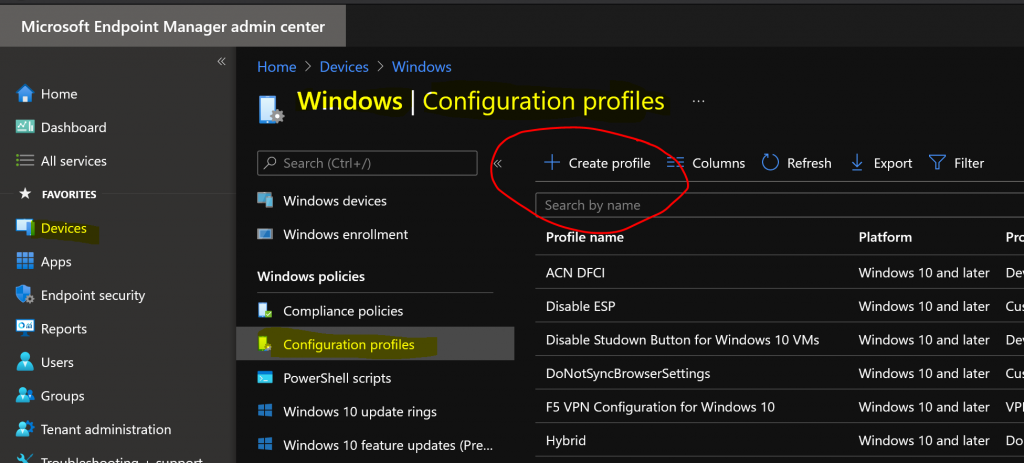
Navigate to Devices -> Windows -> Configuration profiles.
- Click on +Create Profile.
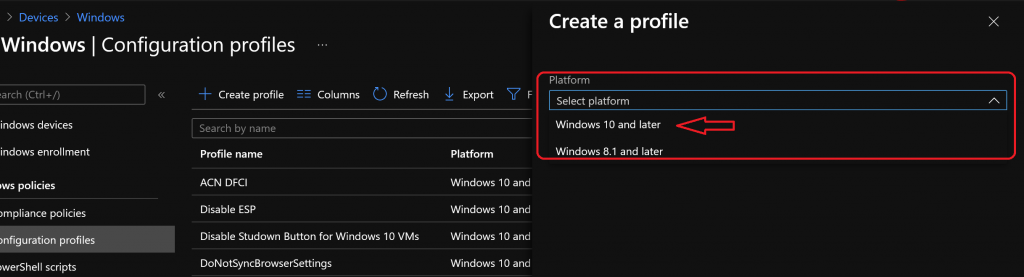
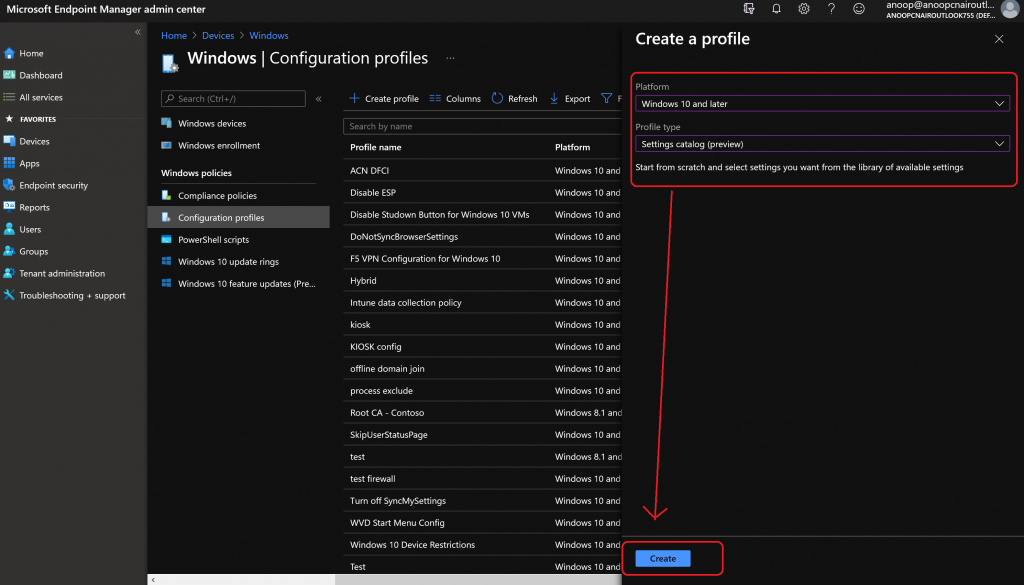
Select Windows 10 and later as the platform from the drop-down menu.
Select Settings Catalog from the Profile type drop-down menu.
Start from scratch and select the settings you want from the library of available settings.
- Click on the Create button.
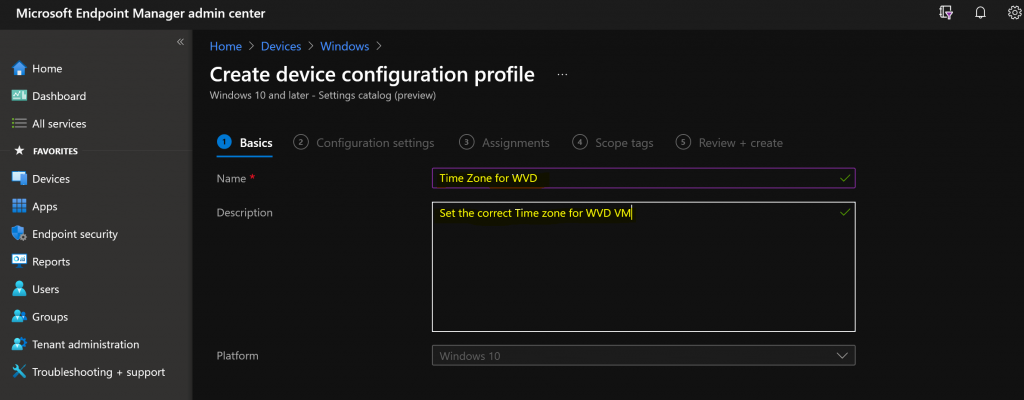
Enter the name of the policy and the time zone for WVD.
Enter the Description – Set the correct Time zone for WVD VM.
- Click on the Next button.
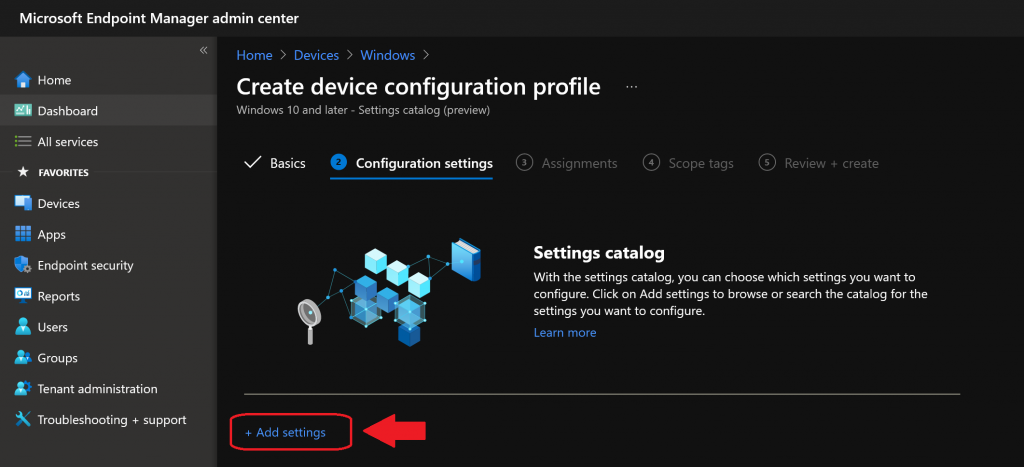
Click on +Add Settings.
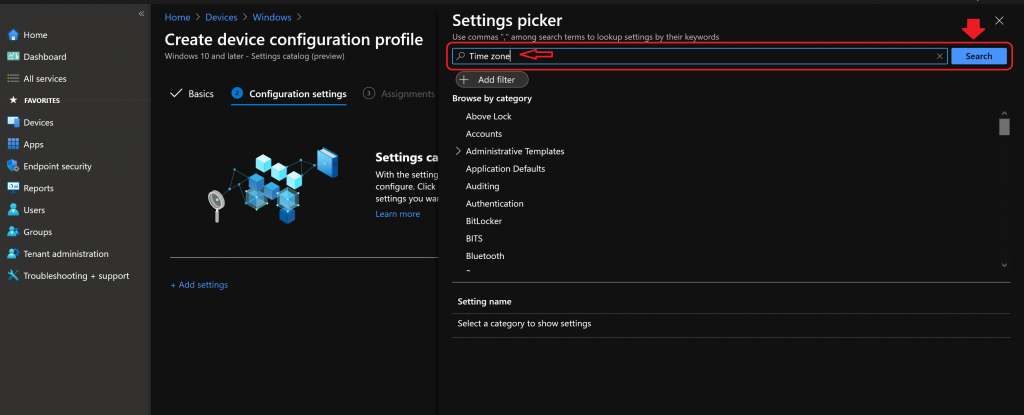
Settings picker: Use double inverted commas(” “) between search terms to view settings by their keywords.
- Search “Time Zone” from the Settings picker.
- Click the Search button.
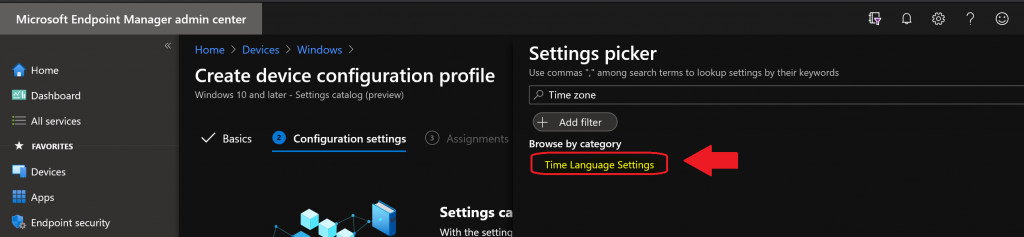
Click on Time Language Setting.
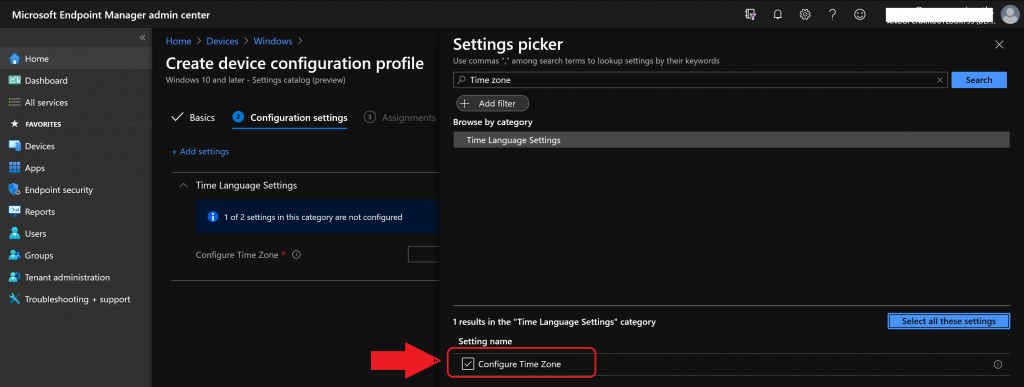
Select check mark – Configure Time Zone.
NOTE: It’s weird that you need to click on the cross mark to remove the right-side blade. This could be a bug that will disappear once the Setting Catalog feature is generally available.
You need to find the correct time zone to apply to WVD devices. The standard Windows name for the target time zone is GMT.
NOTE: I have a post where you can get all the list of time zone details that Windows supports. For more details, see the Latest Updated List of Windows 10 Time Zone | Codes | TZUTIL.
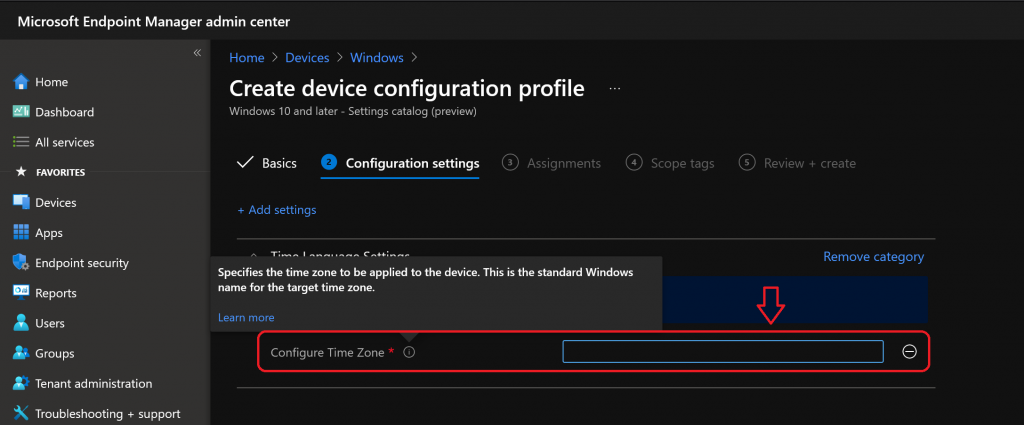
I have set the Time Zone “GMT Standard Time” for UK WVD VMs.
- Click on the NEXT button.
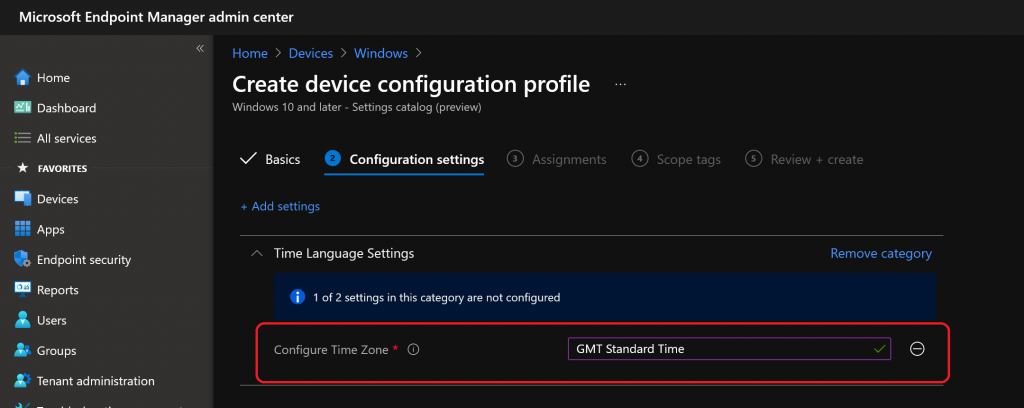
Assignment Options
Click on +Add groups and select the Azure AD device Group to deploy the Intune policy for settings time zone.
- Click on Next and Next (scope page).
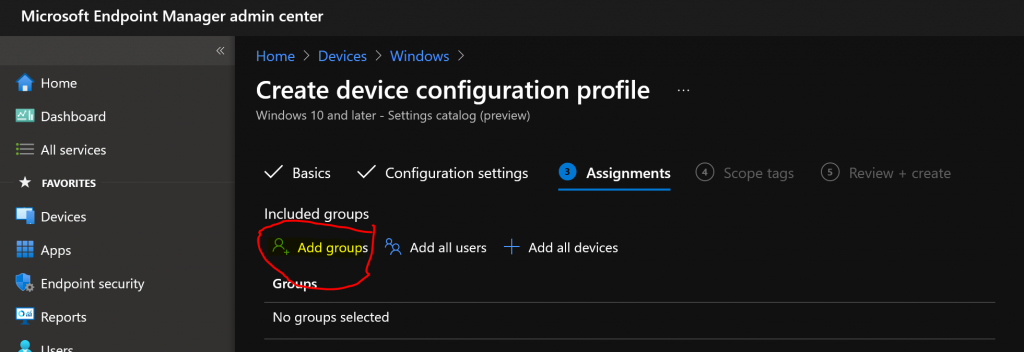
Click on Review + Create to complete the creation and assignment process of the Intune Time Zone Policy for WVD.
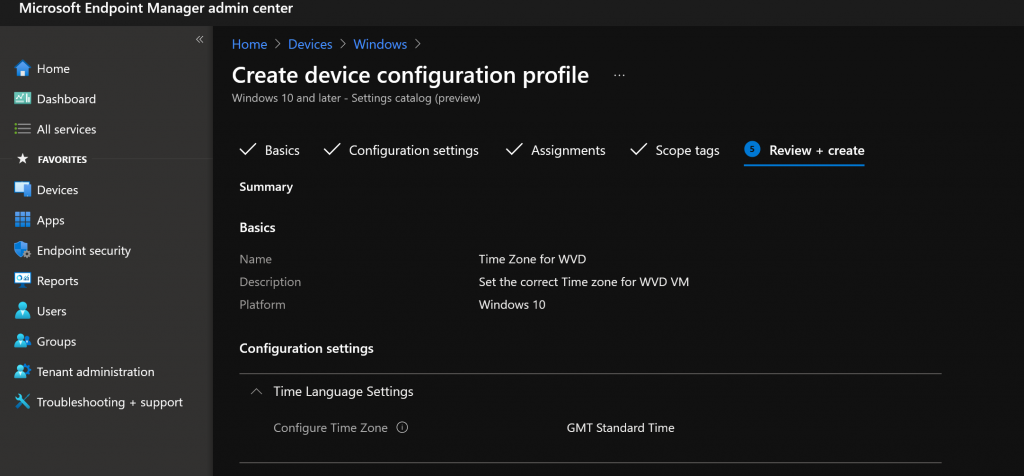
Event Logs
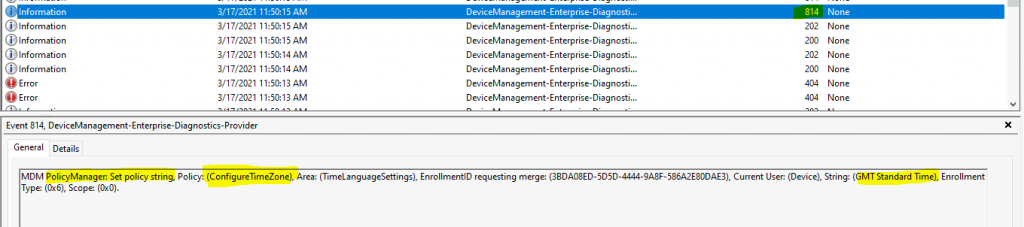
You can check the Windows 10 MDM event logs to confirm whether this time zone policy applies to devices.
Event Logs :- Microsoft->Windows->DeviceManagement-> Enterprise-Diagnostics-Provider/Admin
Event ID 814 – MDM PolicyManager: Set policy string, Policy: (ConfigureTimeZone), Area: (TimeLanguageSettings), EnrollmentID requesting merge: (3BDA08ED-5D5D-4444-9A8F-586A2E80DAE3), Current User: (Device), String: (GMT Standard Time), Enrollment Type: (0x6), Scope: (0x0).
Troubleshooting Options
The following posts might help you troubleshoot issues related to the Intune Settings catalog (and, in general, Intune troubleshooting).
- How to Start Troubleshooting Intune Issues
- Windows 10 MDM Log Checklist
- MDM Diagnostics Tool – Tips & Tricks
- Learn How to Collect Windows 10 Diagnostics Information from Intune Portal | Endpoint Manager
Results
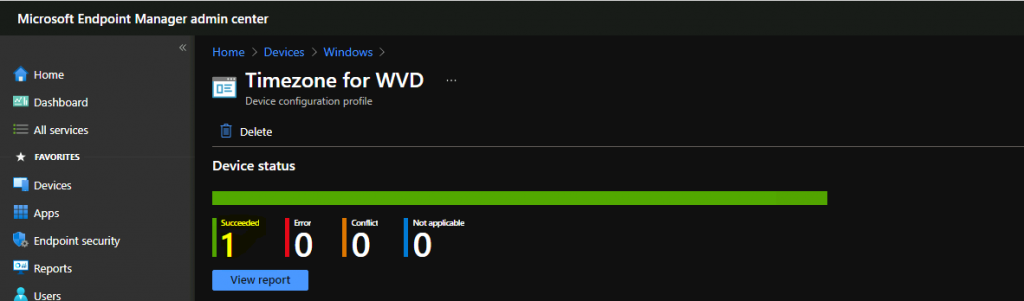
You can check the results from the Endpoint portal (a.k.a. Intune portal). You can also open the Windows 10 configuration profile (setting catalog) policy and check its deployment status.
You can see that on one WVD VM the policy got successfully deployed.
Resources
- Use the settings catalog to configure settings on Windows
We are on WhatsApp now. To get the latest step-by-step guides, news, and updates, Join our Channel. Click here – HTMD WhatsApp.
Author
Anoop C Nair has been Microsoft MVP from 2015 onwards for 10 consecutive years! He is a Workplace Solution Architect with more than 22+ years of experience in Workplace technologies. He is also a Blogger, Speaker, and leader of the Local User Group Community. His primary focus is on Device Management technologies like SCCM and Intune. He writes about technologies like Intune, SCCM, Windows, Cloud PC, Windows, Entra, Microsoft Security, Career, etc.


Frustratingly I’ve done exactly this… and it’s not working. I’ve ensured it’s a device group that’s targeted… yet in Intune on the VM it’s just saying that it’s “Not applicable”, with no errors that I can find in the Enterprise-Diagnostics-Provider log. :-/
StaffThat is really strange … Does this mean the device is not getting any policies or only this one?
Very limited amount of policies it seems, mostly just the certificate policies, mostly everything else is “Not applicable”.
Looking at this:
https://docs.microsoft.com/en-us/mem/intune/fundamentals/azure-virtual-desktop-multi-session#to-configure-policies
If you configure is as they say (to only show policies that apply to Enterprise multi-session devices) indeed the Configure Time Zone policy doesn’t seem to be there / supported.
In fact if you scroll that help page up a bit to “Create the device configuration profile” it seems to suggest that “existing device configuration profile templates aren’t supported for Windows 10 Enterprise multi-session VMs, with the exception of (certificates and VPN)”. Weird.
Only just starting out with AVD, but not finding it as fun as I hoped! 🙂
StaffAh, you are working with multi-session VMs… if so that is entirely a different ball game. The supported scenario for multi-session devices and Intune is only to deploy device-based policies. I have not done a lot of R&D with multi-session WVD/AVD devices yet. it’s a bit weird.
I think Timezone CSP is applied to the device as per CSP doc https://docs.microsoft.com/en-us/windows/client-management/mdm/policy-csp-timelanguagesettings. It’s worth raising a support case to file a bug free of cost 🙂
Argh thanks! That makes sense. I figured everyone uses multi-session as it seemed an obvious thing to do (I guess I was thinking old style RDS farm servers), but you’re right, a bit weird is a good way to put it. 🙂
I tried via CSP as well, but it also didn’t work, so will raise a bug as you suggest (and then abandon multi-session I suspect!).
this only changes the time to that specific time zone, is there one that changes the date format, i would prefer to fix our date formats to UK short date instead of USA
StaffI have explained this here https://www.anoopcnair.com/intune-learn-to-deploy-windows-10-language-pack-step-by-step-mem/
Try the Get-Culture PowerShell command
Hello Anoop,
I need to know how we can allow our user to change date and time settings on their machine through Intune.
I have gone through the same way and opted a user rights option instead of time zone and then selected change system time.
Now it’s asking for SID and I’m not sure what is that. I need your advice if you can help here.
Thank you
StaffCan you elaborate a bit more on SID? Where are you getting this SID prompt?
This will help except VM/WVD.?
I mean the local machines which is connected to Intune.
I recently had an issue with the Laptop CMOS due to that the time not working.
If we apply the above policy can we fix the issue.?
StaffYes, it’s applicable for normal Windows PCs managed with Intune. But this is only one-time activity or policy if the time is reset because of the CMOS battery then every time the PC boots up you need to fix this time issue. In that case better to fix the CMOS issue. Or you need to look for proactive remediation scripts this will check everytime https://www.anoopcnair.com/intune-proactive-remediation-scripts-powershell/
Hi thank for this!
for french people as catalog is translate in our language
Time Language Setting = Paramètres de Langue et de fuseau horaire
Configure Time Zone = configurer le fuseau horaire
i di try to use search with “fuseau horaire” and even the all name of the setting with no luck. only manual picking work…
StaffDid you try PowerShell commands? This helps after installing the language pack.