






SQL Query for SCCM Configuration Baselines Results | ConfigMgr
Hi folks, In this post, we’ll discuss the SQL Query for SCCM Configuration Baselines Results. I have already written one blog post about creating Configuration Items and Configuration Baselines.
I’ll share my ideas here on viewing reports for Configuration Baselines in the ConfigMgr console and SQL.
A configuration item is a container in ConfigMgr that stores specific information. It is widely used in SCCM to identify software updates, application models, etc.
The Configuration Item and Baseline check compliance for users and devices. In a large Windows 10 environment migration, they assess OS and driver versions, application versions, and user information and address noncompliance.

The previous blog post, How to Create SCCM Configuration Items and Configuration Baselines | ConfigMgr, provides more details about the configuration item and configuration baseline creation process.
Table of Contents
Configuration Baselines report using ConfigMgr Console
You know how to create the Configuration Items. Now let’s see how to create SQL reports to learn more about Configuration Items and Baseline deployments.
Open the Configuration Manager console. Go to Monitoring -> Deployments.
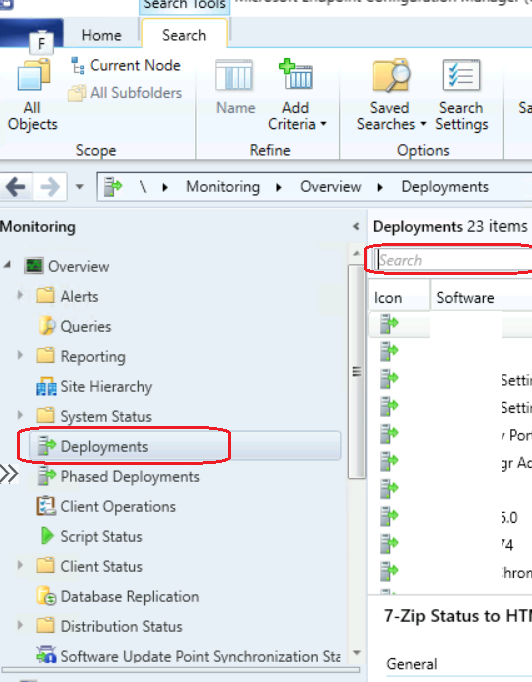
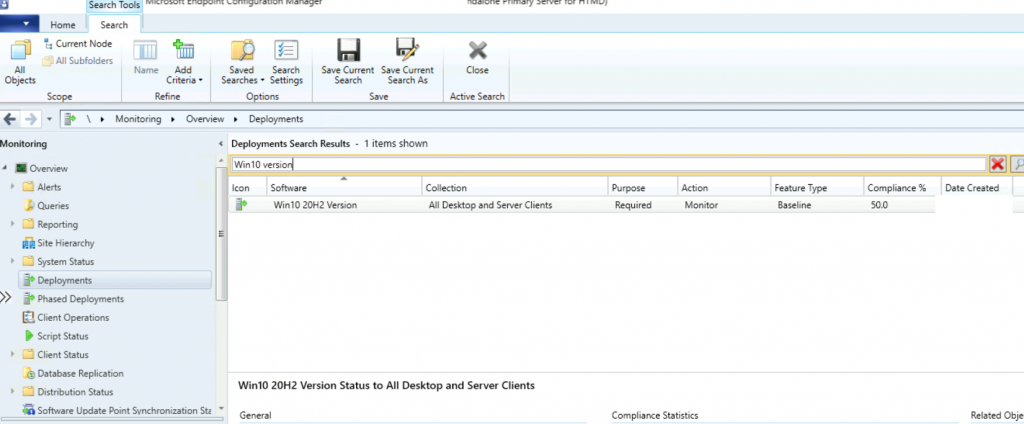
Search the baselines you deployed to the collection.
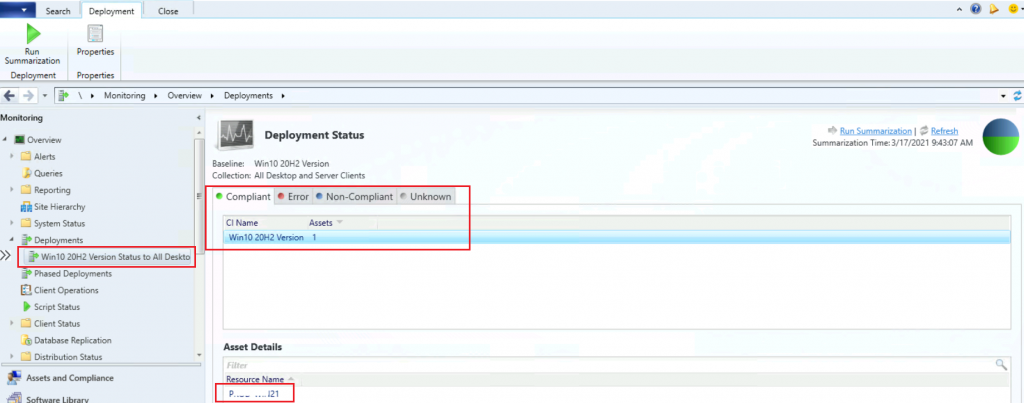
Double-click on the deployment and see the results of how many machines are compliant and non-compliant.
- SCCM CI to find Windows 11 Device is Blocked from an Upgrade
- Detect Registry Changes and Revert using SCCM Configuration Item CI CB
- SQL Query for SCCM Client Last Scan Time SUP WSUS Scan CAB File Version Details
- Export List of SCCM Global Conditions using SQL Query and Admin Console
- SUG Software Update Group Patch Deployments SCCM Report using SQL Query
Configuration Baselines report using SQL Query
Let’s find out the SQL query to get the configuration baseline report.
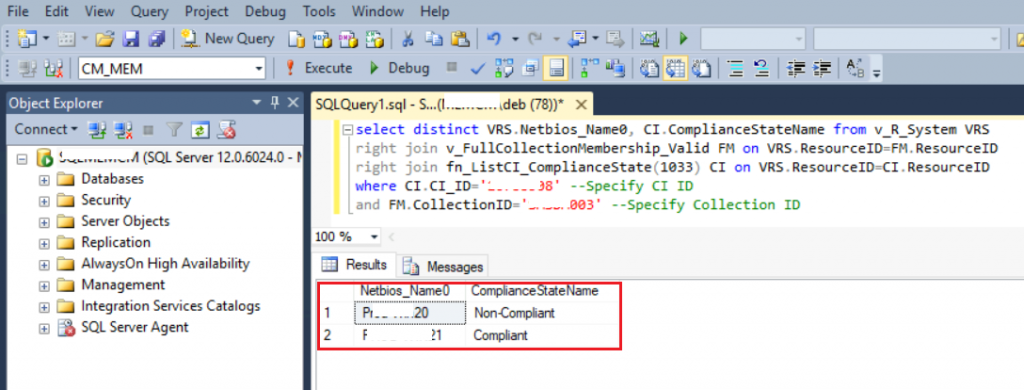
select distinct VRS.Netbios_Name0, CI.ComplianceStateName from v_R_System VRS
right join v_FullCollectionMembership_Valid FM on VRS.ResourceID=FM.ResourceID
right join fn_ListCI_ComplianceState(1033) CI on VRS.ResourceID=CI.ResourceID
where CI.CI_ID='xxx508' --Specify CI ID
and FM.CollectionID='xxx003' --Specify Collection ID
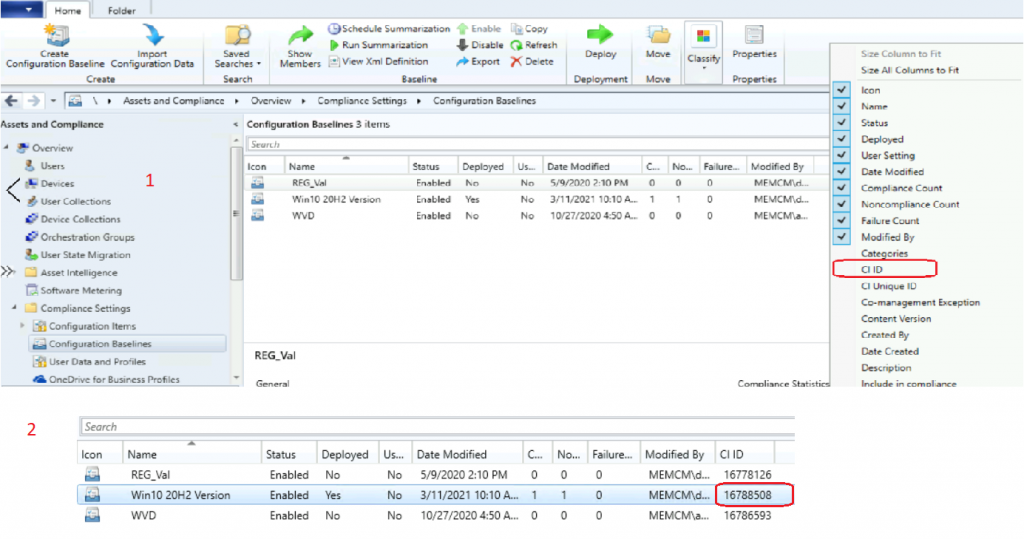
How to find CI ID
Go to Assets and Compliance -> Compliance Settings -> Configuration Baselines. To view, CI ID follow the below snapshot.
Resources
- How to Create SCCM Configuration Items Configuration Baselines | ConfigMgr
- ConfigMgr SCCM DCM Implementation and Troubleshooting Guide
We are on WhatsApp now. To get the latest step-by-step guides, news, and updates, Join our Channel. Click here – HTMD WhatsApp
Author
Debabrata Pati has more than 8+ years of experience in IT. Skilled in MEMCM, Azure, and Powershell. More than Six (6) years of experience in MEMCM (SCCM) administration, OSD, and Troubleshooting for the environment with more than 100K client devices.




Thanks for your post!
And what about compliance for selected device (without specifying particular CB)? I slightly modified your select, but noticed, that CI are returned multiple times with different results (compliant, error,..). So it seems, that it show even the history?
select distinct VRS.Netbios_Name0 as ComputerName, CI.DisplayName, CI.ComplianceStateName from v_R_System
VRS
right join v_FullCollectionMembership_Valid FM on VRS.ResourceID=FM.ResourceID
right join fn_ListCI_ComplianceState(1033) CI on VRS.ResourceID=CI.ResourceID
where VRS.Netbios_Name0=’xxx’ –enter device name
Thanks Debabrata, I was looking for somehting similar to this and the fn_ListCI_ComplianceState(1033) is exactly what I wanted. I did modify it slightly to go by the name of the CI instead of the CI ID. This way we don’t need to lookup and cross reference a number. In case anyone wants to see what I am talking about please see below
select distinct
sys.Netbios_Name0 ‘Hostname’
, CI.ComplianceStateName ‘Compliance’
,CI.DisplayName
from v_R_System sys
right join fn_ListCI_ComplianceState(1033) CI on sys.ResourceID=CI.ResourceID
where CI.displayname like ‘Network – Palo Alto Global Protect 2021 Cert’
Order by [Compliance]
What if the configuration items are based on HKCU, and the baseline is targeting a user collection?
Hi,
i have multiple CI Name.
How to get CI Name if not compliance ?