






ConfigMgr HTTP-only Client Communication is Going Out of Support | SCCM | Configuration Manager
Let’s discuss ConfigMgr HTTP-only Client Communication, which is going out of Support | SCCM | Configuration Manager. Microsoft announced its plans to end support for it.
Many users noticed this when they tried to install Technical Preview version 2103 of Configuration Manager. This alert came up as a prerequisite check warning in the TP version.
You can build the SCCM technical preview version lab to understand new features better. If you are a technology enthusiast and love to test new ConfigMgr features, then YES, go for the Technical Preview Lab.
I have a list of unsupported or ConfigMgr Deprecated Features. I recently updated it with many features that will soon be out of support. One feature that stands out from that list is HTTP client communication.

Table of Contents
RIP ConfigMgr HTTP-only Client Communication
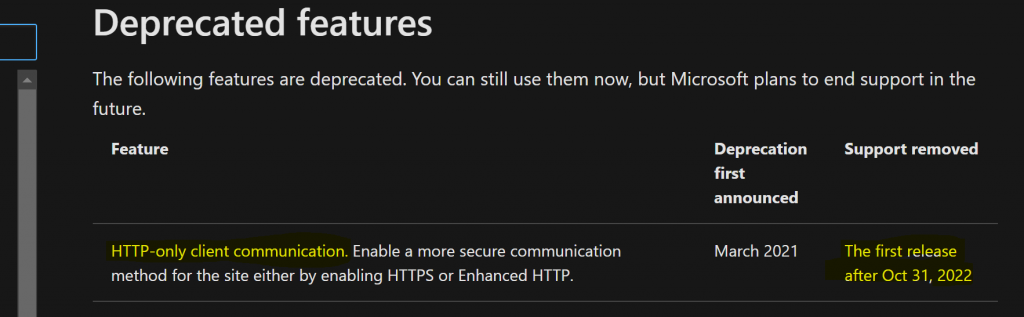
Yes, ConfigMgr HTTP-only Client Communication is Going Out of Support. But this is not going to happen soon. The out-of-support date mentioned in Microsoft docs is the first release after October 31, 2022.
You might have already noticed the following warning in prerequisite checks of the ConfigMgr 2103 TP installation status wizard.
Completed with warning: HTTPS or Enhanced HTTP is not enabled for client communication. HTTP-only communication is deprecated, and support will be removed in a future version of Configuration Manager. Enable a more secure communication method for the site either by enabling HTTPS or Enhanced HTTP. For more information, see https://go.microsoft.com/fwlink/?linkid=2155007.
- Fix Error 403 HTTP STATUS FORBIDDEN SCCM Software Update Patch Package Download Failed ConfigMgr
- Best Guide to Enable ConfigMgr Enhanced HTTP Configuration | SCCM | eHttp
- SCCM 2103 Upgrade Guide | ConfigMgr | Prerequisites | Step by Step
- SCCM Unsupported Deprecated or Removed Features
- SCCM HTTPS Setup Guide for MP DP SUP Site Systems
- Best Way To Manage SCCM Client On Windows Server Core Machines HTMD Blog (anoopcnair.com)
Need to Switch to HTTPS or eHTTPS
I recommend using the enhanced HTTP (a.k.a eHTTP) option to make client communication more secure. I’m sure securing communication will soon add many surprise features to SCCM.
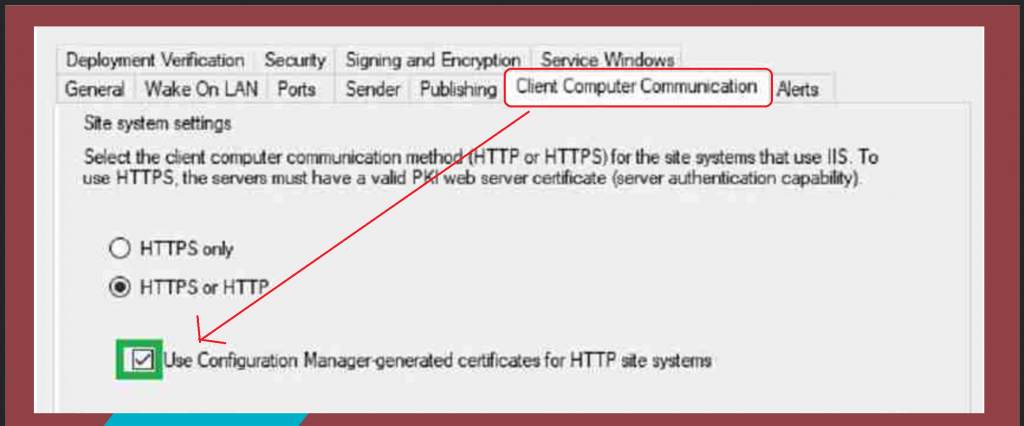
Let’s see how to enable the ehttp option using the following configuration:
- Navigate to Site Properties > Client Computer Communication tab.
- Check the box “Use Configuration Manager-generated certificates for HTTP site systems”.
Other SCCM Features Going out of support
The following are some other SCCM features going out of support soon.
- Microsoft Edge legacy browser profiles
- Desktop Analytics tile and page for Security Updates
- The collection evaluation viewer is integrated into version 2010.
- Log Analytics connector for Azure Monitor.
- The geographical view in the Site Hierarchy node of the Monitoring workspace in the SCCM console.
- We won’t be able to create a traditional Cloud DP in the future.
- Classic service deployment to Azure for CMG and cloud DP.
NOTE! – I have a list of unsupported or ConfigMgr Deprecated Features list.
Resources
We are on WhatsApp now. To get the latest step-by-step guides, news, and updates, Join our Channel. Click here – HTMD WhatsApp.
Author
Anoop C Nair has been Microsoft MVP from 2015 onwards for 10 consecutive years! He is a Workplace Solution Architect with more than 22+ years of experience in Workplace technologies. He is also a Blogger, Speaker, and Local User Group Community leader. His primary focus is on Device Management technologies like SCCM and Intune. He writes about technologies like Intune, SCCM, Windows, Cloud PC, Windows, Entra, Microsoft Security, Career, etc.




Hi Anoop, thanks for this article!
I wonder what this will mean for a site system role like the Fallback Status Point as this is based on pure HTTP communication?
StaffHello – I have not specifically heard anything about the Fallback status point. Any specific reason for this question? Are you concerned about the clients that are orphans (unassigned/not assigned) who can’t communicate with secured channels?
In essence yes, because that is a prerequisite for a Fallback Status Point. It operates purely in HTTP to be able to pick up clients that are not communicating correctly for whatever reason in the environment.
Hi Anoop,
Is there any actual impact to clients by switching on enhanced HTTP? Cant find any information to say it does. Just want to be sure before its done.
StaffI think it won’t impact anything because we are not going only HTTPS mode. So ConfigMgr can always fallback to normal communication.
However, I would recommend testing this in pre-production environment before going into production mass deployment.
Hi Anoop, on a different subject. Will activating Enhanced HTTP on a primary site level, still allow client communication of both EHTTP and PKI level? (with PKI communication being preferred over EHTTP) I am mainly asking this question in the context of our server infra that is currently managed using HTTP based site server roles (MP/DP/SUP) as due to their nature, it is often not straight forward to connect these clients using a PKI based certificate. But then on the other hand we wouldn’t want to go and have to setup a dedicate child primary site in our CAS based hierarchy, just to support these servers on EHTTP if we can’t mix both solutions within the same primary site setup.
After upgrading to SCCM 2103 and enabling the HTTPS or HTTP with the box checked Use Config Manager-generated certificates for HTTP site systems, my clients are all showing offline. I tried switching back to the previous way it was, but that didn’t fix it. Is there something I need to change in IIS?