






Top 5 New Features of ConfigMgr 2103 | SCCM
Let’s quickly look at the Top 5 New Features of ConfigMgr 2103 (a.k.a. SCCM). Microsoft released the latest version of Configuration Manager 2103 on 31 March 2021. The following are my top five picks for the new features.
These features are beneficial for SCCM admins in their day-to-day activities. Many other great features are released as part of version 2103; some are related to tenant attachment and other components not included in this post.
I have already published a step-by-step guide for the ConfigMgr 2103 production release. You can refer to SCCM Server Upgrade to 2103. The upgrade checklist and prerequisites are also covered in that step-by-step guide.
The 2103 version of SCCM does not include the remote Control feature through ConfigMgr CMG (a.k.a. Cloud Management Gateway).

Table of Contents
Feature Update Task Sequence
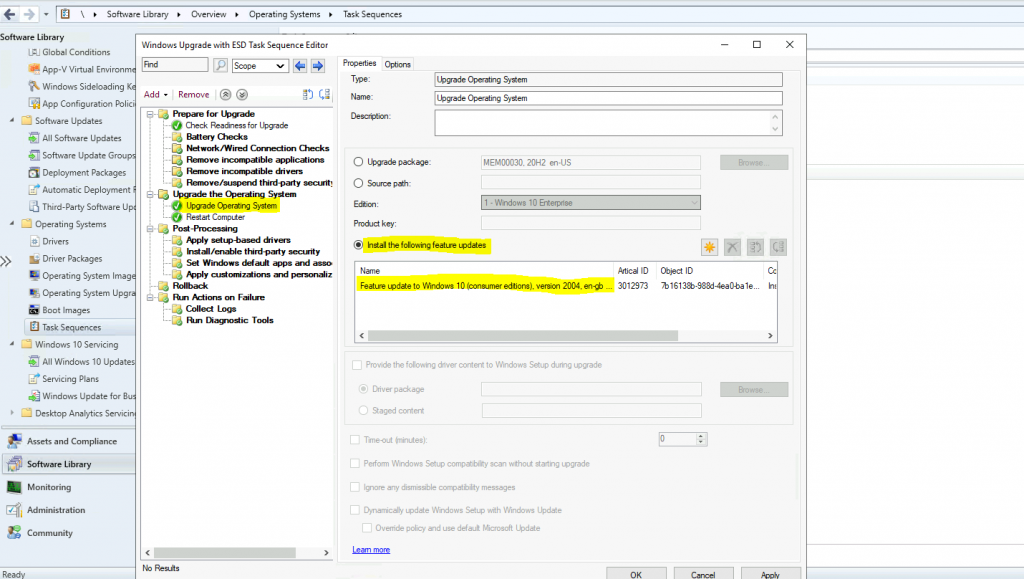
Let’s see an excellent new feature added to Configuration Manager 2103 (a.k.a SCCM). This is nothing but a Feature Update Task Sequence. Onward, you can use Task Sequence to deploy Windows 10 feature updates with all Task Sequence controls.
You can now upgrade a client’s Windows OS using a feature update with a task sequence. The new feature comes with a combination of:
- The simplicity of Windows servicing.
- The Flexibility of task sequences.
You can edit the task sequence, select the Upgrade Operating System step, and select the Install the Following Feature Updates option.
- Top 5 New Features of SCCM 2010 | ConfigMgr
- Windows 10 KB5041580 August 2024 Patches and 7 Zero-Day Vulnerabilities
- Fix Software Update Deployment Issues with SCCM Clients with KB28458746
Discovery – Active Directory OU Exclusion
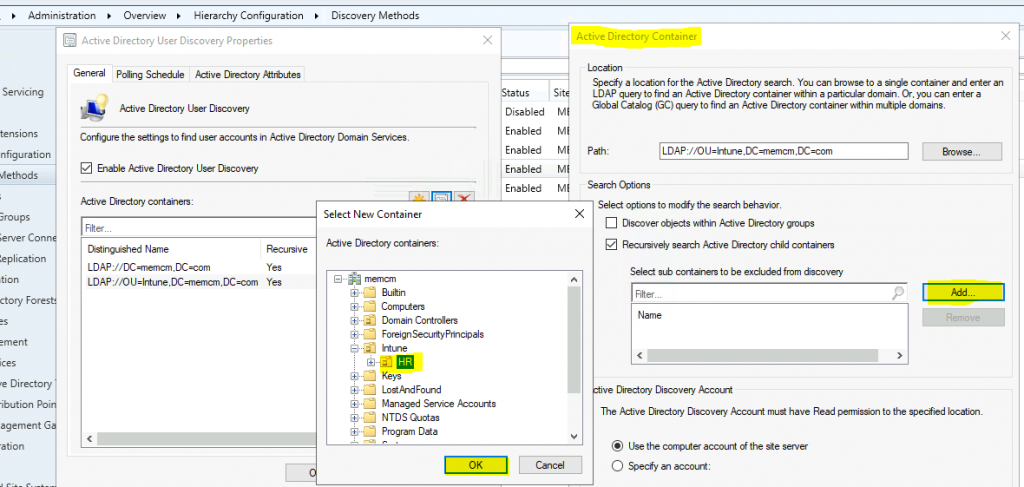
With the ConfigMgr 2103 version, you can now exclude OUs from ConfigMgr Active Directory User Discovery. You can follow the following steps to exclude an OU from AD user discovery.
- From the ConfigMgr console, go to Administration > Hierarchy Configuration > Discovery Methods.
Collection Query Improvements
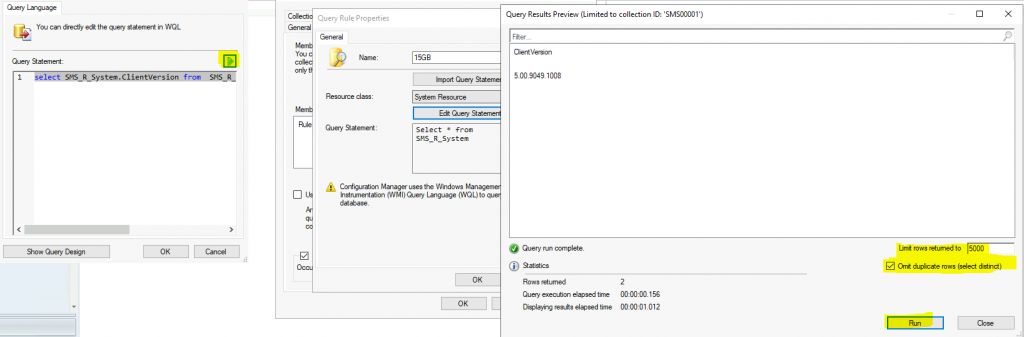
With the ConfigMgr 2103 version, you now have more options for the collection query preview. The following improvements have been made to previewing collection queries:
- Limit the number of rows returned.
- Omit duplicate rows from the result set.
- Review statistics for the query preview, such as the number of rows returned and elapsed time.
Collection Evaluation Status
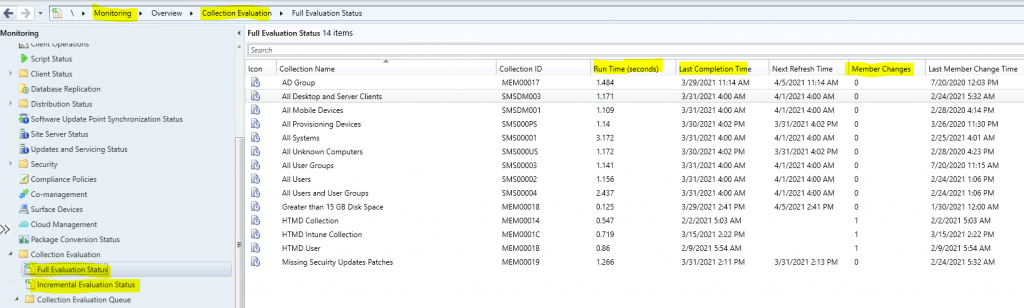
Microsoft improved the experience of the console Collection Evaluation tool with the latest version of Configuration Manager 2103. The latest version includes a Full evaluation and Incremental evaluation summary.
- Collection Evaluation Details are available –> \Monitoring\Overview\Collection Evaluation
- \Monitoring\Overview\Collection Evaluation\Full Evaluation Status
- \Monitoring\Overview\Collection Evaluation\Incremental Evaluation Status
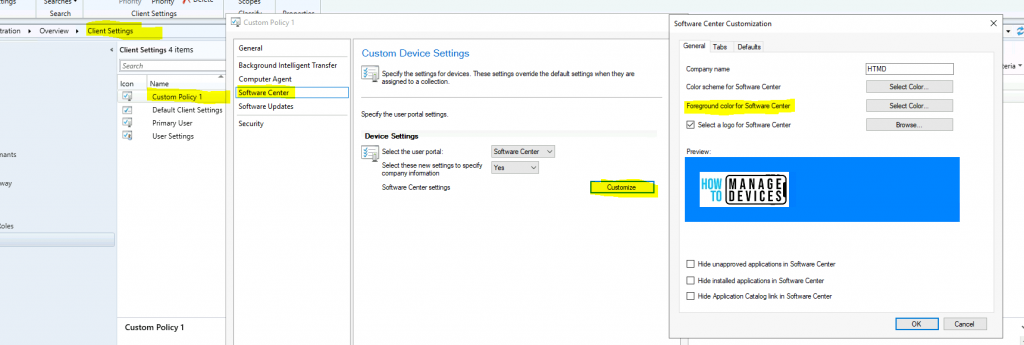
Software Center Foreground Color Theme
With the 2103 version, you can change the software center’s background color. You might already be aware of ConfigMgr Software Center customization options for branding.
You can configure all these branding changes for the Software center from the Client Settings—Software Center tab. For example, you can now configure a custom color for the foreground font.
NOTE! – Custom Tabs – Starting with the 2103 release of Configuration Manager, Software Center can now use the Microsoft Edge WebView2 browser control. The WebView2 browser control provides improved security and user experience.
Resources
We are on WhatsApp now. To get the latest step-by-step guides, news, and updates, Join our Channel. Click here – HTMD WhatsApp
Author
Anoop C Nair has been Microsoft MVP from 2015 onwards for 10 consecutive years! He is a Workplace Solution Architect with more than 22+ years of experience in Workplace technologies. He is also a Blogger, Speaker, and leader of the Local User Group Community. His main focus is on Device Management technologies like SCCM and Intune. He writes about technologies like Intune, SCCM, Windows, Cloud PC, Windows, Entra, Microsoft Security, Career, etc.




Discussion