






The Best Way to Find Collection ID in SCCM | ConfigMgr
Let’s learn how to find Collection ID in SCCM. We received an interesting comment on one of the posts: SCCM Patch Status SQL Query Based on Particular Collection | ConfigMgr. I understand the trouble here because the default console view doesn’t have collection IDs.
Now, let’s understand why the collection IDs are important. The main reason for getting the collection ID details is to run Configuration Manager default reports. So, the fresh SCCM admin should know where to get the collection IDs.
SCCM Collections are critical in the SCCM environment. We should be careful when creating or modifying collections, as they can cause performance issues.
For more details about the collections please refer the following posts: SCCM Collections – How To Build Static Collection SCCM 2. How to create dynamic collections? Create Collection Folders 3. Create AD Group-Based SCCM Collection.

Table of Contents
How many types of Collections are there?
Are collection queries based on SQL or WQL?
Where can you find the Collection ID in SCCM?
Default View
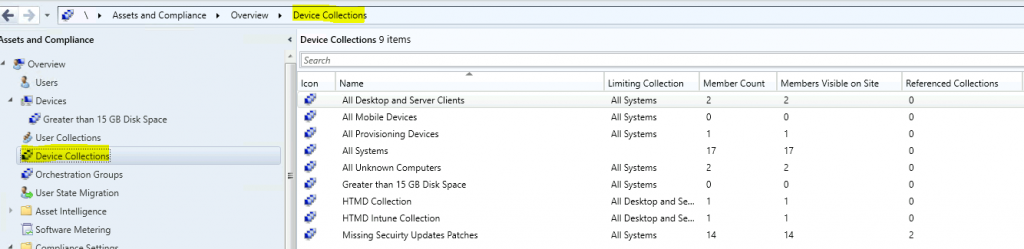
The default ConfigMgr console view from the Assets and Compliance workspace doesn’t show collection ID details. Let’s get the collection ID details from the SCCM console.
- Intune Guide to Turn Off Tracking App Launches
- Best Guide to Install Microsoft Graph PowerShell Modules
- How to Use Wireshark in Windows 11 Detailed User Guide
- Manage Windows 11 Readiness Dashboard using SCCM
Add Collection ID Column
The following steps will give you the details of the collection ID that you require for filtering or running an SCCM report.
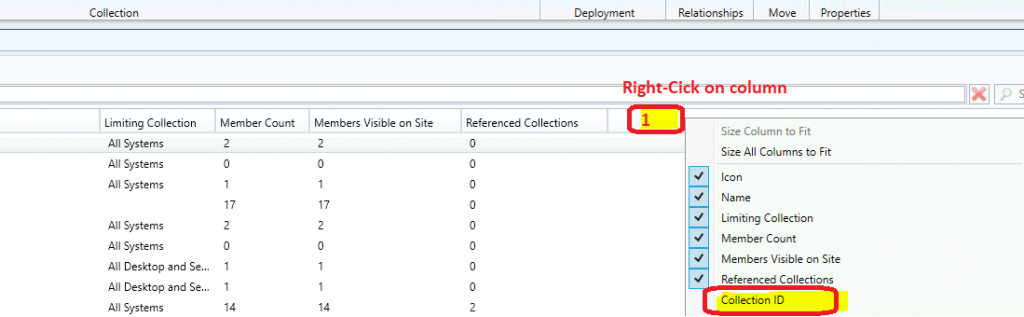
- You can add a new column by right-clicking on any of the columns from the Device Collection or User Collection nodes.
- Select the Collection ID column from the list.
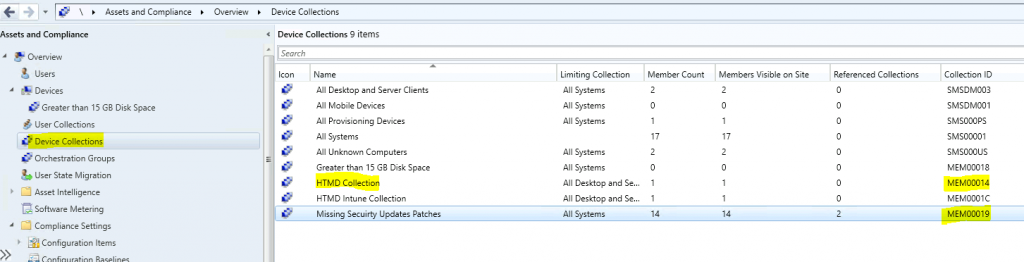
Now check the corresponding collection ID value against each collection.
- For example – The collection ID for the HTMD Collection is MEM00014
- All Systems = SMS0001
Default Collection Vs Custom Collection?
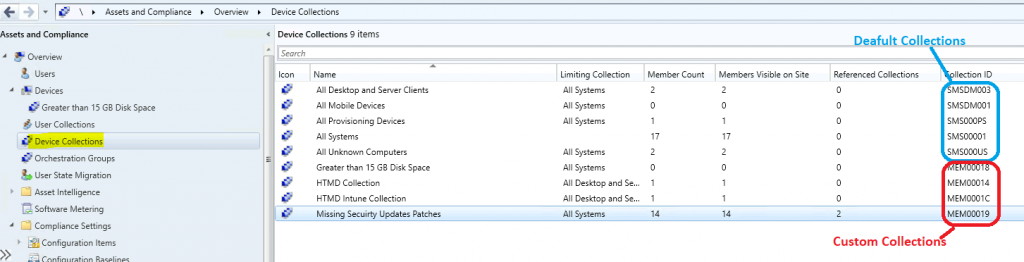
Let’s understand the difference between custom collections and default collections.
Custom Collections = These are the ones created by SCCM admins. The collection IDs of a custom collection start with your site code. In my example, all my custom collection IDs start with MEM.
Default Collections = These are built-in collections automatically created when you install the SCCM primary server or CAS. The Collections ID of these types of collections starts with SMS.
Best Method to Find Collection ID
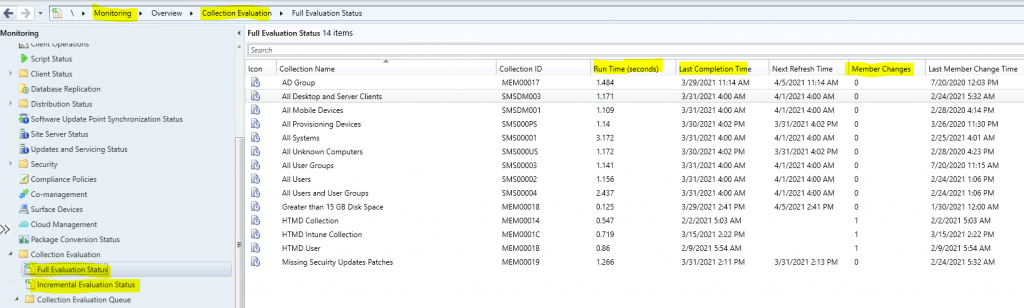
With the 2103 version of Configuration Manager, you can access the collection ID details by going to the following location in the SCCM console.
- Navigate to \Monitoring\Overview\Collection Evaluation node
- Click on Full Evaluation Status to get all the details about collections available in your Configuration Manager infra.
- You can check the collection ID for each collection from this place.
Resources
- SCCM Collections How to Create Direct Membership Collection ConfigMgr
- SCCM Collection Create AD Group Based – Part 3 | ConfigMgr
We are on WhatsApp now. To get the latest step-by-step guides, news, and updates, Join our Channel. Click here – HTMD WhatsApp.
Author
Anoop C Nair has been Microsoft MVP from 2015 onwards for 10 consecutive years! He is a Workplace Solution Architect with more than 22+ years of experience in Workplace technologies. He is also a Blogger, Speaker, and leader of the Local User Group Community. His main focus is on Device Management technologies like SCCM and Intune. He writes about technologies like Intune, SCCM, Windows, Cloud PC, Windows, Entra, Microsoft Security, Career, etc.




Discussion