






Create SCCM Collection for Co-Managed Devices
Create the SCCM Collection for Co-Managed Devices using this How-to Guide. Let’s learn more about the SCCM collection for Co-Managed Devices.
The brain of this post is the WQL query to create an SCCM (ConfigMgr) dynamic device collection for co-managed devices. You can have both static collections and dynamic collections for grouping co-managed devices.
I prefer a dynamic device collection to target policies/applications to co-managed devices. Well, what are co-managed devices? The Co-managed Windows 10/Windows 11 devices are simultaneously managed by ConfigMgr (a.k.a SCCM) and Intune.
SCCM Collections are used to create groups of users or devices. They can also help with typical ConfigMgr admin tasks like deploying Operating systems, managing applications, deploying compliance settings, or installing patches.

Create ConfigMgr Co-Managed Dynamic Device Collection
Let’s create a dynamic collection for grouping co-managed devices from your environment.
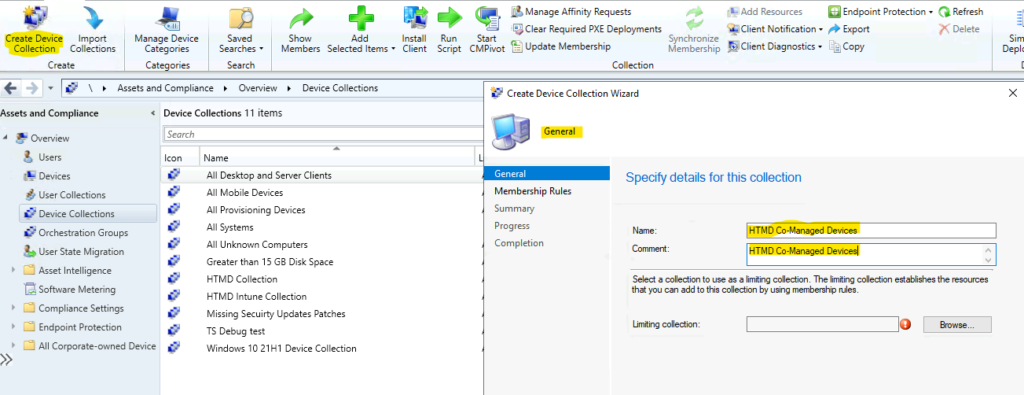
- Navigate to the SCCM console – Assets and Compliance – Device Collections.
- Right-click and select “Create Device Collection” from the Device Collections node.
- On the General page, provide a Name and a Comment.
- You must be careful about Limiting collection (I don’t recommend selecting All Systems collection).
- Choose Browse to select a limiting collection. The collection will only contain members from the limited collection.
- Click on Next to continue.
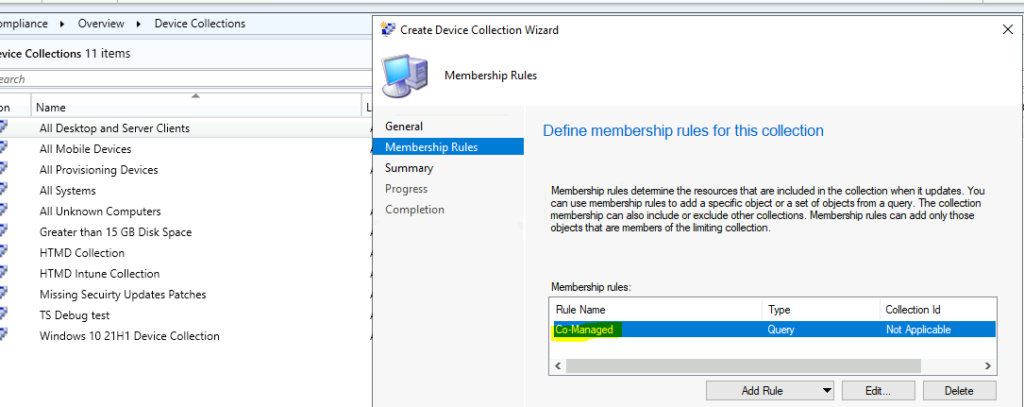
On the Membership Rules page of the Create Device Collection Wizard, in the Add Rule list. Select the type Query Rule membership rule for this collection. You have an option to create multiple rules for each collection.
Add Rule list, select Query Rule. On the Query Rule Properties windows, specify the following information:
- Enter the Query Name: Specify a unique name.
- Resource class: You must select System Resource to create Dynamic Device Collection in SCCM.
- Click Edit Query Statement to open the Query Statement Properties dialog box.
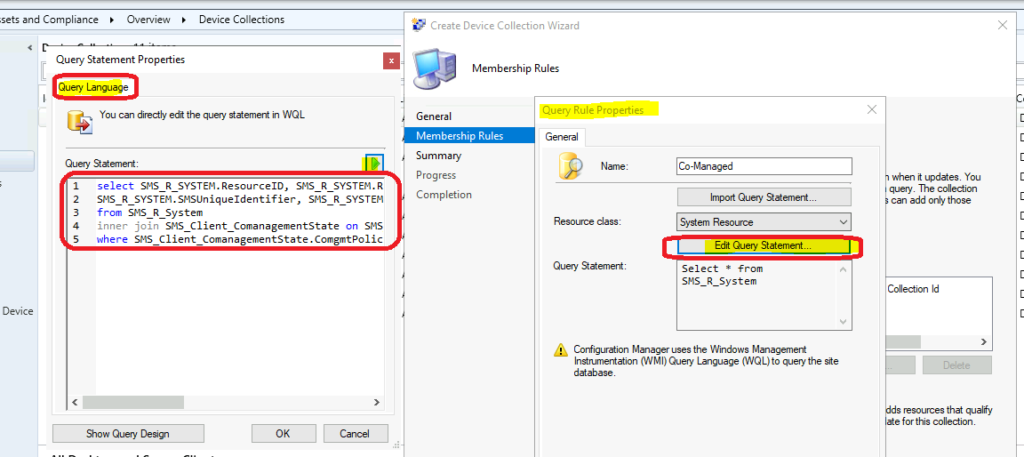
NOTE! You can verify whether the collection query is correct by clicking on the Green play button. The Verify SCCM Collection Query Preview Tool is always useful in this kind of scenario.
To create a dynamic device collection, use the WQL query from the following section (WQL Query—SCCM Collection for Co-Managed Devices).
- Click OK, OK, OK to close all dialog boxes.
- On the Membership Rules page, click on NEXT.
- Click NEXT, NEXT, and Close to finish Creating the Device Collection Wizard.
WQL Query – Create SCCM Collection for Co-Managed Devices
Use the following WQL query to create a ConfigMgr dynamic device collection for Co-managed devices.
NOTE! – Try the WQL query in a testing/staging environment before trying this in a production environment.
select SMS_R_SYSTEM.ResourceID, SMS_R_SYSTEM.ResourceType, SMS_R_SYSTEM.Name,
SMS_R_SYSTEM.SMSUniqueIdentifier, SMS_R_SYSTEM.ResourceDomainORWorkgroup, SMS_R_SYSTEM.Client
from SMS_R_System
inner join SMS_Client_ComanagementState on SMS_Client_ComanagementState.ResourceId = SMS_R_System.ResourceId
where SMS_Client_ComanagementState.ComgmtPolicyPresent = 1 AND SMS_Client_ComanagementState.MDMEnrolled = 1 AND MDMProvisioned = 1
Results
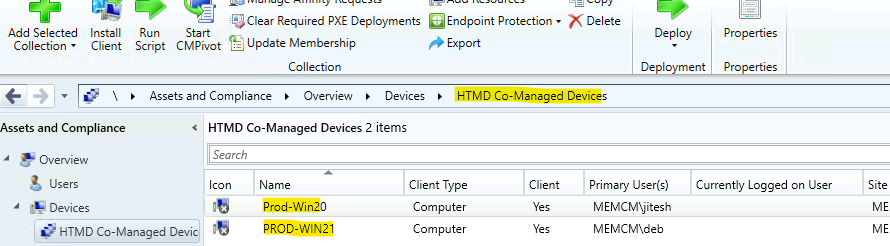
The results of the SCCM Collection for Co-Managed Devices are shown in the screenshot below. In the SCCM lab environment, only two devices are co-managed.
Resources
We are on WhatsApp. To get the latest step-by-step guides and news updates, Join our Channel. Click here –HTMD WhatsApp.
Author
Anoop C Nair has been Microsoft MVP for 10 consecutive years from 2015 onwards. He is a Workplace Solution Architect with more than 22+ years of experience in Workplace technologies. He is a Blogger, Speaker, and Local User Group Community leader. His primary focus is on Device Management technologies like SCCM and Intune. He writes about technologies like Intune, SCCM, Windows, Cloud PC, Windows, Entra, Microsoft Security, Career, etc.




Nice, and what about clients that are NOT co-managed?
That would be:
where SMS_Client_ComanagementState.ComgmtPolicyPresent = 1 AND MDMProvisioned = 0
?
Thanks!
Can we do co-management for 2 separate SCCM collections and or security groups in AD?