






Fix SCCM Failed to Create SQL Always On Certificate Error
Let’s see how to fix the error “failed to create SQL Always On certificate ConfigMgr 2103.” Today, I’d like to explore fixing the SCCM that failed to create an SQL Always On Certificate Error.
Microsoft released a new out-of-band hotfix, KB10216365, for SCCM 2103. This KB fixes the problem of being unable to move the site database to the SQL Always On availability group.
The previous post documented SCCM 2103 known issues. The update rollup for Configuration Manager 2103 is a prerequisite for out-of-band hotfix KB10216365.
Out-of-band hotfixes will not be available in the SCCM console until you download and install the Update Registration Tool to import hotfixes to Configuration Manager.

Table of Contents
Issue Fix SCCM Failed to Create SQL Always On Certificate Error
Modifying SQL Server configuration to move the site database to an availability group fails after upgrading to SCCM CB version 2103. The following error can be seen in the ConfigMgrSetup.log file on the affected SCCM site server.
Not able to decrypt using key stored in operating system.
Successfully refreshed the encrypted site master key from database.
ERROR: Failed to retrieve SQL Server certificate.
ERROR: Failed to create SQL Always On certificate.
- Top 50 Latest SCCM Interview Questions and Answers
- FIX SCCM SQL Replication Issues using Replication Link Analyzer
- SCCM SQL Data Visualization using Azure Data Studio and Query Execution
Download
You can download the out-of-band update registration tool for KB10216365. You can download KB10216365 out-of-the-band update registration tool (CM2103-KB10216365.ConfigMgr.Update.exe).
Install CM2103-KB10216365.ConfigMgr.Update.exe from the SCCM server to make the KB10216365 available.

Fix: Failed to Create SQL Always On Certificate Error
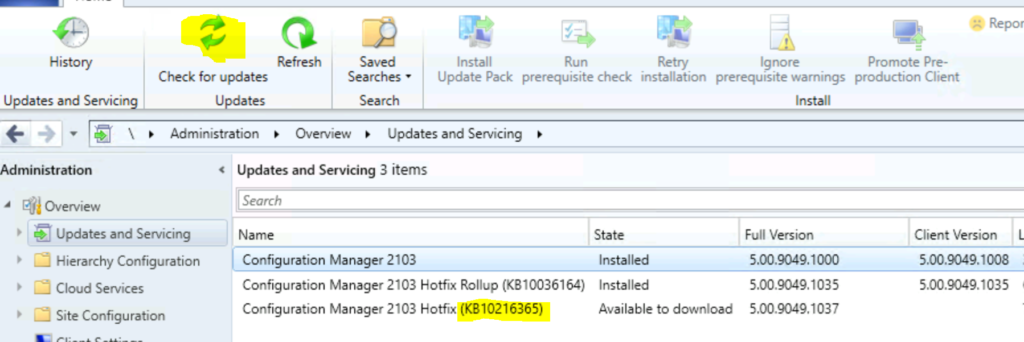
Let’s install KB10216365 to fix the failed SQL Always On certificate error. You can install the out-of-band KB from the updates and services node. You must click the check for updates button to make the KB available.
NOTE! – There is no client component update with KB10216365.
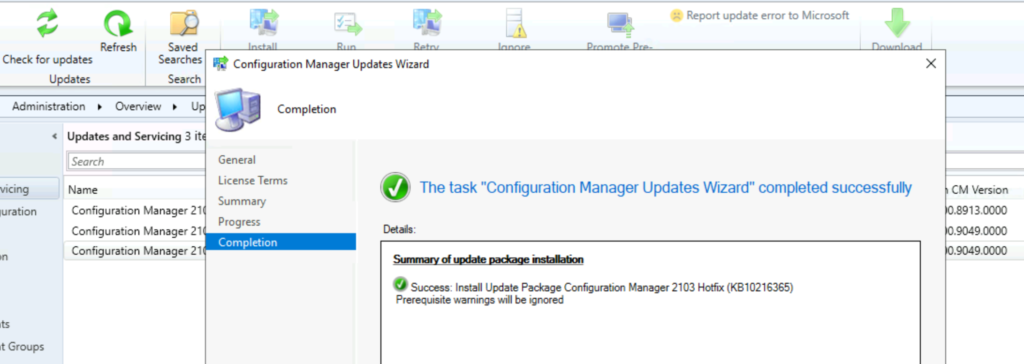
Summary of the updated package installation – Install Update Package Configuration Manager 2103 Hotfix (KB10216365) Prerequisite warnings will be ignored.
- Right-click on the hotfix and select the Install Update package to start the installation.
- Click on NEXT to continue.
- Install Update Package Configuration Manager 2103 Hotfix (KB10216365).
- Select Prerequisite warnings will be ignored.
- Click on Next, Next, and Next to finish the wizard.
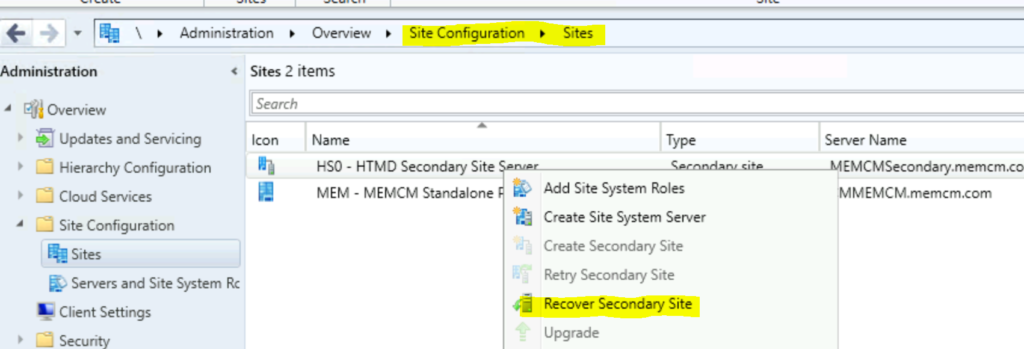
Secondary Server Update
You must manually update a secondary site from the SCCM admin console by selecting Administration > Site Configuration > Sites > Recover Secondary Site.
The latest Configuration Manager 2103 (full version) is 5.00.9049.1037 (of course – after the installation KB10216365).
Resources
We are on WhatsApp. To get the latest step-by-step guides and news updates, Join our Channel. Click here –HTMD WhatsApp.
Author
Anoop C Nair has been Microsoft MVP for 10 consecutive years from 2015 onwards. He is a Workplace Solution Architect with more than 22+ years of experience in Workplace technologies. He is a Blogger, Speaker, and Local User Group Community leader. His primary focus is on Device Management technologies like SCCM and Intune. He writes about technologies like Intune, SCCM, Windows, Cloud PC, Windows, Entra, Microsoft Security, Career, etc.




Discussion