






Fix Windows Print Spooler Service Issue with Out of Band Update Update
Let’s know more about fixing the Windows print spooler service Issue Out of Band Update. Microsoft released the out-of-band hotfix for all the impacted operating systems.
We discussed the workarounds using SCCM and GPO in the HTMD Forum. Microsoft confirmed the known issue, a remote code execution vulnerability that affects Windows Print Spooler.
Microsoft assigned CVE-2021-34527 to this vulnerability on July 1, 2021. However, there are reports that this OOB fix doesn’t resolve all the issues related to the print spooler service.
Microsoft released fixes for all the following operating systems. They have also publicly informed that fixes for the remaining affected supported versions of Windows will be released in the coming days. More details about supported operating system versions are in the resources section below.

- Windows 10 (varies versions)
- Windows 8.1
- Windows 7 SP1
- Windows Server 2019
- Windows Server 2012
- Windows Server 2008 R2 SP1
- Windows Server 2008 SP2
Table of Contents
Issue – Windows Print Spooler service
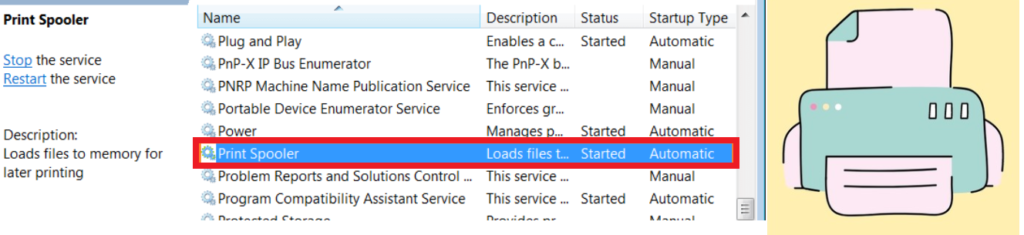
Microsoft released more details about the print spooler issue in CVE-2021-34527. A remote code execution vulnerability exists when the Windows Print Spooler service improperly performs privileged file operations. You can check the following section to learn more about the Fix Windows Print Spooler service Issue.
An attacker who successfully exploited this vulnerability could run arbitrary code with SYSTEM privileges, install programs, view, change, or delete data, or create new accounts with full user rights.
- Top 83 Windows 11 Desktop Admin Interview Questions
- Allow Print Spooler to Accept Client Connections using Intune Policy
- How to Fix Printer Connection Printing Problems in Windows 11
Fix Windows Print Spooler Service Issue
You must go through the Windows update process to fix the Windows Print Spooler Remote Code Execution Vulnerability issue. If you are a Windows consumer user, then you have to follow the steps mentioned below:
- Open the Settings application from the Start menu/button.
- Click on the Updates and Security section.
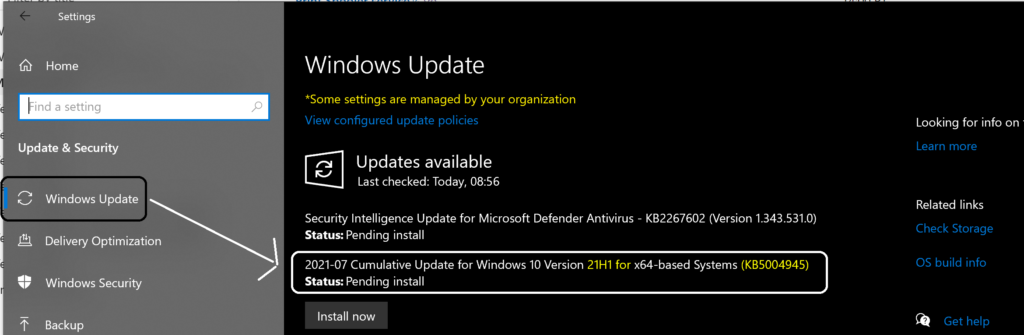
- Click on Windows Update.
- Seek the latest updates by clicking on Check for Updates.
Now, when you are on the 21H1 version of Windows 10, you can see the 2021-07 Cumulative Update for Windows 10 for x64-based System (KB5004945).
NOTE: You can see Windows 11 update details from the Windows 11 Quality Updates, Feature Updates, Driver Updates, and Firmware Updates. Windows 11 Fix Fix is not yet released to fix the Windows Print Spooler service Issue.
Resources
- Windows 11 Quality Updates Feature Updates Driver Updates Firmware Updates | CUs are 40% Smaller
- Supported versions of Windows Operating System
We are on WhatsApp. To get the latest step-by-step guides and news updates, Join our Channel. Click here –HTMD WhatsApp.
Author
Anoop C Nair has been Microsoft MVP for 10 consecutive years from 2015 onwards. He is a Workplace Solution Architect with more than 22+ years of experience in Workplace technologies. He is a Blogger, Speaker, and Local User Group Community leader. His primary focus is on Device Management technologies like SCCM and Intune. He writes about technologies like Intune, SCCM, Windows, Cloud PC, Windows, Entra, Microsoft Security, Career, etc.



Discussion