






What is the Windows 11 Entertainment Widget?
Let’s understand the Windows 11 Entertainment widget. Microsoft introduced this widget option with the Windows 11 build version 22000.71.
Let’s understand why the Windows 11 entertainment widget is vital for Windows’s new generation consumers.
The entertainment widget helps you get updates about new and featured movie titles available in the Microsoft Store. However, this feature is not handy for Windows 11 commercial customers (enterprises).
The latest Windows 11 version numbers/build numbers are recorded in the previous post. Now, let’s understand what the Entertainment widget is.

What is the Windows 11 Entertainment Widget?
Microsoft introduced Windows 11 entertainment widgets with insider review version 10.0.22000.71 on 15th July 2021. Seven (7) widget options are available in the Windows 11 insider preview version. I’m sure there will be a lot of other custom Widget options:
- Calendar
- Tips
- Esports
- Watchlist
- To Do
- Traffic
- Weather
- Photos
- Top 83 Windows 11 Desktop Admin Interview Questions
- Various Ways to Enable or Disable Widgets Feature in Windows 11 GPO Intune Policy Registry
- How to Fix Windows 11 System Components Issues using Repair Terminate and Reset options
Add Entertainment Widget
Let’s see how to add additional widgets. As mentioned above, there are seven widget options available in Windows 11. The latest one introduced is Entertainment widgets to update the latest/trending movies, series, and shows.
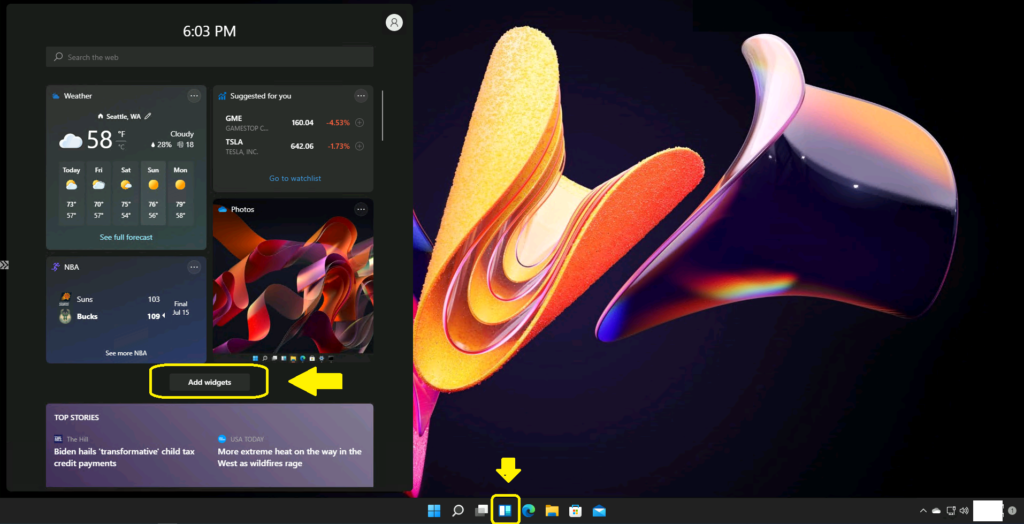
- Click on the Widgets icon from the taskbar.
- Open Widgets.
- Click or tap on the “Add widgets” button.
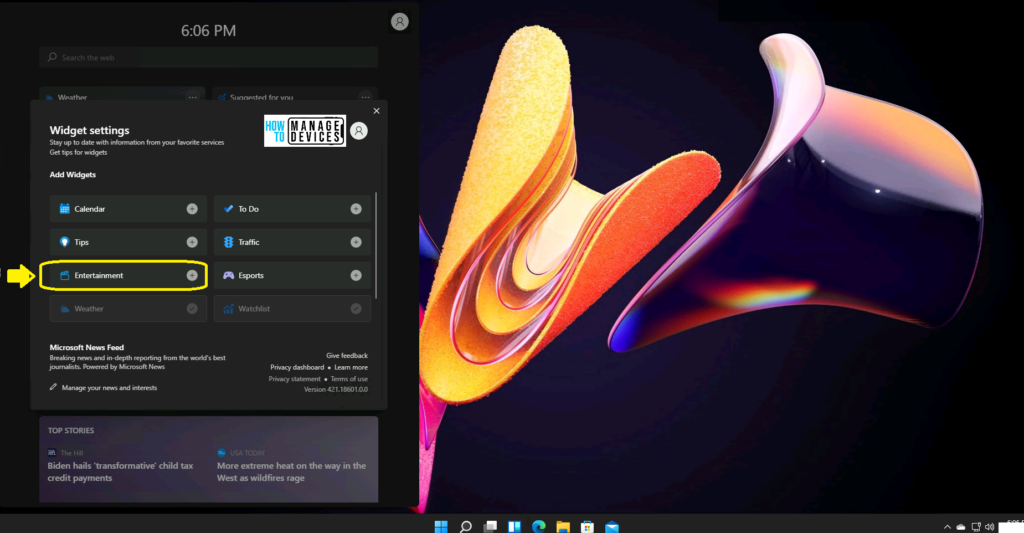
Choose the Entertainment + widget to add an entertainment button.
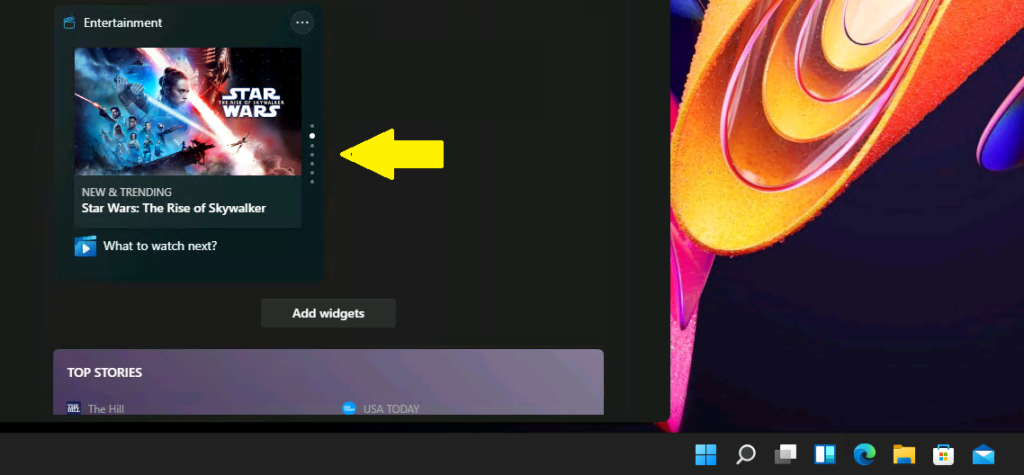
The new entertainment widget gives you quick access to featured moved titles in the Microsoft Store. The entertainment widget gives featured movies that are available in the Microsoft store. There are seven (7) movie features in this entertainment widget.
There are up and down arrows to select the next featured movies from the Microsoft store.
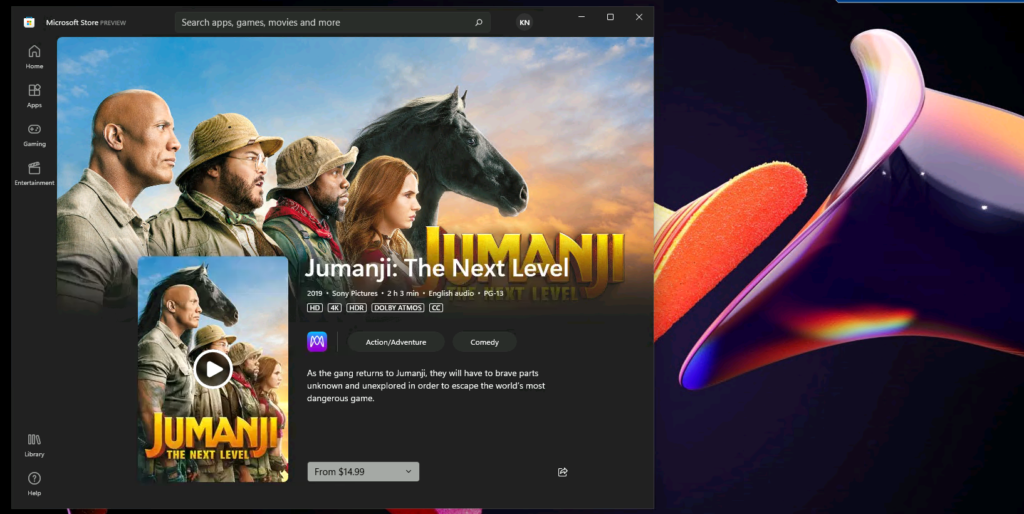
You can click on any of the movie’s feature images to start watching the film from the Microsoft store. I can see that the Jumanji movie is available at USD 14.99.
Remove the Windows 11 Entertainment Widget
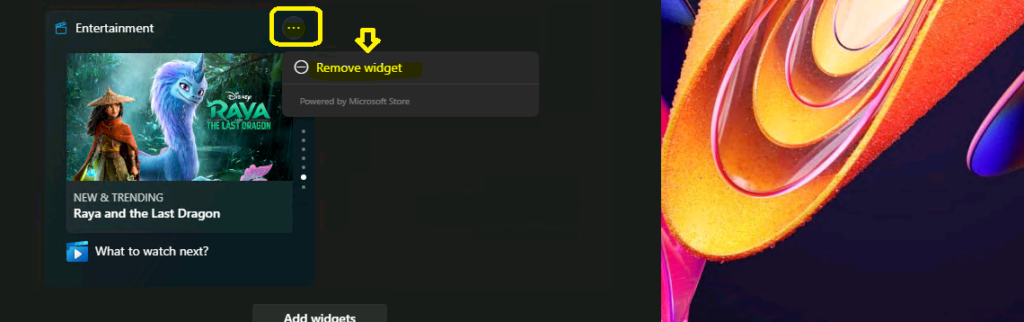
You can easily remove the Windows 11 entertainment widget by clicking on the … (3 dots/ellipsis) and selecting the Remove widget.
Related Post – Add or Remove Windows 11 Widgets Button on Taskbar Easy Option.
Resources
- Show or Hide Search Icon in Windows 11 Easy Option
- Display Taskbar on Multiple Monitors in Windows 11 Quick Option
We are on WhatsApp. To get the latest step-by-step guides and news updates, Join our Channel. Click here –HTMD WhatsApp.
Author
Anoop C Nair has been Microsoft MVP for 10 consecutive years from 2015 onwards. He is a Workplace Solution Architect with more than 22+ years of experience in Workplace technologies. He is a Blogger, Speaker, and Local User Group Community leader. His primary focus is on Device Management technologies like SCCM and Intune. He writes about technologies like Intune, SCCM, Windows, Cloud PC, Windows, Entra, Microsoft Security, Career, etc.




Discussion