






Top 5 Features of SCCM 2107 Configuration Manager
Let’s have a quick look at the top 5 features of SCCM 2107 (a.k.a ConfigMgr). Microsoft now released the latest version of Configuration Manager 2107. This is a quick post to help you understand some of the new features.
There are many other features and cosmetic changes introduced with the latest version of SCCM. There are multiple performance improvements to the CMTrace log viewer. Also, there are cosmetic changes in Support Center (Content views changes to Deployments).
Microsoft added the support for layered keyboard drivers during OS deployment with the 2107 version. Microsoft is putting a lot of effort into security enhancements. The communication between MP and Software Center/Company Portal now prefers secure communication over HTTPS (enhanced HTTP) to get user-available applications.
Video
Top 5 New Features of SCCM 2107 Version – HTMD Community

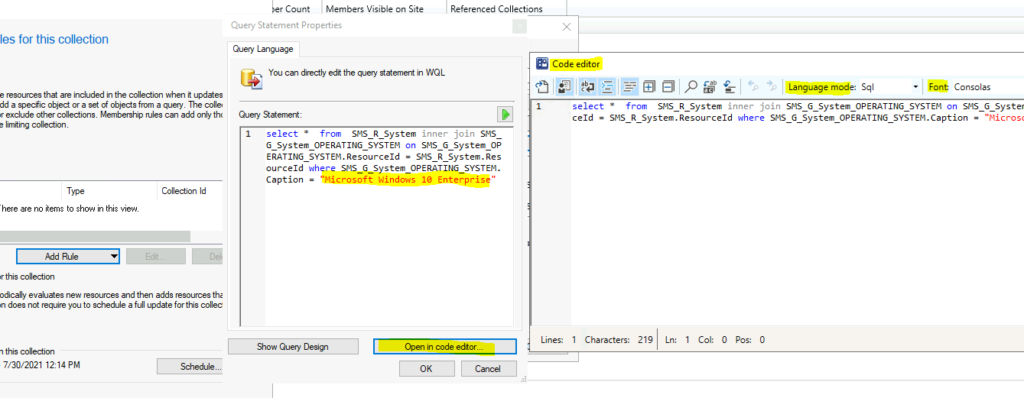
#1 SCCM Code Editor
You can see the try enhanced code editor option from collection queries and many other workloads within the admin console. Microsoft is making a code editor available with the 2107 version of SCCM wherever scripts and queries can be viewed or edited. You can now edit scripts in an enhanced editor. The new code editor supports:
- Syntax highlighting
- Code folding
- Word-wrap
- Line numbers
- Find and replace
This code editor integrated with ConfigMgr admin console supports different “syntax types“. The entire list of supported syntaxes are given below:
- PowerShell, JavaScript, VBScript, Batch, Jscript, KQL, WQL, SQL, and XML.
#2 Navigate to Collection from Collections Tab
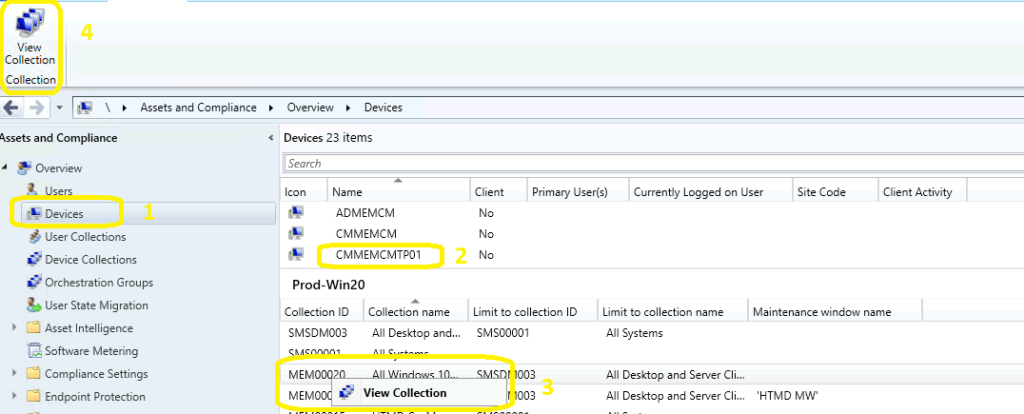
The tabs in the Devices node are handy for day to day admin operation of SCCM. There are six tabs available in the devices node. It’s very useful to have options to go to the different workflows from each tab. Microsoft introduced new functionality to the collection tab.
- You can navigate to collections tab from Devices node -> click on any of the collection and directly navigate to that particular collection by View Collection button in the ribbon menu.
NOTE! – It seems we have a bug with the feature. I couldn’t make this work in my lab environment. Have you got this working?
#3 Added maintenance window column
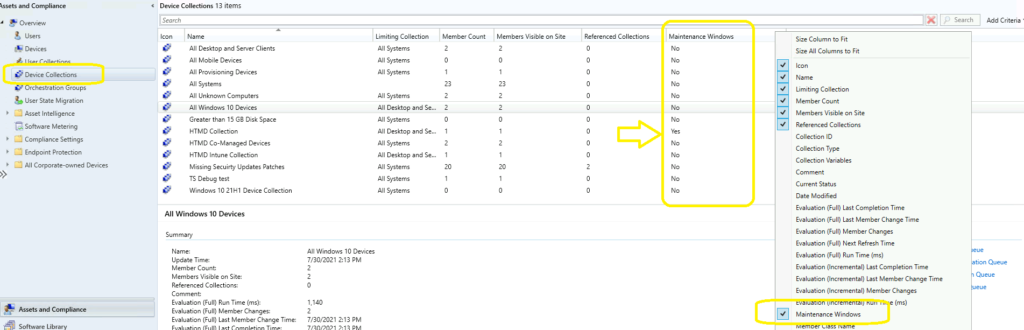
We all know the maintenance windows are an important feature of ConfigMgr. This helps to avoid unwanted or accidental application, OS deployment issues. When a collection is configured with a maintenance window, it’s more secured. With the 2107 version of ConfigMgr, Microsoft added a new feature:
- A Maintenance window column was added to the Collections tab in the Devices node.
- This is going to be very helpful for troubleshooting deployment issues.
#4 All Subfolders Search Option – Top 5 Features of SCCM 2107
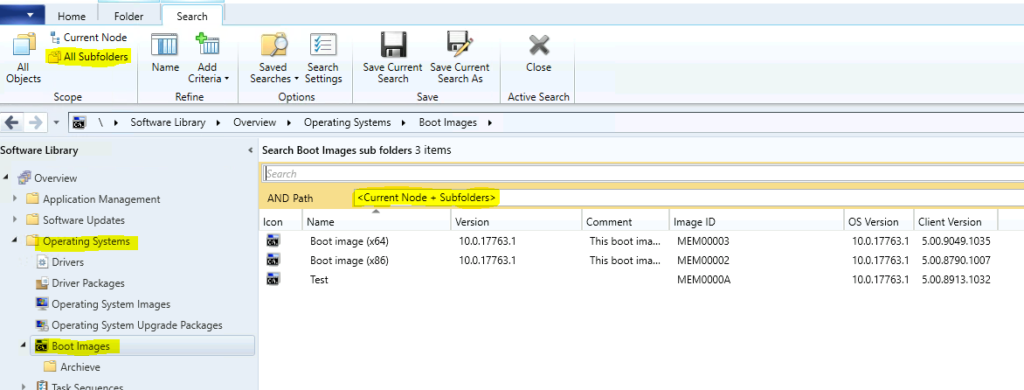
Search options are essential for all enterprise applications. I think the “global search” option is going to be an interesting addition to SCCM customers. The new search enhancements got introduced with the 2107 version of ConfigMgr. You can now select the All subfolders option from the ribbon menu. You can also use the All Subfolders search option (Current Node + Subfolders) from the following nodes:
- Boot Images
- Operating System Upgrade Packages
- Operating System Images
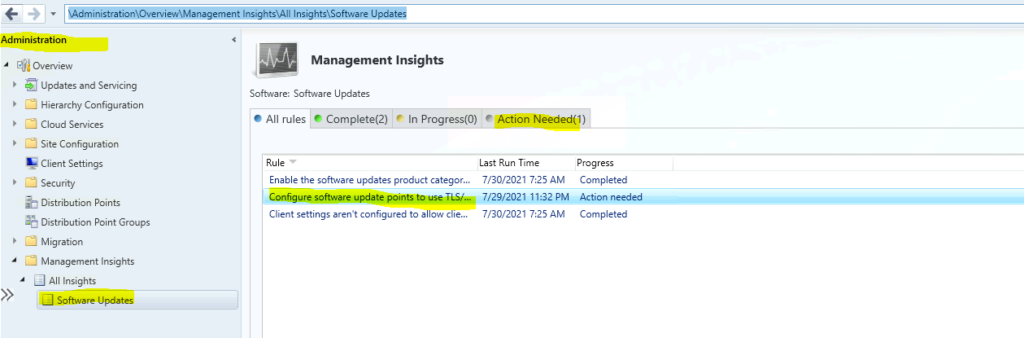
#5 Management Insight Rule – SUPs are configured to use TLS/SSL
This is the 5th feature of the top 5 features of SCCM 2107. You can now use the management insights rule to check whether the SUPs are configured to use TLS/SSL communication. Microsoft announced this requirement a few months back. To review the Configure software update points to use TLS/SSL rule:
- Navigate to \Administration\Overview\Management Insights\All Insights\Software Updates
Additional Feature
Starting in this release 2107, you can enable an application deployment to support implicit uninstall. If a device is in a collection, the application installs. Then when you remove the device from the collection, the application uninstalls.
Resources
- SCCM Management Insights – Healthy SCCM Infra
- SCCM Collection Best Practices while Creating a Dynamic Collection
- SCCM 2107 is Released – How to Upgrade to ConfigMgr 2107




Very Nice information.
Thank you-
Piyush