






SCCM Secondary Server Upgrade to 2107 Version
Let’s learn SCCM secondary server upgrade to 2107 version. Microsoft released the latest SCCM version, 2107. If you have many secondary servers in the SCCM environment, you need to plan the SCCM site server upgrade well in advance.
I don’t think you need to take any backup of the secondary server. Most of the time, it’s easy to complete the upgrade process. You don’t need to worry much about what will happen if the SCCM upgrade fails. The recovery of the secondary server is a straightforward process.
You can use the recovery options if you get into the issue while upgrading the configuration manager secondary site server. I don’t think you need to worry about any SCCM configuration. You can also check out my top 5 features of SCCM 2107.
Need to Upgrade SCCM Secondary?
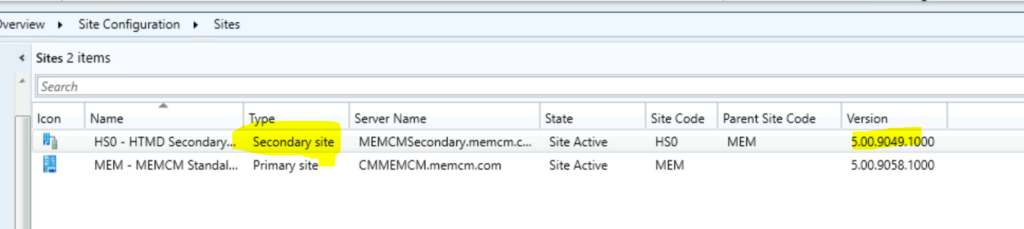
Let’s understand whether you need to upgrade the secondary server or not. I have already upgraded the primary server to 2107, and the version you can see in the below screenshot. However, the secondary server is still with the old version of ConfigMgr.

- Primary Server – 5.00.9058.1000
- Secondary Server – 5.00.9049.100
How to Upgrade SCCM Secondary Server to the 2107
It’s time to upgrade the secondary server to the latest version of ConfigMgr. You can start upgrading the secondary server once the parent primary server is upgraded to the latest version of ConfigMgr. Let’s start the upgrade of the SCCM Secondary Site Server Upgrade.
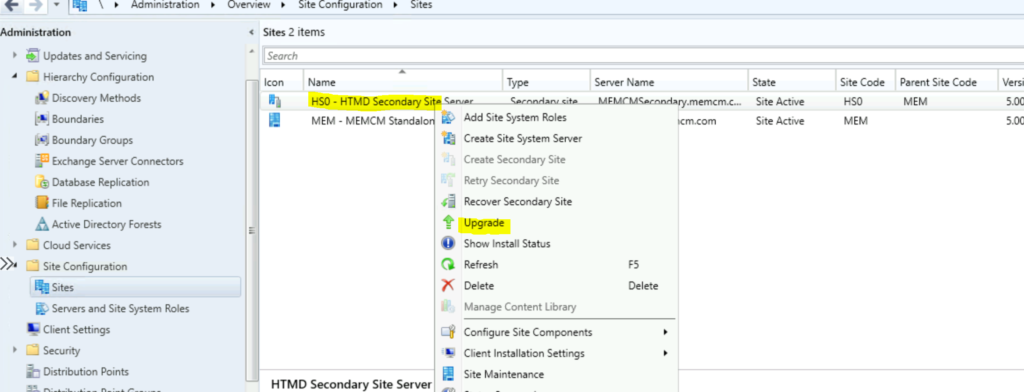
- Navigate to \Administration\Overview\Site Configuration\Sites.
- Select the Secondary server.
- You will need to Upgrade option to start the upgrade of the secondary server.
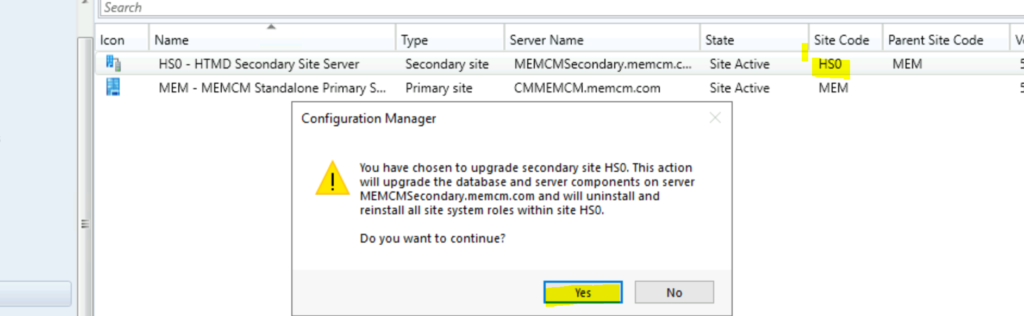
The following is the high-level process of SCCM secondary site upgrade. Don’t worry about all these steps; SCCM will automatically take all these steps in the background.
- Upgrade the database
- Upgrade server components on secondary server MEMCMSecondary.memcm.com
- Uninstall and reinstall all site system roles within site HS0.
You will need to click on the Yes button to start the upgrade process of your secondary server. After this action, you can take a tea or lunch break because SCCM will take the upgrade process.
How to Check Secondary Server Upgrade Status
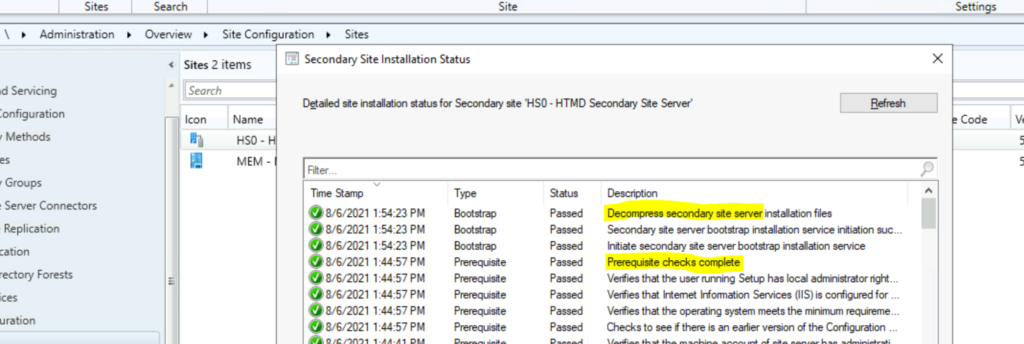
You can check the SCCM secondary site server upgrade status from the primary server console itself. You can see all the required details over there. You can see the secondary server prerequisite completed successfully.
- Navigate to \Administration\Overview\Site Configuration\Sites.
- Select the Secondary server.
- Click on Show Install Status from ribbon menu.
Secondary Server Upgrade Warning
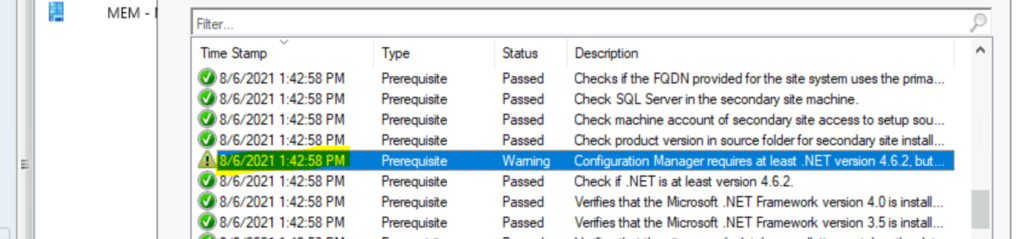
The following are some of the warnings I got during the SCCM secondary server upgrade prerequisites checks. I have a blog post talks about How to Fix SCCM 2107 Prerequisite Errors Warnings. You can ignore the warnings and proceed with the upgrade.
- [Warning]:Configuration Manager requires SQL Server to reserve a minimum of 8 gigabytes (GB) of memory for the central administration site and primary site and a minimum of 4 gigabytes (GB) for the secondary site. This memory is reserved by using the Minimum server memory setting under Server Memory Options and is configured by using SQL Server Management Studio.
- [Warning]:SQL Server is configured for unlimited memory usage. You should configure SQL Server memory to have a maximum limit.
- [Warning]:Configuration Manager detects the site database has a backlog of SQL change tracking data.
- [Warning]:The site server might be unable to publish to Active Directory. The computer account for the site server must have Full Control permissions to the System Management container in its Active Directory domain. You can ignore this warning if you have manually verified these permissions.
- [Warning]:Configuration Manager requires at least .NET version 4.6.2, but recommends the latest version 4.8. A later version of Configuration Manager will require .NET version 4.8. To minimize disruption, before you run Configuration Manager setup, update .NET and restart the system.
How to Troubleshooting SCCM Secondary server Upgrade
You can check the console status from the Show Install Status as the first phase of the troubleshooting. The second phase of the troubleshooting should be done via the log files on the secondary server.
- SMStsvc.log @ Secondary Server
- SMS_Bootstrap.log @ Secondary Server
- ConfigMgrSetup.Log @ Secondary Server
Results
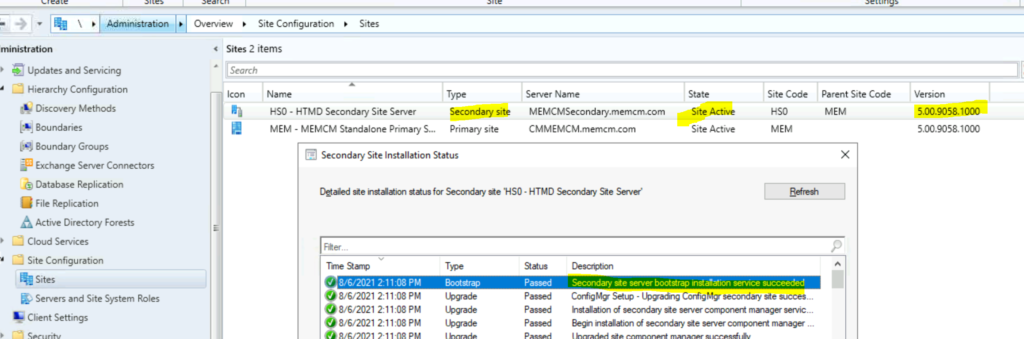
You can check whether the ConfigMgr secondary upgrade is successful or not from the console Show Install Status from the ribbon menu. You can confirm the secondary site version details from the primary server console itself.
- You can check the state of the secondary site server. The state changed from Upgrade to Site Active.
- And the Secondary Site Server version is 5.00.9058.1000.
- Successfully completed the upgrade of the Secondary server.
Resources
- SCCM 2107 is Released How to Upgrade to ConfigMgr 2107
- check out my top 5 features of SCCM 2107.
- Start the update installation at a secondary site




Discussion