






Easily Find SCCM Task Sequences Reference Application
Let’s check the easiest option to find Task Sequences that reference specific Applications in SCCM (a.k.a. ConfigMgr). Starting with the SCCM 1906 release, the Task Sequences tab is available in the applications node. This tab lists the task sequences that reference specific applications.
I have seen this useful for SCCM admins when they want to know which Task Sequences reference specific applications. It’s important to remove application references from other deployments, especially when you plan to retire an older version of an application before you delete it.
The Task Sequences tab lets you get the referenced application’s task sequence details. Later, you can update or remove an application from all the task sequences no longer used in production.
Before moving to the next steps, I recommend having the latest SCCM Production 2107 version to avail of all the exciting features. More you can check the top 5 features. Starting with the release Implicit Uninstall of an Application feature is introduced. This uninstall behavior applies only to deployments targeted to device collections.

Find SCCM Task Sequences Reference Application
Let’s go through the following steps to get the Task Sequences that reference a specific Application –
- Go to the Software Library workspace in the Configuration Manager console, expand Application Management, and select the Applications node.
- Select an existing application in the Applications node. Check the bottom of the console – there are different tabs available :
- Summary
- Deployment Types
- Deployment
- Phase Deployments
- Task Sequences
- Click on the Task Sequences tab to find the application’s task sequence details.
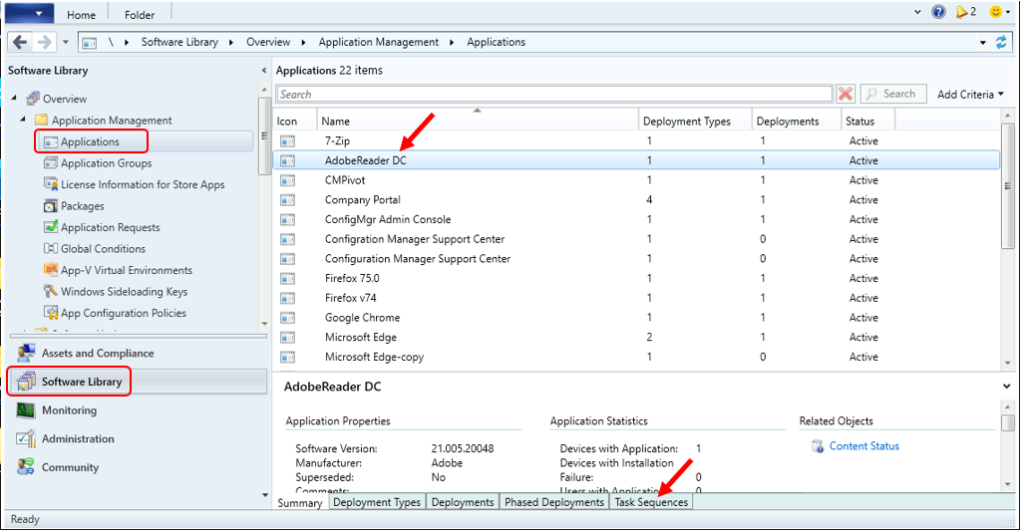
Now, it’s time to check lists of SCCM Task Sequences reference applications. An application can be part of many task sequences.
Under the Task Sequences tab, you can see that the selected application (for example, Adobe Reader) is included in all the task sequence lists that appear.
Note – This tab lists the task sequences that reference this application. By referring to Object Path for Task Sequence Name, You can easily find the existing task sequence in SCCM Console.
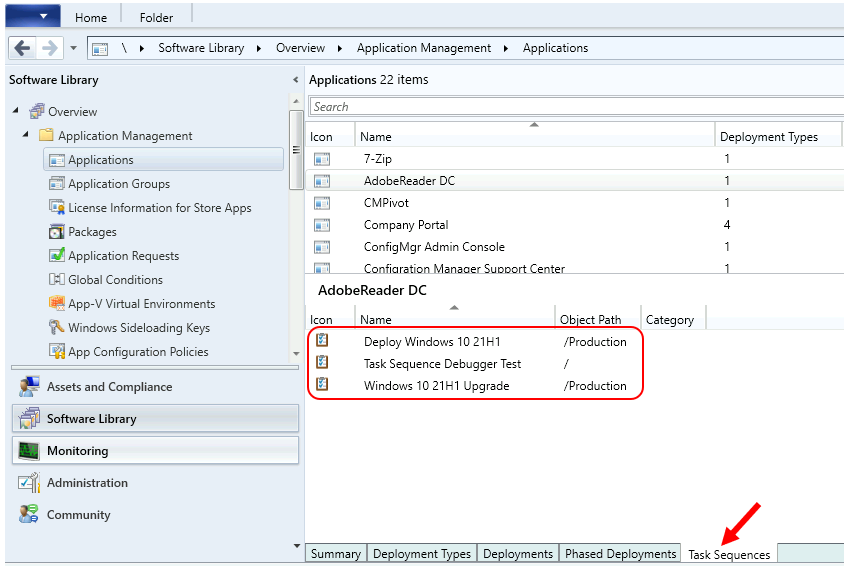
Tips: To remove an application from the task sequence, you need to move to the path of the available task sequence and perform the further process. However, you can use available community scripts to automate the removal process of an application from all of the task sequences that reference it
Join the LinkedIn Page and Telegram group to get the latest step-by-step guides and news updates. Join our Meetup Page to participate in User group meetings. Also, Join the WhatsApp Community to get the latest news on Microsoft Technologies. We are there on Reddit as well.
Jitesh Kumar, Microsoft MVP, has over six years of working experience in the IT Industry. He writes and shares his experiences related to Microsoft device management technologies and IT Infrastructure management. His primary focus is Windows 10/11 Deployment solution with Configuration Manager, Microsoft Deployment Toolkit (MDT), and Microsoft Intune.
Resources
- Available Options for SCCM Install Application Task Sequence Step
- Fix the SCCM Software Center cannot be loaded Issue with ConfigMgr
- HTMD Blog #2 Archieve Posts




Discussion