






Translate SCCM Error Codes to Error Messages
Let’s look at the options and easiest way to translate SCCM error codes to error messages (some meaning full). There are various ways to find the relevant way to get each error code’s details from SCCM logs.
I would love to have more human-understandable error messages than error codes. I think the method that I use is the easiest. Let me know your comments in the comments section below.
Do you have any better methods to find the meaning of SCCM error codes? The best option I have is to share two free tools for Microsoft SCCM customers.
You can check the latest SCCM error codes using the following path Drive Letter:\Program Files\Microsoft Configuration Manager\AdminConsole\bin\SrsResources.dll”.

I won’t cover that process because it’s very complex, and you don’t usually need that information.
Table of Contents
CMtrace Error Lookup Feature
The first and easiest way to translate SCCM error codes to error messages is using a free tool with SCCM called CMTrace. You can get the CMTrace from the following locations.
- Site Server -> cd.latest\SMSSETUP\Tools\CMTrace.exe
- Drive Letter:\Program Files\Microsoft Configuration Manager\tools\CMTrace.exe
- SCCM Client -> C:\Windows\CCM\CMTrace.exe
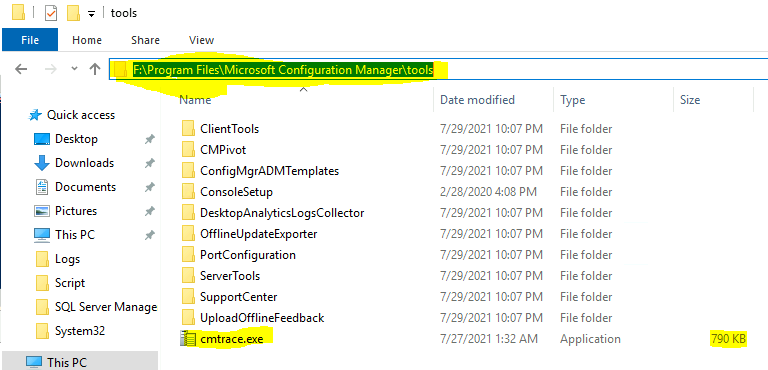
Now, let’s find the easiest way to translate the SCCM error codes into error messages using the CM Trace log reading tool. There is no need to install any apps to get CMTrace.EXE working. You need to double-click on the CMTrace.exe.
- Open the CMTrace.exe from any of the above-mentioned locations.
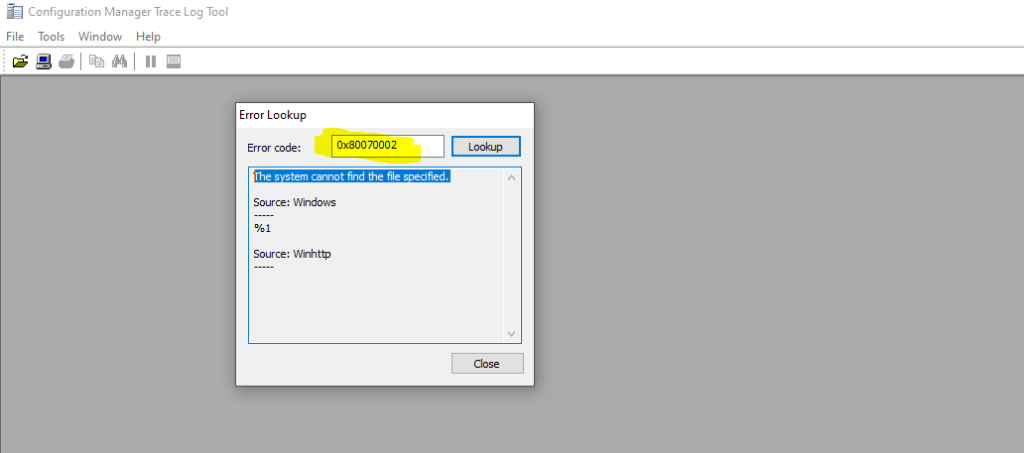
- Go to Tools tab -> Select Error Lookup option.
- The CMTrace Error Lookup popup window will open up.
- Copy the error code from the log file and paste it in the Error Code: search box.
- Click on the Lookup button to display the error message.
The example I have used is the SCCM error code 0x80070002. The CMTrace tool was able to translate the error message to the following:
The system cannot find the file specified.
Source: Windows
%1
Source: Winhttp
Configuration Manager Support Center Error Lookup
The Configuration Manager support center is another tool for client troubleshooting and can also be used as an advanced SCCM log viewer. Unlike CMtrace, you will need to install a support center tool to use it for the SCCM error code translation feature.
You can get the source file of the support center from <Install Directory>\Program Files\Microsoft Configuration Manager\tools\SupportCenter.
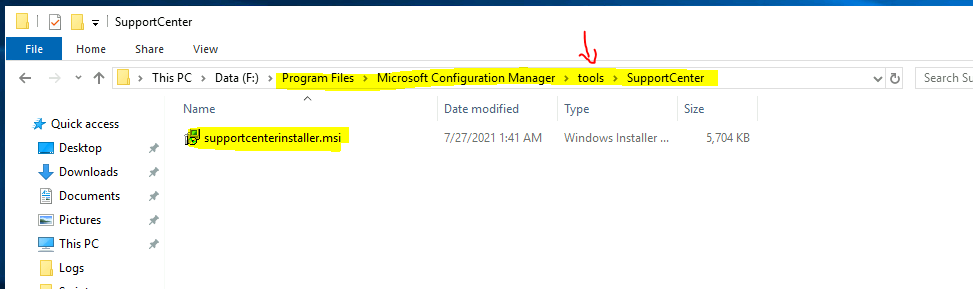
Let’s now check how to translate SCCM error codes using the Support Center tool. I feel the Support Center tool is a bit more helpful because it gives the error code’s HEXA and DECIMAL values, which is useful. How do I use the Support Center tool now?
- Once installed, you can C:\Program Files (x86)\Configuration Manager Support Center\ and select any of the following tools.
- Support Center Viewer (ConfigMgrSupportCenterViewer.exe)
- Support Center (ConfigMgrSupportCenter.exe)
- Support Center Log File Viewer (CMLogViewer.exe)
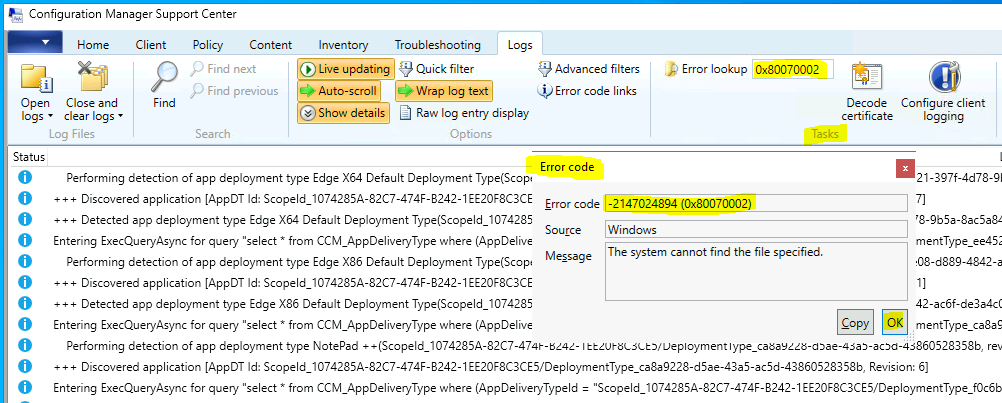
- Under the Tasks section of the Support Center tool, you can use the search box near Error Lookup to translate an error code into an error message.
The SCCM error code -2147024894 (0x80070002) means the system cannot find the file specified. You can also use the support center log viewer to get the same results.
One Trace Tool to perform SCCM Error Lookup
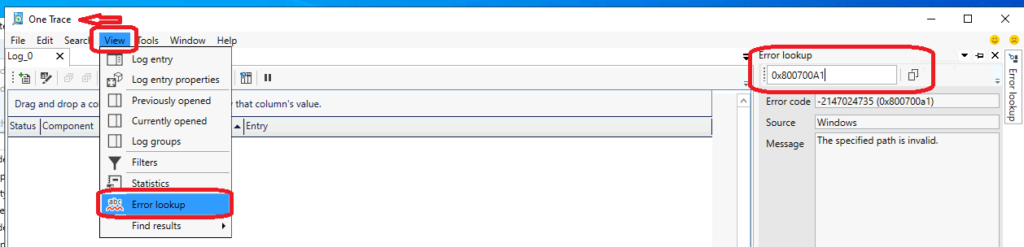
The One Trace Tool is also part of the Support Center tool mentioned above. You can use it to check the error code and convert it to an error message.
- You can launch the tool from the Start menu or use the search function to find the shortcuts for the Support Center.
- The shortcuts will be available only if the Support center is installed on the Windows server/PC.
- Select One Trace Tool from the search results.
- Click on the View option -> Select Error Lookup.
- Paste the SCCM error code in the search window. The translated error message will automatically appear.
Microsoft Error Lookup Tool to Translate SCCM Error Codes to Error Messages
Microsoft’s free tool, Microsoft Error Lookup Tool, translates error codes into human-readable messages. Unlike the support center and CMTrace tools, I don’t think a license is required to use this tool.
You can download the latest version of the Error Lookup Tool from Microsoft and use it from the command line. This is not a GUI tool, so you have to run it from the Command prompt.
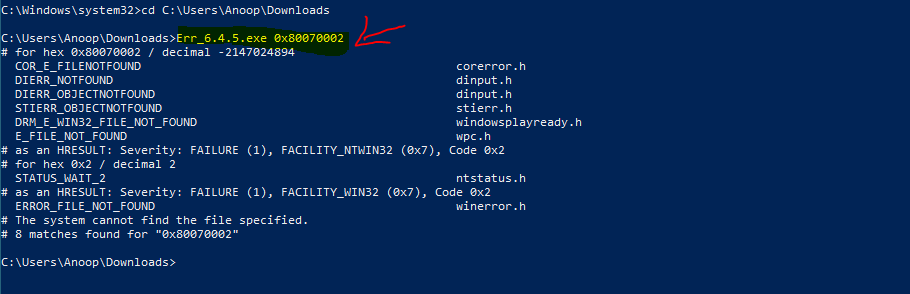
C:\Users\Anoop\Downloads>Err_6.4.5.exe 0x80070002
# for hex 0x80070002 / decimal -2147024894
  COR_E_FILENOTFOUND                                             corerror.h
  DIERR_NOTFOUND                                                 dinput.h
  DIERR_OBJECTNOTFOUND                                           dinput.h
  STIERR_OBJECTNOTFOUND                                          stierr.h
  DRM_E_WIN32_FILE_NOT_FOUND                                     windowsplayready.h
  E_FILE_NOT_FOUND                                               wpc.h
# as an HRESULT: Severity: FAILURE (1), FACILITY_NTWIN32 (0x7), Code 0x2
# for hex 0x2 / decimal 2
  STATUS_WAIT_2                                                  ntstatus.h
# as an HRESULT: Severity: FAILURE (1), FACILITY_WIN32 (0x7), Code 0x2
  ERROR_FILE_NOT_FOUND                                           winerror.h
# The system cannot find the file specified.
# 8 matches found for "0x80070002"
We are on WhatsApp. To get the latest step-by-step guides and news updates, Join our Channel. Click here –HTMD WhatsApp.
Author
Anoop C Nair has been Microsoft MVP for 10 consecutive years from 2015 onwards. He is a Workplace Solution Architect with more than 22+ years of experience in Workplace technologies. He is a Blogger, Speaker, and Local User Group Community leader. His primary focus is on Device Management technologies like SCCM and Intune. He writes about technologies like Intune, SCCM, Windows, Cloud PC, Windows, Entra, Microsoft Security, Career, etc.




Discussion