






FIX: SCCM Task Sequence Error Code 0x80091007
Let’s see how you can FIX SCCM Task Sequence Error code 0x80091007. This error code prompt when task sequence failed to execute steps during operating system deployment with Configuration Manager. The error 0x80091007 Translate SCCM Error Codes to Error Messages “The hash value is not correct.”
This usually happens when the associated Packages, Applications to the task sequence have not been properly distributed to the distribution point or groups. In this scenario, After applying the operating system image, deployment fails to install an associated package with the task sequence Error code 0x80091007.
However, you could easily see the steps from the task sequence prompt. It’s always recommended to examine the SMSTS log for task sequence failure issues to help you get the inside about the failure prompt to troubleshoot the task sequence error 0x80091007.
Issue Summary
This error appears at the initial stage when you have started the deployment. Task Sequence fails with the following error message –

Task Sequence: Deploy Windows 10 has failed with the error code (0x80091007). For more information, please contact your system administrator or help-desk operator.
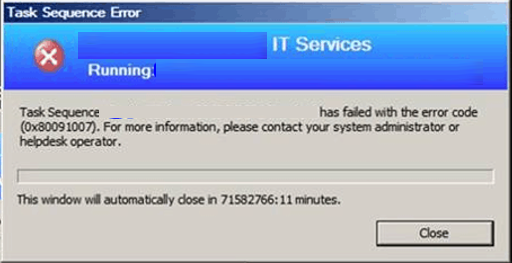
In this scenario, Task Sequence terminated after the installation of the operating system. You will collect the logs C:\Windows\CCM\Logs\Smstslog\smsts.log. To get the command prompt window, you have to press the F8 key. More you can explore SCCM OSD Task Sequence Troubleshooting Steps by Step Ultimate Guide SMSTS.log.
FIX – SCCM Task Sequence Error code 0x80091007
Let’s check the possible solutions to FIX SCCM Task Sequence Error code 0x80091007
- In the Configuration Manager console, navigate to the Software Library workspace, expand Application Management, and select the Applications node.
- Select an application or package from the appeared list, Right-click on the package and select Update Distribution Points.
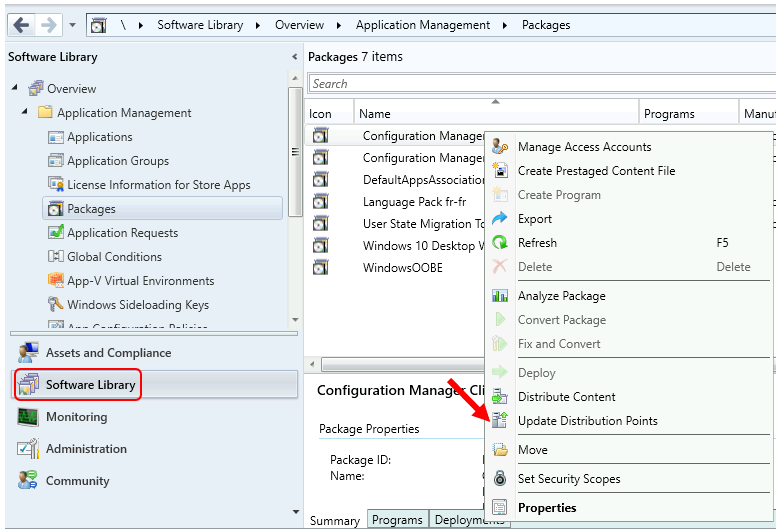
- Before proceding to redistribution for packages, check the option Enable binary differential replication Here’s how you can Enable binary differential replication for existing packages. Applications always use binary differential replication.
- If required, You can remove the package from distribution point and proceed to distribute the package. Ensure the package is sucessfully distributed to DPs. Let’s check how to Redistribute package or application content to Distribution Point.
Verify the content distribution – In the summary tab, under Content status. If the content distribution were successful, it would appear under the Success tab.
Once you are done with the above steps, restart the target machine and reinitiate the task sequence deployment, It should continue without any errors.
About Author -> Jitesh has over 5 years of working experience in the IT Industry. He writes and shares his experiences related to Microsoft device management technologies and IT Infrastructure management. His primary focus area is Windows 10 Deployment solution with Configuration Manager, Microsoft Deployment Toolkit (MDT), and Microsoft Intune.
Resources
- SCCM OSD SMSTS Log File Reading Tips | ConfigMgr | MEMCM
- SCCM Logs Files | 5 Log File Reading Tips | ConfigMgr
- HTMD Blog #2 SCCM Archieve




Discussion