






SCCM WSUS Office Updates Sync Failed with Error 400
Let’s understand more about the SCCM WSUS office updates sync failed issue with Error 400 for office updates. You can get more details about the content download Issues with Office updates. Some Windows update logs still use the old name office apps instead of Microsoft 365 apps.
I noticed many software update sync errors when I initiated sync to test the September CU for Windows 10. The sync worked ok for the cumulative update for September. I was able to download and deploy Windows 10 KB5005565 September Cumulative Updates.
The office update issue that I will cover is Microsoft 365 Apps Update – Semi-Annual Enterprise Channel (Preview). There are different options to change the update channels of Microsoft 365 apps. Learn how to Change Office 365 Update Channel Using SCCM Run Script.
Update: 12th July 2022 – I see a similar issue during July 2022 Patch Tuesday release.

Office Sync Failed because of Content Download Issue
The WSUS sync failure could happen because of several reasons. One of the main reasons I have seen is proxy and firewall connectivity issues in a corporate environment. There is documentation about several Sync issues with SCCM and WSUS below.
- Sync issues with the WSUS 3.0 SP2 version of Windows Server Update Services
- Fixed – SCCM WSUS Sync Failed with UssInternalError SoapException Error 0x80131500
- Fix SCCM WSUS with HTTP Proxy Communication Issues
- FIX SCCM Management Point MP Rotation Issue Partial WSUS Sync Issue
However, this issue was related to only with Office or Microsoft 365 apps update. The other updates were getting synced properly, as I mentioned in the above paragraph. The following are the few points to note here as part of the Office sync issue.
ProcessFileManifest() failed to process O365 file manifest. Caught exception: System.IO.FileNotFoundException: Failed to download file manifest for O365 from http://officecdn.microsoft.com/pr/b8f9b850-328d-4355-9145-c59439a0c4cf/office/data/16.0.14326.20404/s322057.cab, with error 400~~ at Microsoft.SystemsManagementServer.SoftwareUpdatesManagement.WsusSyncAction.WSyncAction.DownloadAndExtractCabFile(String cabFileUrl, String fileNameInCab)~~ at Microsoft.SystemsManagementServer.SoftwareUpdatesManagement.WsusSyncAction.WSyncAction.GetOfficeFileHash_O365Service(O365FileList o365FileList, String fileContainingHash, String updateId)~~ at Microsoft.SystemsManagementServer.SoftwareUpdatesManagement.WsusSyncAction.WSyncAction.ProcessOfficeFile_O365Service(O365FileList o365FileList, Int32 iFile, XmlWriter xml, String updateId)~~ at Microsoft.SystemsManagementServer.SoftwareUpdatesManagement.WsusSyncAction.WSyncAction.ProcessFileManifest_O365Service(String sO365ServiceUrl, XmlWriter xml, String updateId)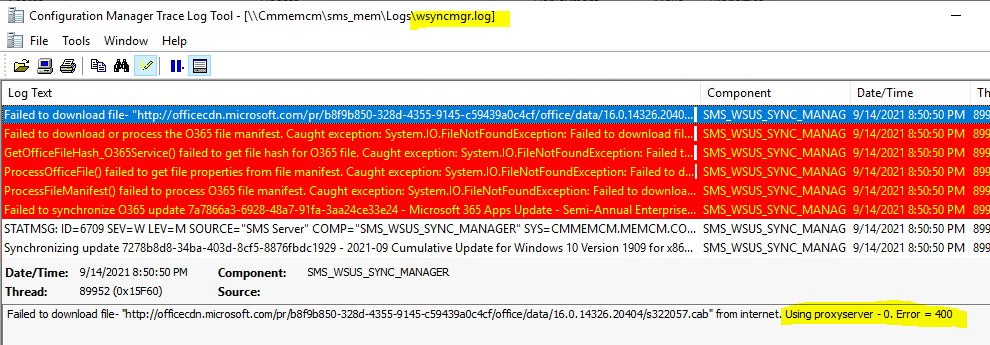
- In the wsyncmgr.log there were no proxy errors and using proxy server – 0 indicates that there is no proxy in between WSUS and Microsoft update service.
- Error 400 translates to an issue related to Microsoft Updates server. It seems the server was unable to process the request sent to the website server.
- Failed to download file manifest for O365 from http://officecdn.microsoft.com/pr/b8f9b850-328d-4355-9145-c59439a0c4cf/office/data/16.0.14326.20404/s322057.cab
- Office Updates Sync Failed with the following note is a bit scary for me – The sync will not retry further.
Failed to synchronize O365 update 7a7866a3-6928-48a7-91fa-3aa24ce33e24 - Microsoft 365 Apps Update - Semi-Annual Enterprise Channel (Preview) Feature Update for x86 based Edition Version 2108 (Build 14326.20404)
Office sync failures because of content download summary:
Update 7a7866a3-6928-48a7-91fa-3aa24ce33e24 not synced due to content download issue
Sync failed: Some Office updates not synced due to content download issue. Reason: The download of the specified resource has failed.. Source: Microsoft.SystemsManagementServer.SoftwareUpdatesManagement.WsusSyncAction.WSyncAction.SyncUpdates
Sync failed because top site Office content processing failure. Sync will *not* retry further.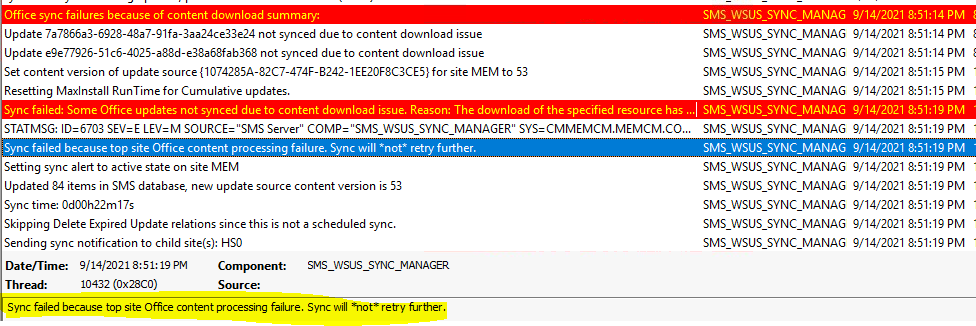
Office Updates Sync Failed with Error 400
It’s time to look at the issue in more detail to understand whether this is a real, impactful issue or just a timely issue. I have not seen this issue Office Updates Sync Failed with Error 400 before. As noted above, the main reason for the issue seems to be with the Microsoft webserver.
The following error indicates that the cab file for the Microsoft 365 apps was not available. Failed to download file manifest for O365, and the error was specifically related to Microsoft 365 Apps Update – Semi-Annual Enterprise Channel (Preview) Feature Update for x86 based Edition Version 2108 (Build 14326.20404).
- I tried to download the file from the browser and it worked fine http://officecdn.microsoft.com/pr/b8f9b850-328d-4355-9145-c59439a0c4cf/office/data/16.0.14326.20404/s322057.cab
- Initiated a manual WSUS sync from Software Updates -> All Software updates node.
- After the sync, I couldn’t find any errors in Wsyncmgr.log.
The Microsoft 365 apps update appeared in the SCCM console as well. You can confirm the following path \Software Library\Overview\Office 365 Client Management\Office 365 Updates. I could see the Office Updates sync failed issue is resolved, and the previously failed updates are already available in the console after the second WSUS sync.
NOTE! – It seems that there was a small glitch from the Microsoft update service, which got resolved automatically. Also, this could be a possibility that I initiated the sync very quickly before Microsoft 365 apps updates were made available (very unlikely).

Author
Anoop is Microsoft MVP! He is a Solution Architect in enterprise client management with over 17 years of experience (calculation done in 2018). He is Blogger, Speaker, and Local User Group HTMD Community leader. His main focus is on Device Management technologies like SCCM 2012, Current Branch, and Intune. He writes about ConfigMgr, Windows 11, Windows 10, Azure AD, Microsoft Intune, Windows 365, AVD, etc…..…




I got exactly your symptom. I have synced at 1hr am (GMT -4)
I am still getting same sync error only for Microsoft 365 Apps.
StaffAre you able to download the cab file mentioned in the post?
Still unable to find the 2108 updates under the 365 client management. Attempted the manual sync multiple times. Any ideas? I’m able to download the file from the browser, but that doesn’t help with large deployments
StaffThe same question … are you able to see the errors in Wsyncmgr log? If so, tried to download the cab file mentioned in the post?
I am having similar issue, Patch is listed in WSUS console but unable to find it in SCCM.
I can download the same file from browser
have the exact same error
Resync and restart of server done
unchecked classfication and recheck and resync .. did not help
SCCM 2203 and
I had the same issue when I tried to download the file “http://officecdn.microsoft.com/pr/64256afe-f5d9-4f86-8936-8840a6a4f5be/office/data/16.0.15928.20098/s640.cab” get “GatewayExceptionResponse”
I don’t know what that means, and It’s the first time I get this error 😐
I still have the issue with two files (did sync several times since 12/13/2022 9:47 AM UTC):
http://officecdn.microsoft.com/pr/64256afe-f5d9-4f86-8936-8840a6a4f5be/office/data/16.0.15928.20098/s640.cab
and
http://officecdn.microsoft.com/pr/64256afe-f5d9-4f86-8936-8840a6a4f5be/office/data/16.0.15928.20098/s320.cab
By attempting to download both CAB files manually I’m getting the response “GatewayExceptionResponse”
I get the same error do you too. Exact same update too
Hi Anoop,
I am trying to install WSUS for SCCM. I have installed WSUS, when I start the synchronise now, it is stuck at 0%. Havent configured any downstream server.