






SCCM Custom Report to Check the Status of Predefined Site Maintenance Tasks
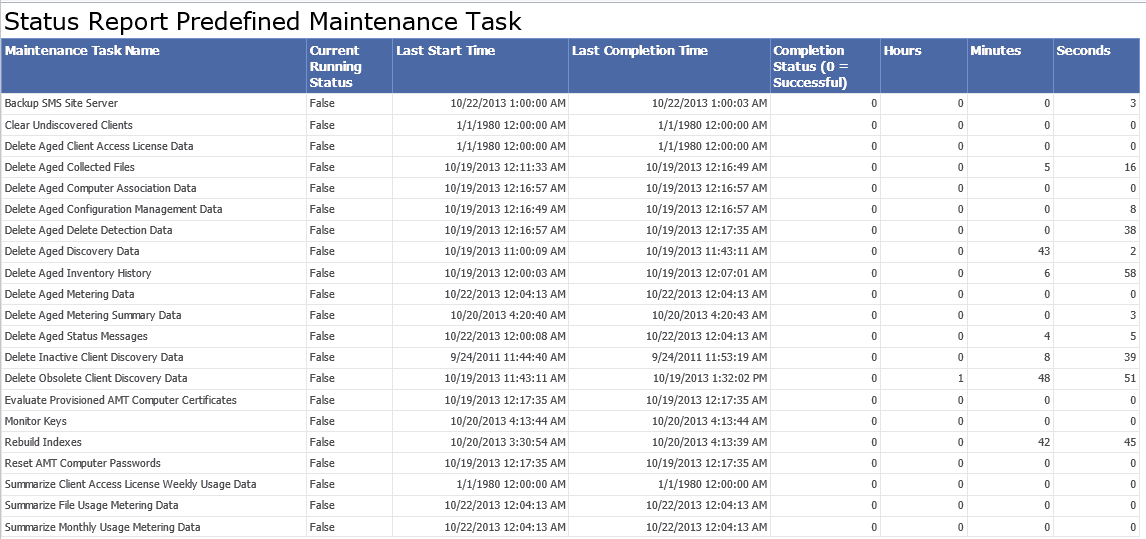
SCCM Custom Report to Check the Status of Predefined Site Maintenance Tasks. This is a long-pending post. I’ve created a custom report to check the status of the SCCM 2007, ConfigMgr 2012, and CB predefined maintenance tasks. I’ve uploaded the RDL file to GitHub and imported it to your SSRS.
Download the RDL file from GitHub. Run the report and monitor the status of your maintenance tasks on SCCM 2012 and 2007 site servers (weekly or daily).
Latest Post – Check SCCM Predefined Maintenance Tasks Status (anoopcnair.com) & SCCM Secondary Site Maintenance Tasks | List | ConfigMgr | SQL Query HTMD Blog
Completion Status ZERO (0) means the task has finished successfully. This data is held in a table called SQLTaskStatus. We can also add a column to find a task’s time to run.

- Setup Configure SCCM Reporting Services Point
- Excellent Resource to Learn and Become an Expert in SCCM Reporting
- FIX Firefox Installation Failed SCCM Reporting Issue
- Setup Configure SCCM Reporting Services Point
- Fix SCCM Report Server Cannot Open A Connection Error
- SCCM Troubleshooting Tips On Reporting Server SSRS Issues
Table of Contents
SCCM Custom Report to Check the Status of Predefined Site Maintenance Tasks?
Checking the status of maintenance tasks is always important and should be part of Weekly health checks. This post continues my old post on how to find out the status of Predefined Maintenance Tasks.
I couldn’t find the view related to the SQLTaskStatus table, so I created the custom report with the above table rather than the view.
Two potential issues:-
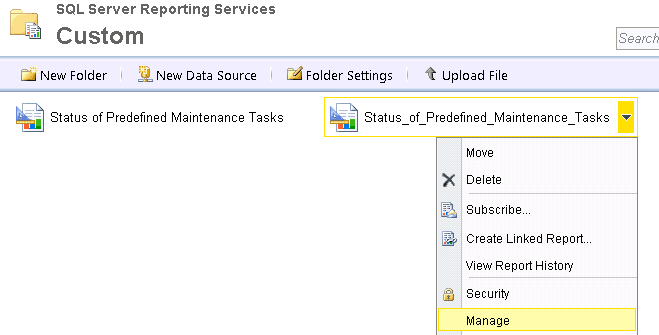
1. Go to the Manage option of the report (from the SSRS web report). Click on Manage –> Data Sources –> Click on A Shared Data Source and browse to connect to /ConfigMgr_SiteCode/{5C6358F2-4BB6-4a1b-A16E-8D96795D8602} and APPLY. Run the report. It should work.
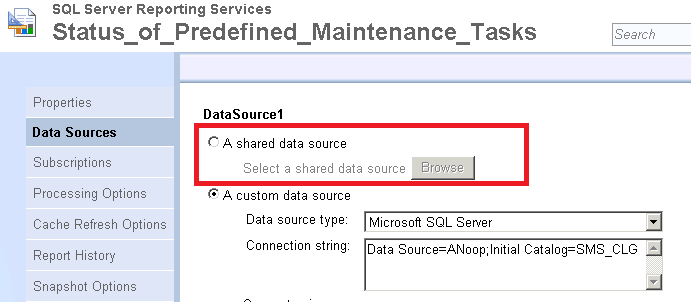
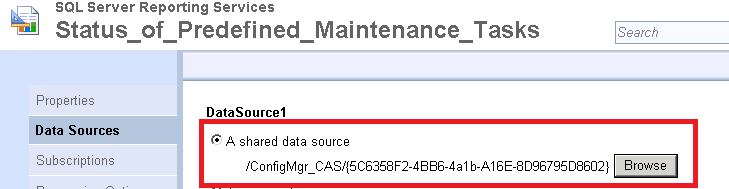
2. Another problem could be with permission. You probably don’t have access to tables. Can you try running the following query from SQL Management Studio?
Select * from SQLTaskStatus.
We are on WhatsApp now. To get the latest step-by-step guides, news, and updates, Join our Channel. Click here. HTMD WhatsApp.
Author
Anoop C Nair is Microsoft MVP from 2015 onwards for consecutive 10 years! He is a Workplace Solution Architect with more than 22+ years of experience in Workplace technologies. He is a Blogger, Speaker, and Local User Group Community leader. His main focus is on Device Management technologies like SCCM and Intune. He writes about technologies like Intune, SCCM, Windows, Cloud PC, Windows, Entra, Microsoft Security, Career, etc…




I tried to import this rdl file in to our SSRS but getting below error:
“The report definition is not valid. Details: The report definition has an invalid target namespace ‘http://schemas.microsoft.com/sqlserver/reporting/2010/01/reportdefinition’ which cannot be upgraded. (rsInvalidReportDefinition) Get Online Help”
StaffOops that’s is strange. I’ll check again 🙁
I’m getting the following error:
The SELECT permission was denied on the object ‘SQLTaskStatus’, database ‘CM_DI1’, schema ‘dbo’.
—————————-
Query execution failed for dataset ‘DataSet1’. (rsErrorExecutingCommand)
—————————-
An error has occurred during report processing. (rsProcessingAborted)
StaffOne problem could be :-
Go to Manage option of the report. Click on Manage –> Data Sources –> Click on A Shared Data Source and browse to connect to /ConfigMgr_SiteCode/{5C6358F2-4BB6-4a1b-A16E-8D96795D8602} and APPLY. Run the report. It may work.
Another problem could be with permission. Probably, you don’t have access on tables. Can you try running the following query from SQL management studio.
select * from SQLTaskStatus
After uploading the report the first thing I did was configure that data source, so i’m guessing its a permission issue too. Our DBA locks us down pretty good 😉 Bummer. Looks like you built a handy report. Thanks for sharing.
StaffAll the best to you. As I know how it would be (dealing with SQL team) 🙂
Hey Anoop, great report! Are we supposed to be able to see the status of ‘all’ site maintenance tasks?
StaffYes, all SCCM predefined site maintenance tasks.
Ah, I was only seeing 13 tasks in the report. We have a CAS and primary site. It was only pulling the 13 tasks in the CAS site. Any tips on getting it to pull from the primary site as well?
StaffTry to check out http://www.anoopcnair.com/2013/10/22/predefined-maintenance-task-sccm-configmgr-2012-r2/
Hi Anoop,
Can you help me !!!
How to get, Patch installation compliance report including date and time through SCCM custom reporting.
This works great once the data source was changed, many thanks Anoop,
Thank you for this very informative report!
Thanks Anoop,
How to identify machines which got deleted by Maintenance Tasks ? Please help.
Hi Anoop,
How to identify machines which are deleted by Maintenance Tasks ?
Hello Anoop. This is a very helpful post. I was wondering if you knew what the other “CompletionStatus” codes are? I know 0 means it completed, but what does 1 mean?
StaffHello Seth – Even I’m not sure about this now. This is very old report published many years before. I think 1 means failed or running. Can you please test it and confirm back?
Hello Anoop C Nair,
I don’t find the RDL file in your path.
Is it always available?
Thanks you
StaffI don’t think you need RDL anymore because this is available in the console itself. But you can download the RDL from https://github.com/AnoopCNair/SCCM-Maintenance-Task-Download-RDL-file-for-SSRS-report/blob/main/Status%20of%20Predefined%20Maintenance%20Tasks.rdl
Hello Annop,
Thank you for your reply.
I know it is available in the console but I want just to schedule this report.
Have a nice day