






SCCM Client Settings Custom Report with Priority Details using SQL query
This post helps to create an SCCM client settings custom report with the priority settings of each policy. This will help you document the details and also help to find out who modified the setting and who created the client settings, etc.
The Client Settings in SCCM help the admin to configure the different settings of SCCM client components. This includes the settings like Hardware Inventory, policy polling interval, etc. There are different types of SCCM client settings. The default client settings are applied to all the clients of an environment. There are two types of custom client settings policies that are also available.
- Custom Client Device Settings
- Custom Client User Settings
From the custom report, you would get the details of both these custom client settings. The SCCM custom reports are exportable, unlike the SCCM console. I found the export option is useful to keep things handy. You can also get the details like who changed the ConfigMgr client settings options from the audit logs.
- Find List Of SCCM Client Settings Assigned For a Device
- The Best Method to Find Custom Client Settings For a Collection
- ConfigMgr Client Action Application Deployment Evaluation Cycle
- SCCM default reports
SCCM Client Settings Details using Console
You can view and change SCCM client settings. I don’t recommend changing the default client setting policy because that will impact all the clients from your environment. Let’s go through the following steps to understand how you can view all the details of Client settings from the Console itself.

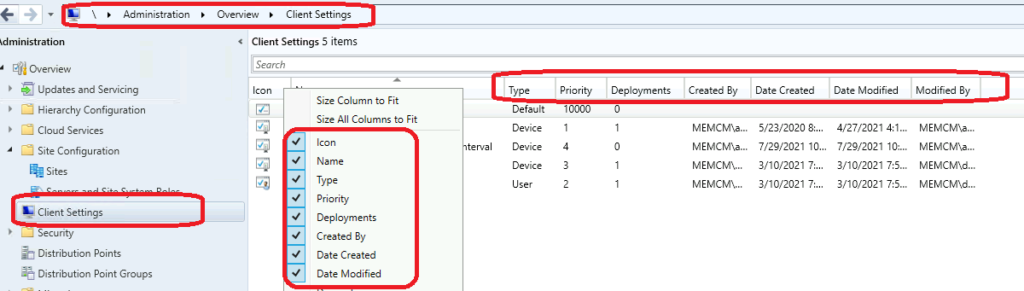
You can navigate to Administration workspace -> Client Settings node and try to add additional columns to view all those details available. All these details, along with priority settings of each client settings using the custom report (SQL query) shared below.
SCCM Client Settings Custom Report using SQL Query
There are different ways to find out relevant views for each function or data. One of the easiest methods I found is using SMSProv.log, as explained in the following post. More details -> Convert WQL Queries to SQL Queries using SCCM Trick.
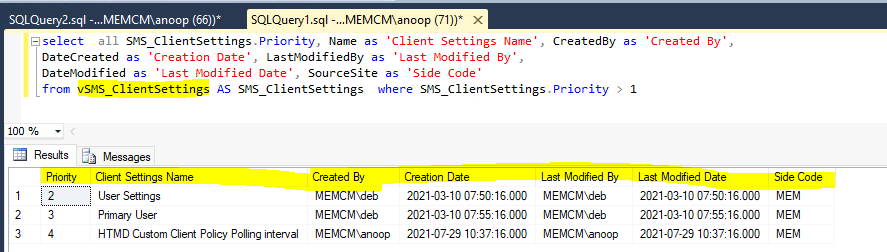
It’s now time to look into the SQL query to get all these SCCM client settings details as promised above. You will need to launch the SQL management studio to check and confirm the following query. Once you are confident that this report works fine, you can probably go into report builder and try to create a custom report for SCCM client Settings.
Let’s follow the steps mentioned below to create a custom report using SQL queries.
- Open the SQL Management Studio.
- Connect your Database Engine.
- Right Click on your database CM_XXX and click on ‘New Query’
- Copy the following SQL query to find the report of SCCM Client Settings details.
- Click on the Execute button.
select  all SMS_ClientSettings.Priority, Name as 'Client Settings Name', CreatedBy as 'Created By',
DateCreated as 'Creation Date', LastModifiedBy as 'Last Modified By',
DateModified as 'Last Modified Date', SourceSite as 'Side Code'
from vSMS_ClientSettings AS SMS_ClientSettings  where SMS_ClientSettings.Priority > 1
NOTE! – You can modify the SQL query to find out SCCM client settings configurations as per your requirements. Currently, I have filtered it based on Client Settings priority.
You want to know more about the custom reports, then the following video by Kannan and Karthick is here for your help.




Discussion