






SCCM ConfigMgr 2012 R2 Known Issues ConfigMgr
Let’s discuss the SCCM ConfigMgr 2012 R2 Known Issues ConfigMgr. Are you planning to upgrade the SCCM 2012 R2 soon? If so, please take a minute to review the following list of issues already identified or known with CM 12 R2.
I’ve already noticed 10 issues with SCCM 2012 R2. I’ll keep this list updated whenever I hear about new issues. Also, the SCCM 2012 R2 upgrade checklist is available for the SCCM 2012 SP1 to R2 Upgrade Checklist.
SCCM 2012 R2 Cu2 has already been released. If you haven’t installed it yet, you don’t need to install SCCM 2012 R2 CU1.
For more details, download and Install SCCM 2012 R2 CU2 Cumulative Update 2 on CAS and Primary servers. See more at https://www.anoopcnair.com/2014/07/09/download-install-sccm-2012-r2-cu2-cumilative-update-2-cas-primary-servers/.

- Download and Install SCCM 2012 R2 CU2 Cumulative Update 2 on CAS Primary Servers
- Server 2012 R2 will block SCCM 2403 Upgrade
- SCCM ConfigMgr 2012 R2 Known Issues ConfigMgr
- XAP Applications are Not Getting Published in Windows Phone 8.1 via Intune Integrated SCCM 2012 R2
Table of Contents
SCCM ConfigMgr 2012 R2 Known Issues
Also, check out the comments section to learn more about known issues. SCCM ConfigMgr 2012 R2 CU1 has been released. Download and keep it ready to apply CU1 to post-R2 installation.
Download SCCM Configmgr 2012 R2 Cumulative Update CU1 – See more at: https://www.anoopcnair.com/2014/03/28/download-sccm-configmgr-2012-r2-cumulative-update-cu1/
Also, a List of post-SCCM ConfigMgr 2012 R2 Hotfixes will be helpful for SCCM admins!! SCCM ConfigMgr 2012 R2 Known Issues. A List of post-SCCM ConfigMgr 2012 R2 Hotfixes is available here to resolve some of these known issues.
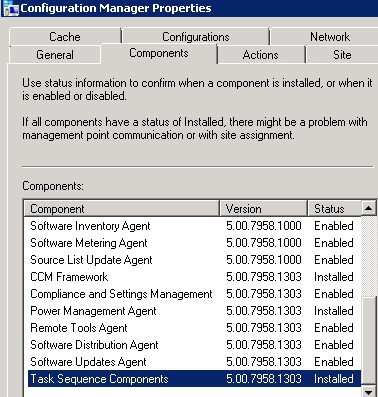
0. SMSExec crashes after modifying the Maximum Number of Retries setting in SCCM ConfigMgr 2012 R2.
Package replication will fail when we change the maximum number of retries to less than the default value (100 retries). SMSExec will also crash. We are waiting for a hotfix soon.
End-user systems were rebooted after the ConfigMgr 2012 R2 client upgrade. Microsoft Visual C++ 2010 Redist (version 10.0.40219.1) is now a prerequisite for the ConfigMgr 2012 R2 client – See more.
2. SCCM ConfigMgr 2012 R2 Issue OSD Content Copying During WinPE is Very Slow
A hotfix is available to resolve this issue. –> http://support.microsoft.com/kb/2905002. It seems the SCCM or ConfigMgr 2012 R2 upgrade is causing some slowness in the OSD process. This is related to BITS downloads (Windows Image, boot image, and other contents) during WinPE. – See more
3. Another post discusses MDT 2013, a known issue that Microsoft has already documented. More details are here.
4. The SCCM 2012 R2 upgrade will fail if you have to Pull DPs in your environment.
SCCM 2012 R2 CAS and ConfigMgr 2012 primary servers went into Maintenance mode after the R2 upgrade. This is applicable if you’re using PULL DP in your environment. More details here.
5. SSRS reporting stopped working after the SCCM 2012 R2 upgrade.
The log file contains the following error: The DefaultValue expression for the report parameter ‘UserTokenSIDs’ contains an error: Logon failure: unknown user name or bad password (rsRuntimeErrorInExpression).
The workaround to this issue is in the link below.
Update: The above workaround is not working for some users, and the registry values are automatically changing repeatedly. My latest post here provides some more analysis and solutions. SCCM 2012 R2 Upgrade Breaks SSRS with UserTokenSIDs contains an error.
6. There is another bug with Device Variables during OSD
“Device Variables of newly added devices aren’t available during OSD and OSI Task Sequences.” This issue only applies when you add collection variables to a device or computer object rather than define collection variables to a collection.
Fix available for the issue kb/2907591
7. Asset Intelligence Sync Stops working after SCCM ConfigMgr 2012 R2 Upgrade
SCCM ConfigMgr 2012 R2 Asset Intelligence (AI) synchronization works for a few days and then stops. More details here.
8. Replication errors in System Center 2012 R2 Configuration Manager
Several customers reported that child primary sites entered maintenance mode after upgrading the central administration site from SCCM 2012 (SP1) with CU2 or CU3 to CM 12 R2. Entries similar to those were recorded in the RcmCtrl.log file at child primary sites: More Details here. SCCM ConfigMgr 2012 R2 Known Issues.
9. Network access account (NAA) credentials are lost during the update. This may cause you a TS failure error with error 80070002. Removing the network access account (NAA) and re-entering the NAA again may solve the issue. SCCM ConfigMgr 2012 R2 Known Issues.
10. ConfigMgr SCCM 2012 R2 Task sequence setup for “Download all content locally before starting task sequence.”
ContentProgressEx invalid request GUID handle). Changing the TS setting to download locally as needed “fixes” the problem. This is registered as a bug (Bug ID: 201683) with no hotfix available. This is the latest update available.
Resources
Free SCCM Training Part 1 | 17 Hours Of Latest Technical Content | ConfigMgr Lab HTMD Blog
How To Automatically Cleanup Intune Device | EndPoint Manager – HTMD Blog #2
We are on WhatsApp now. To get the latest step-by-step guides, news, and updates, Join our Channel. Click here. HTMD WhatsApp.
Author
Anoop C Nair is Microsoft MVP from 2015 onwards for consecutive 10 years! He is a Workplace Solution Architect with more than 22+ years of experience in Workplace technologies. He is a Blogger, Speaker, and Local User Group Community leader. His main focus is on Device Management technologies like SCCM and Intune. He writes about technologies like Intune, SCCM, Windows, Cloud PC, Windows, Entra, Microsoft Security, Career etc…




Anoop, great posts. Another upgrade issue is PXE stops working. WDS service unable to start after upgrade to R2.
It stops working if WDS placed on Site Server
2012 R2 have another one issue – if application have more than one deployment type then Uninstall button will be unavailable in Software Center.
I have the same problem. Application with more than one deployment type can’t uninstall in software center Is there a fix ore workaround? – See more at: https://www.anoopcnair.com/2013/10/29/sccm-configmgr-2012-r2-known-issues/#comment-2226
StaffSorry, I’m not aware of any workarounds 🙁
http://support.microsoft.com/kb/2905002
StaffDownload slowness issue fix is available.please check the link above.
I have the same problem. Application with more than one deployment type can’t uninstall in software center Is there a fix ore workaround?
Anoop – any update on a fix for known issue #5?
StaffIt seems not till now 🙁
I had a fresh install and I’m getting this issue with the SSRS
The DefaultValue expression for the report parameter ‘UserTokenSIDs’ contains an error: The user name or password is incorrect.
(rsRuntimeErrorInExpression)
I’m using the same Service account and it doenst let me to pull out reports.
Please let me know if you found any fix for this issue!
Thanks
There is another bug with Device Variables during OSD:
“Device Variables of new added devices aren’t available during OSD and OSI Task Sequences.”
http://social.technet.microsoft.com/Forums/en-US/455c8ddb-97c9-4874-8168-aca30f8ab306/task-sequence-variables-are-not-applied-in-sccm-2012-r2-osd?forum=configmanagerosd
This issue is fixed : http://support.microsoft.com/kb/2907591/en-us
StaffI heard about this issue. But never able re produce in my environment. Couple of steps you can try. Remove the SSRS role and install it again. Also, is there any specific error in SQL.
Anoop – I was able to resolve my issues with reporting in SCCM 2012 R2. My error was slightly different from the one you referenced. Mine said “The DefaultValue expression for the report parameter ‘UserTokenSIDs’ contains an error: A specified logon session does not exist. It may already have been terminated.” when I tried to run any report. After trying many fixes to no avail, I went into Reporting Services Configuration Manager and changed the service account from Local System to a user account. I also had to save a certificate file. That fixed my problem.
Vishwan
Check this post on http://www.netdavidic.com/2013/11/how-to-fix-sccm-2012-r2-reporting.html it has the Fix for this issue
The DefaultValue expression for the report parameter ‘UserTokenSIDs’ contains an error: Logon failure: unknown user name or bad password. (rsRuntimeErrorInExpression). – See more at: http://www.netdavidic.com/2013/11/how-to-fix-sccm-2012-r2-reporting.html
I have the same issue : unable to uninstall when more than 1 Deployment type.
I summited the bug to Microsoft.
I’ve made a blog entry about it and i’ll update it when I’ll have news : http://sccmmofos.idepix.ca/?p=38
Another bug. I cant open the bootimages in osd anymore. Cant add the new bootimage.
when i select the image on the wizard it says it cant find any wimfile in the pat. Sourcepath is on a shared storage. When i try with powershell it works gine. But not with the console
Ďakujem :-))
Issue #5 with the SSRS. Changing the registry value disabled RBAC on reporting but SCCM keeps reverting it back when it runs a health check. Is there a work around for this?
StaffTry to remove the access rights to that registry key !!
FOUND A NEW ISSUE MAYBE??? After our R2 upgrade it seems the task sequence runs fine until it reaches the client install step. After it installs the client the machine no longer reports back to SCCM to update it’s image deployment progress. The PC actually completes the remaining image deployment steps and shows up in the SCCM console but the monitoring window is still waiting for a progress update. VERY STRANGE.
Anoop, regarding the SSRS reporting bug. It isn’t a bug. The SSRS service account needs to be a member of the active directory built-in group “Windows Authorization Access Group”. This will resolve the unknown username or bad password issue. SSRS without RBAC will obviously work fine …. until you upgrade to R2.
StaffThank you Alexander for more details on this!!
Here is another one that I have noticed:
http://social.technet.microsoft.com/Forums/en-US/ddbf9bc6-9f10-4c69-b2ff-16460b5d2e69/sccm-2012-r2-task-sequence-does-not-start-when-set-to-download-content-locally-before-starting-task?forum=configmanagergeneral
StaffHi Joe ! – Many thanks for letting us know.
Not so much an issue, but has anybody noticed that searching for a client in the console is slower. We have ~90,000 clients being managed from our CAS and the search for a single client can now take > 5 minutes. In SP1 it was appearing within seconds. A search in the DB is also instant, so definitely looks like a console issue over a DB issue.
We are experiencing the same problem, a work around is to only search the last 6 digits of the device name. Have you found a fix for this?
StaffEven I heard the search and collection update are very slow. Probably you need to perform more analysis. In my case it was something related to SQL indexing. Try to check this out http://blogs.technet.com/b/smartinez/archive/2014/03/28/talking-database-in-configmgr.aspx
@Anoop, thanks for the reply and the link to the article. Another snippet for me to include in my library.
I needed to come back here as we carried out some research 2 weeks ago on this. There are 2 interesting solutions to get around this:
When searching, use the advanced search options to only search on the name or an alternative single entry of the client. This makes the SQL query being run much simpler and returns values virtually instantly.
The other options is to drill in to the All Systems collection and run the search from there. Although this uses exactly the same query the results are much faster.
if you want to look at the queries being fired off for this further then check out the SMSprov.log while you run the search. You get some interesting result from that. From our side, we have the indexes being rebuilt at a SQL level using the Maintenance Tasks already, and have confirmed during the CMRaaS that this is the better approach. My personal view on this and R2 is that we’re just stuck with a more complex query being fired off. I no longer have an SP1 Lab for me to test this theory with though unfortunately.
Hi Anoop,
I want to know about disabling drivers from sccm console. What is happening actually when we disable a driver from sccm console. Is it getting deleted from distribution point?
StaffDisabling Drivers from Task Sequence then the drivers packages won’t get removed from DPs.
Regards
Anoop
Hey Anoop,
I have a major bug that has just been accepted by MS that I think if you haven’t blogged about before it may be useful.
If you created a copy of any client settings in 2012 R2 (only have R2 as a test point at the moment) that contain HW Inventory settings. Go to your new copy and select new classes to collect in the HW Inventory and save this. Go back to the original that you made the copy from and you’ll find that the new classes you ticked are now active in the original as well as the copy! Yes, I nearly got caught rolling out a fair sized test in the HW inventory to 90,000 clients last week. Luckily I managed to see this before it went global.
StaffThank you for letting us know. I’ve never tested or noticed this.
Regards
Anoop
during uninstallation of sccm 2007 primary site the following components not started :-
* Uninstall any currently installed feature packs.
* begin the client uninstallation.
* remove inboxes.
* remove configmgr services.
* uninstall configmgr database.
* clean up configmgr related objects in active directory.
* remove file.
* uninstall sms provider.
* cleanup configmgr register.
* remove configmgr progm group.
* remove configmgr mmc config data.
Hi Bro,
I’m regularly looking into your posts. It is very helpful. I’m facing issue is disabled user accounts are still appearing in SCCM 2012 R2. Any solution please
StaffHave you checked the options in the AD User discovery properties? Please check and let me know.
Regards
Anoop
After resetting the service account password in reporting services configuration, reporting did not work under monitoring. We actually had to remove the Reporting services point and remove the account in administration security too. Then setup the Reporting Services again. Add the account in administration security accounts and add the reporting services role again.
Ran into this issue after upgrading to 1511 then 1602 (The DefaultValue expression for the report parameter ‘UserTokenSIDs’ contains an error: The user name or password is incorrect. (rsRuntimeErrorInExpression)). It turns out the upgrade enabled RBAC for reporting services (HKEY_LOCAL_MACHINE\SOFTWARE\Microsoft\SMS\SRSRP| EnableRbacReporting (1)). I worked with Microsoft support and after setting the value to zero and restarting the reporting services it was resolved for me.