






Cloud PC Connectivity Errors Report from MEM Intune
The Cloud PC Connectivity Errors Report from the MEM admin center is useful in troubleshooting. I have already shared how to configure the Cloud PC monitoring health check tool using Intune Endpoint Analytics.
You can review the following connectivity errors experienced by any user’s Cloud PC. You can get the last 7 days of the Cloud PC Connectivity Errors Report from the MEM admin center portal. These errors are captured by Windows telemetry, and there is a possibility that the user might not experience any issues.
The Cloud PC monitoring feature comes without any additional agent deployment. These monitoring details are collected using Intune Management Extension (IME) agent. You would get the application and policy deployment status reports from the same place as connectivity error reports.
- Deploy Windows 365 Security Baseline Policies to Cloud PCs
- Learn How to Resize Cloud PC Windows 365
- Configure Cloud PC RDP Properties using Intune Settings Catalog
- Cloud PC Health Performance Monitoring Using Endpoint Analytics using Intune
Microsoft Cloud PC Connectivity Errors Report
The default report of Cloud PC connectivity errors is listed in the default reports. The review of the following connectivity errors experienced by one of the users of Cloud PC. The last seven days of errors are shown in the default reports.

These errors are captured by telemetry service. There could be several reasons for these cloud PC connectivity errors from the user side. But the MEM admin center portal recommends each error.

There are other options to get the Cloud PC connectivity error details. You can use the proactive remediation option to collect the custom inventory and create useful reports from log analytics. The Cloud PC Connectivity Errors Report helps to troubleshoot issues related to Cloud PCs.
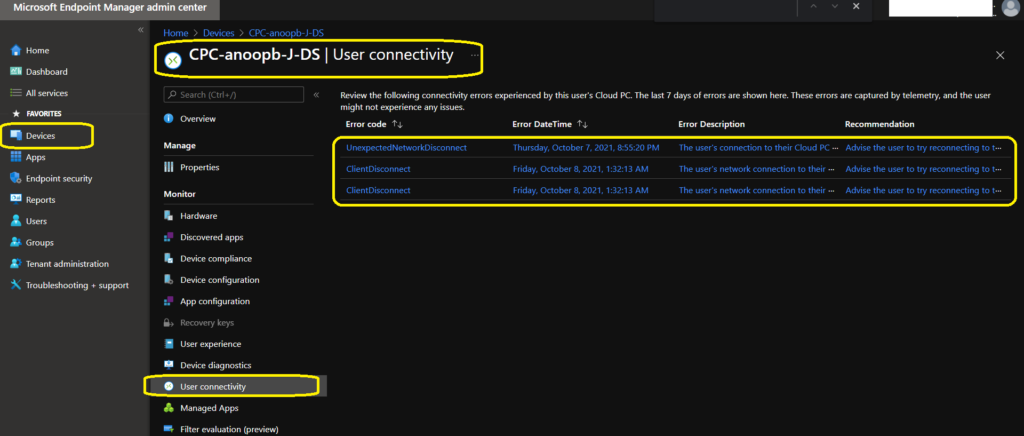
The default Cloud PC user connectivity error gives the following details Error code, Error DateTime, Error Description, and Recommendations to fix the connectivity errors. The following table shows two sample connectivity errors.
| Cloud PC User Connectivity Error code | Error DateTime | Error Description | Recommendation |
|---|---|---|---|
| UnexpectedNetworkDisconnect | Thursday, October 7, 2021, 8:55:20 PM | The user’s connection to their Cloud PC was lost because of an unexpected network error. Such problems can result from poor network quality or network configurations that aren’t valid. | Advise the user to try reconnecting to their Cloud PC. If the issue persists, there might be a problem with the Virtual Network configuration. Check your firewall settings and/or make sure that there are no network appliances that could block HTTP traffic to the Cloud PC service. |
| ClientDisconnect | Friday, October 8, 2021, 1:32:13 AM | The user’s network connection to their Cloud PC was unexpectedly interrupted. | Advise the user to try reconnecting to their Cloud PC. If the issue persists, there might be a problem with the user’s network configuration. |
Run Windows 365 Cloud PC Connectivity Error Report
You can get the Windows 365 Cloud PC connectivity error report from the MEM admin center. You can check reports for individual Cloud PCs. However, I’m missing an aggregated report for all the Cloud PCs with connectivity errors in one place.
Let’s see how to run Windows 365 Cloud PC connectivity error report using the following steps:
- Open MEM Admin center portal – endpoint.microsoft.com
- Navigate to Devices – Windows – Search with “CPC-“
- Click on one of the Cloud PC that you want to check the connectivity error report.
- Scroll down a bit and Click on User Connectivity tab to check the Cloud PC Connectivity error report.




Discussion