





How to Verify WMI Permissions Required for ConfigMgr SCCM Console Access
Today, I will discuss how to Verify WMI Permissions Required for ConfigMgr SCCM Console Access.
We will see how to check and confirm the WMI permissions Required for SCCM / ConfigMgr console access. Also, here are some handy links that can help you with console-related troubleshooting.
- WMI Explorer Details For Configuration Manager SCCM Post 1
- Best Easy way to Check the SCCM objects WMI details SMSDebug SCCM Console Tips Issues #ConfigMgr (youtube.com)
- How to Configure Windows 10 Related ADMX ADML WMI Filter (youtube.com)
- Manage Windows 11 Readiness Dashboard Using SCCM HTMD Blog
| Index |
|---|
| WMI Permissions Required for ConfigMgr SCCM Console Access |
WMI Permissions Required for ConfigMgr SCCM Console Access
Log file to look into SMSADMINUI.log. Location -> \Program Files\Microsoft Configuration Manager\AdminConsole\AdminUILog
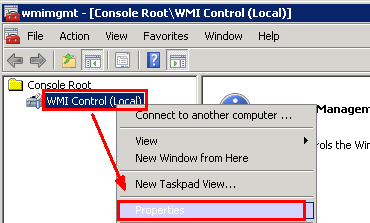
- Run wmimgmt.msc from the primary site server.
- Go to WMI control –> properties
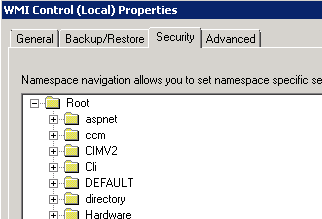
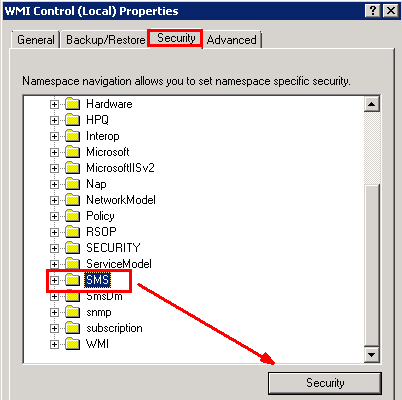
In the Security tab, expand root, and click SMS.

Click security in the results pane to see the permission.
Click Advanced, click SMS Admin, then view-edit.
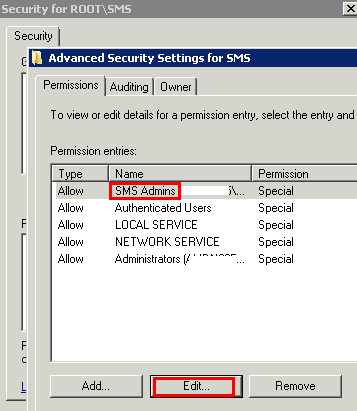
Grant the permission if the SMS Admins group does not have Enable Account and Remote Enable permission.
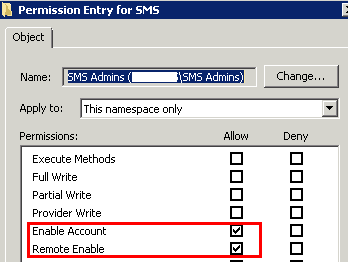
Repeat this procedure for other groups used in addition to SMS Admins.
We are on WhatsApp. To get the latest step-by-step guides and news updates, Join our Channel. Click here –HTMD WhatsApp.
Author
Anoop C Nair has been Microsoft MVP from 2015 onwards for 10 consecutive years! He is a Workplace Solution Architect with more than 22+ years of experience in Workplace technologies. He is also a Blogger, Speaker, and leader of the Local User Group Community. His main focus is on Device Management technologies like SCCM and Intune. He writes about technologies like Intune, SCCM, Windows, Cloud PC, Windows, Entra, Microsoft Security, Career, etc..




Sccm primary site join to aaa.local and Added a security group to this sms admin local group, however the members (members comprise of aaa.local and bb. aaa.local) in that security group but members from bb.aaa.local are unable to access the console too. Any clue?
StaffAre you sure the Firewall ports are open from all those networks? And is there any two way trust between AAA and BBB?
It use to be working well, however we have restore the wsus dbs and that caused the issue.
Yes aaa and bbb is a parent-child domain.
We have tried to access from the same laptop that aaa.local users were able to access. But not for user from bbb.aaa.local
Please note that if the June 2022 monthly patches were applied you might see “Access is Denied” or “You have typed invalid credentials” from Get-WmiObject in WinRE based systems. Using wbemtest you might see “0x8007005” “Access is denied” message. (i.e. WinRE -> MECM query)
See the following change to DCOM protection that went life with June’s patches:
https://msrc.microsoft.com/update-guide/vulnerability/CVE-2021-26414
“…The security updates released on June 8, 2021 enable RPC_C_AUTHN_LEVEL_PKT_INTEGRITY on DCOM clients by default and provide full protection after manually setting RequireIntegrityActivationAuthenticationLevel = 1 on DCOM servers using the steps in Managing changes for Windows DCOM Server Security Feature Bypass (CVE-2021-26414). Note that a reboot is required after making any changes to the RequireIntegrityActivationAuthenticationLevel registry key. Microsoft recommends enabling full protection as soon as possible to identify any OS and application intermobility issues between Windows and non-Windows operating systems and applications.
With the June 14, 2022 security updates, RPC_C_AUTHN_LEVEL_PKT_INTEGRITY on DCOM servers is now enabled by default. Customer who need to do so can still disable it by using the RequireIntegrityActivationAuthenticationLevel registry key.”
While the workaround (of setting RequireIntegrityActivationAuthenticationLevel = 1) did resolve the issue. A more permanent fix is to uninstall the ADK and install the latest ADK which includes the new WinRM image w the fix/patch already baked in.
Anoop saves the day again.
I had the same issues launching the SCCM console on a particular machine and spent countless hours trying to fix until I came across this article
In one posting here someone talks about June 2022 updates which enabled RPC_C_AUTHN_LEVEL_PKT_INTEGRITY on DCOM clients .
What I did was running the latest July updates on this machine and the problem went away. The SCCM console is fully operational for me now. Thank you very much to all of you who commented on this post.