






Fix SCCM 3rd Party Patching Sync Failed Issue
In this post, I will try to help to fix SCCM 3rd party patching sync failed issue. Let’s have a look into the topic SRVMSG_SMS_ISVUPDATES_SYNCAGENT_CATALOG_SYNC_FAILED. The third-party software update sync works based on certificate authentication, which can sometimes be tricky.
I have seen similar issues with trust before as well for different third-party vendor catalogs. I know this issue with the latest version of ConfigMgr 2107. Hopefully, SCCM will be able to fix this issue automatically without any intervention from admins (this is a kind of yearly activity for admins now).
I have explained how to enable SCCM third-party patching in a blog post series. There are free third-party patching catalogs available, and there are some paid ones as well. All these details are available in the below posts.
- SCCM Third-Party Software Updates Setup Step by Step Guide Post 1
- List of Free SCCM Catalogs for Third-Party Software Updates
- SCCM Third-Party Updates Background Process Guide Post 3
Issue Trust Failed
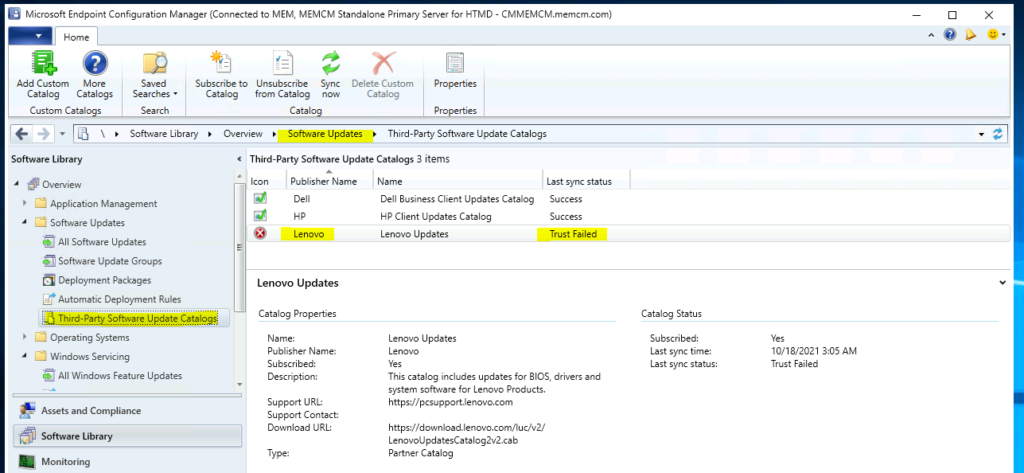
I noticed a trust failed issue in the Third-party software update catalogs node. The 3rd party patching sync didn’t work for the Lenovo catalog. Lenovo is one of the vendors that provide the latest V3 catalogs. I have a blog post that explains the advantages of update catalog v3.

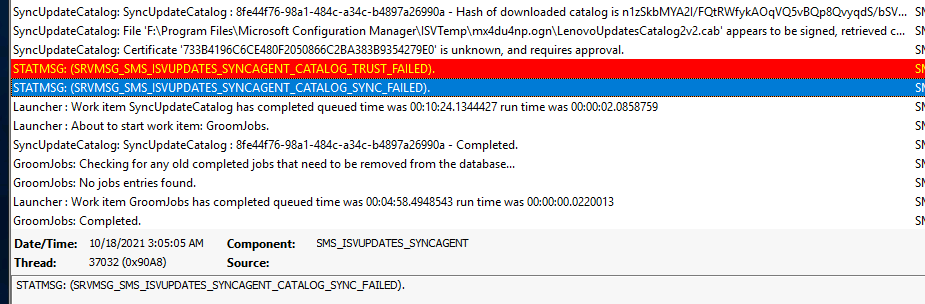
I have a look at the SMS_ISVUPDATES_SYNCAGENT.log log file with CMTrace.
SyncUpdateCatalog: File ‘F:\Program Files\Microsoft Configuration Manager\ISVTemp\mx4du4np.ogn\LenovoUpdatesCatalog2v2.cab’ appears to be signed, retrieved certificate, checking signature…
SyncUpdateCatalog: Certificate ‘733B4196C6CE480F2050866C2BA383B9354279E0’ is unknown, and requires approval.
STATMSG: (SRVMSG_SMS_ISVUPDATES_SYNCAGENT_CATALOG_TRUST_FAILED).
STATMSG: (SRVMSG_SMS_ISVUPDATES_SYNCAGENT_CATALOG_SYNC_FAILED).
Launcher: Work item SyncUpdateCatalog has completed queued time was 00:10:24.1344427 run time was 00:00:02.0858759
Fix SCCM 3rd Party Patching Sync Failed Issue
Now, let’s get into the resolution for the SCCM 3rd Party Patching Sync failed issue. I have seen this issue for other partner catalogs in the SCCM world and fixed those issues with a similar solution. You can get more details about those issues and fixes in the following blog post.
- Launch SCCM admin console.
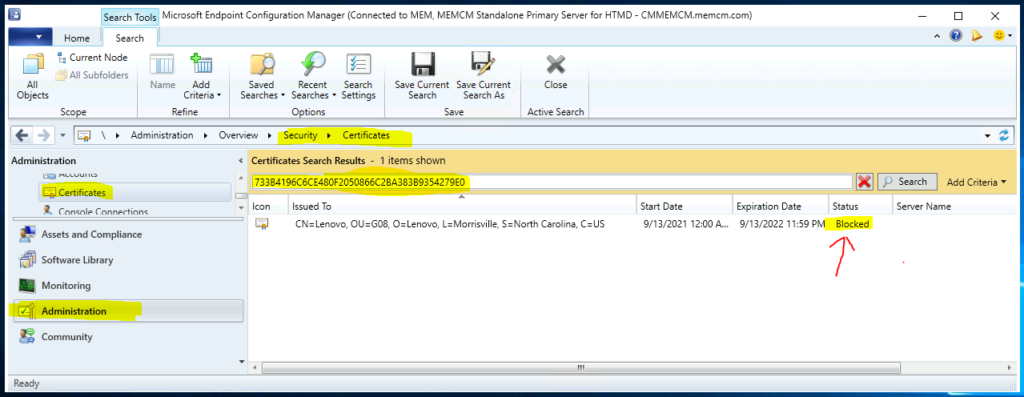
- Navigate to \Administration\Overview\Security\Certificates.
You will need to copy the certificate details from the above log file and search with the certificate ID. You can see the certificate is blocked from the status column.
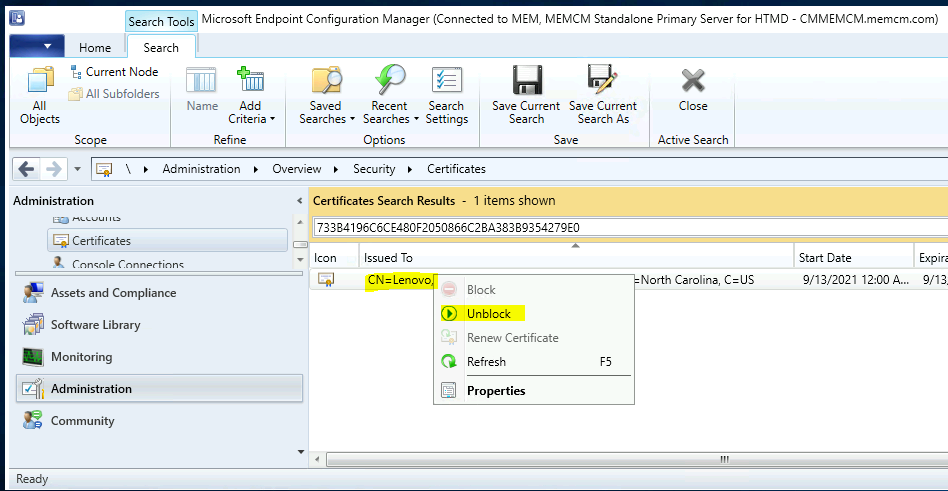
As you can see, the certificate was issued to Lenovo. You will need to right-click on the certificate and unblock it to get Lenovo 3rd party patch sync work again.
All these 3rd party vendor certificates are valid for only one year. So, you will need to unblock it every year. You will need to create SCCM alert options for the sync failure. These alerts would be able to help with certificate issues as well.
- Right click on the blocked certificate.
- Select Unblock option to unblock the certificate.
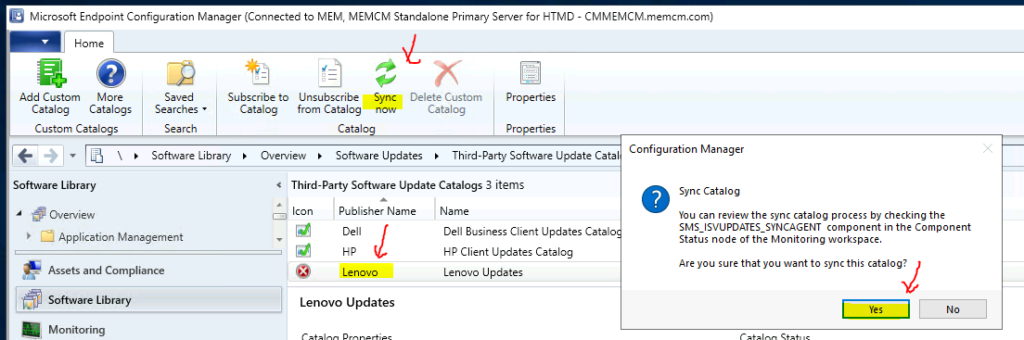
You will need to go back to the Software library – Software Updates – Third-Party Software Update Catalog and select the Lenovo catalog – click on the sync now option to start the sync.
Follow the steps mentioned below screenshot and monitor the SMS_ISVUPDATES_SYNCAGENT.log to confirm whether the sync is completed successfully or not.
The 3rd party update catalog sync looks ok from the below log file entries. Now, you won’t be able to see any errors similar to SRVMSG_SMS_ISVUPDATES_SYNCAGENT_CATALOG_SYNC_FAILED.
SyncUpdateCatalog: ‘Lenovo Edge USB keyboard(Calc) Driver – 7/8.1/10 [64] – 1.22′ (Update:’3c756d93-569d-479f-b6a6-da75370c69d9’) Vendor ‘Lenovo’ Product:’Lenovo Updates’ is not in a category configured for synchronization, it will be skipped.
SyncUpdateCatalog: ‘Intel Management Engine Interface Driver (Windows 10 Version 1803 or Later) – 10 [64] – 1919.14.0.1269′ (Update:’bf9aecc8-2f00-4a2a-90ac-b1d70e8e1840’) Vendor ‘Lenovo’ Product:’Lenovo Updates’ is not in a category configured for synchronization, it will be skipped.
SyncUpdateCatalog: ‘ThinkPad BIOS Update – 10 [64] – 1.09′ (Update:’8a930ea6-355f-4084-ae01-9684a5dcf6cc’) Vendor ‘Lenovo’ Product:’Lenovo Updates’ is not in a category configured for synchronization, it will be skipped.
SyncUpdateCatalog: Update ‘Intel Wifi Driver (Windows 10 Version 2004) – 10 [64] – 21.90.3.2′ (Update:’6822a46c-5df6-4b75-b5c5-c3e251e5f7f5’) Vendor ‘Lenovo’ Product:’Lenovo Updates’ successfully synchronized to WSUS, updating history record.
Author
Anoop is Microsoft MVP! He is a Solution Architect in enterprise client management with over 17 years of experience (calculation done in 2018). He is Blogger, Speaker, and Local User Group HTMD Community leader. His main focus is on Device Management technologies like SCCM 2012, Current Branch, and Intune. He writes about ConfigMgr, Windows 11, Windows 10, Azure AD, Microsoft Intune, Windows 365, AVD, etc…..…




Discussion