






Windows 11 21H2 Cumulative Update Patch KB5007215 for November 2021 Using Intune SCCM
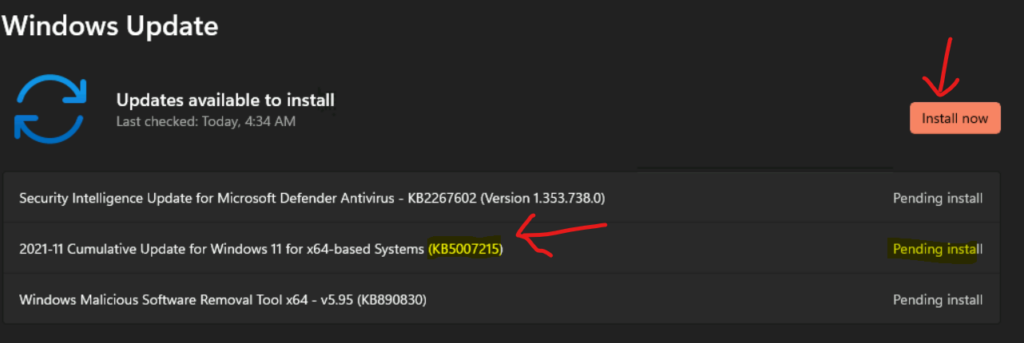
The latest Windows 11 21H2 Cumulative Update Patch KB5007215 (November LCU) is released. Microsoft released the latest Security Updates patch KB5007215 for Windows 11. This is part of the second Tuesday patch release.
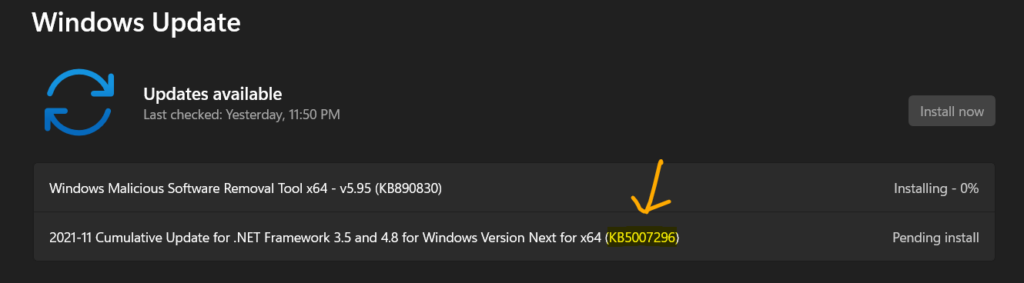
Microsoft also released Security Update for Windows 11 Insider build (Dev Channel) as well. The November LCU for Windows 11 Dev Channel is KB5007296. You will get more details about how to get this update installed etc., in the below section.
You can use Intune or SCCM (MEM) to deploy monthly patches to Windows 11 21H2 production release and Insider build release as well. I have explained this process in the Monthly Patching Process Using Intune blog post.
Manual Download of Windows 11 Cumulative Update Patch KB5007215
There are ways to download the Windows 11 LCU patches manually from Windows Update Catalog as well. The following are the links where you can download the patches for the production version of Windows 11.

You can download Windows 11 21H2 production version LCU for Nov KB5007215 from Microsoft Update Catalog.
Deploy Windows 11 21H2 Cumulative Update KB5007215 Using Intune
You can deploy and install Windows 11 21H2 LCU KB5007215 for November using Intune. I have explained Monthly Patching Process Using Intune, how to set up WUfB policies for monthly patching using Intune in the linked post.
You will need to seek updates from Intune managed device if your admin is enabled that option. Otherwise, you will get the Windows 11 21H2 Latest Cumulative Update for November 2021 patch as per the schedule set on the Intune Software update ring for Windows 10 or later.
Deploy Windows 11 21H1 Patches KB5007215 and KB5006363 using SCCM
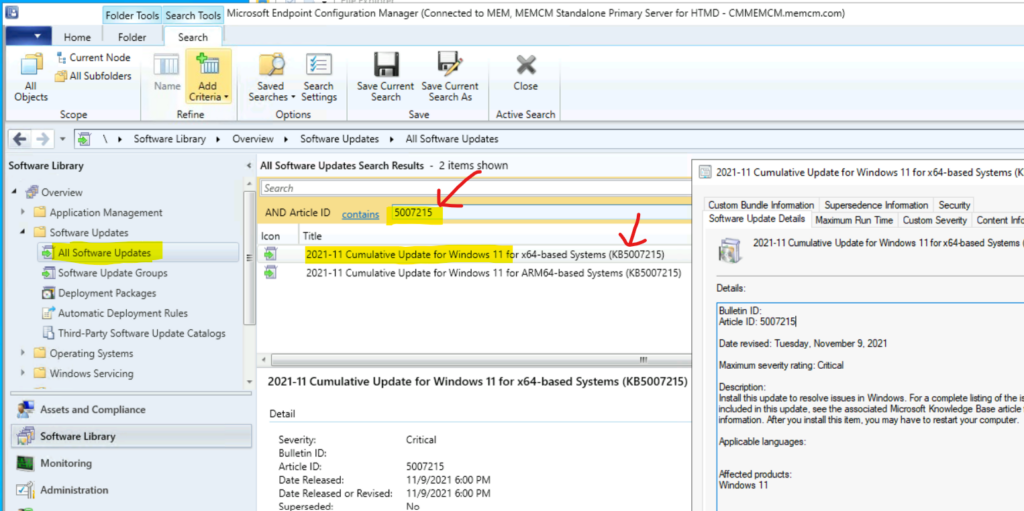
Let’s see how to deploy Windows 11 21H1 patches KB5007215 and KB5006363 using SCCM (aka Configuration Manager – ConfigMgr). First, you will need to enable Windows 11 products from the SCCM software update point component properties – product category.
You can follow the end-to-end patching process of SCCM from the blog post Windows 11 Patch Deployment Using SCCM. As you can see in the screenshot below, you can search with Article IDs for the Windows 11 21H2 patches you want to deploy.
Also, you can build an Automatic Deployment Rule to create the patch packages automatically during the monthly patch cycle using SCCM. More details SCCM ADR Automatic Deployment Rule Creation Process.
2021-11 Cumulative Update for .NET Framework 3.5 and 4.8 for Windows 11 for x64 (KB5006363)
2021-11 Cumulative Update for Windows 11 for x64-based Systems (KB5007215)
Bulletin ID:
Article ID: 5007215
Date revised: Tuesday, November 9, 2021
Maximum Severity Rating: Critical
Description:
Install this update to resolve issues in Windows. For a complete listing of the topics included in this update, see the associated Microsoft Knowledge Base article for more information. After you install this item, you may have to restart your computer.
Affected products:
Windows 11
Windows 11 Cumulative Update KB5007296 for Insiders
You need to install this November LCU KB5007296 hotfix for Windows 11 insider version (10.0.22494.1000). If you don’t have the update available in Windows Updates, you will need to click on Check for Update button from Start > Settings > Windows Update.
You can try to install the latest Windows Insider build for Windows 11 using the following blog post. The Windows Insider Registration for Windows 11 Dev Channel | Insider Program Registration Process.
Author
Anoop is Microsoft MVP! He is a Solution Architect in enterprise client management with more than 20 years of experience (calculation done in 2021) in IT. He is Blogger, Speaker, and Local User Group HTMD Community leader. His main focus is on Device Management technologies like SCCM 2012, Current Branch, and Intune. He writes about ConfigMgr, Windows 11, Windows 10, Azure AD, Microsoft Intune, Windows 365, AVD, etc……………




Discussion