





Where is the SCCM Rate Limits Option in Distribution Point Properties
Let’s find out about the SCCM rate limits option in the post. After reading the post, you will be able to find out where the SCCM Rate Limits Option is in Distribution Point Properties.
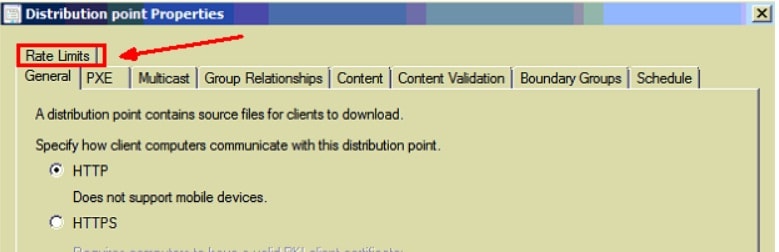
Today, I wasted 10 minutes searching the “Rate Limits” tab/option in SCCM ConfigMgr 2012 Distribution Point Properties. The positioning of the “Rate Limits” tab is exciting on TOP of all the other TABs.
Rate limit restrictions work based on the size of the data limit or maximum data transfer limits. We will find out more details about the size of the data limit in the following section of this blog post.
What is a Distribution Point? A distribution point contains source files for clients to download. You can control content distribution using bandwidth, throttling, and scheduling options.

- Install A New Configuration Manager Distribution Point (anoopcnair.com)
- Remove ConfigMgr Package Content from a Distribution Point | Best Method | SCCM | Configuration Manager
- Enable SCCM Maintenance Mode for Distribution Point DPs Clients Primary Server
- SCCM Content Library Cleanup Tool | Distribution Point | Configuration Manager
Table of Contents
Where is the SCCM Rate Limits Option in Distribution Point Properties
The following screenshot shows how to change the rate limit option from DP properties. So, I thought of just highlighting it with the screenshot.
- Navigate to \Administration\Overview\Distribution Points.
- Right-click on the Remote Site System DP record.
- Select Properties
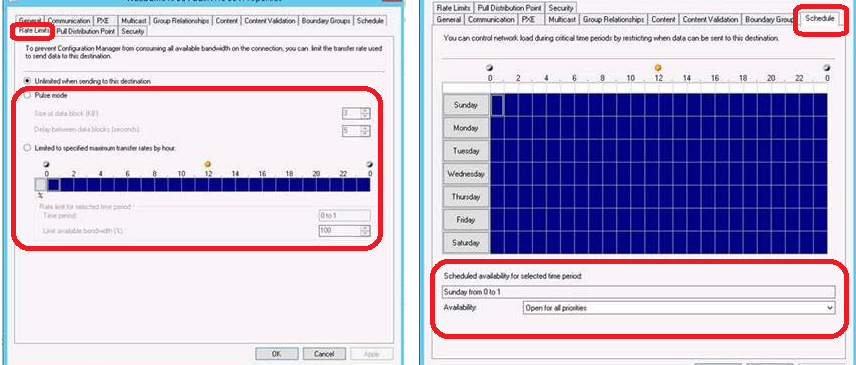
- You can check the above section, where I explained how to configure the File Replication schedule and rate limit options.
You can now refer to the detailed post on rate limit specifications in SCCM (SCCM Server Side Bandwidth Management Options). This is a different screenshot of SCCM rate limit options.
- ConfigMgr Redistribute Content to Distribution Point | SCCM | Package | Best Way | Configuration Manager
- Learn How to Remove Distribution Point Role DP | SCCM | ConfigMgr
- SCCM Install New Distribution Point Role | ConfigMgr
We are on WhatsApp. To get the latest step-by-step guides and news updates, Join our Channel. Click here –HTMD WhatsApp.
Author
Anoop C Nair has been Microsoft MVP from 2015 onwards for 10 consecutive years! He is a Workplace Solution Architect with more than 22+ years of experience in Workplace technologies. He is also a Blogger, Speaker, and leader of the Local User Group Community. His main focus is on Device Management technologies like SCCM and Intune. He writes about technologies like Intune, SCCM, Windows, Cloud PC, Windows, Entra, Microsoft Security, Career, etc.




Hi Anoop,
I cannot see this option in the RC version. Which version are you looking at?
Dea
Never mind. I found it…
Quote: “The Rate Limits and Schedule tabs are displayed only in the properties for distribution points that are not installed on a site server.”
Hi Dean ! – Yes, I was using RC.