






Easily Find SCCM Applications Without Deployments
Let’s check the steps to easily find SCCM applications without deployments or references. The SCCM Management Insights can help you find applications that don’t have any deployments or references.
The Management insights are based on analysis of data in the site database. One of the scenarios the management insight would be useful is to understand your environment better and take action based on the insight.
Applications without deployments or references list the applications in your environment that don’t have active deployments or references. References include dependencies, task sequences, and virtual environments. This insight helps you find and delete unused applications to simplify the list of applications displayed in the console. You can read this post to get the latest details about SCCM Management Insights
- SQL Query All SCCM Applications with no Deployments
- Disable SCCM application deployment
- SCCM Management Insights Clean Healthy SCCM CB Environment Configuration Manager ConfigMgr
Steps to Find SCCM Applications Without Deployments
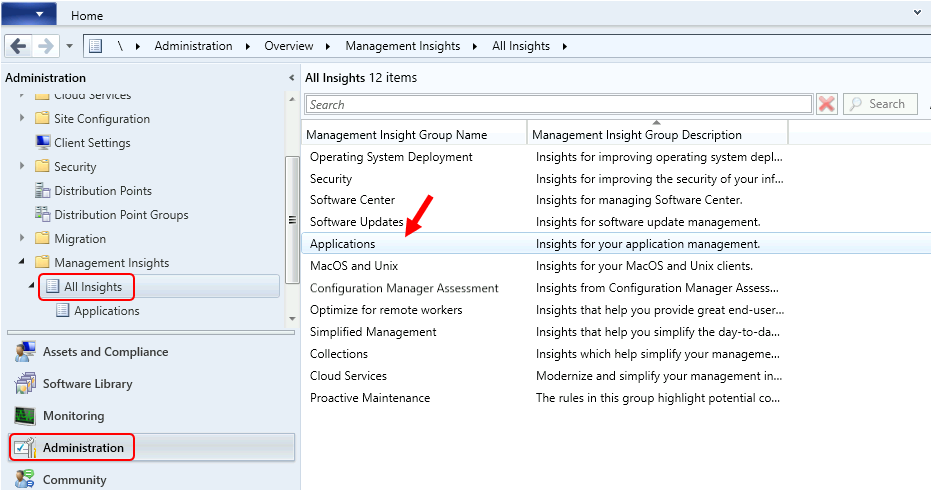
- Launch SCCM Console, Navigate to Administration workspace, Expand Management Insights.
- Select All Insights, Double click Applications insight group name.
Each management insights group contains a set of rules, and those rules will help you to keep the SCCM environment clean & healthy. SCCM team is adding new rules in each release of SCCM.

The following four tabs are available for review –
- All Rules: Gives the complete list of insights for the chosen group.
- Complete: Lists insights where no action is needed.
- In Progress: Shows insights where some, but not all, prerequisites are complete.
- Action Needed: This tab lists insights that need you to take action.
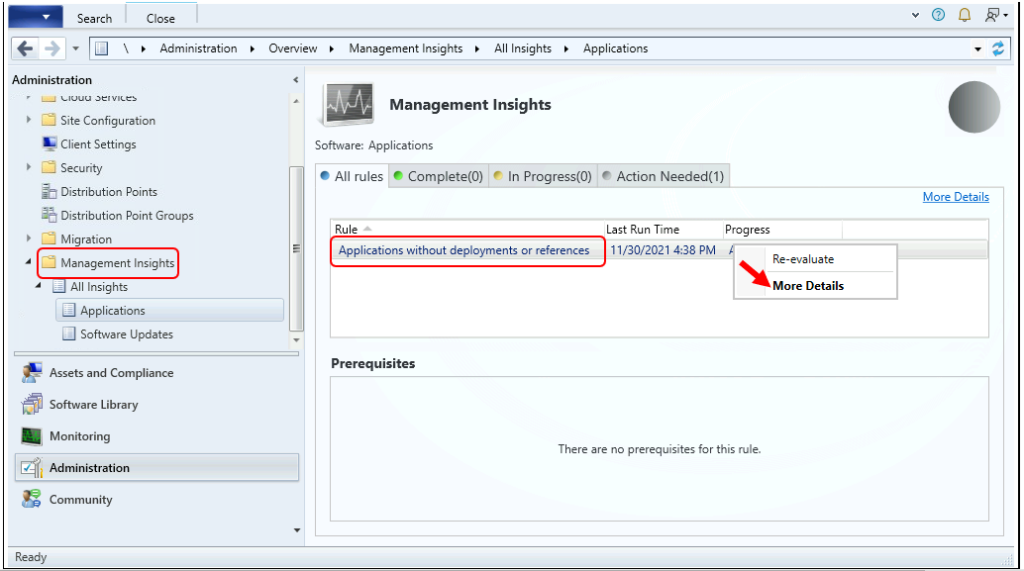
- Right-click Applications without deployments or references and click More Details.
Note – If the rule was evaluated earlier, you can click on Re-evaluate to start evaluation the rule again to find the applications without deployments or references.
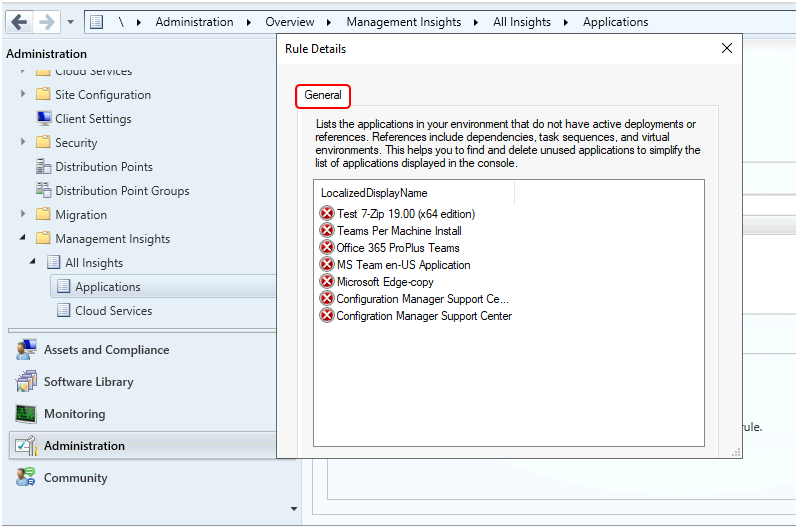
When you evaluate the rule, You will see the lists of all the applications that do not have active deployments or any references. The application will appear with LocalizedDisplayName as you can see below.
Rule Details – Lists the applications in your environment that do not have active deployments or references. References to include dependencies, task sequences, and virtual environments. This helps you find and delete unused applications to simplify the list of applications displayed in the console.
Author
About Author -> Jitesh has over 5 years of working experience in the IT Industry. He writes and shares his experiences related to Microsoft device management technologies and IT Infrastructure management. His primary focus area is Windows 10, Windows 11 Deployment solution with Configuration Manager, Microsoft Deployment Toolkit (MDT), and Microsoft Intune.




Discussion