






Fix GPO Backup option is Missing Issue
Let’s see how to fix GPO backup option missing issue. You might have noticed this issue when you try to use Intune Group Policy Analytics feature to compare Group Policy with Intune policies. Where is the GPO backup option?
Group policy objects (GPOs) are used to configure and manage Windows 10 and Windows 11 devices settings. The GPO can be deployed to Hybrid Azure or Domain joined Windows devices. The GPOs help control Windows OS, Microsoft Edge, Microsoft 365 Office apps, and more security and features.
With digital transformation projects, most organizations are planning to move away from GPOs. MEM Intune Group Policy analytics is a tool and feature that analyzes your on-premises GPOs. This tool helps you determine how your GPOs translate in the cloud or Intune policies.
- How To Use Group Policy Analytics In Intune Portal | Endpoint Manager
- Deploy Microsoft 365 Apps MS Teams Using Intune MEM
- Intune Endpoint Security Policies Microsoft Endpoint Manager Updates
GPO Backup option is Missing Issue
I tried to check the backup option in the Group Policy Management tool and couldn’t find one. Steps to import your Group policies. Since I’m not very familiar with Group policy management, I got confused!

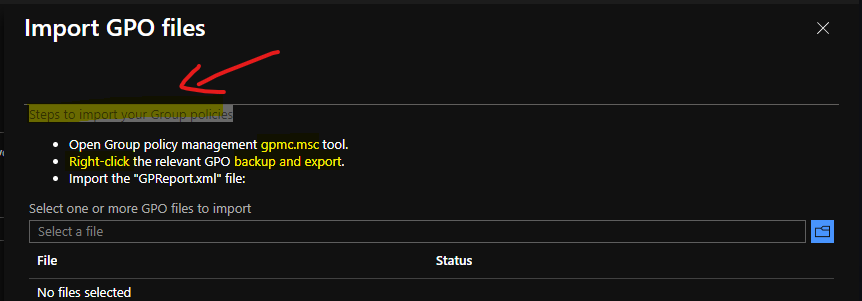
The confusion about the GPO Backup option is Missing Issue increased whenever I read the below instruction from the MEM Intune portal. It says the following are the steps to import your Group policies.
- Open Group policy management gpmc.msc tool.
- Right-click the relevant GPO backup and export.
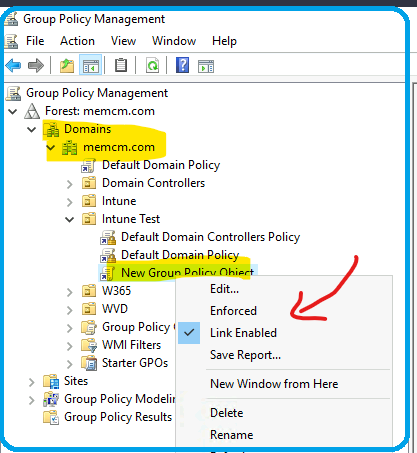
I couldn’t figure out the options to Backup and Export in the Group Policy Management tool (gpmc.msc). The only option I can see is the Save Report option; when I click on the Group Policy Object, I want to export or take back up.
NOTE! – I know Jitesh explained in his post that you could use the Save Report option and use that report to export into Group Policy Analytics In Intune Portal.
Fix GPO Backup option is Missing Issue
Now let’s see how to Fix GPO Backup option is a Missing Issue. Well, first of all, this is not an issue, and there is nothing to fix here. I think the confusion here is because of not having proper documentation. And obviously because of the less experience with Active Directory Group Policy management.
You will need to navigate to the Group Policy Object folder to take the backup of GPO policies. You can follow the steps mentioned below to export or backup GPO from the Group Policy Management console.
- Open Group policy management gpmc.msc tool.
- Navigate to folder called Group Policy Objects.
- Select the GPO (Group Policy Object) that you want to take backup and use for Group Policy analytics.
- Right-click the relevant GPO and select the option called backup.
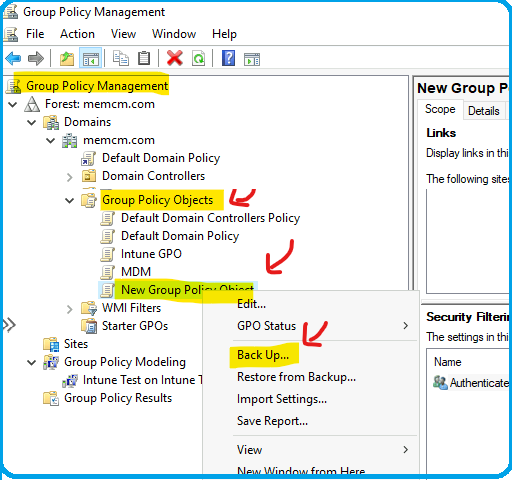
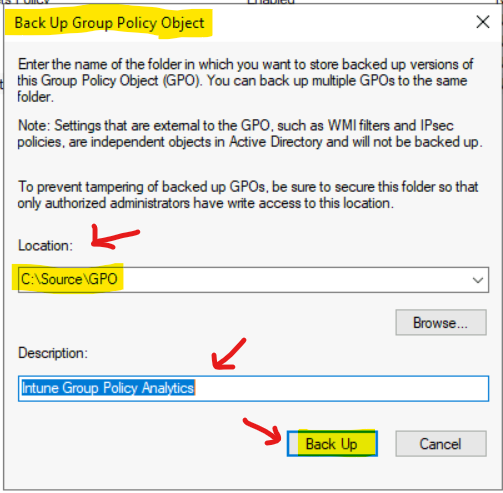
You can now select the location to save from the backup group policy object window.
- Enter the Location – D:\Source\GPO
- Enter the Description – Name of the GPO Backup
- Click on the Backup button.
GPO Backup Results
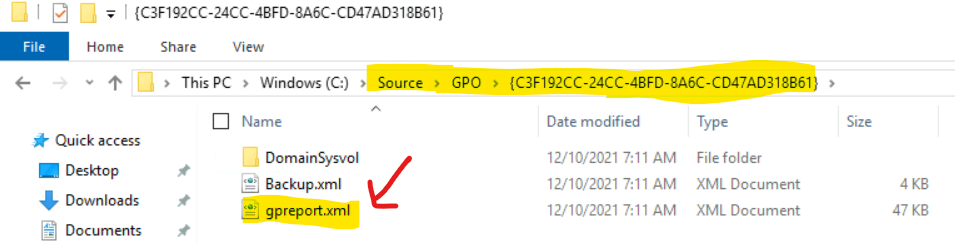
Let’s see what the folder structure for GPO backup results is? The main point here is I could see GPREPORT.XML that can be imported to MEM Intune for Group Policy Analytics.
How to Use Group Policy Analytics with GPO Backup
You have the backup of Group Policy that you want to import into Intune and compare it with MDM policy settings. You can go through the following blog post to know more about the Intune Group policy analysis and how that can help you to move or migrate Group Policies to Intune or Cloud.
How To Use Group Policy Analytics In Intune Portal | Endpoint Manager
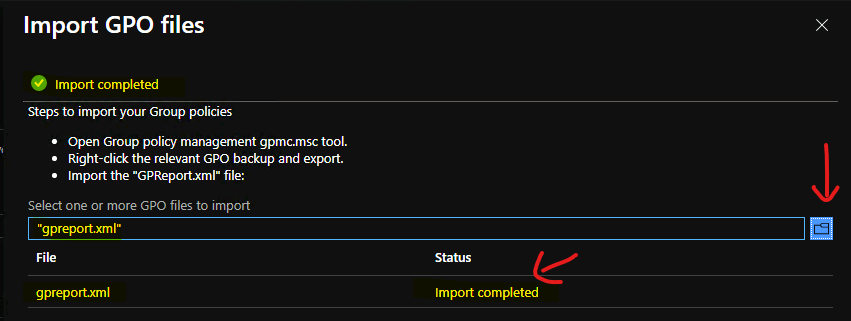
As you can see in the screenshot below, I have uploaded the gpresult.xml that we created above and successfully imported it to MEM Intune.
Author
Anoop is Microsoft MVP! He is a Solution Architect in enterprise client management with more than 20 years of experience (calculation done in 2021) in IT. He is Blogger, Speaker, and Local User Group HTMD Community leader. His main focus is on Device Management technologies like SCCM 2012, Current Branch, and Intune. He writes about ConfigMgr, Windows 11, Windows 10, Azure AD, Microsoft Intune, Windows 365, AVD, etc……………


Discussion