





How to Fix SCCM ConfigMgr Software Distribution Notification Issues
How to Fix SCCM ConfigMgr Software Distribution Notification Issues. Clients may not get “New Program is Available” pop-up system tray notifications in ConfigMgr even though the “Display a Notification Message” option is checked in the Admin Console.
- SCCM CMPivot Query Patches Installed In Last 90 Days | ConfigMgr
- Fix SCCM Client-Side Patching Or Software Updates Issues Troubleshooting Tips
- Best Way To Manage SCCM Client On Windows Server Core Machines
| Index |
|---|
| ConfigMgr Software Distribution Notification Issues |
| CCM_SoftwareDistributionClientConfig/DisplayNewProgramNotification Policy |
| CCM_ClientAgentConfig/DisplayNewProgramNotification Policy |
ConfigMgr Software Distribution Notification Issues
Two Policy entries control the “New Program notification” for clients, and if either is set to “FALSE”, then the new program pop-up will not show:
- CCM_SoftwareDistributionClientConfig/DisplayNewProgramNotification
- CCM_ClientAgentConfig/DisplayNewProgramNotification
The problem is that the Admin Console makes it relatively easy to get the policy into a state where DisplayNewProgramNotification becomes set to false under CCM_ClientAgentConfig even though the notification option is enabled in the UI.
CCM_SoftwareDistributionClientConfig/DisplayNewProgramNotification Policy
Run WBEMTEST query to determine if either of the ClientConfigs is set to FALSE:

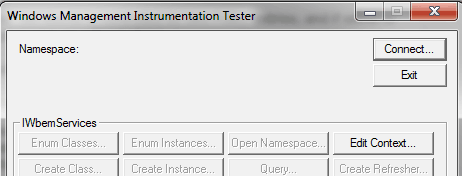
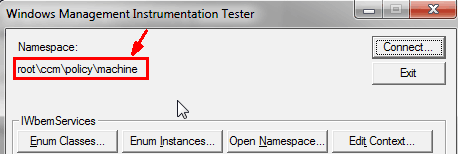
Connect to “root\ccm\policy\machine.”
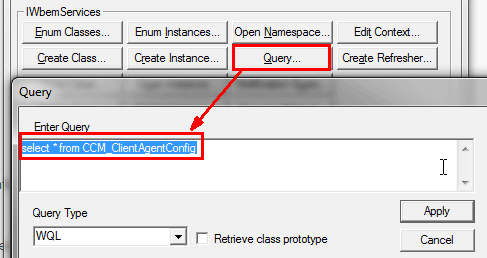
Click on Query, paste the following query in the “query” window, and click Apply.
select * from CCM_ClientAgentConfig
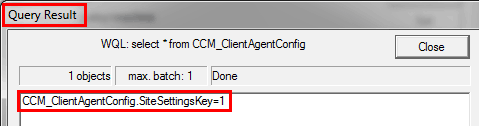
Double-click the one row that is returned (note if there is more than one),
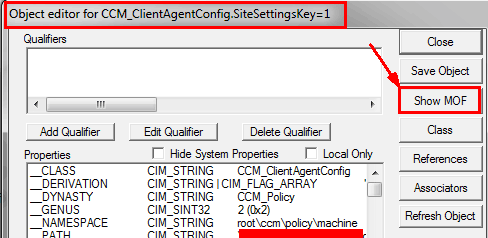
Click the Show MOF tab in the Object editor window.
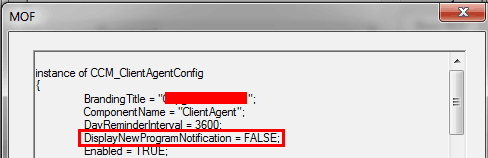
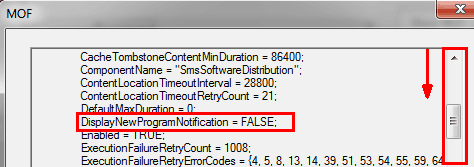
Review the setting for DisplayNewProgramNotification. This example below is set to FALSE, so there won’t be any notification for New Programs.
CCM_ClientAgentConfig/DisplayNewProgramNotification Policy
Run WBEMTEST query to determine if either ClientConfigs is set to FALSE and Connect to “root\ccm\policy\machine.”
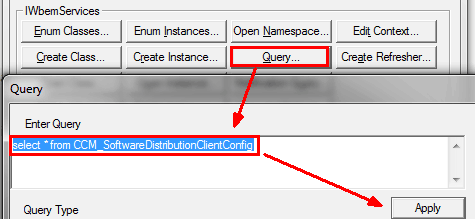
Click on Query, paste the following query in the “query” window, and click Apply.
Select * from CCM_SoftwareDistributionClientConfig
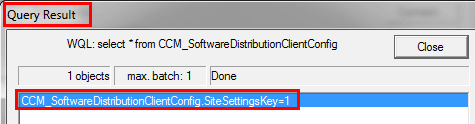
Double-click the one row that is returned (note if there is more than one) in the Query Result window
On the Object editor window, click the Show MOF tab
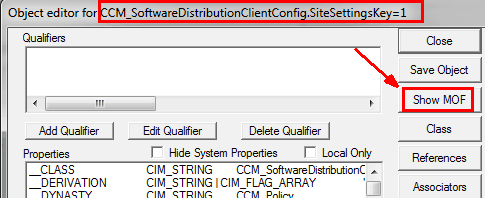
Review the setting for “DisplayNewProgramNotification.” This example below is set to FALSE, so there won’t be any notification for New Programs.
If either of these have DisplayNewProgramNotification set to FALSE, then as a workaround, you can do the following:
After the notifications are re-enabled in “Advertised Programs Client Agent Properties,” change “Computer Client Agent” as well, such as changing the org name and forcing the ClientAgentConfig policy to update.
We are on WhatsApp. To get the latest step-by-step guides and news updates, Join our Channel. Click here –HTMD WhatsApp.
Author
Anoop C Nair has been Microsoft MVP from 2015 onwards for 10 consecutive years! He is a Workplace Solution Architect with more than 22+ years of experience in Workplace technologies. He is also a Blogger, Speaker, and leader of the Local User Group Community. His main focus is on Device Management technologies like SCCM and Intune. He writes about technologies like Intune, SCCM, Windows, Cloud PC, Windows, Entra, Microsoft Security, Career, etc..




Amazing STUFF Anoop !!!…..this shows how powerful and useful WMI can be when it comes to finding valuable information during troubleshooting activity.
Hi Anoop,
Very great post.
I encountered this problem today and I could be still searching without your solution.
Tks
Hi Anoop, I’m approaching an issue very similar to this one in SCCM Current Branch regarding Application deployment. I want the notifications for installation progress and completion status to show balloon tips and system tray notifications but I do not want the clients to receive ‘New Software is available’ notifications. Do you know of a way this can be achieved?
Hi Anoop,
One of my client is not getting windows updates from SCCM. Could you please assist on this. Below is the WUAHandler.log:
Search Criteria is (DeploymentAction= AND Type=’Software’) OR (DeploymentAction= AND Type=’Driver’) WUAHandler 12/14/2021 11:45:57 AM 130492 (0x1FDBC)
Async searching of updates using WUAgent started. WUAHandler 12/14/2021 11:45:57 AM 130492 (0x1FDBC)
Async searching completed. WUAHandler 12/14/2021 11:45:57 AM 71568 (0x11790)
OnSearchComplete – Failed to end search job. Error = 0x80244022. WUAHandler 12/14/2021 11:45:57 AM 130492 (0x1FDBC)
Scan failed with error = 0x80244022. WUAHandler 12/14/2021 11:45:57 AM 130492 (0x1FDBC)
Its a WSUS Update Source type ({60FFC0D7-C5D6-43D5-B4D3-58B2E834F635}), adding it. WUAHandler 12/14/2021 11:45:57 AM 201168 (0x311D0)
Failed to check enrollment url, 0x00000001: WUAHandler 12/14/2021 11:45:57 AM 26552 (0x67B8)
SourceManager::GetIsWUfBEnabled – There is no Windows Update for Business settings assignment. Windows Update for Business is not enabled through ConfigMgr WUAHandler 12/14/2021 11:45:57 AM 26552 (0x67B8)
Existing WUA Managed server was already set (http://SCCMWSUS.server.com:8530), skipping Group Policy registration. WUAHandler 12/14/2021 11:45:57 AM 201168 (0x311D0)
Added Update Source ({60FFC0D7-C5D6-43D5-B4D3-58B2E834F635}) of content type: 2 WUAHandler 12/14/2021 11:45:57 AM 201168 (0x311D0)
CWUAHandler – Scan(), old SupersedenceMode=0, new SupersedenceMode=0. Need update and save to SourceManager. WUAHandler 12/14/2021 11:45:57 AM 201168 (0x311D0)
Modified Update Source ({60FFC0D7-C5D6-43D5-B4D3-58B2E834F635}) to new SupersedenceMode: 0 WUAHandler 12/14/2021 11:45:57 AM 201168 (0x311D0)
Scan results will include superseded updates only when they are superseded by service packs and definition updates. WUAHandler 12/14/2021 11:45:57 AM 201168 (0x311D0)
Search Criteria is ((DeploymentAction=* AND Type=’Software’ AND CategoryIDs contains ‘8C3FCC84-7410-4A95-8B89-A166A0190486’)) WUAHandler 12/14/2021 11:45:57 AM 201168 (0x311D0)
Async searching of updates using WUAgent started. WUAHandler 12/14/2021 11:45:57 AM 201168 (0x311D0)
Async searching completed. WUAHandler 12/14/2021 11:45:57 AM 65628 (0x1005C)
OnSearchComplete – Failed to end search job. Error = 0x80244022. WUAHandler 12/14/2021 11:45:57 AM 201168 (0x311D0)
Scan failed with error = 0x80244022. WUAHandler 12/14/2021 11:45:57 AM 201168 (0x311D0)
Its a WSUS Update Source type ({60FFC0D7-C5D6-43D5-B4D3-58B2E834F635}), adding it. WUAHandler 12/14/2021 11:45:57 AM 79984 (0x13870)
Failed to check enrollment url, 0x00000001: WUAHandler 12/14/2021 11:45:57 AM 88736 (0x15AA0)
SourceManager::GetIsWUfBEnabled – There is no Windows Update for Business settings assignment. Windows Update for Business is not enabled through ConfigMgr WUAHandler 12/14/2021 11:45:57 AM 88736 (0x15AA0)
Existing WUA Managed server was already set (http://SCCMWSUS.server.com:8530), skipping Group Policy registration. WUAHandler 12/14/2021 11:45:58 AM 79984 (0x13870)
Added Update Source ({60FFC0D7-C5D6-43D5-B4D3-58B2E834F635}) of content type: 2 WUAHandler 12/14/2021 11:45:58 AM 79984 (0x13870)
CWUAHandler – Scan(), old SupersedenceMode=0, new SupersedenceMode=0. Need update and save to SourceManager. WUAHandler 12/14/2021 11:45:58 AM 79984 (0x13870)
Modified Update Source ({60FFC0D7-C5D6-43D5-B4D3-58B2E834F635}) to new SupersedenceMode: 0 WUAHandler 12/14/2021 11:45:58 AM 79984 (0x13870)
Scan results will include superseded updates only when they are superseded by service packs and definition updates. WUAHandler 12/14/2021 11:45:58 AM 79984 (0x13870)
Search Criteria is (DeploymentAction= AND Type=’Software’) OR (DeploymentAction= AND Type=’Driver’) WUAHandler 12/14/2021 11:45:58 AM 79984 (0x13870)
Async searching of updates using WUAgent started. WUAHandler 12/14/2021 11:45:58 AM 79984 (0x13870)
Async searching completed. WUAHandler 12/14/2021 11:45:58 AM 58864 (0xE5F0)
OnSearchComplete – Failed to end search job. Error = 0x80244022. WUAHandler 12/14/2021 11:45:58 AM 79984 (0x13870)
Scan failed with error = 0x80244022. WUAHandler 12/14/2021 11:45:58 AM 79984 (0x13870)
StaffThe error 0x8024402 means – Same as HTTP status 503 – the service is temporarily overloaded.
Source: Windows Update Agent
Check whether all the IIS services are running or not. If not try to start the services. Try to check the https://www.anoopcnair.com/best-practices-related-iis-sccm-sup-wsus-setup/
StaffMore details now available – Fix Scan failed with error 0x80244022 Service is Temporarily Overloaded Issue | SCCM | WSUS App Pool Configs https://www.anoopcnair.com/fix-scan-failed-with-error-0x80244022-iis-sccm/