






How can We Achieve Zero Footprint Caching Resolve Disk Space Issues in SCCM Configuration Manager?
How can We Achieve Zero Footprint Caching and Resolve Disk Space Issues in SCCM Configuration Manager? You must have faced loads of high WAN bandwidth issues because clients download the packages from a remote DP on another end of the WAN.
Placing a remote DP in every branch is not an excellent solution for having “server-free branch” offices with no server infrastructure. It’s not worth putting a remote DP for 20-25 clients. Some options could be like branch cache and DP on Windows 7 machines.
However, those are not straightforward solutions when you have deployed SCCM within a vast organization. Also, the operational overhead will be very high. Achieve Zero Footprint Caching. Resolve Disk Space Issues in SCCM.
As mentioned in previous blogs, I’m a big fan of Adaptiva Onesite. Zero Footprint Caching is another excellent feature of Onesite. SCCM clients normally use quota-based caches, and when these quota-based caches fill up, they are very simple-minded about deleting data to make room for new content.
- SCCM Client Free Disk Space can be Converted into Virtual SAN ConfigMgr Configuration Manager
- Windows Autopilot FAQ Clarifying the General Misconceptions Part 1
- How SCCM can Effectively Handle Windows 10 Migrations Configuration Manager ConfigMgr
| Index |
|---|
| Zero Footprint Caching Resolve Disk Space Issues in SCCM |
| Now the Question is How the Zero Footprint Caching Works |
Zero Footprint Caching Resolve Disk Space Issues in SCCM
Adaptiva OneSite offers an incredible solution: zero-footprint caching. It runs a super-fast, lightweight file system within a computer’s unallocated/free disk space. With OneSite zero-footprint caching, you never need to send a single piece of content over the WAN twice.
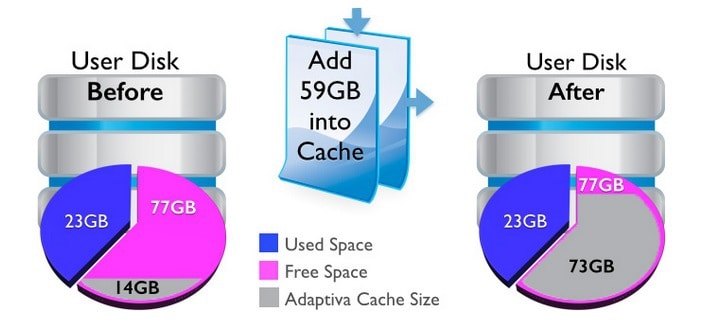
As you can see in the above picture, when we use quota-based cache native to the SCCM client, 14 GB is allocated to the CM client. When you’ve Adaptiva Onesite, your SCCM client can dynamically utilize all the free disk space available in the client disk.
Moreover, end-users won’t feel like all their free space is eaten by some application. This means OneSite can use all unused bytes of disk space on every computer at a site without occupying any space. Some magic? Isn’t it? Achieve Zero Footprint Caching Resolve Disk Space Issues in SCCM?
Now the Question is How the Zero Footprint Caching Works
Users can write to the free space on their hard disks—all of it—at any time without restriction. This astonishing technology solves the SCCM storage problem for Adaptiva customers in financial, insurance, manufacturing, retail, and other industries.
- True intelligence: The Adaptiva client includes a Windows file system driver signed with a Microsoft certificate.
- Virtually unlimited storage:- The cache is immediately available without provisioning, calculating quotas, pre-allocating space, etc.
- Redundancy: Combined with OneSite’s virtual SAN, the zero-footprint cache stores multiple copies of content at an operating location.
- Transparency: Zero-footprint caching is an engineering triumph in many ways, including the stunning ease with which administrators can view and access data.
Resources
Continue Reading http://www.adaptiva.com/zero-footprint-caching/
SCCM Related Posts Real World Experiences Of SCCM Admins
We are on WhatsApp now. To get the latest step-by-step guides, news, and updates, Join our Channel. Click here. HTMD WhatsApp.
Author
Anoop C Nair is Microsoft MVP from 2015 onwards for consecutive 10 years! He is a Workplace Solution Architect with more than 22+ years of experience in Workplace technologies. He is a Blogger, Speaker, and Local User Group Community leader. His main focus is on Device Management technologies like SCCM and Intune. He writes about technologies like Intune, SCCM, Windows, Cloud PC, Windows, Entra, Microsoft Security, Career, etc…


useful info 🙂
Have you seen any issues with Microsoft Hard Quotas (on user folders) on the same drive as Adaptiva Cache?
Have you seen any issues with Microsoft Hard Quotas (on user folders) on the same drive as Adaptiva Cache?