






SUG Software Update Group Patch Deployments SCCM Report using SQL Query
Software Update Group Patch Deployments SCCM Report options are discussed in the post. Let’s find the SCM Report based on Software Update Group (a.k.a SUG) Patch Deployments using SQL Query.
Patch Deployments of a Software Update Group report using SQL query. You can also export the list of Software Update Groups from the SCCM console instead of using SQL Server Management Studio.
You can easily track the patches deployed using Software Update Group (aka SUG) with the SCCM report that I shared below. I have also shared another way to export the Software Update Groups details from the SCCM admin console.
The Software Updates Patching is one of the key features of SCCM, and this feature is used for Client and Server operating systems such as Windows 11, Windows 10, Server 2022, etc. How-To Guide to Create & Deploy New Software Update Patch Package using SCCM gives end-to-end details of SCCM patch deployment using Software Update Groups.

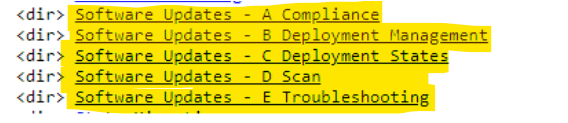
You can use default SCCM patching reports once you install Reporting Services Point and have SSRS reporting working. The following are the 5 default report sections are available as part of SCCM default SSRS.
| Software Updates – A Compliance |
| Software Updates – B Deployment Management |
| Software Updates – C Deployment States |
| Software Updates – D Scan |
| Software Updates – E Troubleshooting |
What is SCCM SUG (Software Update Group)
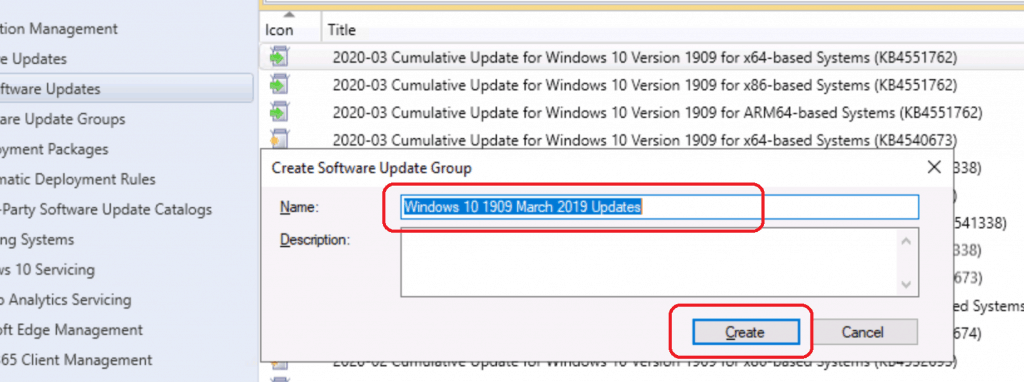
Software Update Group (SUG) is a logic container in Configuration Manager Software Updates workflow to group several Software Updates (aka MS patches) together. Once the Software Update Group is created, you can use the same for better management of the patching process.
You can deploy SUG to SCCM Device Collection(s) and track the deployment progress for that particular SUG. In this post, you will see how to use SUG to filter the Software Updates compliance reporting better.
Read More -> How To Create Deploy New Software Update Patch Package Using SCCM.
Export Software Update Group (SUG) Details from SCCM Console
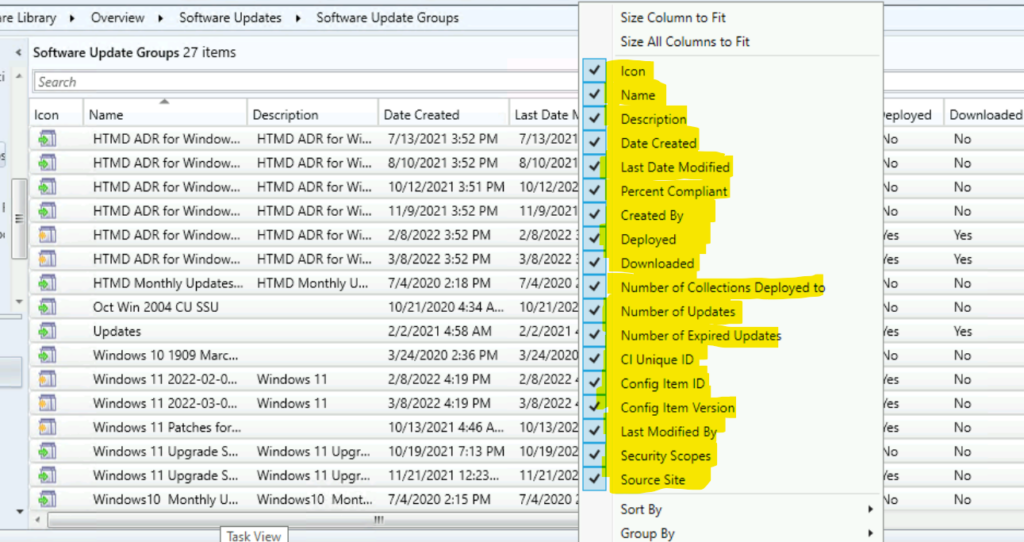
You can export Software Update Group Details from SCCM Console. This is a very quick and effective method to get an overview of SCCM SUG. First, you need to select all the columns from the console Software Update Groups node to get the full details during the export process.
You can use the details received from the Software Update Groups node to troubleshoot SCCM patching issues and get the status of SUG deployments, such as Overall Compliance status of SUG, Downloaded or not, Deployed or not, etc.
- Navigate to \Software Library\Overview\Software Updates\Software Update Groups.
- Right-Click on any of the column tab and select all the available columns as shown in the screenshot below.
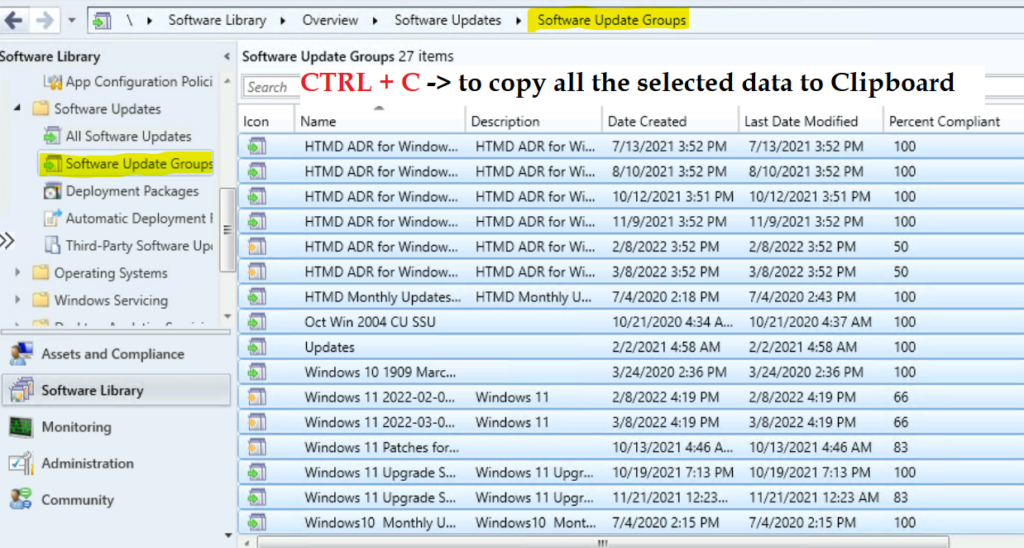
You need to remember that CTRL + A to select all the SUG from the list doesn’t work in the ConfigMgr Admin console selection scenario. You need to choose one SUG and use the up or down arrow to expand the selection of SUGs.
- Select one Software Update Group (SUG) and use the SHIFT + UP or DOWN arrow from the keyboard to select all the other Software Update Groups from the list.
- Select All the SUGs that you want to backup or export.
- Press CTRL + C buttons on the keyboard to copy all the SCCM SUGs from the admin console to the clipboard.
Now, you can open an Excel or Notepad and paste the details of the SCCM Software Update Group from the Clipboard.

SQL Query to Get All Software Update Group SUG Patch Deployments
You can get SCCM Report based on All Software Update Group SUG Patch Deployments using the following SQL query. You have to launch SSMS and paste the following query to get a list of all Software Update Groups-based deployments.
NOTE! – I don’t recommend running this query in a production environment; instead, this should be used only for learning scenarios. This should use only in test labs to get a view of all the Software Update Groups.
For the production scenario, I recommend running the query shared in the below section of the post to get the report on the specific Software Update Group (SUG).
- Open the SQL Server Management Studio (aka SSMS).
- Connect your Database Engine.
- Right Click on your database CM_XXX and click on ‘New Query’
- Copy the following SQL query to find the report All Software Update Group SUG Patch Deployments.
- Click on the Execute button.
         select
          a.AssignmentName as 'Deployment Name',
          ugi.Title as 'SUG Name',
          a.CollectionName as 'Collection Name',
          a.CollectionID as 'Collection ID',
          a.StartTime as Available,
          a.EnforcementDeadline as Deadline,
          a.Assignment_UniqueID as DeploymentID,
          a.LastModificationTime as LastModificationTime
          from v_CIAssignmentToGroup atg
          join v_AuthListInfo ugi on ugi.CI_ID=atg.AssignedUpdateGroup
          join v_CIAssignment a on a.AssignmentID=atg.AssignmentID
                    order by a.AssignmentName
You need to click on Execute button to get the results (SUG Software Update Group Patch Deployments SCCM Report).
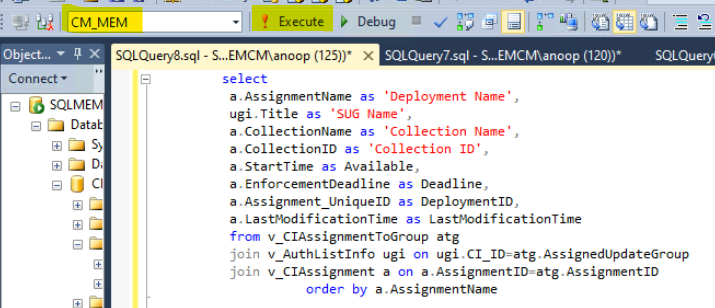
The results of the above SQL Query are based on the SUG Software Update Group Patch Deployments for the lab environment, as shown below.
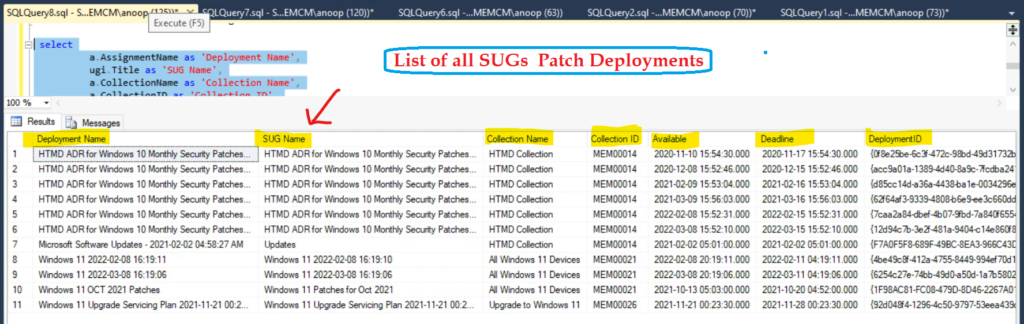
SCCM Report based on Software Update Group SUG Patch Deployments using SQL Query
Let’s check the SQL query to find the SCCM Report based on Software Update Group SUG Patch Deployments. You have to launch SSMS and paste the following SQL query to get a report on the specific SUG based patch deployments.
- Open the SQL Server Management Studio (aka SSMS).
- Connect your Database Engine.
- Right Click on your database CM_XXX and click on ‘New Query’
- Copy the following SQL query to find the report of a specific Software Update Group (aks SUG) Patch Deployments.
- Click on the Execute button.
 select
          a.AssignmentName as 'Deployment Name',
		  ugi.Title as 'SUG Name',
          a.CollectionName as 'Collection Name',
          a.CollectionID as 'Collection ID',
          a.StartTime as Available,
          a.EnforcementDeadline as Deadline,
          a.Assignment_UniqueID as DeploymentID,
          a.LastModificationTime as LastModificationTime
          from v_CIAssignmentToGroup atg
          join v_AuthListInfo ugi on ugi.CI_ID=atg.AssignedUpdateGroup
          join v_CIAssignment a on a.AssignmentID=atg.AssignmentID
          where ugi.Title = 'Windows 11 Patches for Oct 2021'
          order by a.AssignmentName
You can check the results of the above SQL query to get the SUG Software Update Group patch deployments. This helps to get the details of the deployments done based on one particular SUG.
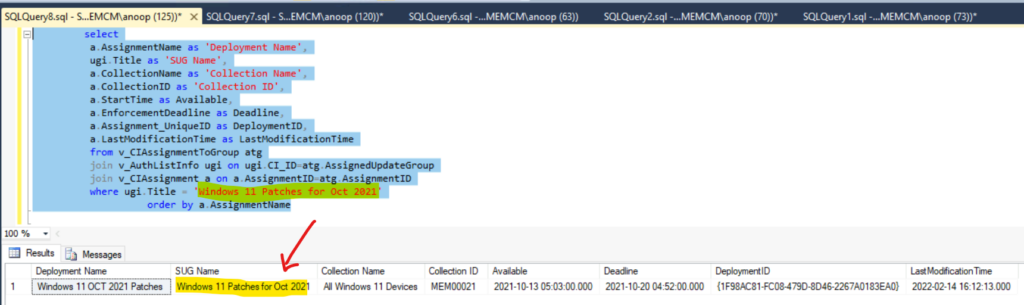
This type of SUG-focused report or SQL query helps troubleshoot patching issues during the monthly patch deployment process.
| Deployment Name | SUG Name | Collection Name | Collection ID | Available | Deadline | DeploymentID | LastModificationTime |
| Windows 11 OCT 2021 Patches | Windows 11 Patches for Oct 2021 | All Windows 11 Devices | MEM00021 | 03:00.0 | 52:00.0 | {1F98AC81-FC08-479D-8D46-2267A0183EA0} | 12:13.0 |





Discussion