






SCCM Asset Intelligence Deprecation and Remove Asset Intelligence Sync Point Role
Let’s learn more about SCCM Asset Intelligence Deprecation and how to Remove SCCM Asset Intelligence Sync Point Role. The AI Sync Point site system role is deprecated as part of the SCCM Asset Intelligence deprecation.
Asset Intelligence is used for a wide variety of features in SCCM (aka ConfigMgr). The Asset Intelligence catalog & Asset Intelligence sync point are already deprecated and are out of support from the Nov 2021 release of SCCM.
More Reading – How To Fix SCCM Prerequisite Errors Warnings and FIX: SCCM Setup Will Not Continue Because Of WARNING In Prerequisite Check Issue.
The detailed list of SCCM deprecated features gives you an overview of other features you must move away from. The CMG classic deployment and macOS support are some other important out of support features announced during the release of SCCM 2203.

The asset intelligence catalog is a set of database tables stored in the SCCM site database. These tables include categorization and identification information for over 300,000 software titles and versions. This feature is also removed from SCCM.
AIUS (Asset Intelligence Update Service Point)
What is the Asset Intelligence synchronization point
An Asset Intelligence synchronization point connects to System Center Online to download Asset Intelligence catalog information and upload uncategorized titles so that they can be considered for future inclusion in the catalog.
You can automatically synchronize the Asset Intelligence catalog synchronization on a schedule. If you don’t enable synchronization on a schedule, you must obtain the updates by using manual synchronization.
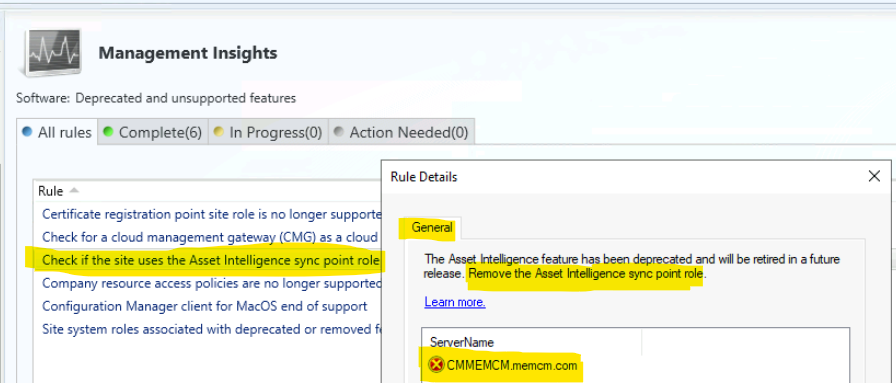
Management Insights to Find Deprecated Features of SCCM
Let’s use Management Insights to Find Deprecated Features of SCCM. There are 6 SCCM management insights rules to find deprecated and unsupported features of SCCM.
- Remove the certificate registration point site system role.
- Remove CMG deployment as a classic cloud service in Azure.
- Remove Asset Intelligence Sync Point role.
- Remove All policies for company resource access features.
- Remove SCCM Clients for macOS.
- Remove Enrollment Proxy point and Enrollment point roles from SCCM.
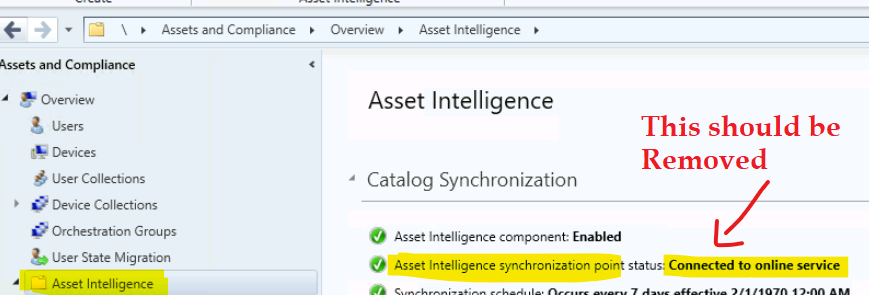
The one role that I will cover in this post is the asset intelligence feature that was deprecated back in Nov 2021. You need to remove the Asset Intelligence Sync point role. I will cover the details in the following section of this post.
Supported Features of SCCM Asset Intelligence
Let’s discuss the Supported Features of SCCM Asset Intelligence in this section. SCCM Asset Intelligence deprecation was a confusing announcement from Microsoft. The clearer details are out there in the documentation now. The only system center online cloud synchronization related components of Asset Intelligence has been deprecated.
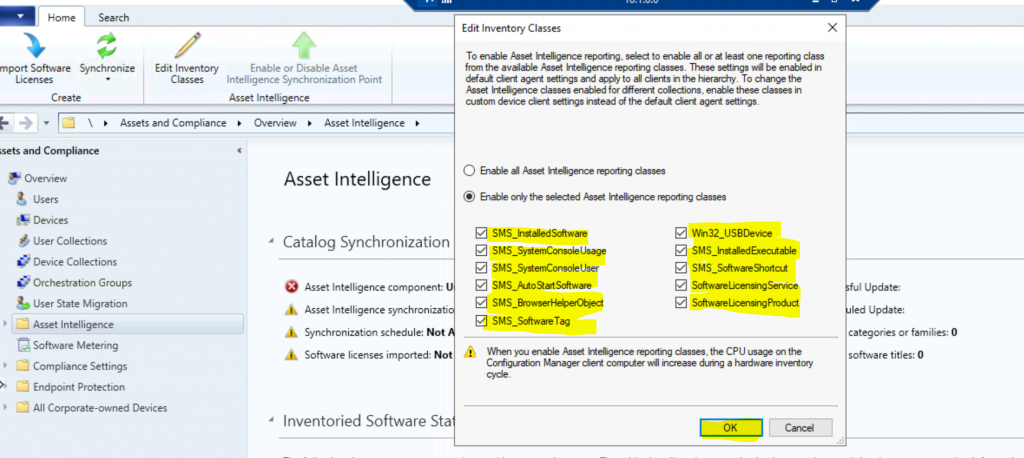
NOTE! – The core components of Asset Intelligence are intact. The Hardware Inventory is one of the powerful features of SCCM Asset Intelligence, and that is not going away.
Let’s check how to find SCCM Asset Intelligence Deprecation and Remove Asset Intelligence Sync Point Role. The following features of SCCM asset intelligence are going to stay with SCCM.
- The inventoried software titles
- The product lifecycle dashboard
- The General License Statement import and reconciliation
- The ability to view the asset intelligence inventory in the console
- The existing static, predefined software title information
- The customization option for the inventoried software title
- Options to add custom software categories, families, and labels
- Options to add custom hardware requirements
Deprecated Features of SCCM Asset Intelligence
The following are the Deprecated Features of SCCM Asset Intelligence. These features are directly linked with the System Center Cloud solution. I think that is the reason for the deprecation of these features.
- Asset intelligence catalog
- Asset intelligence synchronization point
- Microsoft Volume License import and reconciliation
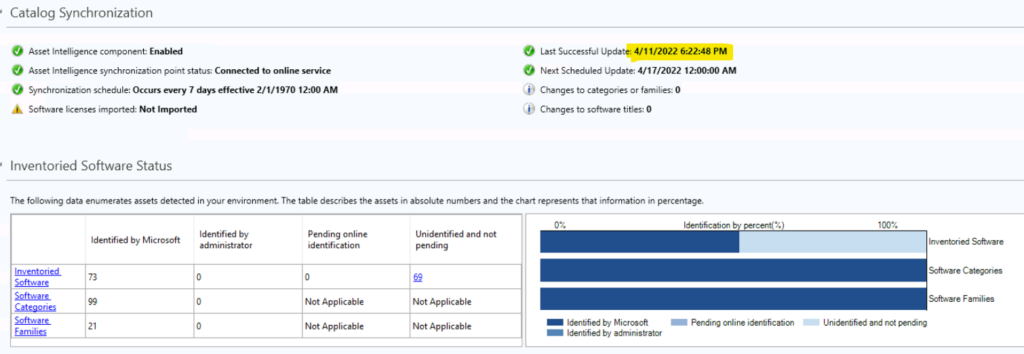
NOTE! – The System Center Online sync still works OK with Asset Intelligence Sync point role (while writing this post). However, the sync can stop any time from now.
You can refer to the AIUpdateSvc.log file to Asset Intelligence Catalog Sync service operational related points such as catalog download from System Center Online services. The following log file snippet gives you a quick overview.
Asset Intelligence Catalog Sync Service Information: 0: Downloading catalog
Asset Intelligence Catalog Sync Service Information: 0:Service URL is https://go.microsoft.com/fwlink/?linkid=2134816&clcid=0x409, Version is ‘2.0’, Timeout is ‘600’ seconds
Asset Intelligence Catalog Sync Service Information: 0: Download catalog processing has completed with watermark ‘295757#6#1454#5145297#4843830#0#0#83#6746#2817645#48207#’
Asset Intelligence Catalog Sync Service Information: 0 : Data/Status copied to outbox
How to Remove SCCM Asset Intelligence Sync Point Role
Learn How to Remove SCCM Asset Intelligence Sync Point Role using the SCCM console. As discussed above, the Asset Intelligence Sync Point Role is out of support from Nov 2022. You get a prerequisite check warning when you upgrade SCCM infrastructure to the 2203 version of SCCM.
I recommend removing the Asset Intelligence sync point role at the earliest to avoid prerequisite check warnings. The following steps might help to remove SCCM AI Sync Point Role.
- Launch the SCCM console.
- Navigate to the Administration workspace.
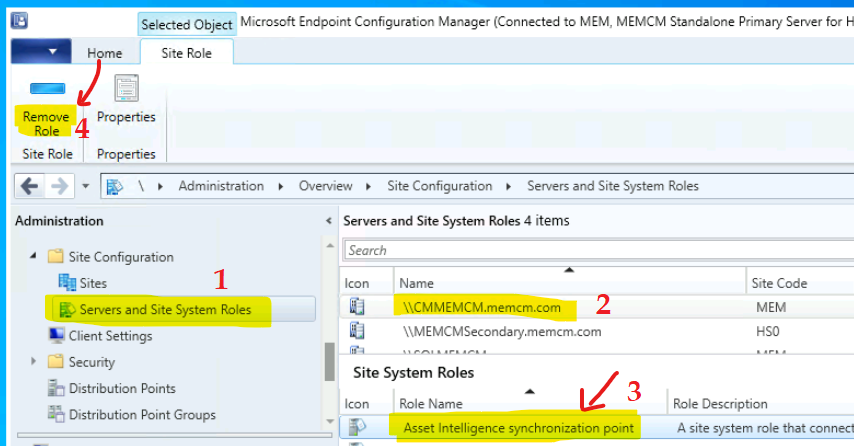
- Expand Site Configuration, and select the Servers and Site System Roles node.
- Select the site system server where Asset Intelligence Sync Point Role is installed.
- In the Site System Roles details pane, select the Asset Intelligence Synchronization Point.
- From the ribbon menu, select Remove Role.
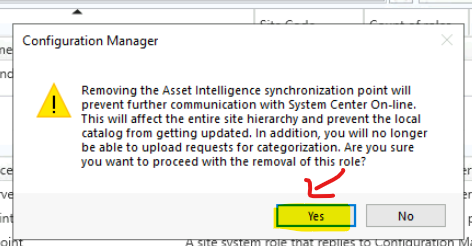
Removing the Asset Intelligence synchronization point will prevent further communication with System Center online. This will affect the entire site hierarchy and prevent the local catalog from getting updated. In addition, you will no longer be able to upload requests for categorization. Are you sure you want to proceed with the removal of this role?
Click on the YES button to confirm that you want to remove the role.
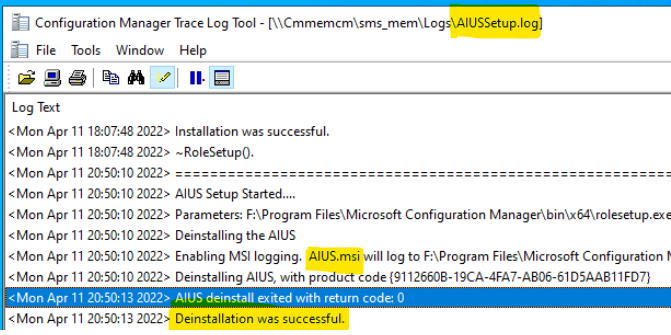
AIUSSetup.Log Asset Intelligence Sync Point Role
The log AIUSSetup.Log helps confirm the uninstall or removal of the Asset Intelligence Sync Point Role from SCCM infra. The following are some log snippets that you can refer to confirm the Asset Intelligence Sync Point Role removal.
We have already discussed SCCM Asset Intelligence Deprecation and Remove Asset Intelligence Sync Point Role. In this section of the post, you learn more about the removal of the AI sync point role and its verification.
AIUS Setup Started….
Parameters: F:\Program Files\Microsoft Configuration Manager\bin\x64\rolesetup.exe /deinstall /siteserver:CMMEMCM AIUS 0
Deinstalling the AIUS
Enabling MSI logging. AIUS.msi will log to F:\Program Files\Microsoft Configuration Manager\logs\AIUSMSI.log
Deinstalling AIUS, with product code {9112660B-19CA-4FA7-AB06-61D5AAB11FD7}
AIUS deinstall exited with return code: 0
Removing AIUS Registry.
You can also refer to AIUSMSI.log to the following line to confirm the removal process of AIUS (Asset Intelligence Update Service Point).
Windows Installer removed the product. Product Name: Asset Intelligence Update Service Point. Product Version: 5.00.9078.1000. Product Language: 1033. Manufacturer: Microsoft Corporation. Removal success or error status:
PowerShell Options to Remove AI Sync Point
Let’s find the PowerShell script options to remove the AI Sync point from SCCM to avoid unsupported scenarios and prerequisites and check errors with the future version of SCCM CB.
The following PowerShell command is for the removal of a single AI sync point. If you have many AI sync points to remove, you can use the second PowerShell commands list.
Remove-CMAssetIntelligenceSynchronizationPoint -SiteSystemServerName "CMMEMCM.memcm.COM" -SiteCode "MEM"$AIsync = Get-CMAssetIntelligenceSynchronizationPoint -SiteSystemServerName "CMMEMCM.memcm.com" -SiteCode "MEM"
Remove-CMAssetIntelligenceSynchronizationPoint -InputObject $AIsync
SQL Server reported SQL message 15401
After the removal of the AI sync point role, we got some alerts on the hierarchy manager. We couldn’t fix it because the SQL DB is trying to add a local user of the primary server to the SQL DB which is hosted on a different server.
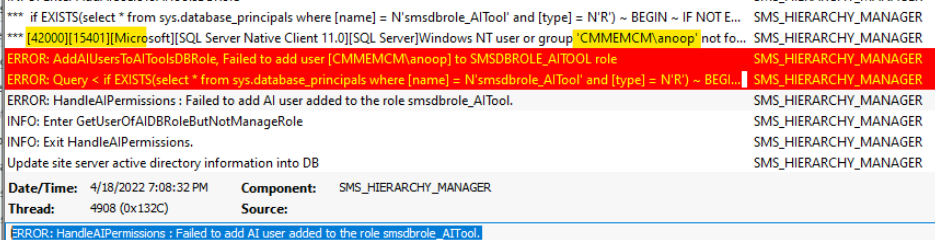
I have checked the \Monitoring\Overview\System Status\Component Status SMS_Hierarchy_Manager and got the following error message.
CMMEMCM.memcm.com SMS_HIERARCHY_MANAGER 620 Microsoft SQL Server reported SQL message 15401, severity 16: [42000][15401][Microsoft][SQL Server Native Client 11.0][SQL Server]Windows NT user or group ‘CMMEMCM\anoop’ not found. Check the name again. Please refer to your Configuration Manager documentation, SQL Server documentation, or the Microsoft Knowledge Base for further troubleshooting information.
I also checked the hman.log to get more details on this error and it seems the SQL is not able to add the local user from the primary server to SQL server DB. This is not related to SCCM Asset Intelligence Deprecation and Remove Asset Intelligence Sync Point Role issue. This could be a known issue with the 2203 version.
*** if EXISTS(select * from sys.database_principals where [name] = N’smsdbrole_AITool’ and [type] = N’R’) ~ BEGIN ~ IF NOT EXISTS(SELECT * FROM sys.server_principals where sid = SUSER_SID(N’CMMEMCM\anoop’)) ~ CREATE LOGIN [CMMEMCM\anoop] FROM WINDOWS ~ ~ IF NOT EXISTS(SELECT * FROM sys.database_principals where sid =SUSER_SID(N’CMMEMCM\anoop’)) ~ CREATE USER [CMMEMCM\anoop] FROM LOGIN [CMMEMCM\anoop] ~ ~ IF NOT EXISTS (SELECT * FROM sys.database_role_members ~ where member_principal_id = USER_ID(N’CMMEMCM\anoop’) and ~ role_principal_id =USER_ID(N’smsdbrole_AITool’)) ~ exec sp_addrolemember N’smsdbrole_AITool’, N’CMMEMCM\anoop’ ~ END
*** [42000][15401][Microsoft][SQL Server Native Client 11.0][SQL Server]Windows NT user or group ‘CMMEMCM\anoop’ not found. Check the name again.
ERROR: AddAIUsersToAIToolsDBRole, Failed to add user [CMMEMCM\anoop] to SMSDBROLE_AITOOL role.
ERROR: Query < if EXISTS(select * from sys.database_principals where [name] = N’smsdbrole_AITool’ and [type] = N’R’) ~ BEGIN ~ IF NOT EXISTS(SELECT * FROM sys.server_principals where sid = SUSER_SID(N’CMMEMCM\anoop’)) ~ CREATE LOGIN [CMMEMCM\anoop] FROM WINDOWS ~ ~ IF NOT EXISTS(SELECT * FROM sys.database_principals where sid =SUSER_SID(N’CMMEMCM\anoop’)) ~ CREATE USER [CMMEMCM\anoop] FROM LOGIN [CMMEMCM\anoop] ~ ~ IF NOT EXISTS (SELECT * FROM sys.database_role_members ~ where member_principal_id = USER_ID(N’CMMEMCM\anoop’) and ~ role_principal_id =USER_ID(N’smsdbrole_AITool’)) ~ exec sp_addrolemember N’smsdbrole_AITool’, N’CMMEMCM\anoop’ ~ END
ERROR: HandleAIPermissions : Failed to add AI user added to the role smsdbrole_AITool. SCCM Asset Intelligence Deprecation and Remove Asset Intelligence Sync Point Role.
Conclusion – SCCM Asset Intelligence Deprecation and Remove Asset Intelligence Sync Point Role
You don’t have to worry after hearing the SCCM Asset Intelligence Deprecation news. As per my analysis, nothing related to hardware inventory, custom hardware inventory, (basic) software inventory, etc., is not going away.
The Asset Intelligence components connected to System Center Online services are already out of support. Hence you should remove those components such as Asset Intelligence Sync Point Role.
While writing this post, the installation of the Asset Intelligence Sync Point Role is not blocking the SCCM CB upgrade or update to the latest version. However, Microsoft can implement a block in place during the update prerequisite check with the future versions of SCCM.
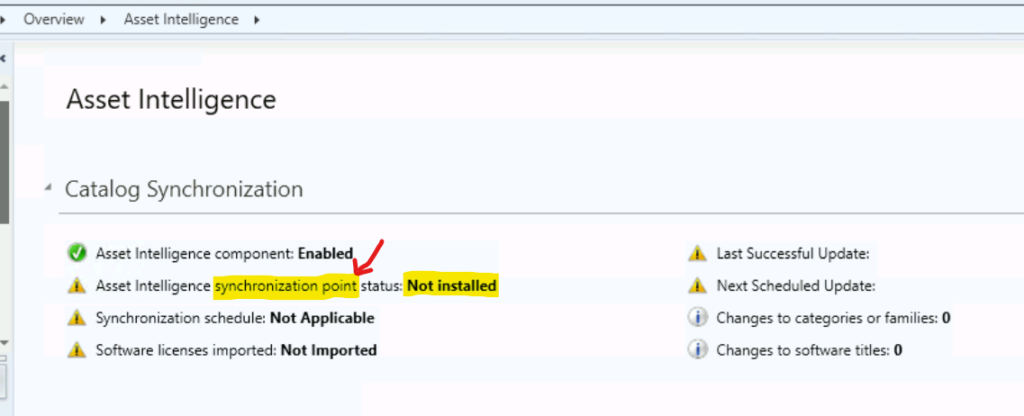
As you can see below, the Asset Intelligence Sync Point is not installed, but Asset Intelligence is ENABLED. This is a supported scenario.




My company requires us to uninstall non-license applications from each and every client for audit purposes and license issues. Can we carry out this activity with SCCM?
Upon connecting to SCCM, the required application is automatically uninstalled.
The installation of the Asset Intelligence Sync Point Role is still not blocking the SCCM update to the latest version, i upgraded my SCCM to 2403 with warning only.