






FIX SCCM Management Point MP Rotation Issue Partial WSUS Sync Issue
Many folks like me have been troubled by the SCCM MP rotation issue. SCCM has a workaround for the Management Point Rotation issue. More details about the MP rotation issue are in SCCM’s “Workaround for Untrusted Forest SCCM 2012 MP Rotation Issue“.
FIX MP Rotation with Registry—Microsoft introduced a registry key called “AllowedMPs.” With this key, you can force the client to communicate with a specific MP that you’ve mentioned in the registry key’s value.
You can set the FQDN of the MP that your client wants to communicate with. Another update in ConfigMgr / SCCM 2012 R2 CU3 relates to software update sync. Microsoft has introduced an essential registry workaround to avoid partial software update Sync of children’s primary or secondary sites.
Sometimes, your SCCM 2012 R2 CAS or primary site is under heavy load, and then the Child sites may perform partial WSUS synchronization.

FIX SCCM Partial WSUS Synchronization
You can set a value for the registry key called “SyncGracePeriod” to avoid this. This grace period will help to prevent partial software update sync scenarios in your environment. The maximum grace period allowed is 10 minutes.
- Fix SCCM Failed to Run Task Sequence because it is not active yet
- FIX: SCCM There Are No Task Sequences Available For This Computer
- FIX SCCM Agent Installation Error 0x80200010
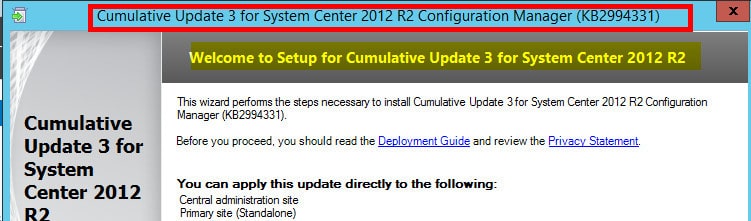
Also, ConfigMgr SCCM 2012 R2 CU3 has included support for another list of non-windows operating systems for application and package deployment. Installation of the CM 12 R2 CU3 is very straightforward.
The Logfile related to installation is located at Windows/Temp/cm12-r2cu3-kb2994331-x64-enu.log and cm12-r2cu3-kb2994331-x64-enu.msi.log. Installation-related errors can be reviewed from these logs. SCCM 2012 R2 CU3 admin console update associated log file is configmgr2012adminui-r2-kb2994331-i386.msp.log.
In this post, I will provide details about two workarounds provided by Microsoft.
- How do I set a registry key to stop the SCCM ConfigMgr 2012 MP rotation Issue?
- How do we set a registry key to stop the SCCM ConfigMgr 2012 Partial Software Update Sync Issue?
- How do we set the registry key to stop the SCCM ConfigMgr 2012 MP rotation Issue?
- Install the SCCM 2012 R2 CU3 update on your site servers.
- Install SCCM 2012 R2 CU3 on the client machine
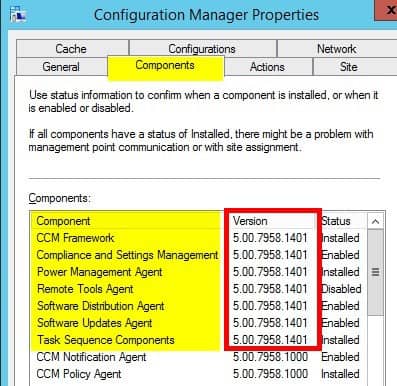
- SCCM 2012 R2 CU3 Client version must be updated to 5.00.7958.1401
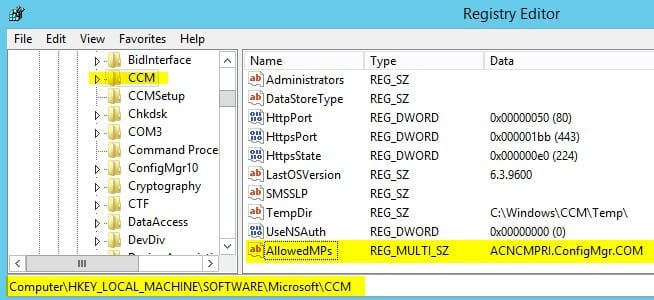
3. Navigate to the registry key HKEY_LOCAL_MACHINE\SOFTWARE\Microsoft\CCM . Create a REG_MULTI_SZ registry value named “AllowedMPs“. Add the FQDN name of MP to the registry value mentioned in the following picture. This registry entry would be useful for the scenarios explained in the post “SCCM 2010 Workaround To Delete Collections Issue ConfigMgr HTMD Blog (anoopcnair.com).
| FIX SCCM Partial WSUS Synchronization | Details |
|---|---|
| CCM Framework | 5.00.7958.1401 |
| Compliance and Settings Management | 5.00.7958.1401 |
| Power Management | 5.00.7958.1401 |
| Software Distribution Agent | 5.00.7958.1401 |
| Software Update Agent | 5.00.7958.1401 |
| Task Sequence Components | 5.00.7958.1401 |
The “AllowedMPs” entry will restrict which SCCM 2012 management point (MP) a client can communicate with. In the following example, my client will only communicate with the MP FQDN provided in the value “ACNCPRI.ConfigMgr.COM“.
Lcoationservice.log will notify you about ignoring the rest of the MPs in the MPlist and accepting only one MP in AllowedMPs.
MP List is forced, ignoring MP 'ACNCMMP3.ConfigMgr.com'
MP List is forced, ignoring MP 'ACNCMMP4.ConfigMgr.com'
MP List is forced, ignoring MP 'ACNCMMP5.ConfigMgr.com'

How Do We Set the Registry Key to Stop the SCCM ConfigMgr 2012 Partial Software Update Sync Issue?
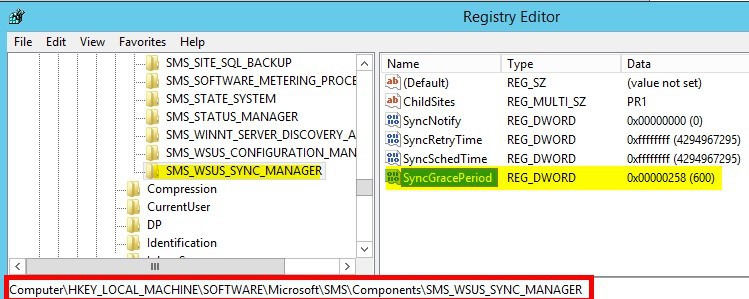
Log in to the topmost site server in your SCCM ConfigMgr 2012 R2 hierarchy. It could be a ConfigMgr 2012 CAS server or a standalone ConfigMgr Primary Server. Navigate to HKEY_LOCAL_MACHINE\SOFTWARE\Microsoft\SMS\Components\SMS_WSUS_SYNC_MANAGER.
- 3. Create a New sub key SyncGracePeriod with REG_DWORD value 600 seconds (10 minutes)
The partial synchronization issue can occur when the WSUS Synchronization Manager component on a primary site begins synchronization before WSUS has completed processing all updates metadata. To prevent this scenario, the following registry subkey can be configured to use a new value in seconds.
We are on WhatsApp now. To get the latest step-by-step guides, news, and updates, Join our Channel. Click here. HTMD WhatsApp.
Author
Anoop C Nair has been Microsoft MVP from 2015 onwards for 10 consecutive years! He is a Workplace Solution Architect with more than 22+ years of experience in Workplace technologies. He is also a Blogger, Speaker, and leader of the Local User Group Community. His main focus is on Device Management technologies like SCCM and Intune. He writes about technologies like Intune, SCCM, Windows, Cloud PC, Windows, Entra, Microsoft Security, Career, etc..




Hi Anoop,
I am having standalone site with SCCM 2012 R2 (WINDOWS 2008 R2 standard SP1 Server OS), shall I go head for this CU3..
Best Regards,
Arshad
StaffYes Arshad ! You can !
Hi Anoop,
Install SCCM 2012 R2 CU3 on client machine
I would like know that we need to install cu3 updates manually By Collation from package on all client systems &
servers
or it install automatically from sccm 2012 R2 to all clients
Best Regards,
Arshad
StaffDuring the installation SCCM 2012 R2 CU3, it will ask for the creation of client installation package x64 and x86. You can use those packages to update the client systems automatically.
Regards
Anoop
Hi Anoop,
Thanks for support & Your feed back.
(1) yes I agree that the package is created during installation. But read some forms we need to push By Collations not by
If I go to administration–> site configuration –> sites in the home tab there is a button called Hierarchy settings, the last tab is about Automatic client Upgrade……?
Fine now this not big issue , now My concern is
(2)After upgrade to CU3 I found that My components status unknown & site system roles are fine. But My system logs are not
updating & no logs error
.As I read the some forms that after installation of CU1 also on sccm 2012 R2 COMPNNETS STATUS going to UNKNOWN,
some comments mentioned that wait for more time it will be online. any Bugs on SCCM 2012 R2…?
on My SCCM 2012 R2 after updates CU3 shows as components
CCM Framework = 5.00.7958.1401.
Compliance and Settings Management = 5.00.7958.1000.
Power Management = 5.00.7958.1000.
Remote Tool Management = 5.00.7958.1000.
Software Distribution Agent = 5.00.7958.1000
Software Update Agent = 5.00.7958.1000
Task Sequence Components = 5.00.7958.1000
I will wait till Sunday , otherwise I will revert back My Backup snapshot to SCCM 2012 R2
Kindly Advise.
Best Regards,
Arshad
Staff1. Automatic Upgrade doesn’t work for CUs… It only works for SPs and R2, R3 etc.
2. First step, I would look into is CU3 installation log files. That may give you some idea about the failures (if there is any).
Regards
Anoop
Dear Anoop,
No such any error on 2012 2 cu3 log file (configmgr2012adminui-r2-kb2994331-i386.msp.log)
But you can find below this 3 Lines on Red Color
(1)MSI (s) (24:60) [12:19:43:374]: Windows Installer installed an update. Product Name: System Center 2012 R2 Configuration Manager Console. Product Version: 5.00.7958.1000. Product Language: 1033. Manufacturer: Microsoft Corporation. Update Name: ConfigMgr2012AdminUI-R2-KB2994331-I386. Installation success or error status: 0.
(2)MSI (s) (24:60) [12:19:43:388]: Windows Installer reconfigured the product. Product Name: System Center 2012 R2 Configuration Manager Console. Product Version: 5.00.7958.1000. Product Language: 1033. Manufacturer: Microsoft Corporation. Reconfiguration success or error status: 0.
(3)MSI (s) (24:60) [12:19:43:395]: Unable to delete the file. LastError = 32
so what this indicate….?
also after installation of CU3 My sms Executive services not up or working… also all logs file stop updateting after installation of
CU3 (BUT NO ANY ERROR)
Best Regards,
Arshad
Hello Anoop,
We have on CAS and 10 primary and 20 secondary server, in one secondary server we are facing some MP issues regularly. If we are updating CU3, is it chance to overcome this MP issue? please suggest,
Regars,
Abdul
StaffWhat kind of MP issues Abdul ? It will fix the MP rotation issue for sure.
Regards
Anoop
MP rotation is only for primary sites ??
StaffCould you please explain in more details ?
This is the MP rotation I was talking about https://www.anoopcnair.com/2014/03/07/configmgr-sccm-2012-mp-selection-forest-trust-related-bug/
Regards
Anoop
@ Anoop and Abdul, this actually can’t be used to force clients to talk to specific management points in a secondary site. See my post here: http://blogs.technet.com/b/jchalfant/archive/2014/09/22/management-point-affinity-added-in-configmgr-2012-r2-cu3.aspx for more information. Abdul, if your clients aren’t talking correctly to a secondary site’s MP as a proxy MP it’s likely an issue with your boundaries/boundary group for the secondary sites location. – Justin
StaffYes Justin . That is 100 % true. Great post !! Thank you for posting here. 🙂 In my blog post, I’ve not mentioned MP rotation on secondary sites.
Regards
Anoop
Anoop and Justin, I am getting an error like “Failed to get DP locations as the expected version from MP “compuername.com”. Error 0x8000ffff “
Hello, do you know a way to perform a silent (unattended) install of CU3?
Hi Anoop. We make use of MP replica databases. Before installing CU3 do we first need to remove the Replication Publications and subscriptions? Just like it was needed with the upgrade to R2?
Hi Anoop, this post is amazing, I just followed and updated my SCCM 2012 R2. Just a curious question, it showed (3) in registry key; and “About” was also showed Version 1401. But when I quickly checked on Site Properties, it still showed Version 1000. Is there anything that I might did wrongly? It would be great if you can help me to figure out. Cheers, Thanks you,
StaffSite properties won’t get changes I guess !
Hi Anoop,
In previous versions the -Id parameter was available for the cmdlet Get-CMSoftwareUpdate. Appears that it was removed in this version. Executing the command “Get-CMSoftwareUpdate -Id 1234” will either work and return nothing or throw an error that the parameter does not map. Check it and see. Unfortunately for me, I used this parameter in some scripts and now I have to figure out how to use description.
Jim
I have a problem that there is no check boxes appears into the SUP Language properties , so if you open SCCM 2012 R2 console and go to Administration -> sites -> Settings -> Software Update Point -> Languages , it will appears blank no check boxes appears, anyone can help on this ?
Hi Anoop,
I need help on SCCM 2012 R2,
SCCM \WSUS Sync issues
Sync failed: WSUS update source not found on site IND. Please refer to WCM.log for configuration error details.. Source: getSiteUpdateSource SMS_WSUS_SYNC_MANAGER 5/1/2016 2:00:01 AM 5036 (0x13AC)
Please advise