






SCCM ConfigMgr Remote SQL Site System Server SMS Executive Component Installation Failed
SCCM ConfigMgr Remote SQL Site System server SMS Executive component Installation failed. Recently, Microsoft has released SCCM ConfigMgr.
After the download, more details about CU3 are provided. Install SCCM ConfigMgr 2012 R2 CU3, stop MP rotation, and fix the partial WSUS Sync Issue. SCCM was installed successfully on the primary site.
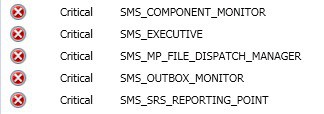
However, we’ve noticed that MonitoringOverviewSystem StatusComponent Status is critical against SQL Site Server. As part of the SCCM ConfigMgr 2012 R2 CU3 installation (site reset), the SQL server SMS executive component was supposed to get reinstalled. However, the reinstallation was not successful.
In this post, you’ll find all the details about the issue where installing the SMS Executive component on the SCCM ConfigMgr Remote SQL Site System server has failed.

- Latest Fixes for SCCM 2207 KB15152495 Hotfix Update Rollup
- Top 50+ Latest SCCM Interview Questions and Answers
| Index |
|---|
| SCCM ConfigMgr Remote SQL Site System Server SMS Executive Component Installation Failed |
| SiteComp.log |
| Troubleshooting |
SCCM ConfigMgr Remote SQL Site System Server SMS Executive Component Installation Failed
Discuss the SCCM ConfigMgr Remote SQL Site System server SMS Executive component Installation failure. The details are explained below.
| Remote SQL Site System Server | Status |
|---|---|
| SMS_COMPONENT_MONITOR | Critical |
| SMS_EXECUTIVE | Critical |
| SMS_MP_FILE_DISPATCH_MANAGER | Critical |
| SMS_OUTBOX_MONITOR | Critical |
| SMS_SRS_REPORTING_POINT | Critical |
SiteComp.log
I validated the SiteComp.log at the primary server, and it gave the following error: The exact issue is not represented in the log file. Logfile says rolesetup.exe is missing, but it was present in the location 🙂
The SMS Executive Component of the SCCM 2012 Site System Server could be unhealthy for some other reason. Well, we’ll come to that in a minute. SCCM ConfigMgr Remote SQL Site System server SMS Executive component Installation failed.
STATMSG: ID=1083 SEV=E LEV=D SOURCE="SMS Server" COMP="SMS_SRS_REPORTING_POINT" SYS=ACNCMPRISQL.ConfigMgr.com SITE=PRI PID=5616 TID=6872 GMTDATE=Thu Sep 25 23:17:21.181 2014 ISTR0="SMS_SERVER_BOOTSTRAP_ACNCMPRI" ISTR1="ACNCMPRISQL.ConfigMgr.com" ISTR2="ACNCMPRISQL.ConfigMgr.comD$SMSbinx64rolesetup.exe" ISTR3="/deinstall" ISTR4="" ISTR5="The file "ACNCMPRISQL.ConfigMgr.comD$SMSbinx64rolesetup.exe" does not exist." ISTR6="SMS_SRS_REPORTING_POINT" ISTR7="" ISTR8="" ISTR9="" NUMATTRS=0
Execution of "ACNCMPRISQL.ConfigMgr.comD$SMSbinx64rolesetup.exe /deinstall /siteserver:ACNCMPRI.ConfigMgr.com" on server ACNCMPRISQL.ConfigMgr.com failed: The file "ACNCMPRISQL.ConfigMgr.comD$SMSbinx64rolesetup.exe" does not exist.
I tried taking MSTSC (RDP) of the SQL Server, and an exciting error came up. I could not take the remote, and it gave me the following error: What should I do next?
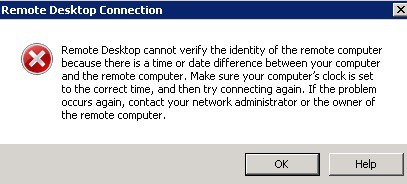
“Remote Desktop cannot verify the remote computer’s identity because there is a time or date difference between your computer and the remote computer. Make sure your computer’s clock is set to the correct time, and then try connecting again; contact your network administrator or the owner of the remote computer”.
I did some research (search) on the error mentioned above. What could be the issue? Apart from some articles on the Windows 7 Operating System, nothing much was found. However, our SCCM ConfigMgr 2012 SQL server is Windows Server 2008 R2.
Troubleshooting
I tried the same old solution, “restarting the server,” as troubleshooting. The next question was how to restart the server when you cannot take RDP (MSTSC) and don’t have the server’s ILO details. The “Shutdown—i” command was a suitable option for restarting the server.
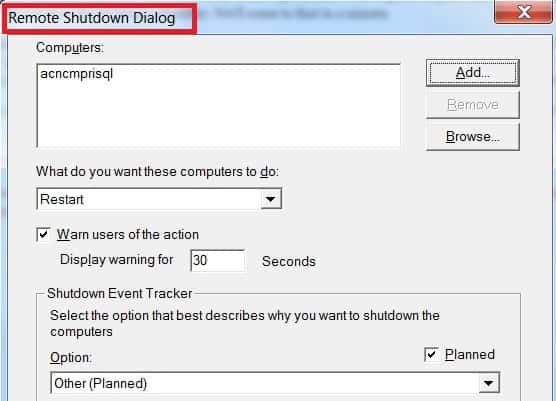
After restarting the SCCM ConfigMgr SQL DB server, I could log in. I checked the log files (SMSExec.log, CompMon.log, etc.) located at “SMSLogs.” The logs have not been updated since the primary server’s SCCM ConfigMgr 2012 R2 CU3 update.
What next? I don’t want to wait until the next reinstall effort from the SCCM ConfigMgr site server to the remote SQL site system server. I bounced back the services (SMS Executive and SMS Component). Phew… 🙂 The SCCM ConfigMgr Remote SQL Site System server SMS Executive component Installation failed.
The server was able to find the “rolesetup.exe“, which was missing last time around 🙂 After a few minutes, the SQL server SMS Executive component was successfully reinstalled, and “all is well” now !! Following are some lines of SiteComp.log at the SCCM ConfigMgr 2012 primary server after the restart.
ACNCMPRISQL.ConfigMgr.comD$SMSbinx64rolesetup.exe /deinstall /siteserver:ACNCMPRI." executed successfully on server ACNCMPRISQL.ConfigMgr.com.
Starting service SMS_SERVER_BOOTSTRAP_ACNCMPRI with command-line arguments "PRI D:SMS /deinstall ACNCMPRISQL.ConfigMgr.comD$SMSbinx64rolesetup.exe SMSSRSRP 262171
ACNCMPRISQL.ConfigMgr.comD$SMSbinx64rolesetup.exe /install /siteserver:ACNCMPRI.REG." executed successfully on server ACNCMPRISQL.ConfigMgr.com.
Installed file ACNCMPRISQL.ConfigMgr.comD$SMSbinx64rolesetup.exe.
 Starting service SMS_SERVER_BOOTSTRAP_ACNCMPRI with command-line arguments "PRI D:SMS /install ACNCMPRISQL.ConfigMgr.comD$SMSbinx64rolesetup.exe SMSSRSRP 262171
Resources
SCCM Related Posts Real World Experiences Of SCCM Admins
We are on WhatsApp now. To get the latest step-by-step guides, news, and updates, Join our Channel. Click here. HTMD WhatsApp.
Author
Anoop C Nair is Microsoft MVP from 2015 onwards for consecutive 10 years! He is a Workplace Solution Architect with more than 22+ years of experience in Workplace technologies. He is a Blogger, Speaker, and Local User Group Community leader. His main focus is on Device Management technologies like SCCM and Intune. He writes about technologies like Intune, SCCM, Windows, Cloud PC, Windows, Entra, Microsoft Security, Career etc…




Discussion