






New Features of Configuration Manager Technical Preview 2204
In this post, you will see the list of features released in ConfigMgr Technical Preview 2204. Microsoft has released the first Technical Preview Version, after announcing SCCM 2203 Production Version.
ConfigMgr Technical Preview 2204 comes with two newly added features. Features available in a previous version of the technical preview remain available in later versions. The Configuration Manager Technical Preview 2204 includes –
- Administration Service Management option
- Folders for automatic deployment rules (ADRs)
Technical Preview Branch releases give you an opportunity to try out new Configuration Manager features in a test environment before they are made generally available.
In the previous technical preview version, Microsoft introduced a dark theme for SCCM Console and it is added to the production release of configuration manager version 2203. The addition of dark mode in the SCCM Console is more exciting. How many of you like dark mode? Enable Dark Theme for SCCM Console | Easy Method

The 2203 version of SCCM is now generally available for all the customers for production use. Let’s learn how to perform SCCM 2203 Upgrade using the following step-by-step guide, SCCM 2203 Upgrade Guide with Top 5 Best New Features.
Important⚠️- The technical preview branch of Configuration Manager is not supported for use in a production environment. The technical preview is licensed for use only in a lab environment.
Download Technical Preview
When you install a new technical preview site, use the latest baseline version. After installing a baseline version, use in-console updates to bring your installation up to date with the most recent Technical preview version 2204.
Here’s how you can download a baseline Technical Preview 2202 version from the Evaluation Center.
First, install a baseline version of the technical preview branch. After installing a baseline version, then use in-console updates to bring your installation up to date with the most recent preview version. Typically, new versions of the technical preview are available each month.
Let’s check how to build Microsoft Endpoint Configuration Manager aka MECM Technical Preview LAB – How to Build Configuration Manager Technical Preview LAB | SCCM
Upgrade Technical Preview Version
ConfigMgr Technical Preview builds installation is active for 90 days before it becomes inactive. You need to install the available new technical preview updates within 90 days before the technical preview build expires. Typically, new versions of the technical preview are available each month.
To install Configuration Manager Technical Preview 2204 update –
- Launch the Configuration Manager console.
- Go to Administration > Overview > Updates and Servicing node.
- Right click Configuration Manager Technical Preview 2204 and click Install Update Pack.
- On the General tab, You can ignore the prerequisite check warnings. Click Next.
- On the Features tab, select the new features that you want to enable in technical preview 2204.
- Complete all the steps. You are ready to go.
New Features in Configuration Manager Technical Preview 2204
Features in Configuration Manager technical preview version 2204, Let’s see what the features and improvements of Configuration Manager 2204 Technical Preview are –
Administration Service Management Option
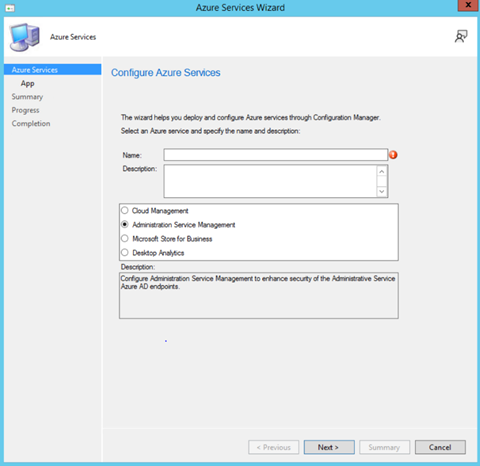
Starting in Configuration Manager Technical Preview 2204, When configuring Azure Services, a new option called Administration Service Management is now added for enhanced security.
Selecting this option allows administrators to segment their admin privileges between cloud management gateway (CMG) and administration service. By enabling this option, access is restricted to only administration service endpoints. Configuration Management clients will authenticate to the site using Azure Active Directory.
Folders for Automatic Deployment Rules (ADRs)
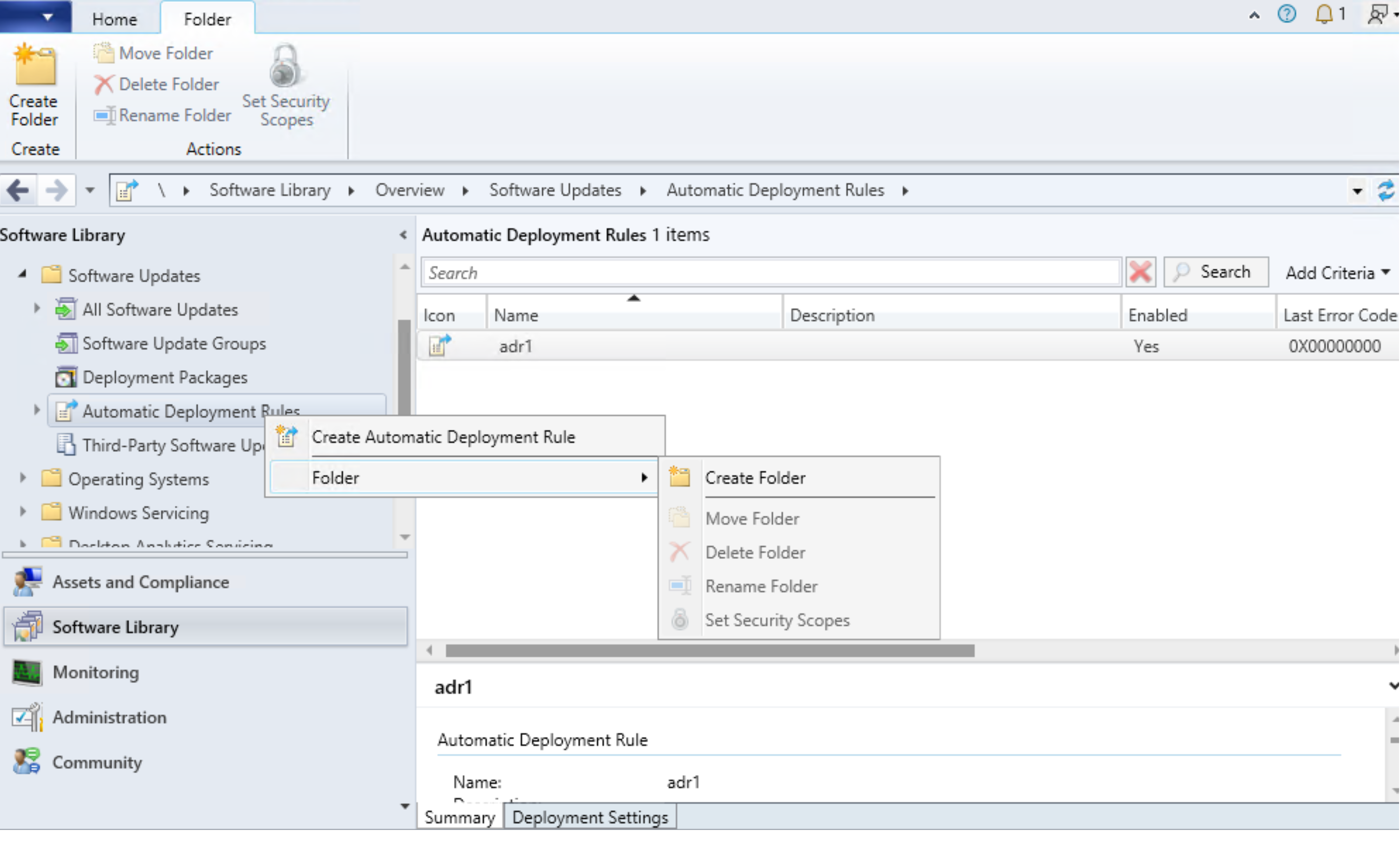
Admins can now organize ADRs by using folders. This change allows for better categorization and management of ADRs. Folder management for ADRs is also supported with PowerShell cmdlets.




Could anyone share link or directly ISO of SCCM TP 2204? Evaluation Center is down.
StaffYes the direct links are updated here https://www.anoopcnair.com/microsoft-evaluation-center-portal-is-down/