






FIX SCCM Failed to Resolve Selected Task Sequence Dependencies Code 0x80040104
Let’s check how you can FIX Failed to Resolve Task Sequence Dependencies 0x80040104. You might encounter a prompt message Failed to Run Task Sequence while performing Operating System Deployment with SCCM Task Sequence.
The Failed to Run Task Sequence message is generic, and the solution could be different based on the details you get into the logs.
This usually happens when the associated Packages, Applications to the task sequence have not been properly distributed to the distribution point or groups.
For OSD Troubleshooting, First of all, you will need to understand what is the meaning of the error code. You can try to use the method to translate SCCM Error Codes To Error Messages.

Here you won’t be able to translate the error code for the scenarios, Examining the SMSTS log for task sequence failure issues is always recommended to help you understand the failure prompt. More you can explore SCCM OSD Task Sequence Troubleshooting Steps by Step Ultimate Guide SMSTS.log.
- Fix SCCM Import New Driver Wizard Completed with Errors
- Fix SCCM PXE Issues with C Type Network Adapter Duplicate MACID
- SCCM Deployment Failed to Resolve Task Sequence Dependencies 0X80040102
Issue Description – SCCM Failed to Resolve Selected Task Sequence Dependencies Code 0x80040104
The task sequence error appears when you have started the deployment. Once we select any specific Task Sequence from the Wizard, the machine downloads the policy for the same and proceeds with resolving dependencies for all the content associated with the task sequence.
Before SCCM Task Sequence execution starts, the machine resolves the dependencies, which checks for the Content-Location for each package associated with the Task Sequence.
It will proceed with SCCM Task Sequence only if it can receive at least one content location for each package. If it cannot find any of the packages on the Distribution Points, it will fail to resolve the dependencies. This is mostly due to Boundary issues or package distribution issues.
Here the Task Sequence fails with the following error message –
This task sequence cannot be run because a package referenced by the task sequence could not be found. For more information, contact your system administrator or helpdesk operator.
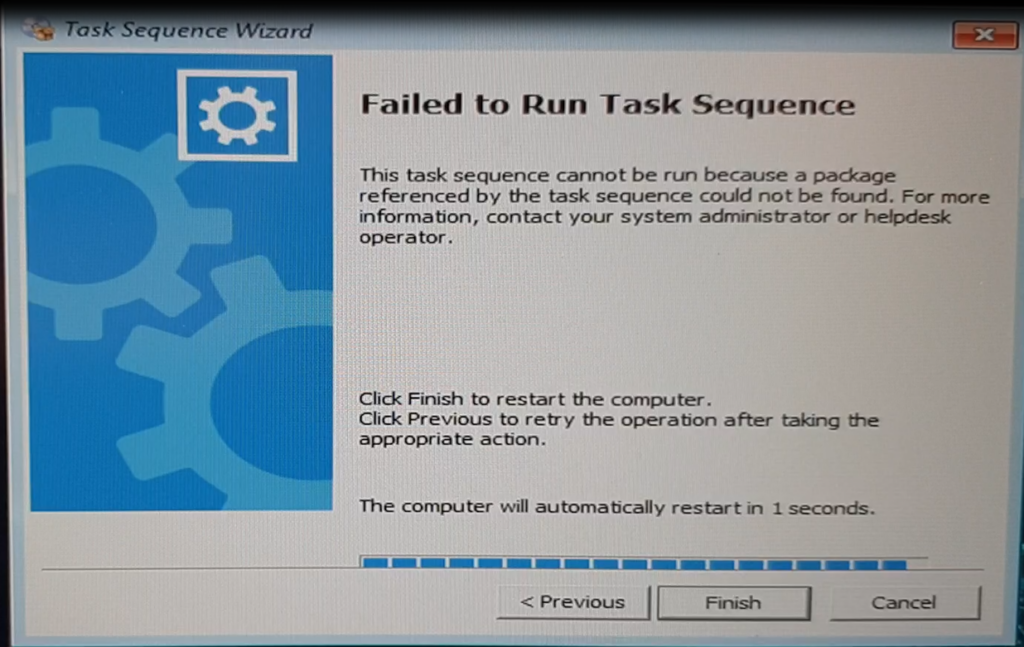
In this scenario, Task Sequence terminated at the beginning. You will collect the logs at WinPE x:\windows\temp\smstslog\smsts.log. To get the command prompt window, you have to press the F8 key. After reviewing the logs, you will see the details –
More you can explore SCCM OSD Task Sequence Troubleshooting Steps by Step Ultimate Guide SMSTS.log.
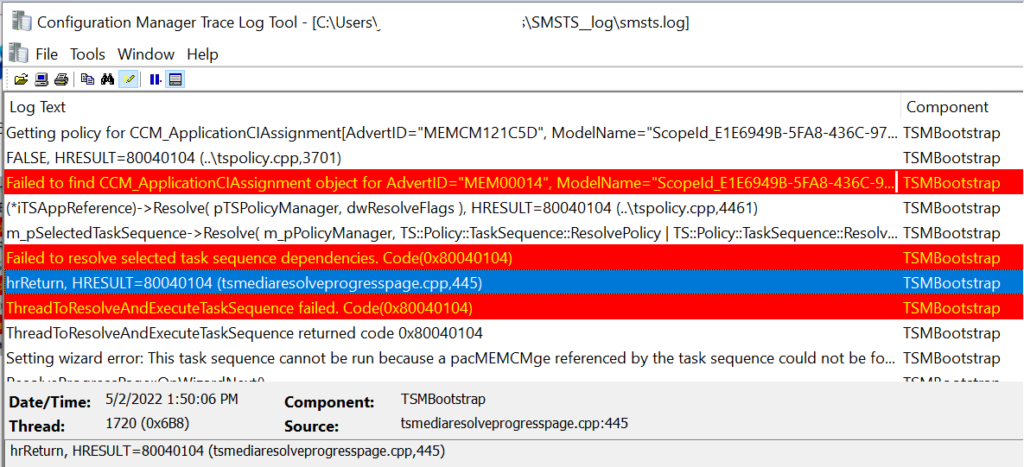
You will get the following highlights from the logs that indicates the package ID is not properly distributed at the first impression. However, the issue is different here –
- Failed to find CCM_ApplicationCIAssignment object for AdvertID=”MEM00014″, ModelName=”ScopeId_E1E6949B-5FA8-436C-9767-7941075C0307/Application_080e247c-c44e-4e1c-956a-d8e4d3c82121″
- Failed to find CCM_SoftwareDistribution object for AdvertID=”MEM131C5D”, PackageID=”MEM100CBD”, ProgramID=”*”
MEMCM101224 http content location: https://HTMDWSSCCM09.ad.MEMCM.com/CCMTOKENAUTH_SMS_DP_SMSPKG$/MEMCM101224,http://HTMDWSSCCM09.ad.MEMCM.com/SMS_DP_SMSPKG$/MEMCM101224	TSMBootstrap	5/2/2022 1:50:06 PM	1720 (0x06B8)
Getting policy for CCM_ApplicationCIAssignment[AdvertID="MEMCM121C5D", ModelName="ScopeId_E1E6949B-5FA8-436C-9767-7941075C0307/Application_080e247c-c44e-4e1d-956b-d8e4d3c82121"]	TSMBootstrap	5/2/2022 1:50:06 PM	1720 (0x06B8)
FALSE, HRESULT=80040104 (..\tspolicy.cpp,3701)	TSMBootstrap	5/2/2022 1:50:06 PM	1720 (0x06B8)
Failed to find CCM_ApplicationCIAssignment object for AdvertID="MEM00014", ModelName="ScopeId_E1E6949B-5FA8-436C-9767-7941075C0307/Application_080e247c-c44e-4e1c-956a-d8e4d3c82121" 	TSMBootstrap	5/2/2022 1:50:06 PM	1720 (0x06B8)
(*iTSAppReference)->Resolve( pTSPolicyManager, dwResolveFlags ), HRESULT=80040104 (..\tspolicy.cpp,4461)	TSMBootstrap	5/2/2022 1:50:06 PM	1720 (0x06B8)
m_pSelectedTaskSequence->Resolve( m_pPolicyManager, TS::Policy::TaskSequence::ResolvePolicy | TS::Policy::TaskSequence::ResolveSource, fpCallbackProc, pv, hCancelEvent), HRESULT=80040104 (tsmediawizardcontrol.cpp,1642)	TSMBootstrap	5/2/2022 1:50:06 PM	1720 (0x06B8)
Failed to resolve selected task sequence dependencies. Code(0x80040104)	TSMBootstrap	5/2/2022 1:50:06 PM	1720 (0x06B8)
hrReturn, HRESULT=80040104 (tsmediaresolveprogresspage.cpp,445)	TSMBootstrap	5/2/2022 1:50:06 PM	1720 (0x06B8)
ThreadToResolveAndExecuteTaskSequence failed. Code(0x80040104)	TSMBootstrap	5/2/2022 1:50:06 PM	1720 (0x06B8)
ThreadToResolveAndExecuteTaskSequence returned code 0x80040104	TSMBootstrap	5/2/2022 1:50:06 PM	1468 (0x05BC)
Setting wizard error: This task sequence cannot be run because a package referenced by the task sequence could not be found. For more information, contact your system administrator or helpdesk operator.	TSMBootstrap	5/2/2022 1:50:06 PM	1468 (0x05BC)
ResolveProgressPage::OnWizardNext()	TSMBootstrap	5/2/2022 1:50:06 PM	1468 (0x05BC)
Activating Finish Page.	TSMBootstrap	5/2/2022 1:50:06 PM	1468 (0x05BC)
Fix SCCM Failed to Resolve Selected Task Sequence Dependencies Code 0x80040104
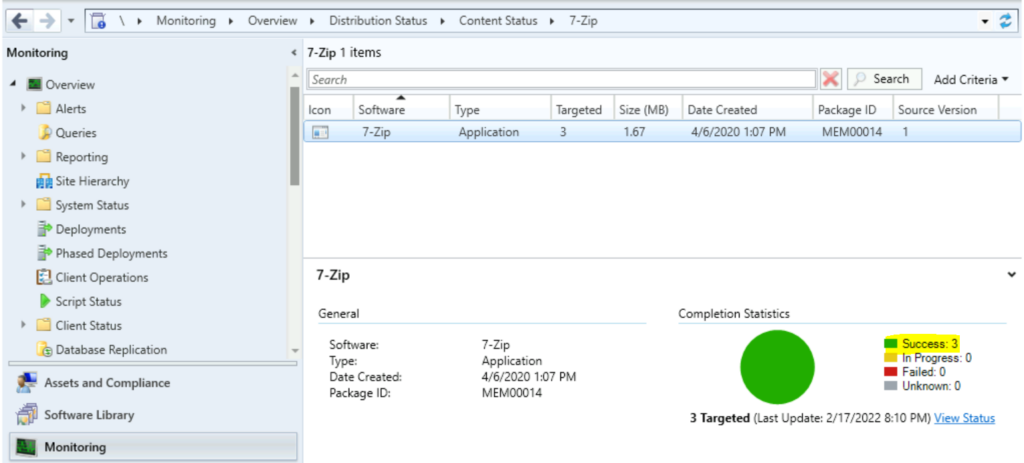
Let’s check the steps and resolution to fix the error Since we were able to get the problematic package ID associated with the task sequence. So we first validated the content distribution by navigating to SCCM Console.
Here, the package content status is a success, indicating it’s available to all targeted distribution points.
In the next step, we decided to disable the steps from the task sequence and reinitiate the deployment. However, the next attempt task sequence failed with the same error message, as reviewing the smsts logs indicates.
The different package ID Failed to find CCM_SoftwareDistribution object for AdvertID=”MEM131C5D”, PackageID=”MEM100CBD”, ProgramID=”*” who’s content was also distributed, but the content successfully distributed.
It happens if the sccm packages show NewHash as empty. Suppose you look at the actual package in the dbo.SMS_Packages table shows that the fields for the HASH and New HASH are empty. If you do an “Update Distribution Points,” the HASH values will be filled out, and the Task Sequence will run without errors.
The first troubleshooting step to resolve content transfer failures is redistributing content to the problematic distribution point(s). You can check the details ConfigMgr Redistribute Content to Distribution Point | SCCM | Package | Best Way




ive got the same issue, re-syncing the last changed packages in task sequence fixed the job.
maybe bug in 2203??
In my case there was a issue one of the default application was retired so i found and removed it from TS.