






FIX SCCM Hotfix Failed to Install Update Files Issue 0x80004005 Error
Let’s check how to fix SCCM Hotfix Failed to Install Update Files Issue with the 0x80004005 error. It’s a weird issue Failed to Install Update Files. I didn’t get any clue when I saw this the first time.
Failed to install update files error in the CMUpdate.log file is interesting. Also, the error installing files required for the update failed was not a very good indicator for me. The cause of some of the errors could be manual or human errors.
SCCM upgrades and hotfix installations are generally straightforward and with less chance of failure. I have seen odd failures because of known issues/bugs/manual errors. One of the SCCM infra upgrade errors because of a known issue is below.
Read More -> FIX SCCM Upgrade Issue because of SQL Based Replication

There are some issues such as SCCM update content Download is not happening that we need to deal with regularly. These issues can occur because of proxy or so many other issues. You also might have seen Prerequisite Errors or Warnings during the upgrade process.
- FIX SCCM Dot NET Version Error During Prerequisite Check
- FIX: SCCM Site Database has a Backlog of SQL Change Tracking Data
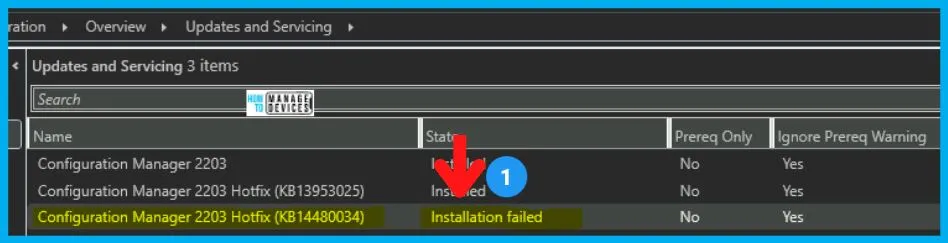
Install Update Files Issue
Let’s see how I ended up having the Install Update Files Issue for the SCCM hotfix update scenario. I was trying to install the latest hotfix released for SCCM 2203 to fix the SCCM PKI Client Registration Issue.
The hotfix installation failed with an error. You can check the status of the hotfix install from SCCM console monitoring -> Show Status.
- Navigate to \Administration\Overview\Updates and Servicing
- Select the Hotfix Update KB14480034.
- Click on the Show Status link as shown in the below screenshot.
The SCCM hotfix update failed in the installation phase with the following error:
[Failed] Installing files required for the update. Check cmupdate.log for details.
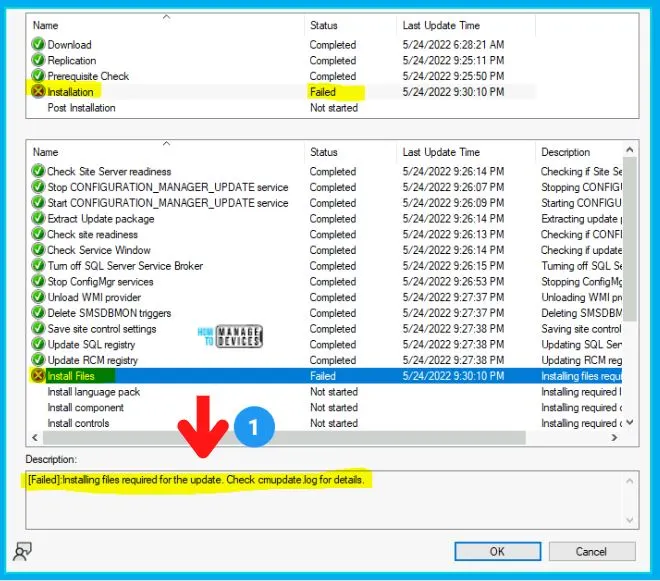
Troubleshoot – Installing files required for the update Issue
Let’s check more details on installing files required for the update Issue during the SCCM hotfix install. The next step of the troubleshooting is to look into the CMUpdate.log file as suggested by the Update Status window.
The CMUpdate log is located in the SCCM Logs folder Drive-Letter:\Program Files\Microsoft Configuration Manager\Logs. You can refer to the CMUpdate log for any updates and servicing related issues in SCCM.
I have opened the CMUpdate.log with the SCCM log reader tool called CMTrace. I have to scroll up for more than a few seconds to reach the red lines and understand the issue.
INFO: Failed to delete the file \?\f:\program files\microsoft configuration manager\bin\x64\bgbserver\baseobj.dll (LastError=32). Will try to move it to a temporary file.
ERROR: MoveFileExW(\?\f:\program files\microsoft configuration manager\bin\x64\bgbserver\baseobj.dll, \?\f:\program files\microsoft configuration manager\bin\x64\bgbserver\baseobj.dll_@{55fd4ce5-afc9-45af-b1a9-1345faef1900}) failed. (LastError=32)
ERROR: Failed to delete file f:\program files\microsoft configuration manager\bin\x64\bgbserver\baseobj.dll, Win32 error = 2
ERROR: Failed to copy F:\Program Files\Microsoft Configuration Manager\CMUStaging\B7C3979F-9A1B-41EB-929F-47920F0E94FA\SMSSetup\bin\x64\BGBServer\BASEOBJ.DLL to f:\program files\microsoft configuration manager\bin\x64\bgbserver\baseobj.dll.
Setup has encountered fatal errors while performing file operations.
Failed to install update files.
Failed to apply update changes 0x80004005
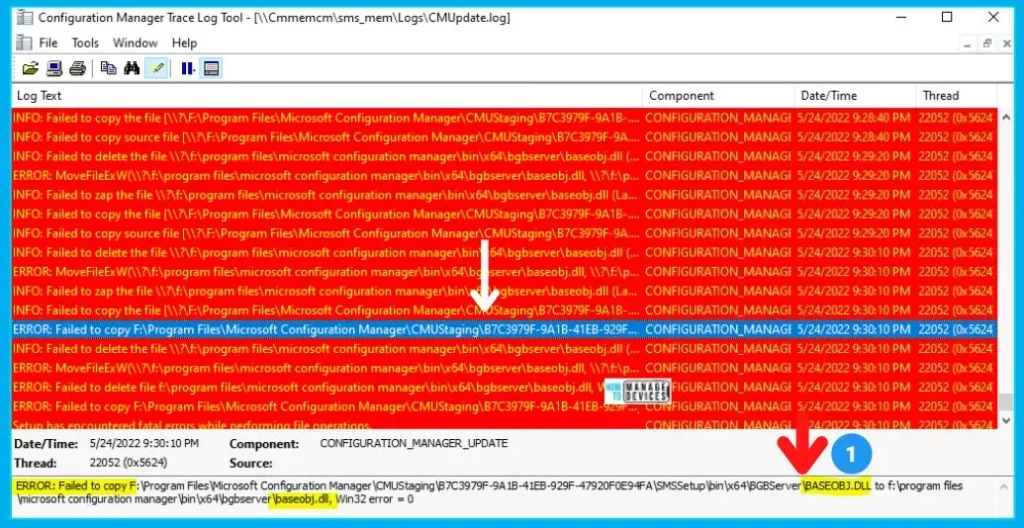
There are a lot of access denied error messages in the above log snippet. Three (3) of them are listed below.
- LastError=32
- Win32 error = 2
- 0x80004005
All these errors were related to the baseobj.dll file. It seems this DLL file got locked somehow and can’t be moved, deleted, or replaced. This file lock issue could be because someone might have opened the file properties.
FIX SCCM Hotfix Failed to Install Update Files Issue
Let’s see how to fix the SCCM hotfix failed to install update files Issue with error 0x80004005. The Access Denied error is not listed in the same place as the other errors in CMUpdate.log. So I couldn’t conclude that the SCCM hotfix install failure was because of a file lock issue (baseobj.dll).
I tried to check CompMgmt.msc Open Files use System Tools -> Shared Folders -> Open Files, but nothing shows up there. I tried to perform Disconnect All Open FIles without any success. In the end, I restarted the SCCM primary server, which helped resolve the lock issue of the DLL file.
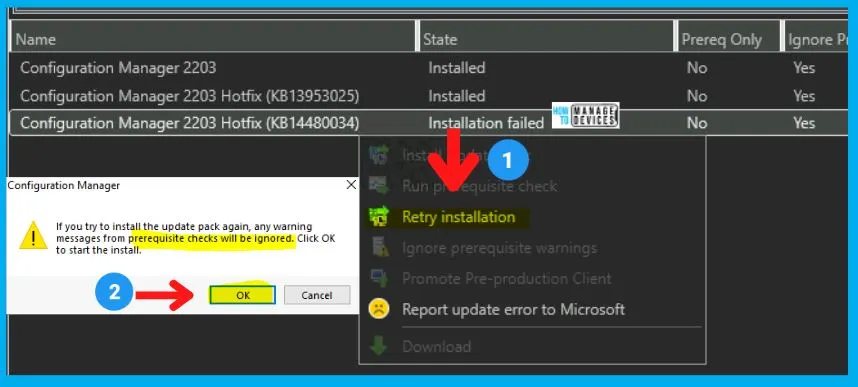
I have restarted the SCCM hotfix re-installation using the following steps. This time the hotfix update from Updates and Servicing worked as expected!
- Navigate to \Administration\Overview\Updates and Servicing
- Select the Hotfix Update KB14480034.
- Click on the Retry Installation option as shown in the below screenshot.
Click on the OK button to continue with the reinstallation of the hotfix update. The installation was completed successfully, as explained in the following post. FIX SCCM PKI Client Registration Issue Hotfix KB14480034.




Discussion