





SCCM DP Roles have PXE and Throttling Options ConfigMgr 2012
SCCM DP Roles have PXE and Throttling Options ConfigMgr. Exciting changes have been made to the Configuration Manager 2012 DP and PXE (more details).
In Configuration Manager 2012, unifying infrastructure and simplifying administration are two of the release’s three key pillars (the third is user empowerment).
Keeping those pillars in mind, we have updated the distribution and PXE service points to make them easier to use and deploy.
What is a Distribution Point? A distribution point contains source files for clients to download. You can control content distribution using bandwidth, throttling, and scheduling options.

- Fix Report Server Cannot Open A Connection Error ConfigMgr | SCCM
- How To Disable SCCM Application Deployment | ConfigMgr | MEMCM
SCCM DP Roles have PXE and Throttling Options ConfigMgr
To explain this, let’s review the Configuration Manager 2012 Distribution Point.
In Configuration Manager 2007, there were three essential distribution points: Standard, Server Share, and Branch Distribution Points. Each role had benefits, but not always one type met all the administrator requirements.
Starting with Configuration Manager 2012 Beta 2, we have updated the distribution point role to become one standard distribution point. Let’s go over some of the details of the 2012 distribution point.
Configuration Manager 2012 Distribution Point – DP Roles have PXE and Throttling Options
- One Distribution Point role (merges Standard, Branch, and Server Share distribution points)
- Can run on client operating systems Windows Vista SP2 and later
- Can run on server operating system Windows Server 2003 SP2 and later
- Requires Internet Information Services (IIS) and defaults to BITS download for clients
- SMB download option for clients available for most package types
- PXE service point is now just an option for the distribution point
- Ability to set scheduling and throttling for content distribution (no secondary site required)
- Ability to prestage content and new functionality around managing prestage distribution points (more details in a later post)
- Single instance storage of content on a distribution point
The Configuration Manager 2012 distribution point now has a new storage format called the Content Library. The Content Library replaces SMSPKG shares as the default folder structure for hosting content. SCCM ConfigMgr DP Roles have PXE and Throttling Options.
The Content Library now stores all content on the distribution point in single-instance storage. This means each file is only stored once on the distribution point, regardless of how many times a package references it. It also keeps the file on the distribution point once, even if contained in multiple packages!
The Content Library contains three components: the File Library, the Data Library, and the Package Library. The data library contains all the metadata about the files stored at the distribution point. The Package library contains all the references to the files for each package stored on the distribution point. SCCM ConfigMgr DP Roles have PXE and Throttling Options.
The Data Library and Package library will only reside on the drive with the lowest priority. The File Library is the location that stores all the actual files that are used in packages. The files in the File library are renamed and stored based on the hash of the files. So, when you browse the File library, you will most likely not recognize the individual files. Since the File library will contain GB – TB of data, the File library can be spanned across multiple volumes. (We will go into more detail later.)
Now, let’s transition to the changes we have made with our PXE service point. We think we changed a lot, but let’s review a few things we did not change. First, PXE services in Configuration Manager 2012 still required Windows Deployment Services (WDS). WDS needs to be installed before enabling PXE.
This is still only available on server operating systems. Secondly, the PXE provider in Configuration Manager 2012 is mostly unchanged (aside from what we mention below and some bug fixes ). So, all the troubleshooting you learned in Configuration Manager 2007 will still be helpful. SCCM ConfigMgr DP Roles have PXE and Throttling Options.
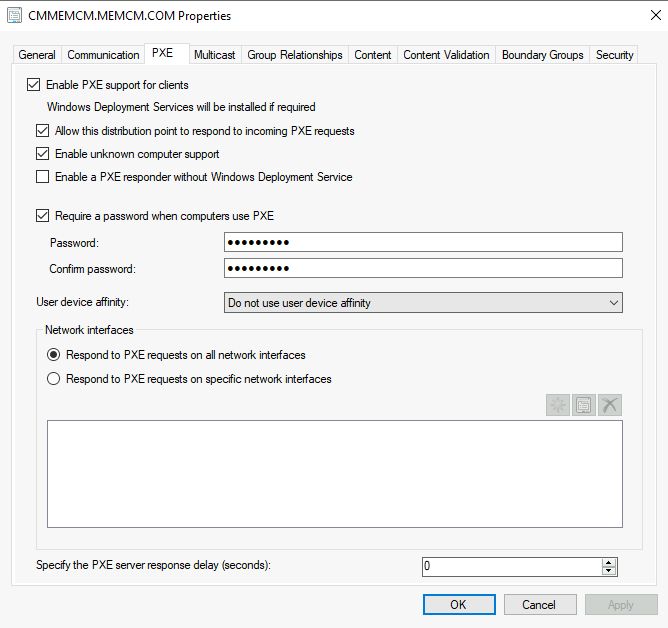
In Configuration Manager 2007, our capacity planning states, “Up to 10 PXE service points per site, with a maximum of 75 PXE service points per primary site database.” One reason for this is the reliance on the Site Component Manager. Learning from our customers’ requirements, we have redesigned portions of our PXE service points. SCCM ConfigMgr DP Roles have PXE and Throttling Options.
Starting with Configuration Manager 2012 Beta 2, the PXE service point is a property of the Distribution Point role and is no longer a separate site system. Since it is a distribution point property, SiteComp no longer monitors or installs it. The Distribution Manager now does this. This change will allow Configuration Manager 2012 to improve the capacity beyond the numbers published for Configuration Manager 2007. Final capacity numbers are unavailable at the time of the blog post, but we expect to increase this number significantly (I will update later as numbers become available).
Another change to the PXE service point is updating how we interact with the site database. In Configuration Manager 2007, the PXE service point directly contacted the database to access deployment information about the client PXE booting. In Configuration Manager 2012, the PXE service point will route through the management point just like a client. This is primarily an infrastructure optimization, but it is vital to know the traffic flow.
Conclusion – DP Roles have PXE and Throttling Options
Above is an overview of the infrastructure changes surrounding operating system deployments. I will start deep-diving into more functional features over the following days to weeks. Feel free to comment if you have a specific question for more information on portions of this overview.
We are on WhatsApp. To get the latest step-by-step guides and news updates, Join our Channel. Click here –HTMD WhatsApp.
Author
Anoop C Nair is Microsoft MVP! He is a Device Management Admin with more than 20 years of experience (calculation done in 2021) in IT. He is a Blogger, Speaker, and Local User Group HTMD Community leader. His primary focus is Device Management technologies like SCCM 2012, Current Branch, and Intune. He writes about ConfigMgr, Windows 11, Windows 10, Azure AD, Microsoft Intune, Windows 365, AVD, etc.




Discussion