






SCCM Architecture Decision Making Guide for 2023 or Later | Best Practices
SCCM Architecture Diagrams Decision Making Guide for 2023 or later | Configuration Manager | Microsoft Intune. I have prepared a sample SCCM Architecture Visio Template that you can download from GitHub.
SCCM (ConfigMgr) Architecture decisions are based on many factors, including requirement gathering and an understanding of the existing infrastructure and environment. This guide provides tips and tricks along with best practices.
The design of the SCCM hierarchy entirely depends upon your network and computing environment and your business requirements. There is no standard design that suits every environment.
We can plan to implement Configuration Manager by using the minimal number of servers and the least amount of administration overhead to meet your organization’s goals.

A step-by-step guide for SCCM Infrastructure setup is available with HTMD for free: New ConfigMgr Primary Server Installation Step By Step Guide.
- How To Recover SCCM CB Primary Server Using SQL Database Backup Configuration Manager ConfigMgr
- SCCM Architecture Visio Template Download from GitHub Throwback
- What is ConfigMgr SCCM Tenant Attach Architecture?
- SCCM Co-Management Schema Workflow Scenarios – Architecture
Video What are Intune Architecture Considerations or Intune Design Considerations?
Existing Investments (External to Intune): These help you make better Intune Design/Architecture Decisions and Cloudification Initiatives for your organizations.
Azure AD Join vs. Hybrid AAD Join—How does this impact Intune Architecture/Design Decisions Kerberos vs. Modern Authentication Organization? Is it looking for another migration project in 3-4 years? Feature parity with Hybrid AAD Join Complex to design and implement.
SCCM Architecture Decisions
Let’s quickly list some critical decisions you must make while planning to implement a new SCCM infrastructure.
#1—Double confirm (SCCM or Intune?) whether you want to build the SCCM infrastructure or use Microsoft Intune as a SaaS solution. I would go with Intune if this is a new infrastructure and you don’t have any existing SCCM infrastructure.
#2 – Flat SCCM Hierarchy using Peer to Peer / Client Cache / DO technologies. Build a flat SCCM hierarchy with fewer site and site systems servers using Cloud integrated technologies such as SCCM Cloud Management Gateway and Tenant Attach.
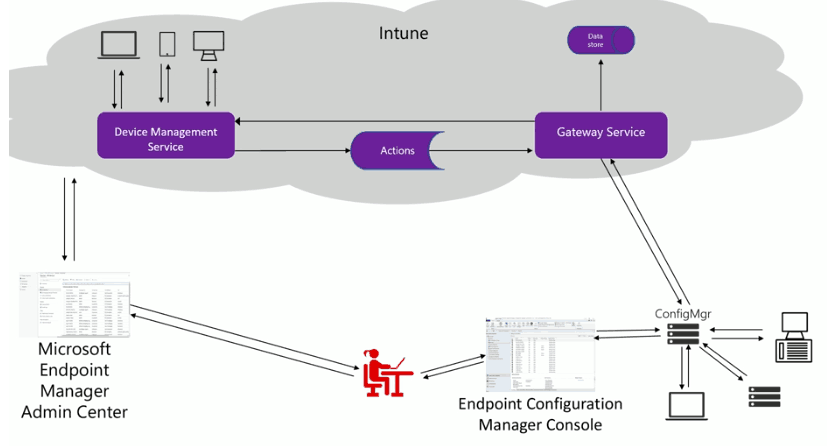
The design decisions will be based on the existing SCCM/ConfigMgr CB environment and will replicate some of the features as required. An SCCM solution will be implemented to provide device management facilities for fully managed Windows servers and Windows endpoints.
A standalone Intune platform will also be installed on managed mobile devices (iOS, Android, and Windows 10 modern devices via MDM channel).
| Contents |
|---|
| SCCM Servers On-Premises or AZURE? |
| CAS and NO CAS SCCM Server |
| Integration with ISVs ServiceNow/Remedy? |
| Windows 10 Co-Management? |
| SCCM/Intune High Availability-DR Options? |
| Intune + SCCM Architecture Diagram |
| Other Design Decisions |
SCCM Servers On-Premises or AZURE?
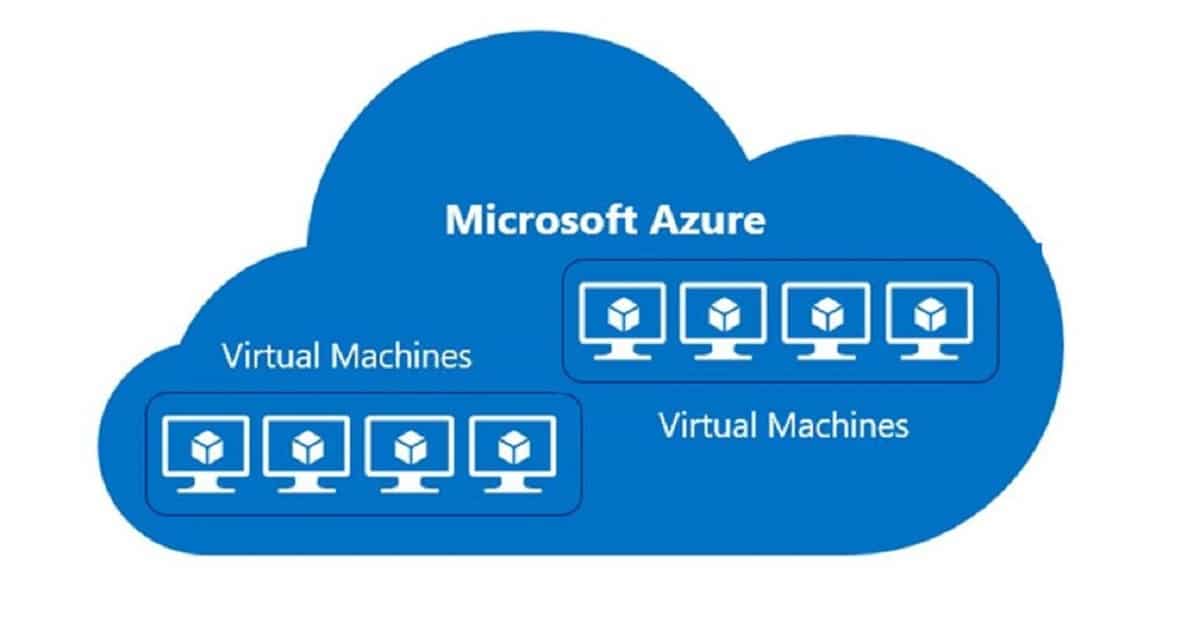
Can we install SCCM/ConfigMgr CB infrastructure in Microsoft Azure? Is installing SCCM servers in Azure supported? Yes, we can install SCCM CB infrastructure in Microsoft Azure. Microsoft fully supports this.
Microsoft doesn’t provide any supporting statement about hosting SCCM infra in the AWS IaaS solution, but it should work well if all the communication ports are open. I know some customers are running SCCM infra in AWS. This is the first step toward SCCM architecture decision-making.
The better option is to look for Intune management as a permanent modern management solution.
Decision – CAS and NO CAS SCCM Server
A CAS (Central Administration Site) is the SCCM/ConfigMgr site server role. I would recommend avoiding the SCCM/ConfigMgr CAS server wherever possible.
You don’t need an SCCM hierarchy with CAS in 99% of scenarios. Several blog posts discuss CAS or NO CAS decision-making. “Determine when to use a central administration site (CAS).”
I will surely use a standalone SCCM primary server in most SCCM infrastructures.
Intune Standalone?
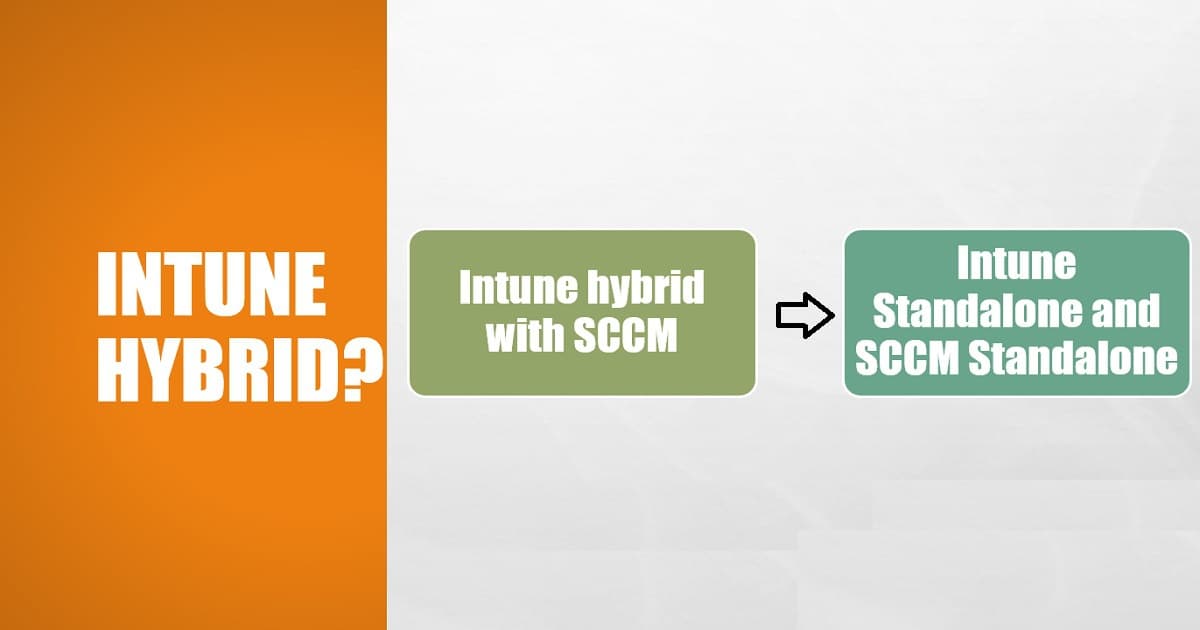
Intune hybrid is no longer supported, so the only option is to use Intune standalone. If you already have SCCM infra, use the SCCM Tenant Attach and Co-management features.
Do not choose the Intune Hybrid Solution with SCCM/ConfigMgr. The hybrid SCCM solution has already been removed or deprecated.
Integration with ISVs ServiceNow/Remedy?
Can Intune be integrated with ISVs like ServiceNow or Remedy? SCCM can be integrated with various third-party service providers like ServiceNow or Remedy. IT service management tools are essential for most organizations.
As SCCM has the vast majority of the market share in device management, this is one of the critical points that we should consider when making architecture decisions.
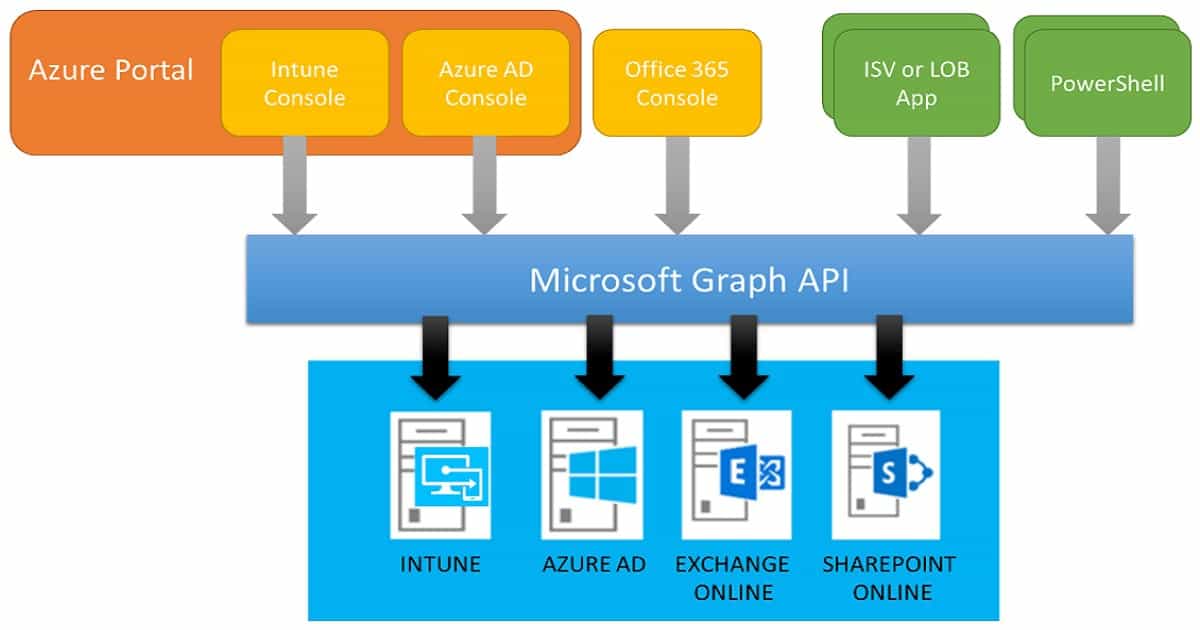
Microsoft Intune can integrate with ISVs like Remedy and ServiceNow for IT service and asset management through Microsoft Graph APIs. However, I heard nothing from Remedy or ServiceNow about Intune integration.
Decision – Windows 10 or Windows 11 Co-Management?
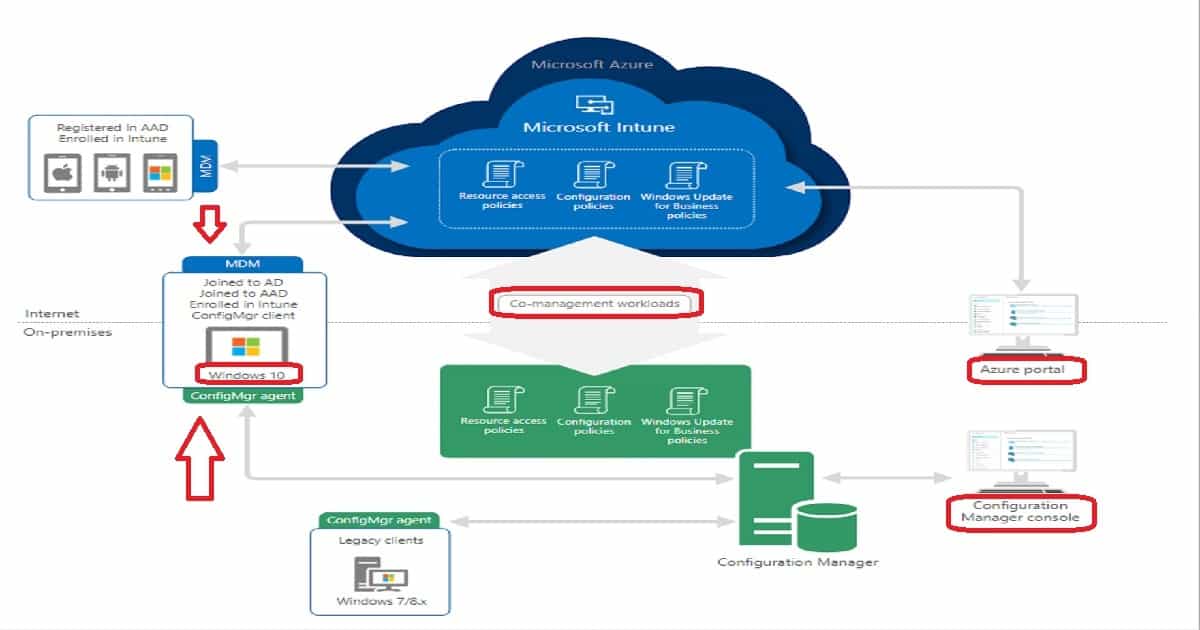
Windows 10 co-management is a dual management capability available with Windows 10 1709 version (Fall Creators Update) and later. Co-management is the bridge between traditional management and modern management.
Managing Windows 10 with Intune is a possible option for some scenarios. However, there are some challenges with Intune management for large enterprises. These challenges could be because of
- Win 32 Application Delivery Mechanism
- Application Deployment Automation with ISV
- Bandwidth Issues (Delivery Optimization is only available for some channels)
- Complex Operating System Deployment (OSD) scenarios
- Existing investment in the SCCM echo system
The co-management option could allow the organization to process the workload from on-prem to the cloud. The co-managed Windows 10 devices would be visible in the SCCM and Intune console ( + Database).
SCCM/Intune High Availability-DR Options?
Is SCCM/Intune treated as a business-critical service within your organization? Most organizations don’t consider SCCM an essential business service (unlike online exchanges).
But, in the modern world, with Intune and co-management options, we may need to rethink this strategy. From my perspective, SCCM is not business-critical. We can live without SCCM for hours (4-8).
What are the DR or High Availability(HA) options available for SCCM? Microsoft SCCM product group (development team) is working to improve the HA/DR options for SCCM/ConfigMgr.
One of the improvements already in the production version of SCCM CB 1706 and later is SQL Availability groups. SQL Server Always On availability groups are high availability and disaster recovery solutions for the site database.
When you use the SQL availability group, you need to adjust the backup and restore procedure for your SCCM infra.
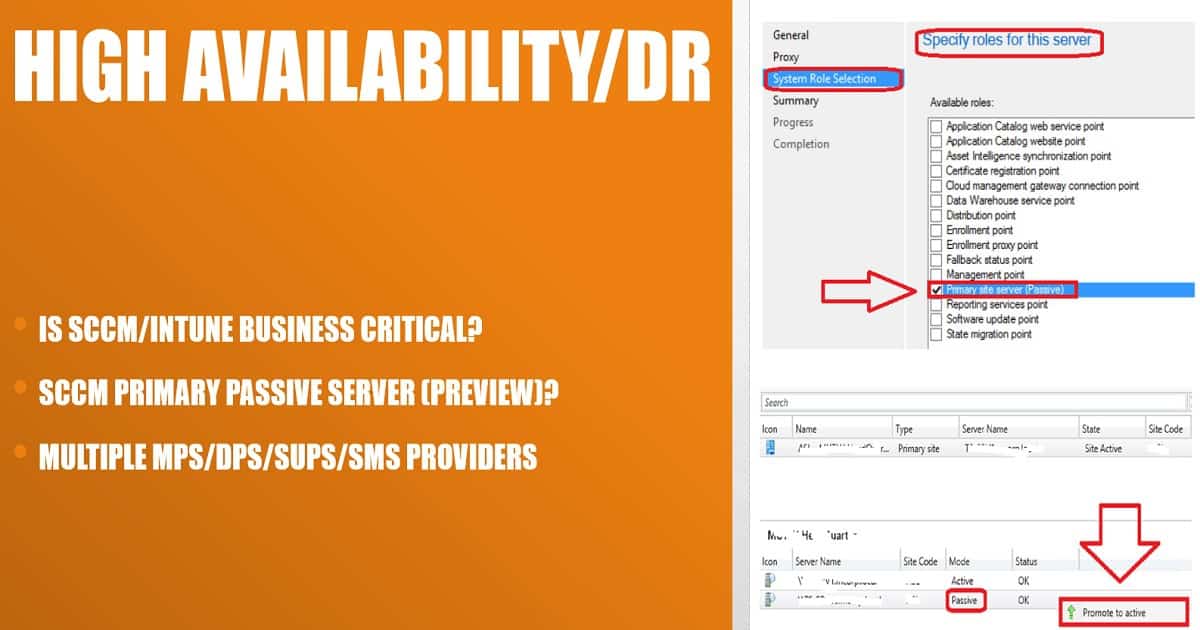
The SCCM Primary Passive Server installation option is available in the Preview versions of SCCM CB. SCCM’s primary passive site server option is not enabled for production versions of SCCM CB.
The passive-mode SCCM site server is in addition to your existing SCCM primary site server, which is in Active mode.
Intune SCCM Architecture Diagram
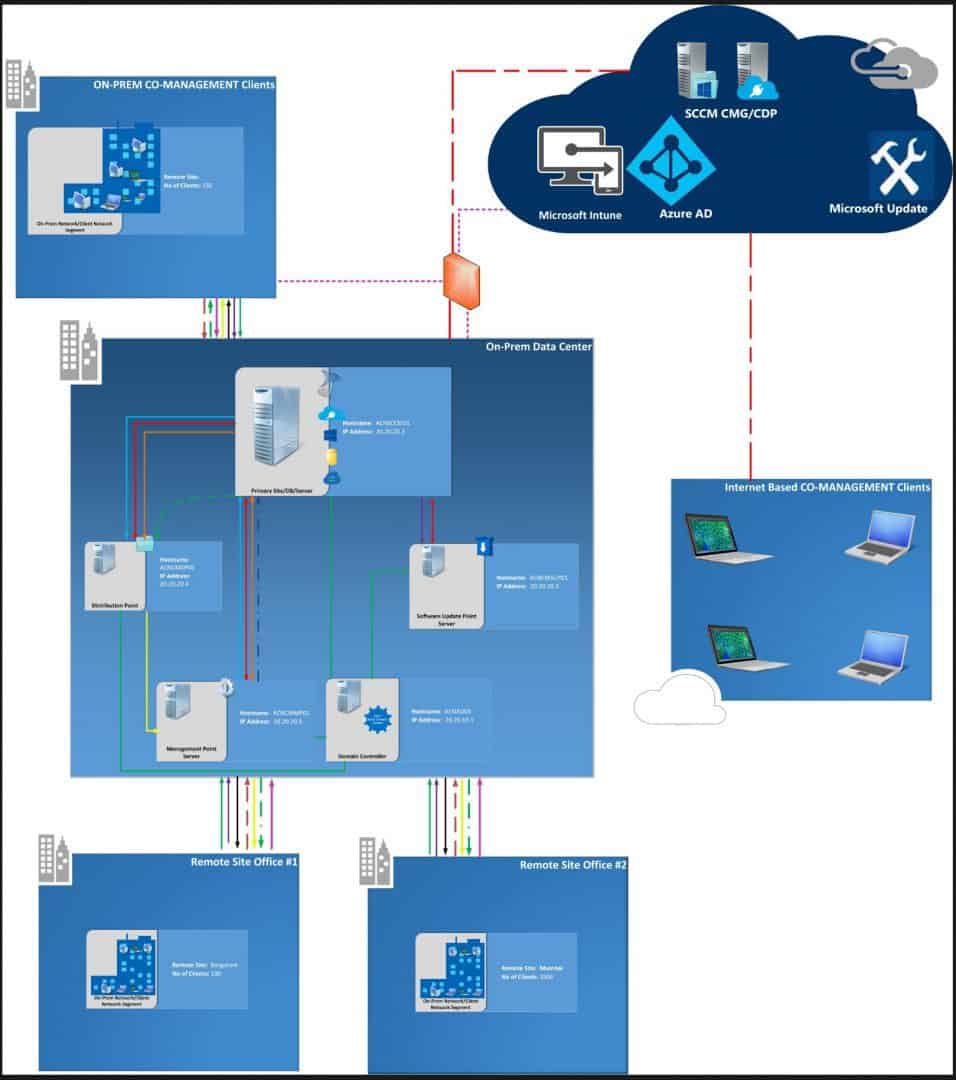
The following is the sample Intune SCCM/ConfigMgr architecture diagram. It explains the high-level flow between Intune/SCCM/CMG/Cloud DP and the Co-managed Windows 10 devices.
Download Visio Template – SCCM Architecture Visio Template Download From GitHub 1 (anoopcnair.com)
Other Design Decisions
Several other critical design decisions are involved. I won’t be able to cover all of them in this post. Some will be discussed at the Bangalore IT Pro event on December 16, 2017.
I will try to share the presentation deck after the event.
- SCCM Tier 2/3 Hierarchy Strategies (Secondary servers/Remote DPs/MPs)
- SCCM Servicing Strategy
- SCCM Client Management Strategy
- SCCM Application Management Strategy
- SCCM Software Update Strategy
- SCCM Backup and Restore Strategy
Resources
- SCCM Backup, Restore, and Availability Requirements
- SCCM/ConfigMgr 2012 and 2007 High-Level Architecture Design Guide
Useful links to help design decisions and implement SCCM ConfigMgr 2012 / Intune infrastructure !! In the following portion of the post, I will share super cool design diagrams of the SCCM 2012 Infrastructure.
- SCCM Backup, Restore, and Availability Requirements more details.
- SCCM/ConfigMgr 2012 and 2007 High-Level Architecture Design Guide here
SCCM OSD Best Practices
SCCM Download Whitepaper on Top 10 Best Practices on Windows 10 OSD Configuration Manager ConfigMgr?ConfigMgr/SCCM Operating System Deployment (OSD) is a vast topic! Because it is so complex, OSD has much to consider, especially in environments where security is extra important. Things to consider:
Restrict access to the ConfigMgr Console and Media. Only users who should have access to them should have it.
If someone were to gain unauthorized access to your environment, they could employ Task Sequences to your computers, resulting in accidental data loss, system outages, and the discovery of sensitive information like account credentials and volume licensing keys used by ConfigMgr/SCCM for OSD tasks.

Top 10 Best Practices on Windows 10 OSD Configuration Manager ConfigMgr
Use built-in ConfigMgr Security Roles! Such as the Operating System Deployment Manager and, if necessary, custom security roles to ensure only those OSD users have access and can only deploy to specific collections.
The last thing we want is people who shouldn’t access OSD, causing problems on purpose or because they have features they don’t understand. They deploy to a Collection like All Systems or others, which is a big deal if targeted wrong.
Collection Variables
Be careful with the use of collection variables! Administrators could maybe read sensitive information they might be in there. SCCM Download Whitepaper on Top 10 Best Practices on Windows 10 OSD Configuration Manager ConfigMgr?
State Migration Points
There’s no way to limit the data a machine stores on a state migration point (SMP). So, can an attacker’s machine take all disk space on the SMP, which would cause a denial of service...
Block the Client Certificate if it is Compromised
If you discover the client certificate has been compromised (is required to deploy an OS), revoke it if it is a PKI certificate. Also, you block it in the ConfigMgr. Not blocking might let attackers be able to impersonate ConfigMgr Client and have the capability to download Policies that can contain sensitive information.
Don’t Enable Command Support on your Production Boot Images
Enabling Command Support, you can press F8 to start Command Prompt if a machine build fails so you can perform troubleshooting and look at the smsts.log. A security risk: An attacker potentially has access to your network, and access to variables in the Task Sequence environment could have sensitive data.
Protect the Client Authentication Certificate during its Capture
If attackers could get the Client Authentication Certificate, they can impersonate a valid Client on your network. This happens because they would have access to the Private Key in the certificate.
Do not Grant the Network Access Account (NAA) Excessive Rights
The NAA gives you access to this computer from the network right on any Distribution Points or other servers that hold package content the machine needs to access.
Do Not Re-use the Account Configured as the NAA | Try to Avoid Network Access Account
Ideally, Client computers can only use the NAA when they cannot access the local computer account to access content on DPs.
Do not configure the same account used for the NAA for these:
- Capture Operating System Image Account.
- Task Sequence Editor Domain Joining Account.
- Task Sequence Run As Account
Sample Architectural Diagrams of Native SCCM with CAS Server
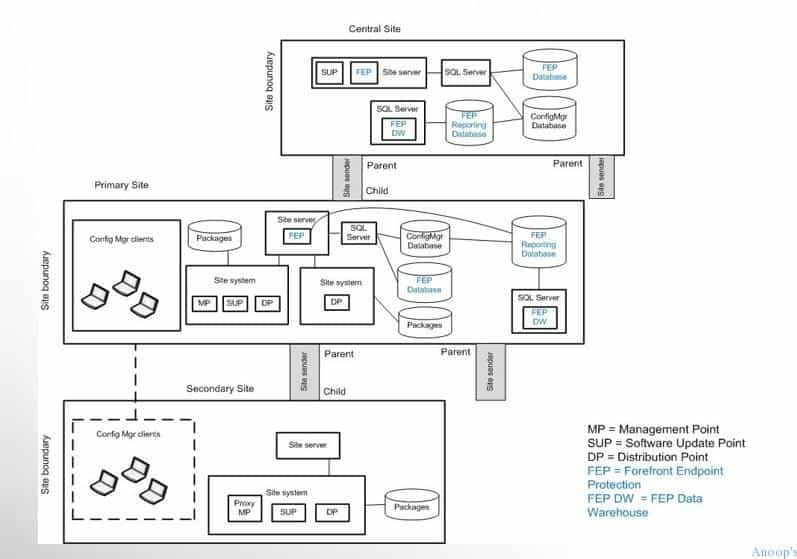
SCCM Architecture Diagrams Decision Making Guide | ConfigMgr Configuration Manager Endpoint Manager. Sample architectural diagrams of Native SCCM 2012 with a Single Primary server.
Following is the sample Architectural design diagram, which is available in the IPD guide provided by Microsoft. This diagram is for SCCM 2007 and does not apply to SCCM 2012.
SCCM Architecture Visio Template Download From GitHub 1
We are on WhatsApp now. To get the latest step-by-step guides, news, and updates, Join our Channel. Click here. HTMD WhatsApp.
Author
Anoop C Nair is Microsoft MVP! He is a Device Management Admin with more than 20 years of experience (calculation done in 2021) in IT. He is a Blogger, Speaker, and Local User Group HTMD Community leader. His main focus is on Device Management technologies like SCCM 2012, Current Branch, and Intune. He writes about ConfigMgr, Windows 11, Windows 10, Azure AD, Microsoft Intune, Windows 365, AVD, etc.




Great ! Nicely Elaborated 🙂
StaffThank you Raman 😉 !
Great stuff
StaffThanks !
Hi Anoop..
Great Document.
I am preparing for the interview and need a few basic questions and ans on SCCM Architecture level.
Can you pls share if have any
Thanks in advance
Excellent Document Anoop. Can you please share document for Troubleshooting Software Updates in Client Machines.
StaffHi Narayan ! – See http://blogs.technet.com/b/sudheesn/archive/2010/11/10/troubleshooting-sccm-part-iii-software-updates.aspx
Hello Anoop,
Nice article first of all. 🙂
Not sure my query is applicable in this post?
My scenario:
1 PRI–> 2 Secondaries(with DP on same server). DPs in other remote locations configured on Windows 7/Windows 8 PCs.
Questions:
a. What is recommended hardware configuration for the DPs on client OS?
b. What all services are required on those DPs? for all other activities except PXE(pretty obviously as there is no WDS).
c. Can we use PXE/Multicast on the secondary server which has DP on itself? Is there any caveat?
d. What is the suggested bandwidth between DP and primary site?
Any information is highly appreciated. Many thanks.
——- Ravi Sharma
Can i install the SUP role with MP role in SCCM 2012?
StaffYes
Hello Anoop.
I’m very new to sccm environment. And tasked to deploy sccm current branch and request you if you could advise any best practice to design high level architecture depicting high availability options including site resilency if any options.
thank you
StaffI’m sorry, if you are very new to SCCM then, how can you design SCCM CB environment?
hello Anoop
I’m very new to sccm environment. And tasked to deploy sccm current branch.
I request if you could suggest me any best practice to design high level architecture depicting high availability options