






Fix Error 403 HTTP STATUS FORBIDDEN SCCM Software Update Patch Package Download Failed ConfigMgr
Fix Error 403 HTTP STATUS FORBIDDEN SCCM Software Update Patch Package Download Failed ConfigMgr. We encountered an interesting issue during our monthly security patching.
WSUS sync was completed successfully, and we could download some patches from the Windows Update service; however, the .NET patches were not downloaded. I’ve seen this issue while creating the monthly patch package for the SCCM/ConfigMgr software update.
However, a “couple of retries” often solved this patch download issue. This time, retrying/retrying, restarting the server, etc., didn’t help us. It was giving us Error 403 (HttpSendRequest failed HTTP_STATUS_FORBIDDEN or HTTP_STATUS_DENIED).
In this post, you will find all the details on how to Fix Error 403 HTTP STATUS FORBIDDEN SCCM Software Update Patch Package Download Failed ConfigMgr.

- Best Guide to Enable ConfigMgr Enhanced HTTP Configuration | SCCM | eHttp
- ConfigMgr HTTP-only Client Communication is Going Out of Support | SCCM | Configuration Manager
- Fix SCCM WSUS with HTTP Proxy Communication Issues | ConfigMgr
| Index |
|---|
| Issue – Fix Error 403 HTTP STATUS FORBIDDEN SCCM |
| Following are the Log File Entries which I Found in PatchDownloader.log |
| More Details Fix Error 403 HTTP STATUS FORBIDDEN SCCM? |
Issue – Fix Error 403 HTTP STATUS FORBIDDEN SCCM
As a next step, we analyzed PatchDownloader.log. As expected, we found some clues about the issue. In the PatchDownloader.log located on the SCCM site server, the patch file with the “.CAB” extension downloads without any problems.
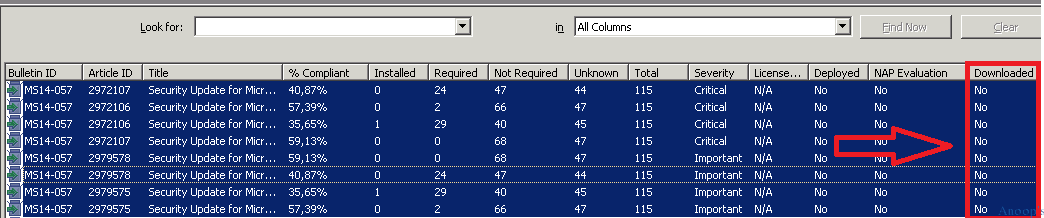
However, we’re getting a “403 HTTP STATUS FORBIDDEN” download error for the patch files with the “.EXE” extension. The issues turned out to be with proxy and Firewall box configuration. Many networks are nated behind the source SCCM server; hence, the network and the proxy team also struggled to get to the issue’s root.
Following are the Log File Entries which I Found in PatchDownloader.log
The network team found the “TCP_DENIED/403” log entry and made the necessary settings to “TCP_CLIENT_REFRESH_MISS/200”!! Thus, the network and proxy teams helped resolve the issue. More details and log file samples are at the bottom of the post.
More Details Fix Error 403 HTTP STATUS FORBIDDEN SCCM?
Try username configmgr\ServiceAccount from the registry. Proxy enabled proxy server 10.10.10.12 HttpSendRequest failed HTTP_STATUS_FORBIDDEN or HTTP_STATUS_DENIED. Fix Error 403 HTTP STATUS FORBIDDEN SCCM Software Update Patch Package Download Failed ConfigMgr.
Download destination = \\ACNCMCAS\SUPackages\Nov\979d1441-d8f7-4844-9a4f-a68abd66a68f.1\MSIPatchRegFix-AMD64.exe . Contentsource = http://wsus.ds.download.windowsupdate.com/msdownload/update/software/secu/2012/10/msipatchregfix-amd64_5011cb29b096fb674a4795ee8fc2f7fdad33863a.exe .
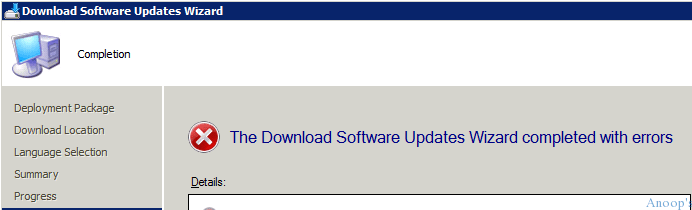
Errors noticed in SCCM 2012 Download Software Update Wizard!!!
ERRORS
•There was an error downloading the update. (403)
Warning: Security Update for Microsoft .NET Framework 4.5, 4.5.1 and 4.5.2 on Windows 7, Windows Vista and Windows Server 2008 x86 (KB2978128)
ERRORS
•There was an error downloading the update. (403)
 Warning: Security Update for Microsoft .NET Framework 4 on Windows Server 2003, Vista, Windows 7, Server 2008, Server 2008 R2 x64 (KB2978125)
ERRORS
•There was an error downloading the update. (403)
•There was an error downloading the update. (403)
 Warning: Security Update for Microsoft .NET Framework 4 on Windows Server 2003, Vista, Windows 7, Server 2008 x86 (KB2978125)
ERRORS
•There was an error downloading the update. (403)
•There was an error downloading the update. (403)
Warning: Security Update for Windows Server 2003 x64 Edition (KB3006226)
ERRORS
•There was an error downloading the update. (403)
 Warning: Security Update for Windows Server 2003 (KB3006226)
ERRORS
•There was an error downloading the update. (403)
Warning: Cumulative Security Update for Internet Explorer 6 for Windows Server 2003 x64 Edition (KB3003057)
ERRORS
•There was an error downloading the update. (403)
 Warning: Cumulative Security Update for Internet Explorer 8 for Windows Server 2003 (KB3003057)
ERRORS
•There was an error downloading the update. (403)
 Warning: Cumulative Security Update for Internet Explorer 8 for Windows Server 2003 x64 Edition (KB3003057)
ERRORS
•There was an error downloading the update. (403)
 Warning: Cumulative Security Update for Internet Explorer 7 for Windows Server 2003 x64 Edition (KB3003057)
ERRORS
•There was an error downloading the update. (403)
 Warning: Cumulative Security Update for Internet Explorer 6 for Windows Server 2003 (KB3003057)
ERRORS
•There was an error downloading the update. (403)
 Warning: Cumulative Security Update for Internet Explorer 7 for Windows Server 2003 (KB3003057)
ERRORS
•There was an error downloading the update. (403)
Warning: Security Update for Windows Server 2003 (KB3002885)
ERRORS
•There was an error downloading the update. (403)
 Warning: Security Update for Windows Server 2003 x64 Edition (KB3002885)
ERRORS
•There was an error downloading the update. (403)
Warning: Security Update for Windows Server 2003 x64 Edition (KB2993958)
ERRORS
•There was an error downloading the update. (403)
 Warning: Security Update for Windows Server 2003 (KB2993958)
ERRORS
•There was an error downloading the update. (403)
Warning: Security Update for Windows Server 2003 x64 Edition (KB2992611)
ERRORS
•There was an error downloading the update. (403)
 Warning: Security Update for Windows Server 2003 (KB2992611)
ERRORS
•There was an error downloading the update. (403)
Warning: Security Update for Windows Server 2003 x64 Edition (KB2991963)
ERRORS
•There was an error downloading the update. (403)
 Warning: Security Update for Windows Server 2003 (KB2991963)
ERRORS
•There was an error downloading the update. (403)
 Warning: Security Update for Windows Server 2003 x64 Edition (KB2989935)
ERRORS
•There was an error downloading the update. (403)
 Warning: Security Update for Windows Server 2003 (KB2989935)
ERRORS
•There was an error downloading the update. (403)
 Warning: Security Update for Microsoft .NET Framework 4.5, 4.5.1 and 4.5.2 on Windows 7, Vista, Server 2008, Server 2008 R2 x64 (KB2978128)
ERRORS
•There was an error downloading the update. (403)
 Warning: Security Update for Microsoft .NET Framework 4.5, 4.5.1 and 4.5.2 on Windows 7, Windows Vista and Windows Server 2008 x86 (KB2978128)
ERRORS
•There was an error downloading the update. (403)
 Warning: Security Update for Microsoft .NET Framework 4 on Windows Server 2003, Vista, Windows 7, Server 2008, Server 2008 R2 x64 (KB2978125)
ERRORS
•There was an error downloading the update. (403)
•There was an error downloading the update. (403)
 Warning: Security Update for Microsoft .NET Framework 4 on Windows Server 2003, Vista, Windows 7, Server 2008 x86 (KB2978125)
ERRORS
•There was an error downloading the update. (403)
•There was an error downloading the update. (403)
 Warning: Security Update for Microsoft .NET Framework 2.0 SP2 on Windows Server 2003 (KB2978124)
ERRORS
•There was an error downloading the update. (403)
•There was an error downloading the update. (403)
 Warning: Security Update for Microsoft .NET Framework 2.0 SP2 on Windows Server 2003 for x64-based Systems (KB2978124)
ERRORS
•There was an error downloading the update. (403)
•There was an error downloading the update. (403)
Warning: Security Update for Microsoft .NET Framework 1.1 SP1 on Windows Server 2003 and Windows Server 2003 R2 x86 (KB2978114)
ERRORS
•There was an error downloading the update. (403)

Proxy / Network side logging

TCP_DENIED/403 0 GET http://wsus.ds.download.windowsupdate.com/msdownload/update/software/secu/2012/10/msipatchregfix-amd64_5011cb29b096fb674a4795ee8fc2f7fdad33863a.exe - DIRECT/wsus.ds.download.windowsupdate.com application/x-dosexec CMF:4 DCF:200000 ERR:10 BLOCK_ADMIN_FILE_TYPE_12-No_Auth_for_IP_Policy-No_Auth_for_IP_Identity-NONE-NONE-NONE-DefaultGroup <iw_swup,9.2,-,"-",-,-,-,1,"-",-,-,-,"-",-,-,"-","-",-,-,iw_swup,-,"-","-","unknown","unknown","-","-",0.00,0,-,"-","-",-,"-",-,-,"-","-"> - 376734 -

TCP_CLIENT_REFRESH_MISS/200 178122994 GET http://wsus.ds.download.windowsupdate.com/c/msdownload/update/software/crup/2014/11/mso-x-none_4003f83d82ddccd3c0905c04d80c377e94780c78.cab - DIRECT/wsus.ds.download.windowsupdate.com application/vnd.ms-cab-compressed CMF:4 DCF:0 ERR:0 ALLOW_WBRS_12-No_Auth_for_IP_Policy-No_Auth_for_IP_Identity-NONE-NONE-NONE-DefaultGroup <iw_swup,9.2,-,"-",-,-,-,1,"-",-,-,-,"-",-,-,"-","-",-,-,iw_swup,-,"-","-","unknown","unknown","-","-",13550.37,0,-,"-","-",-,"-",-,-,"-","-"> - 470619 -
Resources
SCCM Related Posts Real World Experiences Of SCCM Admins (anoopcnair.com)
We are on WhatsApp now. To get the latest step-by-step guides, news, and updates, Join our Channel. Click here. HTMD WhatsApp.
Author
Anoop C Nair is Microsoft MVP! He is a Device Management Admin with more than 20 years of experience (calculation done in 2021) in IT. He is a Blogger, Speaker, and Local User Group HTMD Community leader. His main focus is on Device Management technologies like SCCM 2012, Current Branch, and Intune. He writes about ConfigMgr, Windows 11, Windows 10, Azure AD, Microsoft Intune, Windows 365, AVD, etc.




Hi,
I hope you found the solution a long time ago, but for those who are still stuck with this problem and arrived on this page while seeking a solution :
DISABLE UAC !
[HKEY_LOCAL_MACHINE\SOFTWARE\Microsoft\Windows\CurrentVersion\policies\system]
“EnableLUA”=dword:00000000
And reboot