






FIX IE Mode tabs not Responding Issue After Installing June CU
Let’s check the details of the FIX to IE Mode tabs not responding issue. As per Microsoft, the issue affects all the Windows platforms that support IE Mode. More details on this permanent fix from Microsoft is updated now.
Impacted versions of Client Operating System with this issue: Windows 11, version 21H2; Windows 10, version 21H2; Windows 10, version 21H1; Windows 10, version 20H2. Server operating system: Windows Server 2022.
The IE Mode tabs not responding issue is mainly identified after installing June CU and Windows 10 KB5014699, Windows 11 KB5014697, and Server operating systems. The IE standalone browser app is already out of support as of 15th June 2022 for some versions of Windows 10 operating systems.
If you are looking for resources to help with MS Edge migration communication templates, the Edge adoption kit to make the migration to the Microsoft Edge browser smoother for enterprises. The first step that you need to do for Windows 10 devices is to Disable the IE11 browser and redirect it to the MS Edge and enable IE Mode.

There are other known issues with June CU, and Microsoft has already provided fixes to most of them. The latest fix to error 0xC002001B Microsoft Store Apps might fail to Install.
- Enable Internet Explorer IE Mode in Microsoft Edge
- Configure Enterprise Mode Site List to use IE Mode
- Disable Internet Explorer Using Intune Group Policy Browser App
IE Mode tabs not Responding Issue
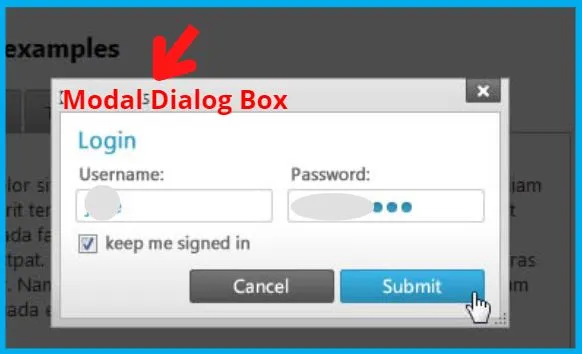
Windows 10, 11, and the server operating system devices might have IE mode issues after installing KB5014023 and later updates. The IE mode tabs in Microsoft Edge might stop responding when a site displays a modal dialog box.
This issue does not impact all the IE Mode sites in MS Edge. A modal dialog box is a form or dialog (popup) box that requires the user to respond before continuing or interacting with other portions of the webpage or app.
If you are a Developer: IE mode Sites affected by this issue call window.focus. The focus() method requests to bring a window to the front, as shown in the below picture.
What is Known Issue Rollback (aka KIR)?
Before getting into the solution, let’s learn what is Known Issue Rollback ( aka KIR)? Known Issue Rollback is the new capability that Windows provides with the help of the Windows update engine to quickly return an impacted device back to productive use if an issue arises during a Windows update.
Read More -> What is Known Issue Rollback KIR Process to Fix Issue
FIX IE Mode tabs not Responding Issue
Let’s check what the solution Microsoft offers to fix the IE mode tabs not responding issue for Windows 10/11 and Server 2022 devices is. Don’t expect anything fancy this time, but it’s a complex solution from my perspective.
Updated on 30th Aug 2022 – This issue was resolved in updates released on August 26, 2022 (KB5016688) and later with Sep 2022 Cumulative Update. Microsoft recommends you install the latest security update for your device.
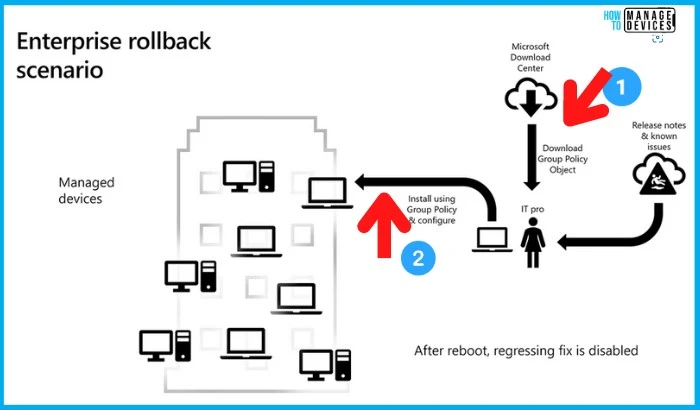
This IE Mode Tabs not responding issue is resolved using Known Issue Rollback (KIR). There is no specific out-of-band or preview hotfix to fix this issue. The Known Issue Rollback process takes up to 24 hours for the resolution to propagate automatically to consumer devices and non-managed business devices.
The quick TIP: Restart the Windows device/server to have a faster resolution with the KIR feature.
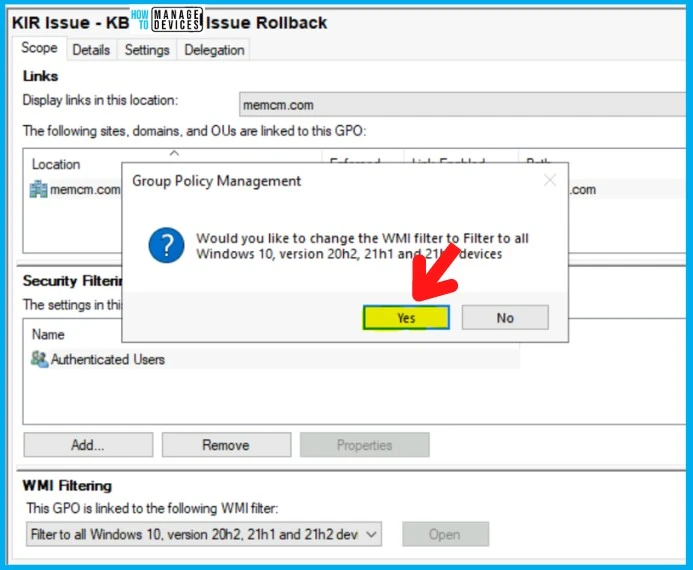
You must download and configure a KIR Group Policy Template ADMX to fix the issue on managed Windows devices (domain-joined, etc.). For example, suppose you have installed an affected update and encountered this issue. In that case, this issue can be resolved by installing and configuring the special Group Policy explained in the following blog post.
Read More to Learn How to Implement KIR Group Policy to FIX IE Mode tabs not Responding Issue -> Fix Windows Issue Deploy Known Issue Rollback KIR Using Group Policy.
Resource
Windows 10, version 21H2 | Microsoft Docs
Author
Anoop is Microsoft MVP! He is a Device Management Admin with more than 21 years of experience (calculation done in 2022) in IT. He is Blogger, Speaker, and Local User Group HTMD Community leader. His main focus is on Device Management technologies like SCCM 2012, Current Branch, and Intune. He writes about ConfigMgr, Windows 11, Windows 10, Azure AD, Microsoft Intune, Windows 365, AVD, etc.



Hi Anoop,
Is this issue addressed in Win 10 version 22H2 or we still need KIR? Can you share your thoughts on this please?