






New Hotfix Released KB5014666 to Fix Unable to connect to Internet using WiFi hotspot feature
New hotfix released KB5014666 to Fix Unable to connect to internet when using WiFi hotspot feature Issue for Windows 10. Microsoft released this preview hotfix KB5014666 on 28th June 2022. They have already released preview hotfixes for Windows 11 (KB5014668) and Server 2022 (KB5014665).
I have highlighted the WiFi issue with 2 known Issues With June Patches For Windows 10 And 11. Microsoft already resolved the second issue related to AAD and Microsoft 365 services login for ARM-based Windows 10 or 11 devices, or the AAD login issue was fixed with the Out-of-Band patch.
There are other issues with the June CU patch, and one of them is FIX IE Mode tabs not Responding Issue After Installing June CU. Microsoft also released a hotfix in June to fix old issues with April CU ->Error 0xC002001B Microsoft Store Apps might fail to Install.
Besides the WiFi fix, Microsoft Addresses several issues with these preview hotfixes KB5014665, KB5014666 & KB501466. One of them is an issue that causes the LocalUsersAndGroups configuration service provider (CSP) policy to fail when you modify the built-in Administrators group.

This issue occurs if the local Administrator account isn’t specified in the membership list when you perform a replace operation using Intune.
Unable to connect to Internet using WiFi hotspot feature Issue
After installing the KB5014699 or KB5014697, or KB5014678 patch, when you enable Mobile Hotspot, the host device (any impacted Windows operating systems) might lose the connection to the internet after the first client device connects to the mobile hotspot.
I have shared the ways to disable the mobile hotspot from Windows 10, 11, and Server 2022 in the following blog post -> Disable Internet Sharing using Mobile Hotspot.
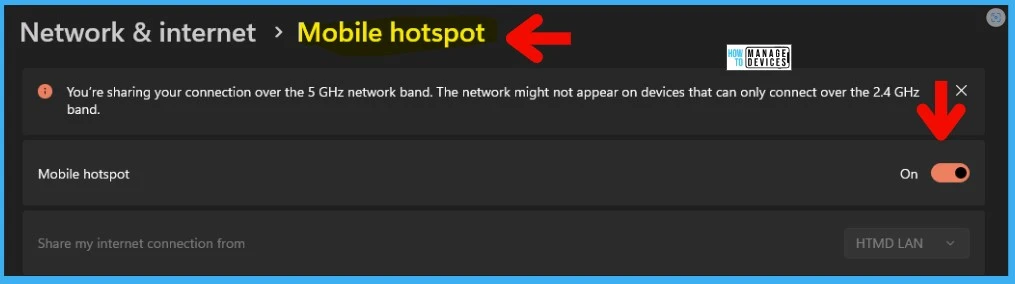
Hotfix KB5014666 to Fix Unable to connect to Internet
You need to install any of the following hotfixes to fix unable to connect to the Internet using the WiFi hotspot feature. These hotfix releases are part of the preview release cycle. The deployment of preview hotfix is sometimes challenging because these are not available via WSUS and WUfB.
You can still deploy these patches using SCCM and Intune using the workaround (offline/DISM) options I have documented in the following blog posts.
- SCCM methods to patch preview hotfixes that are not available via WSUS.
- Intune methods to patch preview hotfixes that are not available via WUfB.
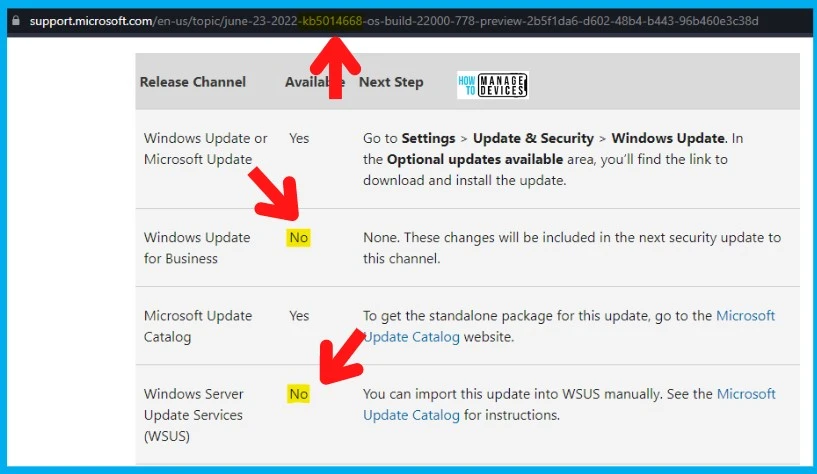
Manually Download Hotfix from Update Catalog
New Hotfix Released KB5014666 to Fix Unable to connect to Internet using WiFi hotspot feature. The following are the links that you can use to download the patches manually from Microsoft’s Update Catalog website.
- Windows 10 and Server 20H2 -> https://www.catalog.update.microsoft.com/Search.aspx?q=KB5014666
- Windows 11 -> https://www.catalog.update.microsoft.com/Search.aspx?q=KB5014668
- Server 2022 -> https://www.catalog.update.microsoft.com/Search.aspx?q=KB5014665
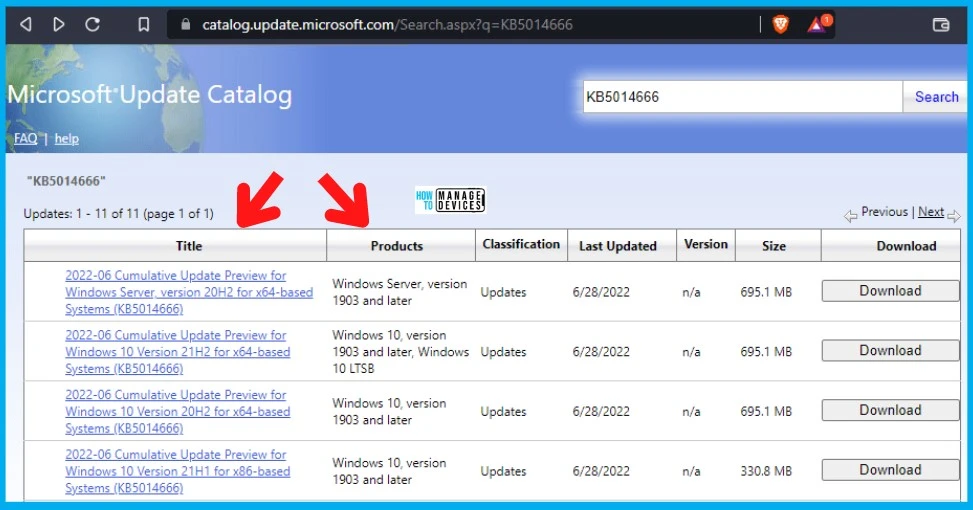
The following table provides different patch versions available to fix internet/WiFi issues.
| Title | Products |
|---|---|
| 2022-06 Cumulative Update Preview for Windows Server, version 20H2 for x64-based Systems (KB5014666) | Windows Server, version 1903 and later |
| 2022-06 Cumulative Update Preview for Windows 10 Version 21H2 for x64-based Systems (KB5014666) | Windows 10, version 1903 and later, Windows 10 LTSB |
| 2022-06 Cumulative Update Preview for Windows 10 Version 20H2 for x64-based Systems (KB5014666) | Windows 10, version 1903 and later |
| 2022-06 Cumulative Update Preview for Windows 10 Version 21H1 for x86-based Systems (KB5014666) | Windows 10, version 1903 and later |
| 2022-06 Cumulative Update Preview for Windows 10 Version 20H2 for x86-based Systems (KB5014666) | Windows 10, version 1903 and later |
| 2022-06 Cumulative Update Preview for Windows 10 Version 21H1 for ARM64-based Systems (KB5014666) | Windows 10, version 1903 and later |
| 2022-06 Cumulative Update Preview for Windows 10 Version 21H1 for x64-based Systems (KB5014666) | Windows 10, version 1903 and later |
| 2022-06 Cumulative Update Preview for Windows 10 Version 20H2 for ARM64-based Systems (KB5014666) | Windows 10, version 1903 and later |
| 2022-06 Cumulative Update Preview for Windows 10 Version 21H2 for ARM64-based Systems (KB5014666) | Windows 10, version 1903 and later, Windows 10 LTSB |
| 2022-06 Cumulative Update Preview for Windows Server, version 20H2 for ARM64-based Systems (KB5014666) | Windows Server, version 1903 and later |
| 2022-06 Cumulative Update Preview for Windows 10 Version 21H2 for x86-based Systems (KB5014666) | Windows 10, version 1903 and later, Windows 10 LTSB |
| 2022-06 Cumulative Update Preview for Windows 11 for x64-based Systems (KB5014668) | Windows 11 |
| 2022-06 Cumulative Update Preview for Microsoft server operating system version 21H2 for x64-based Systems (KB5014665) | Microsoft Server operating system-21H2 |
Author
Anoop is Microsoft MVP! He is a Device Management Admin with more than 21 years of experience (calculation done in 2022) in IT. He is Blogger, Speaker, and Local User Group HTMD Community leader. His main focus is on Device Management technologies like SCCM 2012, Current Branch, and Intune. He writes about ConfigMgr, Windows 11, Windows 10, Azure AD, Microsoft Intune, Windows 365, AVD, etc.



Discussion