






Print and Scan Failures after Aug 9th Patch Updates on Domain Controllers | Smart Card Authentication
When using Smart Card Authentication, you might see Print and Scan Failures after Aug 9th Patch Updates on Domain Controllers. This is mainly because the Printer or Scanner vendors are not compliant with the RFC 4556 specification.
Microsoft released July cumulative updates on 12th July, and this comes with many security fixes and feature improvements. The new message from Microsoft on 13th July 2022 is Printing and scanning might fail when these devices use smart card (PIV) authentication.
Microsoft also confirms that devices affected when using smart card (PIV) authentication should work as expected when using username and password authentication. So there is a fallback option available if your printers and scanners are not compliant with RFC 4556.
Microsoft released an advanced notification on this with Feb 2022 CU release. They also added an audit event on Active Directory domain controllers that identifies clients that are not RFC-4456 compliant.

Cause of Print and Scan Failures Authentication Failure
Let’s check the cause of Print and Scan Failures Authentication Failures. As per Microsoft, the cause of failure is that printer/scanner vendors are not compliant with RFC 4556 specifications.
“On July 13, 2021, Microsoft released hardening changes for CVE-2021-33764. This might cause this issue when you install updates released July 13, 2021, or later versions on a domain controller (DC).”
For printer and scanner client devices to be compliant, they must either:
- Use Diffie-Hellman for key-exchange during PKINIT Kerberos authentication (preferred).
- Or, both support and notify the KDC of their support for des-ede3-cbc (“triple DES”).
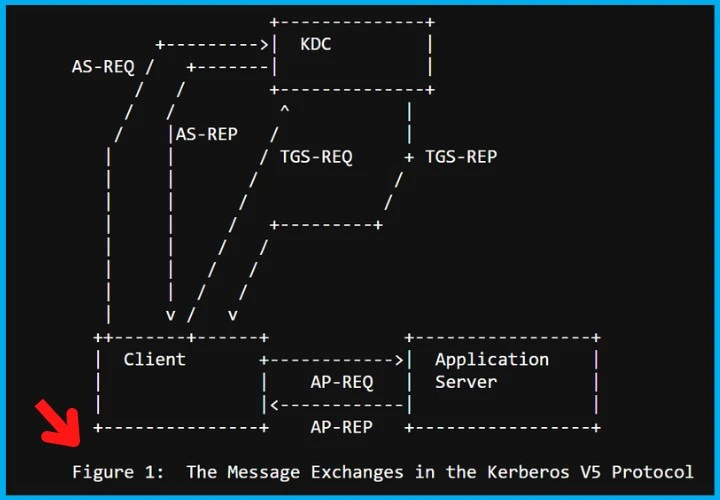
Permanent FIX to Print and Scan Smart Card Authentication Failures
Let’s check the recommendation from Microsoft to permanently fix the issue with Print and Scan Smart Card Authentication Failures.
- Verify Printers and Scanners have the latest firmware and drivers.
- Contact the device manufacturer and get the latest update if still facing the issue.
- Ask the manufacturer of the device to get the device into compliance with the hardening change for CVE-2021-33764.
After the July 2022 update, devices not compliant with the RFC 4456 specification and CVE-2021-33764 will not be usable with an updated Windows device.
Important Dates
After the August 9th, 2022, patch updates on Domain Controllers, all the devices that are not compliant with RFC 4456 will stop working with smart card authentication. Users can still use the user name and password instead of smart card authentication.
NOTE! – All updates released on 8th Aug 2022 day or later will be unable to use the temporary mitigation. The quick mitigation registry fixes and KBs are given below. This is applicable for Operating Systems which are domain controllers, such as:
- Windows Server 2019
- Windows Server 2016
- Windows Server 2012 R2
- Windows Server 2012
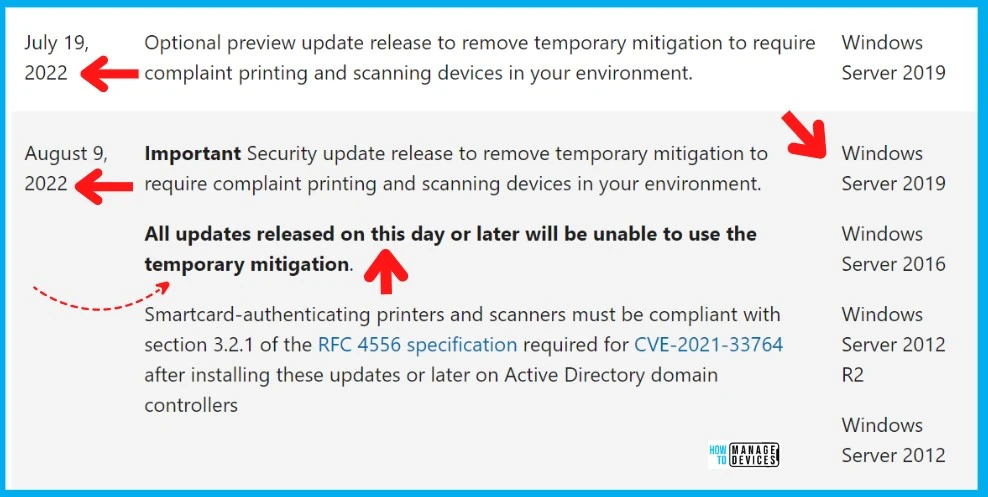
Temporary Mitigation to Fix Print and Scan Failures
Quick Mitigation to Fix Print and Scan Failures with smart card authentication comes with registry fix and installation of KB articles to allow Temporary Mitigation.
- Implement the registry fix on Domain Controllers.
- Install updates on domain controllers to allow the temporary Mitigation.
The following are the out-of-band updates released one year back (July 2021) or later. You can’t have these updates via WSUS or SCCM because these are out-of-band updates. However, you can find the patch missing from the SCCM guide to deploying this via WSUS or SCCM.
| Impacted Domain Controller OS | Direct Download Link (x64) |
|---|---|
| Windows Server 2019 | KB5005394 |
| Windows Server 2016 | KB5005393 |
| Windows Server 2012 R2 | KB5005391 |
| Windows Server 2012 | KB5005389 |
| Windows Server 2008 R2 SP1 | KB5005392 |
| Windows Server 2008 SP2 | KB5005390 |
Let’s look at the registry fix to Temporary Mitigation to Fix Print and Scan Failures until the 9th Aug 2022 patch updates. This registry fix applies only to domain controllers. With administrative permissions, you can run the following command from PowerShell prompt, as you see in the screenshot below.
reg add HKLM\System\CurrentControlSet\Services\Kdc /v Allow3DesFallback /t REG_DWORD /d 1 /fYou must have the following registry entries on domain controllers to Temporary Mitigation to Fix Print and Scan Failures with smart card authentication – “Allow3DesFallback”=dword:00000001.
Windows Registry Editor Version 5.00

[HKEY_LOCAL_MACHINE\SYSTEM\CurrentControlSet\Services\Kdc]
"DependOnService"=hex(7):<removed>
"Description"="@%SystemRoot%\\System32\\kdcsvc.dll,-2"
"DisplayName"="@%SystemRoot%\\System32\\kdcsvc.dll,-1"
"ErrorControl"=dword:00000001
"Group"="MS_WindowsRemoteValidation"
"ImagePath"=hex(2):<removed>
"ObjectName"="LocalSystem"
"Start"=dword:00000002
"Type"=dword:00000020
"Allow3DesFallback"=dword:00000001

[HKEY_LOCAL_MACHINE\SYSTEM\CurrentControlSet\Services\Kdc\Parameters]
"ServiceDll"=hex(2):<removed>

[HKEY_LOCAL_MACHINE\SYSTEM\CurrentControlSet\Services\Kdc\Security]
"Security"=hex:<removed>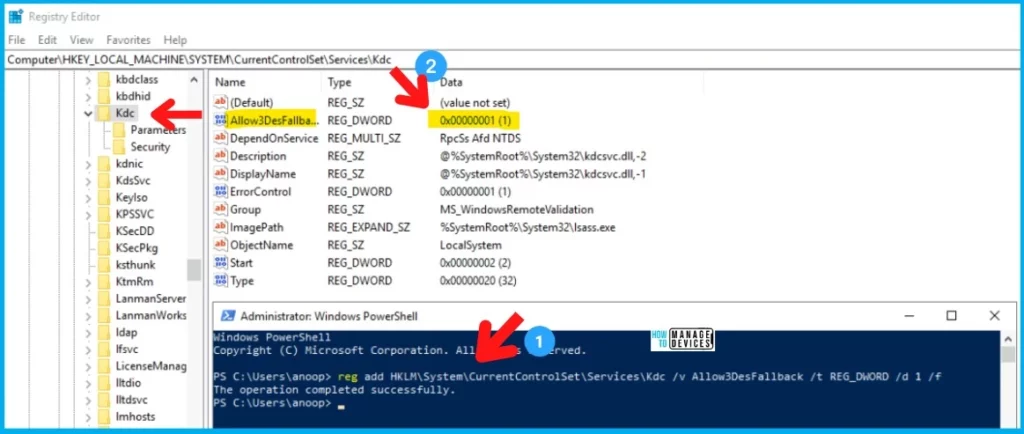
Resources
Author
Anoop C Nair is Microsoft MVP! He is a Device Management Admin with more than 20 years of experience (calculation done in 2021) in IT. He is Blogger, Speaker, and Local User Group HTMD Community leader. His main focus is on Device Management technologies like SCCM 2012, Current Branch, and Intune. He writes about ConfigMgr, Windows 11, Windows 10, Azure AD, Microsoft Intune, Windows 365, AVD, etc.


Discussion