






FIX PowerShell DSC Encrypted PSCredential property Issue
Microsoft has fixed PowerShell DSC Encrypted PSCredential property Issue with June 2022 cumulative update. This PSCredential property issue impacts you if password encryption is in use. This issue is already fixed with the latest CU.
Desired State Configuration (aka DSC) is a management platform in PowerShell that enables administrators to manage IT and development infrastructure with configuration as code. There is another known issue with DSC and WMF 5.0 update and this is explained in the below section.
This encrypted password issue is only applicable for enterprise/education/prof versions of Windows operating systems. This issue is not likely to be experienced by home users of Windows.
Microsoft didn’t release any documentation on this issue with the original release notes of June or July 2022 cumulative updates. It’s interesting to see that this issue is opened on 19th July 2022 and resolved on 12th July 2022.

July/Aug 2022 Cumulative Update Note-> Print and Scan Failures after Aug 9th Patch Updates On Domain Controllers | Smart Card Authentication.
The issue with PowerShell DSC Encrypted PSCredential property
Let’s check the Issue with PowerShell DSC Encrypted PSCredential property. This issue is impacting all the server and client Windows operating systems. This included Windows 11, Windows 10, Windows Server 2022, 2016, etc.
There were similar issues (SqlSetup: Does not allow null or empty password for MSA) reported back in 2017, etc but I don’t think the known issue with June 2022 Cumulative Updates has anything to do with other issues.
The following is the Error that you receive if you are yet to apply July patches and use an encrypted password for PowerShell DSC implementation. PowerShell Desired State Configuration resources might fail to apply successfully.
“The password supplied to the Desired State Configuration resource <resource name> is not valid. The password cannot be null or empty.”
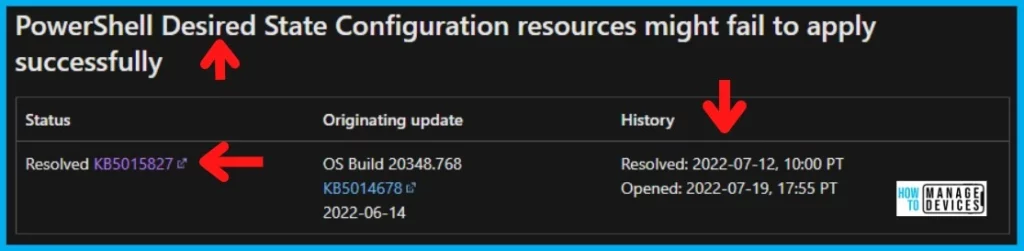
I have also seen another DSC encrypted password issue with WMF 5.0 RTM updates. The Certificates used to encrypt/decrypt passwords in DSC configurations may not work after installing WMF 5.0 RTM. Microsoft already provided a workaround for this issue as well.
FIX Encrypted the PSCredential property with DSC Issue
As per Microsoft documentation, the issues with PowerShell DSC Encrypted the PSCredential property are fixed with July 2022 Cumulative Update Patches for different operating systems. You need to install the July Cumulative Updates immediately on the following devices.
- Windows 10 -> KB5015807
- Windows 11 -> KB5015814
- Server 2022 21H2 -> KB5015827
- Server 20H2 -> KB5015807
Read More details on July 2022 patches and direct download links from the following post -> Windows 10 KB5015807 Windows 11 KB5015814 July 2022 Patch Tuesday.

FIX: Certificates used to encrypt/decrypt passwords in DSC configurations
The issue with DSC configuration after WMF 5.0 update is a different issue than the one with the June 2022 Cumulative Update. However, I thought it’s worth mentioning over here so that we can avoid confusion.
Microsoft already provided a fix for WMF 5.0 update issue. You have to re-create the certificate with Data Encipherment or Key Encipherment Key usage, and Document Encryption Enhanced Key usage (1.3.6.1.4.1.311.80.1). All the details are available at Protect-CmsMessage.
DSC PowerShell cmdlets may fail after installing WMF 5.0 RTM with the LCM failed to retrieve the property PendingJobStep from the object of class dscInternalCache. This is also a known issue and the workaround is given below.
Remove-Item -Path $env:SystemRoot\system32\Configuration\DSCEngineCache.mofAuthor
Anoop C Nair is Microsoft MVP! He is a Device Management Admin with more than 20 years of experience (calculation done in 2021) in IT. He is Blogger, Speaker, and Local User Group HTMD Community leader. His main focus is on Device Management technologies like SCCM 2012, Current Branch, and Intune. He writes about ConfigMgr, Windows 11, Windows 10, Azure AD, Microsoft Intune, Windows 365, AVD, etc.




Discussion