






Fix to MS Access Error can’t complete the output operation after July Office Patch Deployment
Let’s check the fix to MS Access Error can’t complete the output operation after applying July 2022 Office Patch. Microsoft confirmed the bug in Office 365 Access application after installing July.
The July 2022 Office patches (KB5002121, etc.) break MS Access runtime applications. This was reported on July 14, 2022, in the Microsoft Answers forum. More details are in the below section.
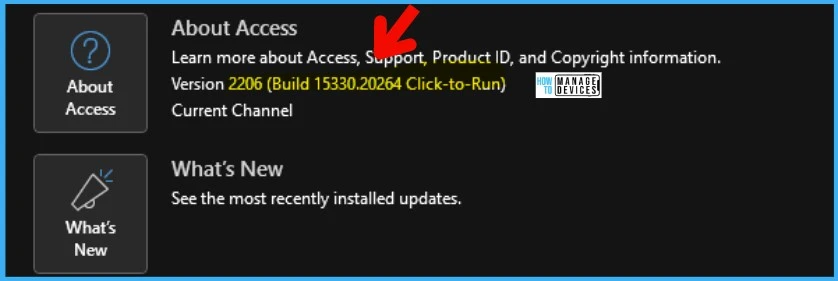
The Microsoft Access engineering team already confirmed that the FIX is available with the Microsoft 365 App current channel 2206, and the version number is 15330.20264. More details on some people who still see the issue, even with version 15330.20264, are in the below section.
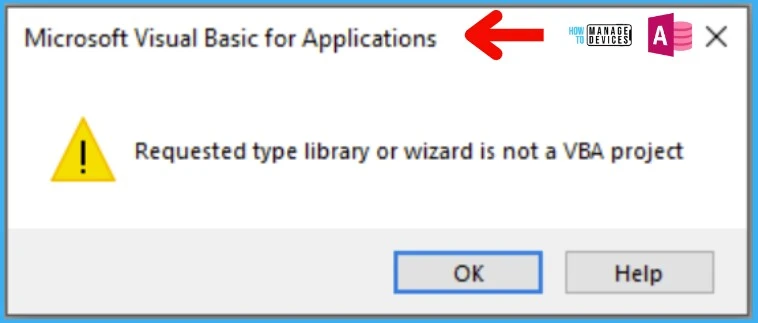
Microsoft explained this issue when opening an ACCDE/MDE file; users may receive an error message with the text “Requested type library, or wizard is not a VBA project.”

MS Access Error
There are two types of errors that can occur because of MS Access known issues. Microsoft documented the following errors in the following KB Error when trying to open an ACCDE/MDE file created in a different version of Access (microsoft.com).
- When opening an ACCDE/MDE file, users may receive an error message with the text “Requested type library or wizard is not a VBA project.”
- “Can’t complete the output operation” when trying to export to text or Excel files.
FIX to MS Access Error – Current Channel?
Let’s discuss the fix to MS Access Error for Office 365 Current channel. Microsoft Access Engineering Team member Shane Groff confirmed that this fix is already in place for the current channel.
You can get all these details on a thread called KB5002121 breaks MS Access runtime applications. The details are of the fixed version of MS Access – current channel 2206, and the version number is 15330.20264.
NOTE! – Some users from the thread didn’t get the MS Access issue fixed even after updating the MS Access application to 15330.20264 with the current channel 2206. The latest version of the current channel is 15330.20266.
How to get the Latest Update of MS Access
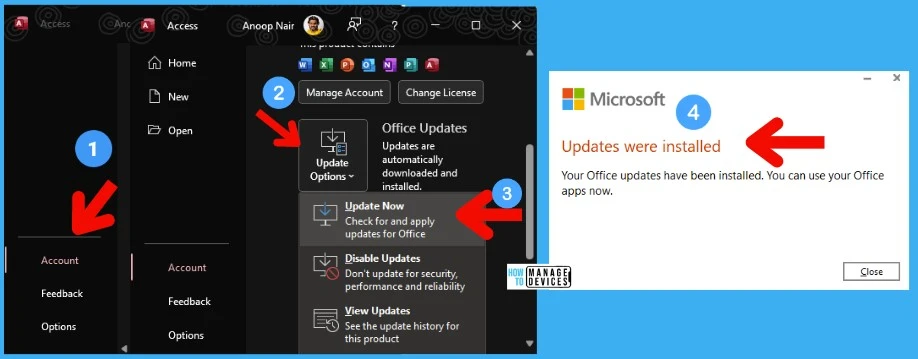
Let’s check how to get the latest update of MS Access. You can open MS Access on the Current Channel to get the latest version. Follow the steps to get the latest updates:
- Open MS Access application
- Open File -> Account -> Update Options -> Update Now
FIX to Rest of the Office Channels?
Microsoft KB didn’t confirm the fix to the current channel as oppose to a statement from the MS engineer. As per the Microsoft KB (Last Updated: July 21, 2022), “We are working on a fix for this issue, and this page will be updated with the appropriate build or KB article number as it becomes available.”
Impacted versions that are impacted with MS Access Error
Microsoft confirmed that this MS Access issue was introduced in the July 2012 Cumulative Update Patch Tuesday update across all supported versions of Access.
| Office Product | Issue Introduced | Fix available |
|---|---|---|
| Office 2013 | KB5002121 | Estimated August 2, 2022 (subject to change) |
| Office 2016 MSI | KB5002112 | Estimated August 2, 2022 (subject to change) |
| Office 2019 Volume Licensed | Version 1808, Build 10388.20027 | Estimated August 9, 2022 (subject to change) |
| Office LTSC 2021 Volume Licensed | Version 2108, Build 14332.20345 | Estimated August 9, 2022 (subject to change) |
| Office 2016 Retail | Version 2206, Build 15330.20246 | Version 2206, Build 15330.20264 |
| Office 2019 Retail | Version 2206, Build 15330.20246 | Version 2206, Build 15330.20264 |
| Office 2021 Retail | Version 2206, Build 15330.20246 | Version 2206, Build 15330.20264 |
| Microsoft 365 Apps Current Channel | Version 2206, Build 15330.20246 | Version 2206, Build 15330.20264 |
| Microsoft 365 Apps Monthly Enterprise Channel | Version 2205, Build 15225.20356 | Estimated July 25, 2022 (subject to change) |
| Microsoft 365 Apps Monthly Enterprise Channel | Version 2204, Build 15128.20312 | For the Monthly Enterprise Channel, a fix will only be made to Version 2205 |
| Microsoft 365 Apps Semi-Annual Enterprise Channel (Preview) | Version 2202, Build 14931.20604 | Estimated July 25, 2022 (subject to change) |
| Microsoft 365 Apps Semi-Annual Enterprise Channel | Version 2202, Build 14931.20604 | Estimated July 25, 2022 (subject to change) |
| Microsoft 365 Apps Semi-Annual Enterprise Channel Extended | Version 2108, Build 14326.21062 | Estimated July 25, 2022 (subject to change) |
| Microsoft 365 Apps Semi-Annual Enterprise Channel Extended | Version 2102, Build 13801.21528 | Estimated July 25, 2022 (subject to change) |
| Microsoft 365 Apps on Windows 7 | Version 2002, Build 12527.22183 | Estimated August 9, 2022 (subject to change) |
Author
Anoop C Nair is Microsoft MVP! He is a Device Management Admin with more than 20 years of experience (calculation done in 2021) in IT. He is Blogger, Speaker, and Local User Group HTMD Community leader. His main focus is on Device Management technologies like SCCM 2012, Current Branch, and Intune. He writes about ConfigMgr, Windows 11, Windows 10, Azure AD, Microsoft Intune, Windows 365, AVD, etc.




Discussion