






MS Teams Login Issue with Intune MAM Enrolled iOS Devices
Let’s check on MS Teams Login Issue with Intune MAM Enrolled iOS devices. Microsoft confirmed that there is an issue with the Microsoft Teams application and Intune MAM services on iOS devices.
Martin Schmidli shared the Microsoft Teams application login issues happening with personal iOS devices with the App protection policy. He also confirms that the overall Service Health looks ok. Also, the Microsoft Intune team acknowledged that this is a known issue with some users. More details are available below.
There are other reports that Intune Company Portal and Office application updates are causing some issues with Android devices. The Outlook & Teams apps wouldn’t load after updating the latest version of the Company Portal.
Another ongoing issue with some of the Android OEM vendors is also active. The customers are losing access to Microsoft Intune managed enterprise resources after upgrading to the Android 12 version.

- How to Collect Intune Logs from iOS Device Company Portal
- Microsoft Intune Mobile App Management MAM Policy Issues and Workaround
- [Intune Silverlight portal Experience of How to Deploy Applications MAM Policies To Mobile Devices Using Intune Part 3]
MS Teams Login Issue with Intune MAM Enrolled
Let’s check more details on MS Teams Login Issue with Intune MAM Enrolled iOS devices. This is reported by Martin Schmidli on Twitter. Microsoft Intune team confirmed that this is a known issue with some of the iOS users.
The iOS users are getting the following error when they try to launch Microsoft Teams from Intune Enrolled + App protection policy assigned iOS devices.
MS Teams Unknown Error – This app could not be protected because a connection with the Intune service did not complete. Please try again.
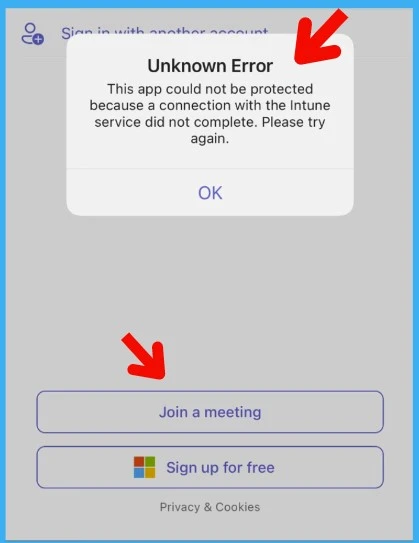
Advisory details on MS Teams Login issue on iOS Devices with Intune MAM policies
Microsoft Intune Support team confirmed that this is an issue they are aware of. I think they are already working on getting this issue resolved for impacted Tenants. The following are the advisory details on this issue.
“Some users can’t access Microsoft Teams with Mobile Application Management (MAM) enrolled iOS devices. If your tenant is impacted, please look for TM405582 in the SHD: http://aka.ms/MEMSHD”
Intune MAM App Protection Policies for iOS devices
Let’s quickly check where to check for Intune MAM App protection policies for iOS devices in the MEM Admin center (aka Intune) portal. Following is the path that you can look into:
- Open the MEM Admin Center portal
- Navigate to Apps -> App protection policies
You can see a list of Intune MAM App protection policies created and deployed in your tenant.
| Policy | Deployed | Updated | Platform | Management type | Apps |
|---|---|---|---|---|---|
| App Protection Policy BLR Users | Yes | 1/11/22, 5:52 AM | iOS/iPadOS | Apps on unmanaged devices | 20 |
You can open the policies to check more details, such as which are applications protected with Intune App protection policies. The Public Apps list will be available in the properties node of the application.
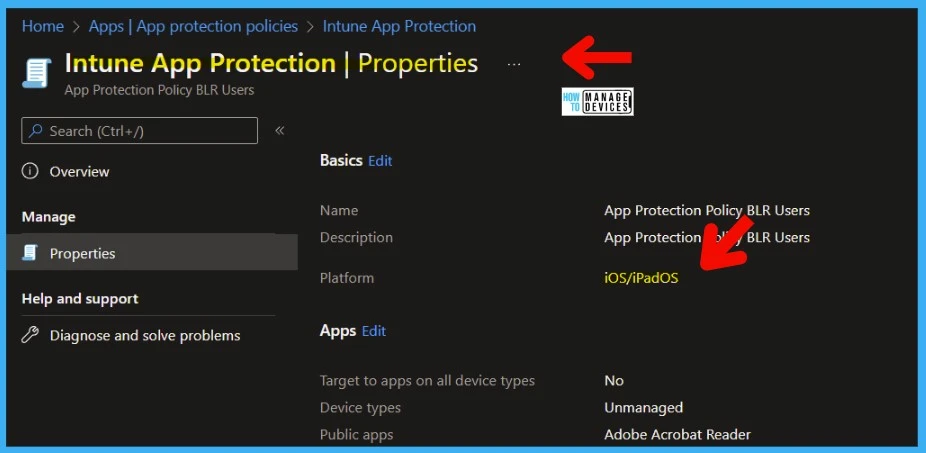
List of Intune App Protection MAM Enabled Public Applications
List of Intune App Protection MAM Enabled Public Applications are listed down as of 26th July 2022. I have seen the Microsoft Intune team always adding new public apps to enable Intune MAM protection for those SaaS apps.
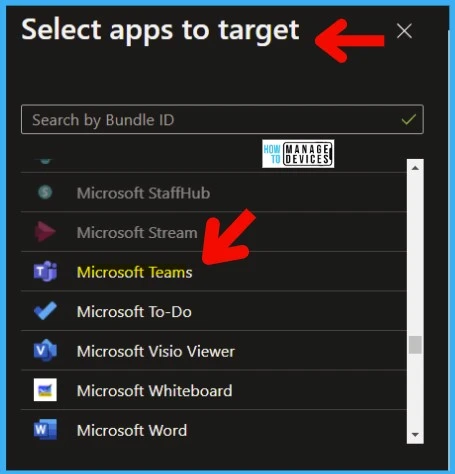
There are 101 public applications that are Intune MAM enabled. You can use these applications with Intune App protection policies. Microsoft Teams is also part of this application list. This policy is causing MS Teams login issues with MAM policies.
| Adobe Acrobat Reader |
| Appian for Intune |
| ArchXtract |
| AssetScan For Intune |
| Azure Information Protection |
| BlueJeans Video Conferencing |
| Board Papers |
| Board Papers for Intune |
| Box — Cloud Content Management |
| Box for EMM |
| Breezy for Intune |
| CAPTOR |
| CellTrust SL2™ for Intune |
| Cisco Jabber for Intune |
| Citrix ShareFile for Intune |
| Comfy |
| Condeco |
| Confidential File Viewer |
| Cortana |
| Dashflow for InTune |
| Dialpad |
| Diligent Boards |
| Dynamics 365 Remote Assist |
| Dynamics 365 Sales |
| F2 Manager – Intune |
| F2 Touch Intune |
| FactSet |
| Field Service (Dynamics 365) |
| Field Service Mobile |
| FleetSafer |
| Fuze Mobile for Intune |
| Groupdolists |
| Hearsay Relate for Intune |
| HowNow |
| iAnnotate for Intune / O365 |
| iBabs For Intune |
| iManage Work 10 For Intune |
| ISEC7 Mobile Exchange Delegate |
| ISEC7 Mobile Exchange Delegate for Intune |
| Leap Work for Intune |
| Lexmark Mobile Print Intune |
| LumApps for Intune |
| M-Files for Intune |
| Meetio |
| MentorcliQ |
| Microsoft 365 Admin |
| Microsoft Bookings |
| Microsoft Defender Endpoint |
| Microsoft Dynamics 365 |
| Microsoft Dynamics 365 for phones |
| Microsoft Edge |
| Microsoft Excel |
| Microsoft Invoicing |
| Microsoft Kaizala |
| Microsoft Lens |
| Microsoft Lists |
| Microsoft Office |
| Microsoft OneDrive |
| Microsoft OneNote |
| Microsoft Outlook |
| Microsoft Planner |
| Microsoft Power Apps |
| Microsoft Power BI |
| Microsoft PowerPoint |
| Microsoft SharePoint |
| Microsoft StaffHub |
| Microsoft Stream |
| Microsoft Teams |
| Microsoft To-Do |
| Microsoft Visio Viewer |
| Microsoft Whiteboard |
| Microsoft Word |
| Mobile Work Orders |
| MultiLine for Intune |
| My Portal By MangoApps |
| Naso Mobile |
| Notate for Intune |
| Now® Mobile – Intune |
| Omnipresence Go |
| PenPoint |
| PK Protect for Intune |
| Power Automate |
| PrinterOn for Microsoft |
| Qlik Sense Mobile |
| RICOH Spaces |
| Secure Contacts |
| Senses |
| ServiceNow® Agent – Intune |
| ServiceNow® Onboarding -Intune |
| Skype for Business |
| Slack for Intune |
| Space Connect |
| Speaking Email |
| Tableau Mobile for Intune |
| Team Papers for Intune |
| Vera for Intune |
| Webex for Intune |
| Work Folders |
| Yammer |
| Zero for Intune |
| Zoom for Intune |
Author
Anoop C Nair is Microsoft MVP! He is a Device Management Admin with more than 20 years of experience (calculation done in 2021) in IT. He is Blogger, Speaker, and Local User Group HTMD Community leader. His main focus is on Device Management technologies like SCCM 2012, Current Branch, and Intune. He writes about ConfigMgr, Windows 11, Windows 10, Azure AD, Microsoft Intune, Windows 365, AVD, etc.


Remediation: affected users may be able to access the Microsoft Teams iOS app by removing all accounts and re-adding them. To remove an account while not signed in users can go to “Edit” from the Teams sign-in page and then select the remove button “-“.
Update 4.14.1 was just released and it seems to fix the issue