






FIX SCCM Console Access Error 0x80070005 0x800706ba RPC Server is Unavailable
Fix SCCM Console Access Error 0x80070005 0x800706ba RPC Server is Unavailable. I started getting comments on How to Verify WMI Permissions Required for SCCM Console Access post back in June 2022.
David N commented on the SCCM console WMI permission post on 27th June that “the workaround (of setting RequireIntegrityActivationAuthenticationLevel = 1) did resolve the issue.” But Microsoft fixed this issue permanently now without any registry hack!
I have blogged about the error 0x800706ba RPC Server is Unavailable before – Fix ConfigMgr DP Issue RPC Server Is Unavailable Error Code 0x800706ba. The errors and fix discussed in this post are a bit different.
I have seen a note from Rashid Siddiqui on Twitter about a FIX from the Microsoft side – “Some customers may face issues with provider connectivity, Remote Control, and Content distribution after installing June security patches due to DCOM hardening changes.” More details are given below.


SCCM Console Access Issue because of DCOM hardening
Let’s check more details on the SCCM Console Access, Remote Control, and Content distribution Issues because of DCOM hardening. The Dcom Harding happened on the Windows side with June 2022 patches as mentioned above.
When you check the SmsAdminUI.log (SCCM logs for admin console) from the following location(s) depending on which device or server the console is installed.
- Remote Site Server – D:\Program Files\Microsoft Configuration Manager\AdminConsole\AdminUILog
- Remote Admin Console Server – C:\Program Files (x86)\Microsoft Endpoint Manager\AdminConsole\AdminUILog
The following table gives you more details on the issue and its impact on different components of SCCM. These components include SMS Provider, DP, Client, SCCM Admin Console, etc.
| Issue | Impacted SCCM Components/Tools | Error Message |
|---|---|---|
| Console fails to access the SMS Provider remotely under any user account | SCCM Admin Console | 0x80070005 – Access is Denied |
| Remote connectivity issues with different SCCM support tools that use Dcom | Remote Assist, Policy Spy, Support Center Tools | 0x80070005 – Access is Denied |
| Content Distribution issues with Remote DP | Remote Distribution Point (aka Remote DP) | 0x800706ba – The RPC server is unavailable |
Insufficient privilege to connect, error: 'Access is denied. (Exception from HRESULT: 0x80070005 (E_ACCESSDENIED))' System.UnauthorizedAccessException
Access is denied. (Exception from HRESULT: 0x80070005 (E_ACCESSDENIED))
Workaround to FIX Errors Error 0x80070005 and 0x800706ba
The following are some workarounds shared by David N in the comments section of the WMI Permission post as mentioned above. I don’t recommend the workaround now because Microsoft shared a permanent solution for this issue.
DCom Hardening changes were required for CVE-2021-26414. Microsoft recommended that you verify if SCCM client or server applications that use DCOM or RPC work as expected with the hardening changes enabled. You can enable or disable the hardening changes for CVE-2021-26414 using the following registry settings.
| Registry Path | Value Name | Type | Disable – Enhancement | Enable – Enhancement |
|---|---|---|---|---|
| HKEY_LOCAL_MACHINE\SOFTWARE\Microsoft\Ole\AppCompat | RequireIntegrityActivationAuthenticationLevel | dword | 1 (decimal value) | 0 (decimal value) |
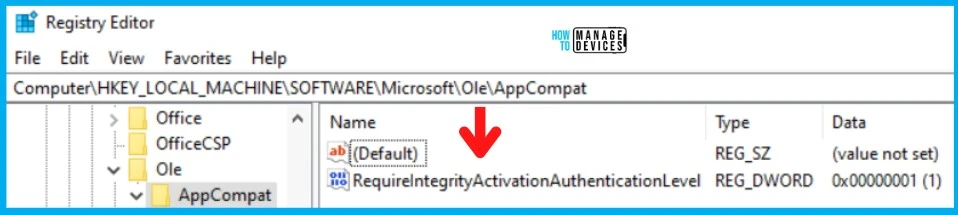
FIX | Resolution SCCM Remote Tools Access Errors 0x80070005 and 0x800706ba
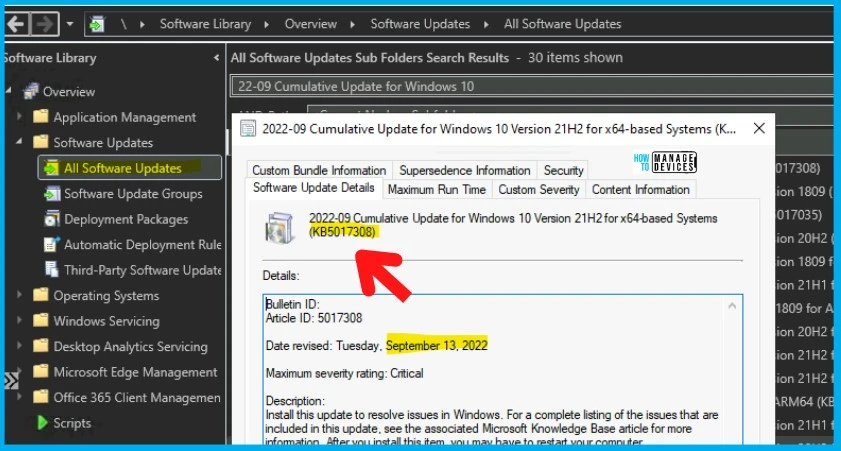
Let’s check the FIX | Resolution SCCM Remote Tools Access Errors 0x80070005 and 0x800706ba. Microsoft suggests that to install the latest Cumulative Update on the SCCM client and server-side Windows devices.
Also, Microsoft suggests upgrading to the latest SCCM CB version, and there are a lot of security improvements with the SCCM version 2203 or later. While writing this post, the latest Windows Cumulative Update is released on 13th September 2022 Patch Tuesday.
NOTE! – More Details on Windows 11, Windows 10, and Server OS patches with direct download links are available in the following post – September 2022 Patch Tuesday Windows 10 KB5017308 Windows 11 KB5017328.
The following Table gives you the details for September 2022 Cumulative Updates where this fix to SCCM Remote Tools Access DCOM/RPC Errors 0x80070005 and 0x800706ba is included.
| Windows OS Version | KB |
|---|---|
| Windows 10 | KB5017308 |
| Windows 11 | KB5017328 |
| Server 2012 | Not Publically Available? |
| Server 2016 | KB5017305 |
| Server 2019 | KB5017315/KB5017305 |
| Server 2022 | KB5017316 |
Author
Anoop C Nair is Microsoft MVP! He is a Device Management Admin with more than 20 years of experience (calculation done in 2021) in IT. He is Blogger, Speaker, and Local User Group HTMD Community leader. His main focus is on Device Management technologies like SCCM 2012, Current Branch, and Intune. He writes about ConfigMgr, Windows 11, Windows 10, Azure AD, Microsoft Intune, Windows 365, AVD, etc.




Discussion