






Intune Advisory TPM attestation error 0x81039001 with Windows Autopilot. Microsoft raised an alert (Advisory #IT431147) on the TPM Provisioning Issue with Windows Autopilot. We have seen TPM issues popping up again and again on Twitter.
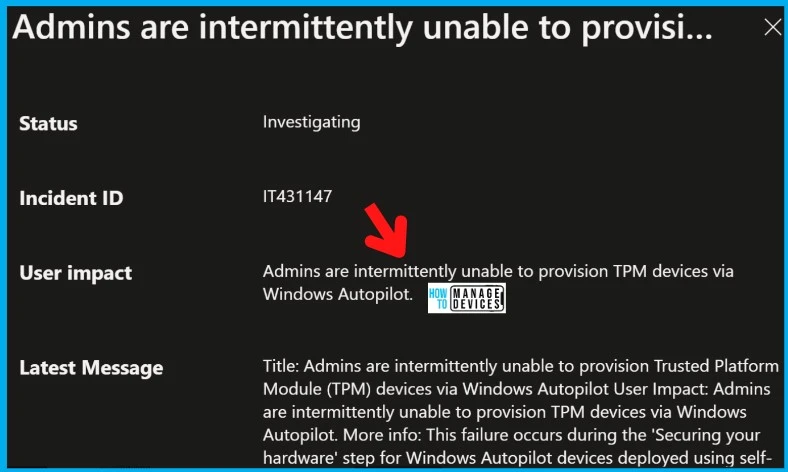
Admins intermittently cannot provision Trusted Platform Module (TPM) devices via Windows Autopilot. Daniel Davila raised this issue on Twitter on 14th Sept 2022, but Microsoft confirmed that they are investigating the issue with an advisory IT431147 a few days after.
The impact is mainly for Admins because Admins won’t be able to provision TPM devices using the Windows Autopilot service. This failure occurs during the ‘Securing your hardware‘ step during Windows Autopilot pre-provisioning scenario.
Microsoft stated that it might take a few weeks to investigate and find out the latency issue with the certificate authentication. Microsoft is currently investigating the TPM attestation issues today across different tenants. You can refer to the advisory IT431147 for more details or read the below sections of this post.

Update 20th Sept 8:50 AM – Another Autopilot issue (IT434773). This user is not authorized to enroll. Users may be unable to perform Autopilot Enrollments within Microsoft Intune. The users may be unable to perform Autopilot Enrollments within Microsoft Intune.
Autopilot Error – This user is not authorized to enroll. You can try to do this again or contact your system administrator with error code 80180003.”
- Part 1 ▶ Windows Autopilot FAQ Clarifying the General Misconceptions
- Part 2 ▶ Windows Autopilot from the perspective of IT Admin setup
- Part 3 ▶ Windows Autopilot In-Depth Processes from Device Side
- Part 4 ▶ Windows Autopilot WhiteGlove Provisioning Deep Dive
Issue: TPM Attestation Error 0x81039001 with Windows Autopilot
Let’s check the details of TPM attestation error 0x81039001 with Windows Autopilot and Intune Advisory #IT431147. First of all, Microsoft confirmed that it is an intermediate issue with the service!
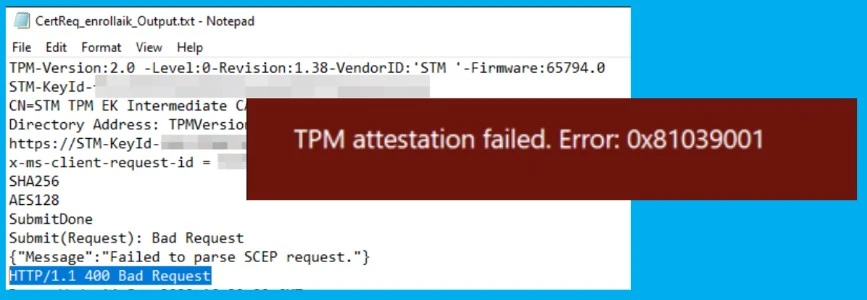
Error Messages shared by Daniel on the TPM attestation error with Autopilot – HTTP/1.1 400 Bad Request and TPM attestation failed: 0x81039001. He also added that the certreq process failed during pre-provisioning but was successful during log gathering.
This failure occurs during the ‘Securing your hardware‘ step for Windows Autopilot devices deployed using self-deploying mode or pre-provisioning mode. Admins are intermittently unable to provision Trusted Platform Module (TPM) devices via Windows Autopilot.
- Microsoft 365 Intune Degraded Performance Issue Azure Cosmos DB infrastructure
- Unable to Login with Microsoft Account to Windows 11 Issue
- Windows Upgrade Troubleshooting Logs
Workaround | FIX – TPM Attestation Error 0x81039001 with Windows Autopilot
The workaround to this issue is RETRY or Try Again, as per Microsoft Advisory. In the event provisioning fails, the recommendation from MS is to try again, as subsequent attempts to provision should be successful.
“A few weeks to investigate and find out the latency issue with authentication” was an interesting statement from Microsoft. Microsoft has already started investigating the issue, but it might take a long time because of the issue’s complexity!
ROOT CAUSE: Microsoft has identified that latency associated with an authentication component in the affected environment is causing Windows Autopilot to fail intermittently, resulting in intermittent pre-provisioning and self-deployment failures for TPM devices.
Microsoft is investigating to discover where this latency originates, allowing them to formulate a strategy that remediates impact. Due to the complexities of this issue, it may take a few weeks to conclude our investigation.
| User Impact | Current Status | Scope of Impact | Impacted Service | Root Cause |
|---|---|---|---|---|
| Admins are intermittently unable to provision TPM devices via Windows Autopilot. | Microsoft attempts to discover where this latency originates, allowing us to formulate a strategy that remediates impact. Due to the complexities of this issue. This might take a week to complete. | This event may affect your organization, and admins attempting to utilize the Windows Autopilot self-deploying or pre-provisioning modes for TPM devices may experience an impact. | 1. Microsoft Intune 2. Autopilot Pre-provisioning Service 3. Autopilot self-deploying | A latency associated with an authentication component |
Author
HTMD Admin Account to provide news and latest updates on the known issue from Microsoft world. We cover Windows, Intune, Azure, AVD, and Windows 365 news.


How can I see the incident in service health? Having a global admin account and cannot see the incident. If I am using a url to this incident, I am getting a blade message „I do not have permissions“
Is there something I need to add to my account?
StaffHey – This incident IT434773 is visible or applicable only to the tenants that are impacted by this issue as per Microsoft’s telemetry data. https://www.anoopcnair.com/intune-service-health-status-message-mem-admin/
It could be possible that Microsoft thinks that your tenant is not impacted by this issue.
Thank you very much for the reply!
So the incident impacts my tenant, but it is not shown.
Do I have the possibility to request that?
StaffTry this https://admin.microsoft.com/AdminPortal/home#/servicehealth/:/reportanissue or raise a service request from the MEM admin center portal
to keep trying like you stated in the workaround, am i to keep on restarting the device to be sure it deploys to intune, as 12 out of 14 have deployed.
How best to “retry”?
Errors later in the OOBE seem to require a full system reset to restart the OOBE properly and that is a lengthy process.