






Windows 10 KB5021233 Patch Tuesday December 2022
Microsoft has released the Windows 10 KB5021233 cumulative updates to fix known issues, security vulnerabilities, and performance issues.
All editions of Windows 10, version 21H1 will reach end of service on December 13, 2022. After this date, devices will not receive monthly security & quality updates.
Microsoft warned after installing cumulative updates KB5021233, and some Windows devices might start up to an error (0xc000021a) with a blue screen when starting up the operating system.
You need to update to one of the newer Windows 10, as recommended by Microsoft, using the appropriate Enablement Package KB (EKB). You can use EKB KB5003791 to update to Windows 10 21H2.

You can go to Windows 10 Settings > Update & Security > Windows Update. Sometimes you have to seek updates using the Check for Updates button. You will find the link to download and install the update.
Known Issues from Windows 10 KB5021233
Here you can check the current status of known issues after the last patch update on Decemeber 2022 CU. This table offers a summary of current active issues and those issues that have been resolved in the last 30 days.
This KB5021233 update addresses an issue that affects the Camera app. The app stops responding when memory is low.
| Known Issue | Originating KB | Status |
|---|---|---|
| Database connections using Microsoft ODBC SQL Server driver might fail. Apps using ODBC connections might fail to connect to databases. | OS Build 19045.2251 KB5019959 2022-11-08 | Confirmed |
| Sign in failures and other issues related to Kerberos authentication After installing updates released November 2022, you might have Kerberos authentication issues. | OS Build 19045.2251 KB5019959 2022-11-08 | Resolved |
| Your desktop or taskbar might momentarily disappear or might become unresponsive You might experience an error in which the desktop or taskbar disappearing then reappearing. | N/A | Resolved |
| Direct Access might be unable to reconnect after your device has connectivity issues This issue might happen after losing network connectivity or transitioning between Wi-Fi networks or access points. | OS Build 19045.2193 KB5018482 2022-10-25 | Resolved |
| Domain join processes may fail with error “0xaac (2732)” This might be encountered when an account was created by a different identity than the one used to join the domain | N/A | Confirmed |
| Update might fail to install and you might receive a 0x800f0922 error Security update for Secure Boot DBX might fail to install. | N/A | Investigating |
New Features of Windows 10 KB5021233
HTMD community covered all the new features of the Windows 10 22H2 release in the following blog post. All these features are included in the latest Cumulative Update released on patch Tuesday, 13th December 2022.
- New! The search box now appears, by default, on the taskbar when the taskbar is at the top of your screen or when you turn on small taskbar button mode.
- New! Cortana is no longer pre-pinned to your taskbar by default. If you want to re-pin Cortana to the taskbar.
Let’s check the new features of Windows 10 22H2 and the issues fixed with the 22H2 version of Windows 10, New Features Of Windows 10 22H2
SCCM Windows 10 KB5021233 Deployment
Learn how to Deploy Windows 10 KB5021233 December 2022 Cumulative Updates using SCCM/WSUS. You can deploy Windows 10 December 2022 CU KBs using Intune or SCCM.
Using the following methods, you can create a monthly patch package for December 2022. You can also search with Windows 10 LCU for December 2022 KB5021233. The easiest way is to check from the SCCM admin console.
NOTE! – You can verify the Windows 10 versions
(OS Builds 19042.2364, 19043.2364, 19044.2364, and 19045.2364) by installing December 2022 Latest Cumulative Updates.
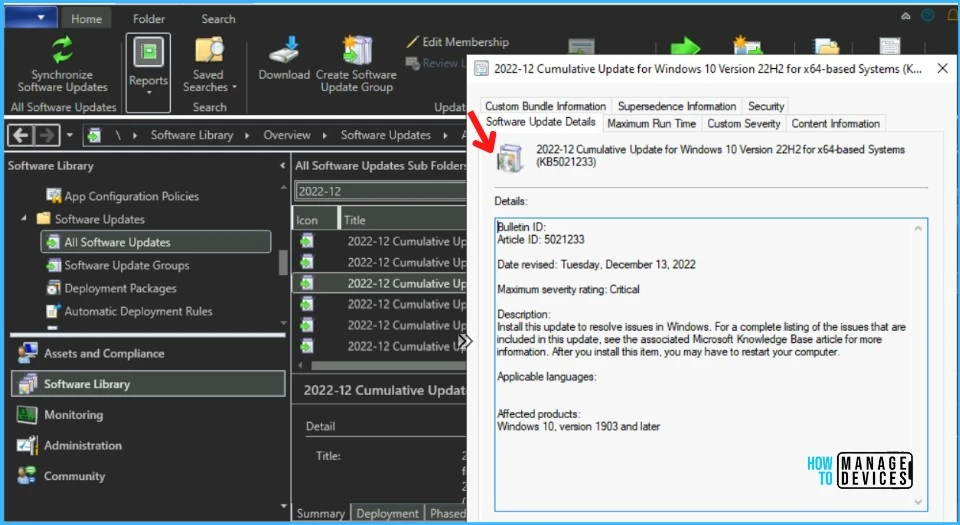
- In SCCM Console, Navigate to \Software Library\Overview\Software Updates\All Software Updates.
- You will need to initiate a WSUS Sync from the All Software Updates node (Right-click on the node and initiate the sync).
- Search with the following KB5021233 Number.
- Or you can search with 22-11 Cumulative Update for Windows 10, as shown in the below screenshot.
- How to Create Deploy New Software Update Patch Package Using SCCM | ConfigMgr
- SCCM ADR Automatic Deployment Rule Creation Process
- ConfigMgr Software Updates Troubleshooting Tips | Fix Installation Issues
Intune Windows 10 KB5021233 Deployment
Let’s check how to deploy the December 2022 Patch Tuesday (LCU) Deployment using Intune. You can deploy Windows 10 Nov CU using Microsoft Intune. The patch deployment process in Microsoft Intune is different from that of SCCM.
I don’t think creating a new patch deployment policy to cater to monthly CU deployments is mandatory, but you can use the following method to expedite. The existing patch deployment policy will deliver the patches using WUfB (Windows Update for Business).
Read More – Software Update Patching Options with Intune Setup Guide
You have the option to expedite the Installation of December 2022 quality updates. Create expedited update profiles for Quality updates using the following steps.
- Sign in to the Microsoft Intune admin center https://endpoint.microsoft.com/
- Navigate Device -> Windows 10 quality Updates (preview).
- Click on + Create Profile.
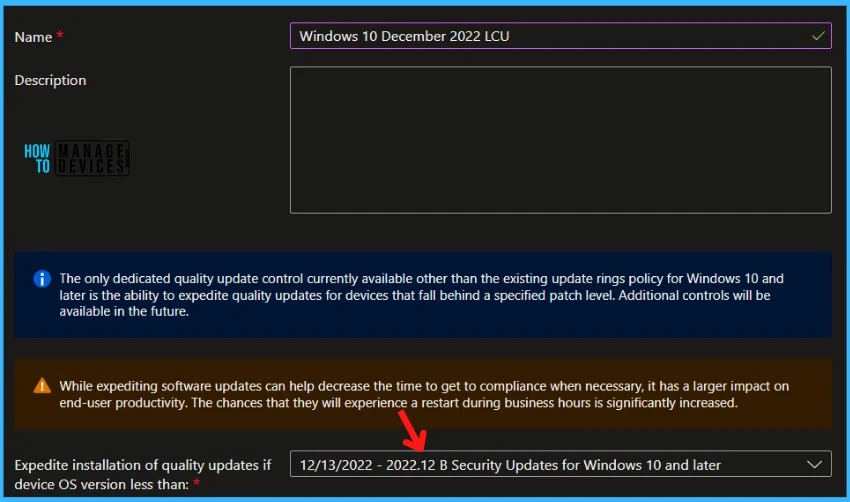
The following are the Settings for Intune quality update profile for the monthly patching process if you want to expedite the deployment of patches. Otherwise, you can use the standard quality updates policy from Intune.
- Name – December 2022 LCU for Windows 10.
- Description— I would recommend adding a detailed description.
- Expedite installation of quality updates if the device OS version is less than 13th December 2022 – 2022.12 B Security Updates for Windows 10 and later
- Number of days to wait before the restart is enforced – 1 Day
More Details on Zero Day Out Of Band Patch Deployment Using Intune MEM Expedite Best Option and Intune Reporting Issue: Expedite Windows Security Patch Deployment.
Windows 10 KB5021233 Direct Download Links
Let’s manually download the 2022 December Cumulative Update for Windows 10 (KB5021233) from the Microsoft Update Catalog website. The following tables provide the direct links to download the December 2022 Cumulative Updates for Windows 10.
You can check the Microsoft Update Catalog portal to get the direct download links to the hotfixes for December 2022 LCU. Check this out Microsoft Update Catalog –https://www.catalog.update.microsoft.com/
| Title | Products | Size | Direct Download |
|---|---|---|---|
| 2022-12 Cumulative Update for Windows 10 Version 22H2 for x64-based Systems (KB5021233) | Windows 10 22H2 | 692.6 MB | Download |
Author
About Author – Jitesh, Microsoft MVP, has over five years of working experience in the IT Industry. He writes and shares his experiences related to Microsoft device management technologies and IT Infrastructure management. His primary focus is Windows 10/11 Deployment solution with Configuration Manager, Microsoft Deployment Toolkit (MDT), and Microsoft Intune.



I cannot open my HP’s laptop since blue screen appeared on 13 /12/22 because of releasing KB5021233 updates.Now,I need how to do? tell me how to do,please! Thank you so much.