






Out-of-band Patches KB5022553 and KB5022554 Fix for Windows Server Hyper-V VM Issues
Microsoft released out-of-band (OOB) Windows Server updates KB5022553 and KB5022554 to address issues with new VMs managed by SCVMM and using Software Defined Networking (SDN).
The Out-of-band update addresses a known issue that might cause new virtual machines or new network adapters for existing VMs to have issues when using Software Defined Networking (SDN) managed by System Center Virtual Machine Manager (VMM).
To resolve this issue, you will need to install one of the updates KB5022553 or KB5022554, on all Hyper-V hosts in your environment which are affected by this issue. You do not need to install any updates or change other servers or client devices in your environment to resolve this issue.
The updates are not delivered through Windows Updates, Windows Server Update Services (WSUS), and will not install automatically on impacted servers. You can download the standalone package from Microsoft Update Catalog and install them manually.

How to Fix the issue of the latest Zero-Day patch missing from SCCM. You can manually import these updates into WSUS and SCCM. Let’s check here how you can manually import the Patch Missing from SCCM How to Import Into WSUS and SCCM manually.
- How to Create Deploy New Software Update Patch Package Using SCCM | ConfigMgr
- Zero Day Out Of Band Patch Deployment Using Intune MEM Expedite Best Option
Out-of-band Patches KB5022553 and KB5022554 Fix for Windows Server Hyper-V VM Issues
This Out of band hotfix is available via Windows Update, You do not need to apply any previous update before installing these cumulative updates. If you have already installed updates released on December 13, 2022, you do not need to uninstall the affected updates before installing any later updates.
| KB Details | Products | Size (MB) |
|---|---|---|
| 2022-12 Cumulative Update for Microsoft server operating system version 21H2 for x64-based Systems (KB5022553) | Microsoft Server operating system-21H2 | 316.3 MB |
| 2022-12 Cumulative Update for Windows 10 Version 1809 for x64-based Systems (KB5022554) | Windows 10 LTSB | 594.1 MB |
| 2022-12 Cumulative Update for Windows Server 2019 for x64-based Systems (KB5022554) | Windows Server 2019 | 594.1 MB |
| 2022-12 Cumulative Update for Windows 10 Version 1809 for x86-based Systems (KB5022554) | Windows 10 LTSB | 324.7 MB |
| 2022-12 Cumulative Update for Windows 10 Version 1809 for ARM64-based Systems (KB5022554) | Windows 10 LTSB | 638.0 MB |
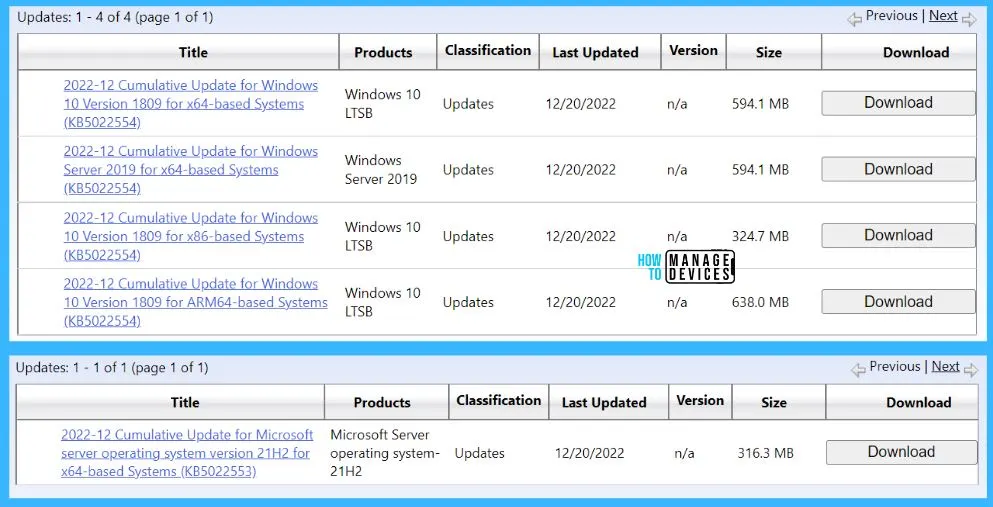
Download Out-of-Band Patches KB5022553 and KB5022554
Microsoft recommends Windows Server users to install the latest cumulative updates on all affected Hyper-V hosts. For Windows Server 2022 and Windows Server 2019, the new updates are released as KB5022553 and KB5022554, respectively.
You can download the standalone Out-of-Band Patches directly from the Microsoft Update Catalog website.
- Windows Server 2022: KB5022553 https://www.catalog.update.microsoft.com/Search.aspx?q=KB5022553
- Windows Server 2019: KB5022554 https://www.catalog.update.microsoft.com/Search.aspx?q=KB5022554
This non-security update includes quality improvements. When you install this KB:
- This update addresses a known issue that affects Hyper-V hosts that use software defined networking (SDN) and are managed by System Center Virtual Machine Manager (VMM). You might receive an error for workflows that involve:
- Creating a new network adapter for an existing virtual machine (VM) that is joined to a VM network
- Creating a new VM with a network adapter joined to a VM network.
You can verify the Windows Server 2019 and 2022 versions after patch installation. Windows Server 2019 version after KB5022553 installation 22000.740. Windows Server 2022 version number after KB5022554 patch installation 17763.3772.
Author
About Author – Jitesh, Microsoft MVP, has over five years of working experience in the IT Industry. He writes and shares his experiences related to Microsoft device management technologies and IT Infrastructure management. His primary focus is Windows 10/11 Deployment solution with Configuration Manager, Microsoft Deployment Toolkit (MDT), and Microsoft Intune.


Discussion