






How SCCM can Effectively Handle Windows 10 Migrations Configuration Manager ConfigMgr
How can SCCM Effectively Handle Windows 10 Migrations Configuration Manager ConfigMgr Endpoint Manager? Windows 10 migrations are the next most significant challenge for the SCCM admins. Isn’t it?
How many Giga bites of data do we (SCCM admins) need to transfer to remote DPs over the WAN for Windows 10 migrations? Are most organizations planning to stay with Windows 10 Current Branch for Business (CBB), or would it be a mix of CBB and Long Term Service Branch (LTSB)?
How SCCM can Effectively Handle Windows 10 Migrations—Here are more Infographics details about Windows 10 branches. There should be scenarios where we need OSD images for both branches (CBB and LTSB). This increases the content transfer over the WAN and causes more headaches for SCCM admins.
Your existing SCCM infrastructure will help you achieve seamless Windows 10 migration. Before starting the migration, you should ask the following questions.

Table of Contents
- How to Perform Mass Migrations of Windows 10 Upgrades Using SCCM 2012
- SCCM CB Release has Changed 2 Versions per Year | March and September
- Top 10 New Features of SCCM 2207

Can You View all WAN Transfers Worldwide? Can You Pause and Reprioritize in Real-Time? Can You Select Content (Such as an Image) and See Where it is Cached Worldwide?
This is always a problem for SCCM administrators, who struggle to get exact content transfer details. With Adaptiva OneSite’s LiveFlow, the SCCM admin will know precisely where SCCM data is being transferred at any given moment and how much more time it will take to complete the package replication.

How many Windows 10 Devices are Connected to a Corporate WiFi Network? Does peer-to-peer on WiFi Work well with SCCM?
SCCM admins can even consider pausing and restarting a replication job. However, with Adaptiva OneSite LiveFlow, they will have more power to wait and start traffic.

Can PowerShell Automation be Used as Part of the Windows 10 Migration Project?
WiFi network connections and Windows 10 deployment are other headaches for SCCM admins. Peer-to-peer technologies have technical limitations that make them unsuitable for enterprise security requirements.
Now, with Adaptiva OneSite’s P2P WiFi Optimizer, innovative networking technology helps overcome the technical limitations previously associated with running secure, enterprise P2P networks over WiFi. Enterprises can now leverage WiFi networks for peer sharing with SCCM infrastructure wherever desired.
| Onesite Workflow Designer |
|---|
| SCCM |
| Active Directory |
| Azure |
| Office 365 |
| Exchange |
| SQL |
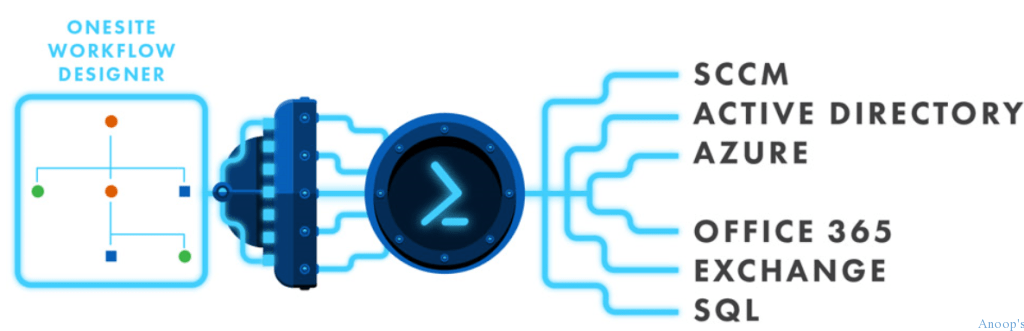
PowerShell and Automation are essential parts of modern IT strategy. The Adaptiva OneSite workflow designer can work very well with PowerShell. PowerShell Fusion allows you to invoke any PowerShell script from within any Adaptiva OneSite workflow, which provides immense power.
This automation technology boosts Windows 10 migrations very quickly. Also, there is no limit to what you can accomplish. With Adaptiva Onesite PowerShell Fusion, you can easily integrate with SCCM, Active Directory, Azure, Office 365, Exchange, SQL, etc.
Do You have Quota Baches with SCCM? Would that Impact Windows 10 Migration?
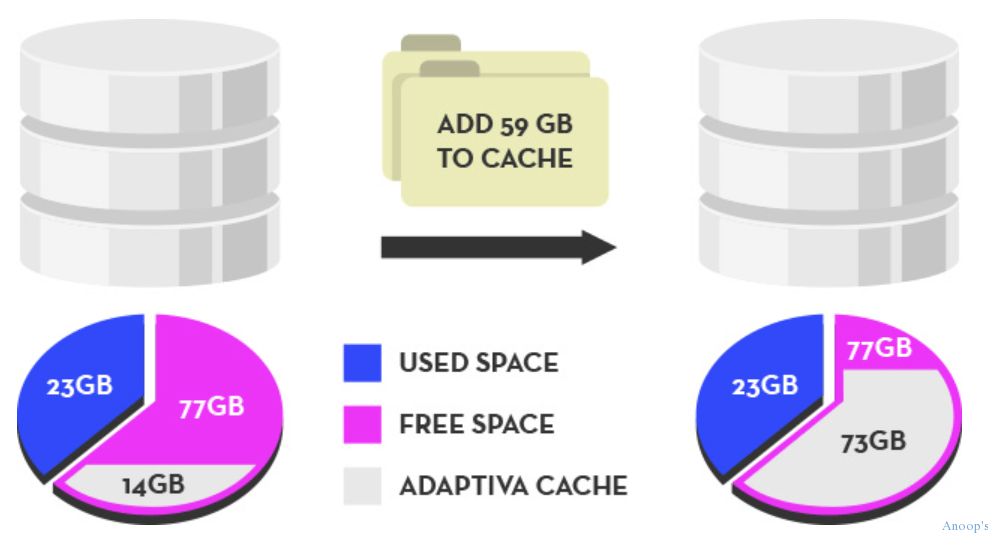
Quota-based caches are always a headache for SCCM admins. Systems use pre-allocated disk space to cache data. SCCM Admins may struggle to decide how much space to take away from end-users. Yes, this could impact Windows 10 migration and application deployment.
The quotas fail to use hard disks, especially during migration times. Adaptiva OneSite comes with a solution: zero-footprint caching. It runs a super-fast, lightweight file system within a computer’s unallocated/free disk space.
Do You Have Custom Scripts that Must Be Streamlined for Windows 10 Migration?
The SCCM team always needs to create scripts and in-house scripts. When implementing Windows 10 migration, we may also require script development. However, the problem with in-house scripts is that they are not “Enterprise Class. “
We can’t manage those tools centrally (remotely)! However, with Adaptiva Tool Foundry (a visual scripting engine), you can create centrally managed EXE on the fly with workflows.
Adaptiva OneSite addresses most of the headaches of Windows 10 migration. Before deciding, I suggest testing the solution in the environment (pre-production). You can find more details about Adaptive OneSite and download the trial version here.

Resources
SCCM Related Posts Real World Experiences Of SCCM Admins (anoopcnair.com)
We are on WhatsApp now. To get the latest step-by-step guides, news, and updates, Join our Channel. Click here. HTMD WhatsApp.
Author
Anoop C Nair is Microsoft MVP! He is a Device Management Admin with more than 20 years of experience (calculation done in 2021) in IT. He is a Blogger, Speaker, and Local User Group HTMD Community leader. His main focus is on Device Management technologies like SCCM 2012, Current Branch, and Intune. He writes about ConfigMgr, Windows 11, Windows 10, Azure AD, Microsoft Intune, Windows 365, AVD, etc.



