






Fix Error 0x87D30067 and 0x87D300C9 in Brave Installation using Intune
Let’s discuss Fix Error 0x87D30067 and 0x87D300C9 in Brave Installation using Intune. Some of the Admins reporting Installation failure of Brave browser using Intune. While installation, errors occurred and Silent install appears to stall, possibly awaiting hidden approval.
There are 2 errors are occurred while brave installation. The errors are Error unzipping downloaded content 0x87D30067 and Unmonitored process may timeout 0x87D300C9. Error 0x87D30067 “Unzipping Downloaded Content” is that, Intune successfully downloaded the .intunewin package but failed to extract it in the IME (Intune Management Extension) cache folder.
Error 0x87D300C9 “Unmonitored Process May Timeout” is the installation process started but Intune lost track of it, often due to a silent install that hangs or prompts invisibly. Due to this error Missing or incorrect silent install switches are occured.
On this context Error 0x87D300C9 and 0x87D30067 are reasons of installation failures. Due to Error 0x87D30067 Corrupted .intunewin file or packaging issues and Long file names or special characters in folder/file names occured.


Table of Contents
Fix Error 0x87D30067 and 0x87D300C9 in Brave Installation using Intune
Due to this issue installation failed and badly affect the organization. To resolve the issue, the admin Verified and double checked all settings, but still the issues persists. Intune retries failed deployments, increasing bandwidth usage and cluttering logs.
| After Effects |
|---|
| Failed App Availability |
| Delayed Rollouts |
| Admin Time Drain |
- How to Deploy Brave Browser Using Intune
- 12 Best Ways to Speed Up Brave Browser
- Brave Browser Deployment Using SCCM | Step-by-Step Guide
Workarounds Error 0x87D30067 and 0x87D300C9 in Brave Installation
You can easily fix Error 0x87D30067 and 0x87D300C9 in Brave Installation issue by following some steps. The steps are: Download the Correct Brave Installer, Create the PowerShell Installation Script, Package the Application for Intune (Win32 App), Create the Application in Microsoft Intune.
Download the Correct Brave Installer
First, ensure you are using the Brave for Business (Enterprise) offline installer. Do not use the standard online “stub” installer, as it’s not designed for silent deployment.
- Go to the Brave for Business GitHub repository: https://github.com/brave/brave-browser/releases
- Find the latest release version.
- Download the correct offline installer for your architecture, likely BraveBrowserStandaloneEnterpriseX64.exe.
Create the PowerShell Installation Script
Create a new text file and name it Install-Brave.ps1. Copy and paste the following code into it. This script will handle the silent installation and logging. Follow the below PowerShell Script.
# Install-Brave.ps1
# — Script Configuration —
$InstallerName = “BraveBrowserStandaloneEnterpriseX64.exe”
$LogFile = “C:\Windows\Temp\Brave_Install.log”
# — Helper Function for Logging —
function Write-Log {
param (
[string]$LogString
)
$Stamp = (Get-Date).toString(“yyyy-MM-dd HH:mm:ss”)
$LogMessage = “$Stamp – $LogString”
Add-content -Path $LogFile -Value $LogMessage
}
# — Main Script Logic —
try {
Write-Log “Starting Brave Browser installation script.”
# Get the directory where the script is running from
$PSScriptRoot = Split-Path -Parent $MyInvocation.MyCommand.Definition
$InstallerPath = Join-Path $PSScriptRoot $InstallerName
Write-Log “Installer path resolved to: $InstallerPath”
if (-not (Test-Path $InstallerPath)) {
Write-Log “ERROR: Installer file not found at ‘$InstallerPath’. Exiting.”
Exit 1
}
# The correct silent install arguments for Brave Enterprise
$Arguments = “–silent –install”
Write-Log “Executing command: $InstallerPath $Arguments”
# Use Start-Process and -Wait to ensure the script waits for the entire installation to finish
# This is the key to avoiding the timeout error (0x87D300C9)
$Process = Start-Process -FilePath $InstallerPath -ArgumentList $Arguments -Wait -PassThru -ErrorAction Stop
# Check the exit code of the process
$ExitCode = $Process.ExitCode
Write-Log “Brave installer process finished with Exit Code: $ExitCode”
if ($ExitCode -ne 0) {
Write-Log “ERROR: Installation failed with a non-zero exit code.”
Exit $ExitCode
} else {
Write-Log “Installation completed successfully.”
Exit 0
}
}
catch {
Write-Log “FATAL ERROR: An unexpected error occurred in the script.”
Write-Log $_.Exception.Message
Exit 1
}
Package the Application for Intune (Win32 App)
You will now package these files into a single .intunewin file. Create a folder (e.g., C:\BravePackage). Inside this folder, create two subfolders: Source and Output. Place both BraveBrowserStandaloneEnterpriseX64.exe and Install-Brave.ps1 into the Source folder. Download and run the Microsoft Win32 Content Prep Tool.
- When prompted:
- Source folder: C:\BravePackage\Source
- Setup file: Install-Brave.ps1
- Output folder: C:\BravePackage\Output
- Specify catalog folder? No
- This will create an Install-Brave.intunewin file in your Output folder.
Create the Application in Microsoft Intune
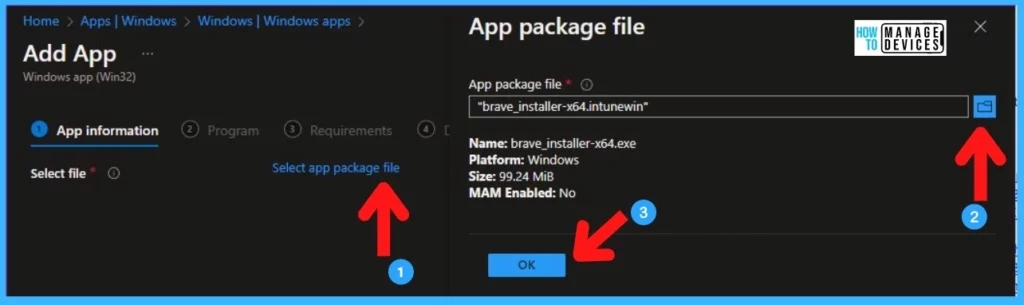
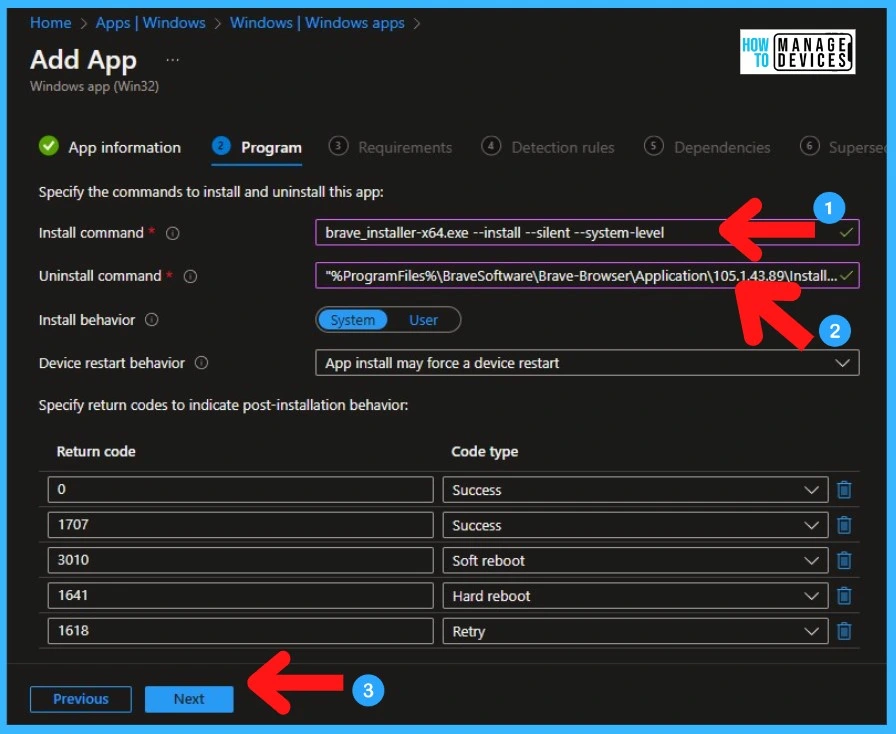
To create the app, Sign to Microsoft Intune Admin center and go to Apps > Windows > Add and select Windows app (Win32). Then Upload the Install-Brave.intunewin file you just created. Then Program Settings follow the below step.
- Install command: powershell.exe -ExecutionPolicy Bypass -File .\Install-Brave.ps1
- Uninstall command: “C:\Program Files\BraveSoftware\Brave-Browser\Application\brave.exe” –uninstall –system-level –force-uninstall
- Install behavior: System
- Detection Rules:
- Rules format: Manually configure detection rules
- Rule type: File
- Path: C:\Program Files\BraveSoftware\Brave-Browser\Application
- File or folder: brave.exe
- Detection method: File or folder exists
- This is a simple and reliable detection method. You can also use “Version” if you need to be more specific.
- Assignments: Assign the app to your desired user or device groups.
Need Further Assistance or Have Technical Questions?
Join the LinkedIn Page and Telegram group to get the step-by-step guides and news updates. Join our Meetup Page to participate in User group meetings. Also, Join the WhatsApp Community to get the latest news on Microsoft Technologies. We are there on Reddit as well.
Author
Anoop C Nair has been Microsoft MVP for 10 consecutive years from 2015 onwards. He is a Workplace Solution Architect with more than 22+ years of experience in Workplace technologies. He is a Blogger, Speaker, and Local User Group Community leader. His primary focus is on Device Management technologies like SCCM and Intune. He writes about technologies like Intune, SCCM, Windows, Cloud PC, Windows, Entra, Microsoft Security, Career, etc.


Discussion