






10 SCCM Proactive Monitoring Tasks
Let’s check the list of SCCM Proactive Monitoring Tasks. SCCM infrastructure monitoring is a key topic. In this post, let’s talk about the infrastructure Monitoring tasks. This is not the maintenance task that I will cover in this post.
Why are these proactive monitoring tasks available for Configuration Manager? These tasks continuously evaluate for signals that indicate a problem is about to happen in your SCCM infrastructure. There are 10 SCCM proactive maintenance tasks available with SCCM 2203 version.
You can identify potential issues with these monitoring tasks. These could be related to the performance of the entire infrastructure or some of the SCCM components. You must have these SCCM Proactive Monitoring Tasks as part of the admin team’s daily or weekly activities.
The SCCM maintenance monitoring tasks are part of SCCM Management Insights -> Proactive Maintenance. I think maintenance tasks make sense if these are scheduled tasks that run on a daily, weekly, or monthly basis, similar to SCCM predefined maintenance tasks.

More Details on Deploy Proactive Remediation Script Using Intune | Easy Method | Microsoft Endpoint Manager
10 SCCM Proactive Monitoring Tasks
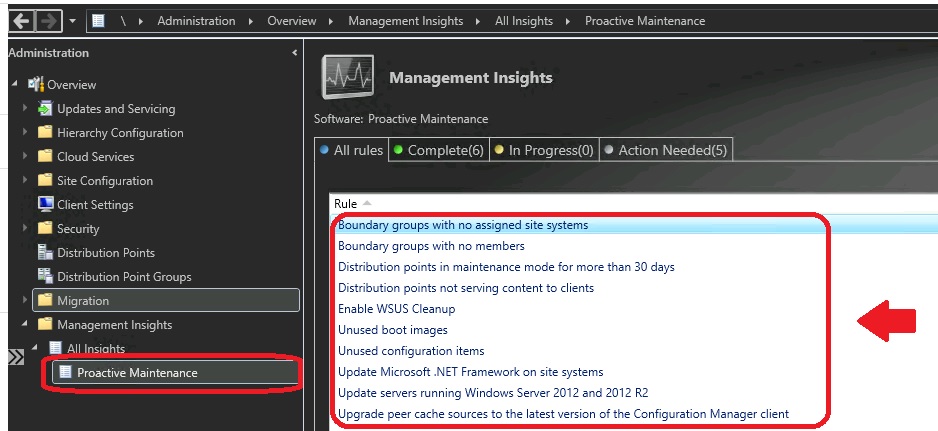
The following are the top 10 SCCM proactive Monitoring tasks available. The proactive maintenance tasks are always helpful in understanding the potential opportunities to improve the overall SCCM performance.
- Boundary Groups with no assigned site systems
- Boundary Groups with no members
- Distribution Points in Maintenance mode for more than 30 days
- Distribution Points not serving content to clients
- Enable WSUS Cleanup
- Unused boot images
- Unused Configuration Items
- Update Microsoft .NET Framework on-site systems
- Update Servers running Windows Server 2012 and 2012 R2
- Upgrade peer cache sources to the latest version of Configuration Manager Client
You can launch and check proactive monitoring or maintenance tasks from the SCCM admin console. You can follow the steps below. Navigate to \Administration\Overview\Management Insights\All Insights\Proactive Maintenance to check the 10 rules available.
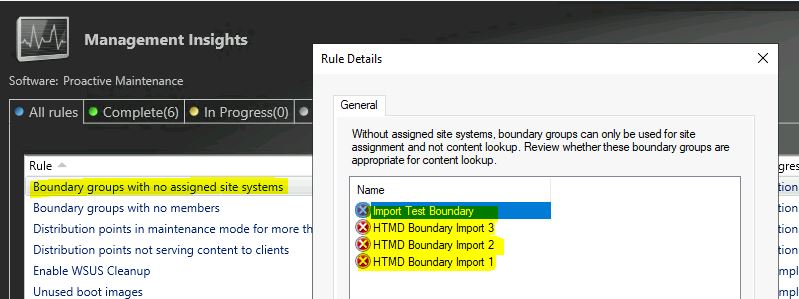
Boundary Groups with no assigned site systems
This proactive maintenance rule, Boundary Groups with no assigned site systems, is created to identify boundary groups that are not used by any of the clients. This is mainly because none of the site systems are assigned to this boundary group.
Boundary Groups are not very useful without SCCM site systems. The boundary groups can only be useful for site assignments but not for content lookup.
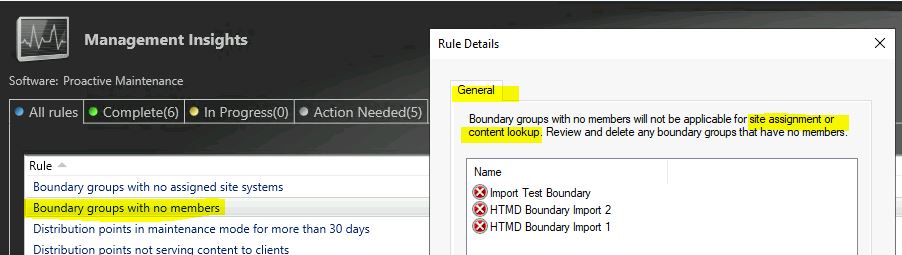
Boundary Groups with no members
Boundary Groups with no members are a situation where you just created a boundary group but have not used it. It’s a kind of stale object in the console.
This rule shows the useless boundary groups. The SCCM boundary groups without any boundaries (i.e., members) will not apply to site assignment and content lookup. I recommend deleting these types of boundary groups from SCCM.
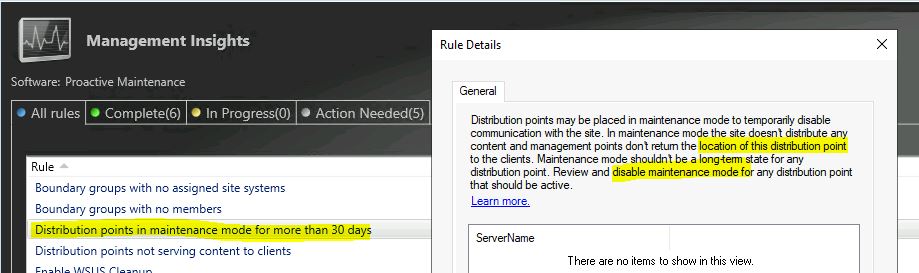
Distribution Points in Maintenance mode for more than 30 days
The real question is, do you need the DP if SCCM DP is in maintenance mode for more than 30 days. The DPs may temporarily be placed in maintenance mode to disable communication with the SCCM site. One of the possibilities is that it’s a sailing DP in the ships. No, I’m not joking; there are scenarios like this.
If DP is in maintenance mode site doesn’t distribute any content, and SCCM management points don’t return the location of this DP to the clients. Review the DPs in the maintenance mode for more than 30 days and take a collective decision.
Distribution Points not serving content to clients
Let’s check that SCCM Distribution Points are not serving content to clients. This also provides a valuable proactive monitoring example that you are not optimizing the resources in the SCCM environment.
Why do we need to pay for the resources that are not used for more than 30 days? Is this SCCM DP needed or serving the purpose etc.? It also helps to bring down some of the servers from the data center and helps with your organization’s green initiatives.
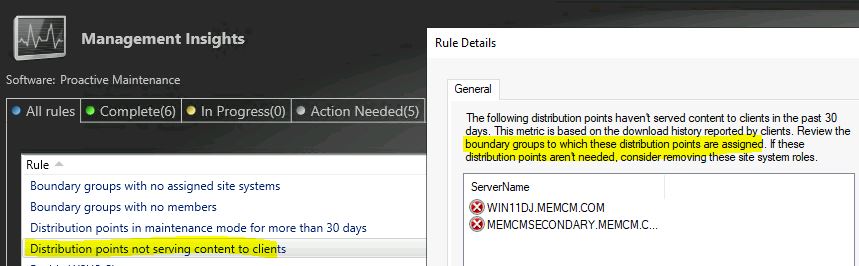
This report is based on the download history reported by clients. You need to review the boundary groups these distribution points are assigned to. If these DPs are not needed, you can consider removing them from the site system roles.
Enable WSUS Cleanup – 5th SCCM Proactive Monitoring Tasks
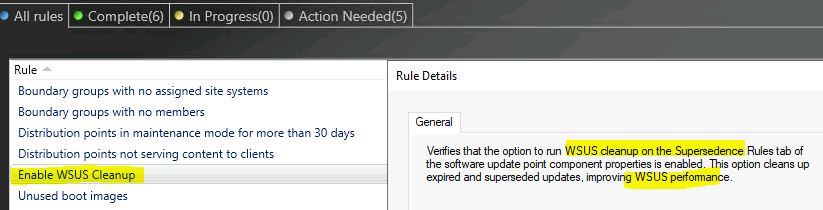
Let’s check whether the WSUS Cleanup maintenance task is enabled or not. This is the 5th SCCM Proactive Monitoring Tasks. This rule verifies that the option to run WSUS cleanup on the supersedence rules tab of the Software Update Point component properties is enabled.
This WSUS cleanup helps avoid any known issues with WSUS when there are a lot of stale or expired updates available in the database and the CAB files. This interms helps to improve the WSUS performance.
Unused boot images
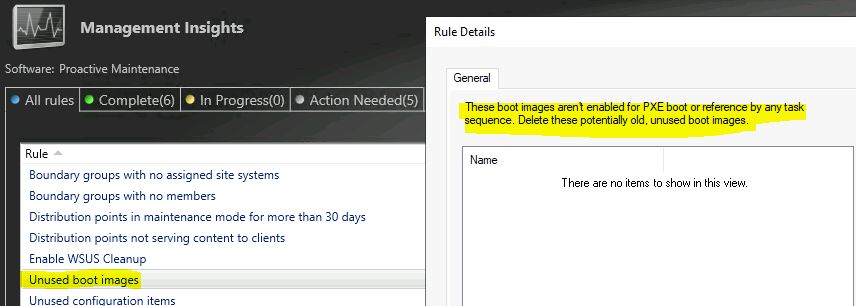
Unused boot images are another rule that helps identify the unused legacy boot images that are still available in your SCCM environment. The action plan gives you the details on fixing the issue highlighted with unused boot image SCCM maintenance rules.
The boot images are not enabled for PXE boot or references by any SCCM Task Sequences. You have an opportunity to review this kind of unused boot image and delete those if there is no dependency on them.
Unused Configuration Items
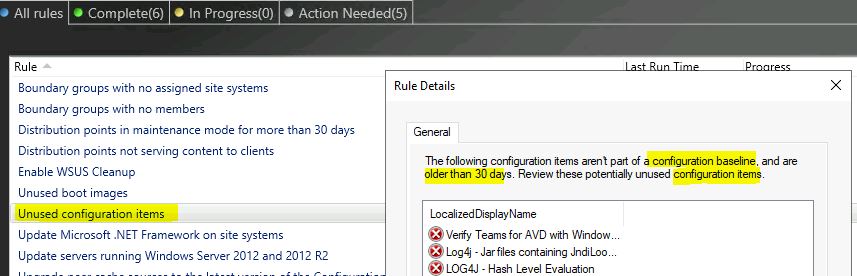
Let’s check the Unused SCCM Configuration Items and review them. You can use the management insights rule called unused configuration items to find the CIs that are not part of any Configuration Baseline and more than 30 days.
You can review the potentially unused Configuration Items and delete those. This helps to maintain a clean and better performing SCCM environment.
Update Microsoft .NET Framework on-site systems
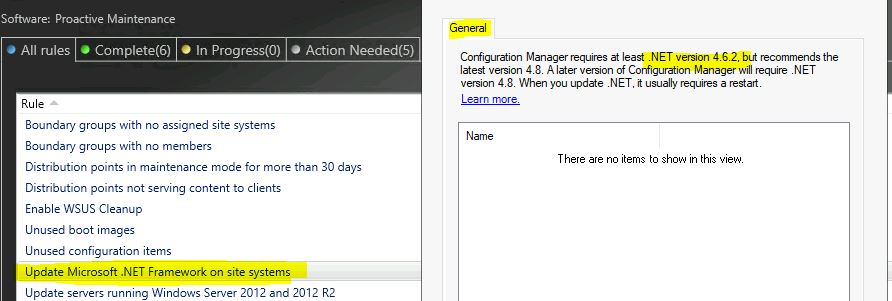
The 8th SCCM proactive monitoring task is Update Microsoft .NET Framework on-site systems. The .Net Framework is one of the core components of the SCCM server and client-side. It’s important to have a proper version of the .Net Framework to make SCCM work seamlessly.
This management insights rule checks whether the SCCM site systems have the minimum required .Net Framework (4.6.2) installed or not. I have a blog post on the .Net Framework prerequisites to check errors and fix topics. The recommended version of the .Net Framework is 4.8.
Update Servers running Windows Server 2012 and 2012 R2
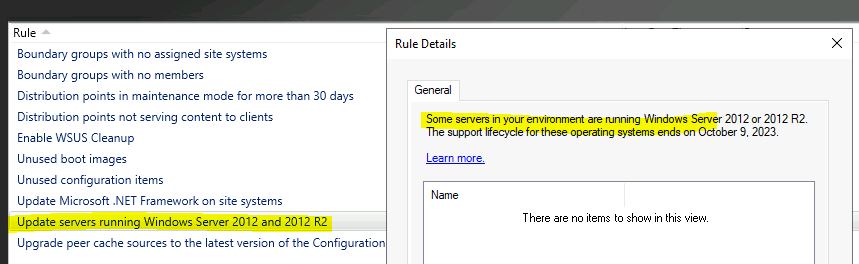
This is an interesting proactive monitoring task related to operating systems of SCCM servers. You can review the OS versions of SCCM site systems and servers. Let’s list down Windows Servers running Windows Server 2012 and 2012 R2.
The end of support for Server 2012 is on 9th October, 2023. You need to review whether the SCCM servers are still running with OS 2012. You can collectively decide to upgrade (in-place upgrade) those servers to 2022 or any other supported versions well in advance.
Upgrade peer cache sources to the latest version of Configuration Manager Client
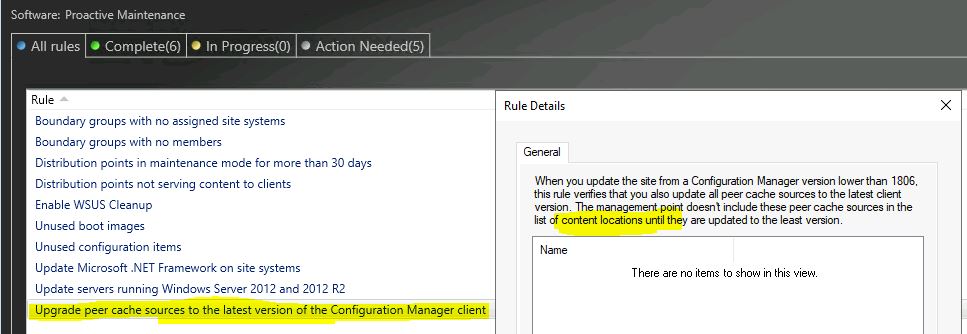
If you use peer-to-peer cache for content sharing in SCCM, you need to review this management insights rule. Let’s check more details on Upgrade peer cache sources to the latest version of the Configuration Manager Client rule.
When you update the site from an SCCM version lower than 1806, this rule verifies that you need to update all peer cache sources to the latest client version. The management point doesn’t include these peer cache sources in the list of content locations until they are updated to the newest version.
Daily SCCM Administrative Task
These are some of the other daily SCCM administrative monitoring tasks that admins could carry out.
- Check SCCM Site Database Status
- Check Site Server Status
- Check Site Systems Status
- Check Clients Status
- Check the Operating System Event Log
- Check the SQL Server Error Log
- Check System Performance
- Check Status Filter Rules
- Check the Inboxes to Monitor
Weekly SCCM Administrative Task
These are some of the other Weekly SCCM administrative monitoring tasks that admins could carry out.
- Checking the SCCM site database, available space
- Checking available disk space
- Weekly automated tasks.
- Produce and distribute end-user reports.
- Run disk defragmentation tools.
- Back up application, security, and system event logs.
- Delete Unnecessary Files
- Delete Unnecessary SCCM Objects
- Back-Up Application, Security, and System Event Logs
Periodic SCCM Administrative Task
These are some of the other periodic SCCM administrative monitoring tasks that admins could carry out.
- Back-Up Account Data
- Change Accounts and Passwords
- Check Network Performance
- Review the Security Plan
- Review the Maintenance Plan
- Perform Recovery Tests in a Test Lab
- Check Hardware
- Check Site’s Overall Health
- Check the Backup Snapshot




Discussion